

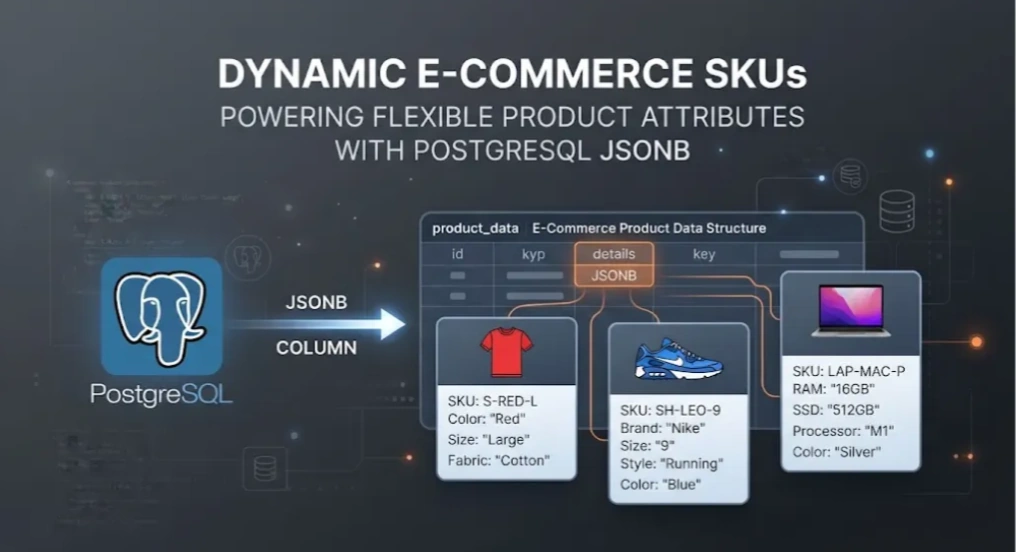
I’m currently learning about PostgreSQL, and I’ve discovered that this popular database has many cool features. One of them is the ability to store semi-structured data in the same table.
Consider an e-commerce website where we sell T-shirts, running shoes, laptops, smartphones, and so on.
A traditional relational database might have columns such as:
ProductID
Name
Description
CategoryID
Price
Quantity
and so on.
But then we have a problem: different SKUs can have different attributes that are not shared by other product types.
For example, a T-shirt might have information such as Size, Colour, and Material that we need to store in the database so customers can filter or search by these attributes.
The same applies to running shoes and laptops. Running shoes might have information such as Brand, Gender, and Style that is important to customers before making a purchase.
A laptop, on the other hand, has a completely different set of attributes, such as Model, Processor, RAM Size, and SSD Capacity.
One possible approach would be to add all of these attributes as columns in the same table and leave unrelated columns as NULL.
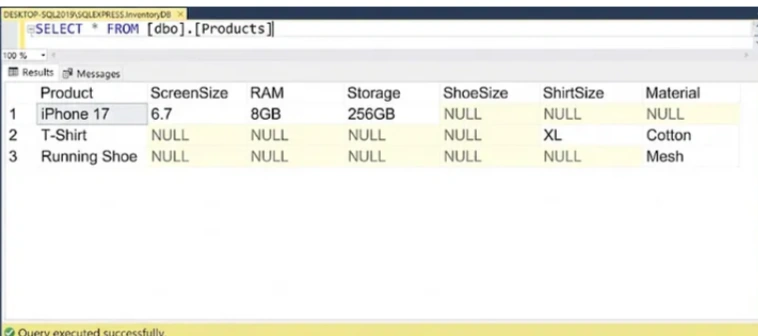
However, as the number of product types and their attributes grows, this approach can result in a very wide and sparse table that becomes increasingly difficult to maintain.
This is one of the situations where JSONB becomes attractive.
So in PostgreSQL, we can have a table like this:
CREATE TABLE products (
    id            BIGINT GENERATED ALWAYS AS IDENTITY PRIMARY KEY,
    product_name        VARCHAR(200),
   ...
    attributes  JSONB
);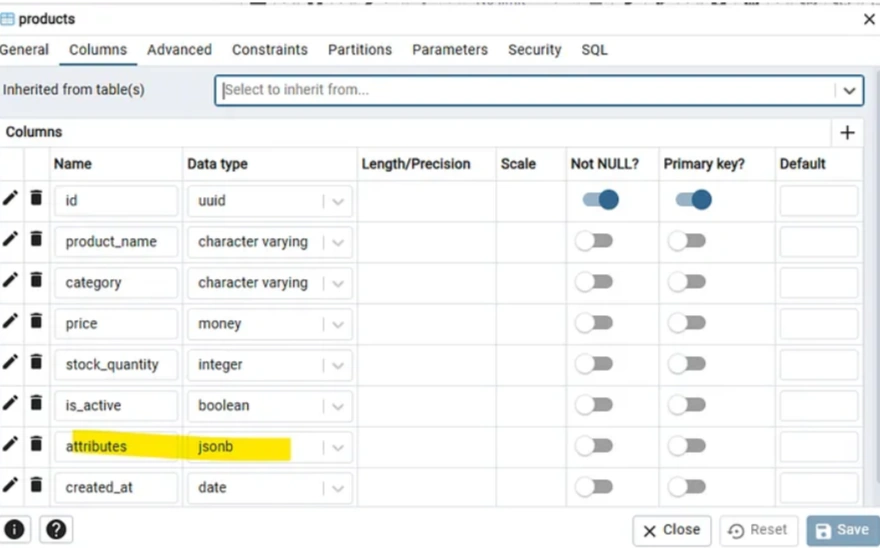
(This is pgAdmin4, it is a graphical management tool to manage PostgreSQL, similar of SSMS to MSSQL)
We create a column named attributes with JSONB as datatype. This column will store our flexible attribute of different SKUs.
And these are the specific properties for my tshirt, running shoes and laptop.
{
  "size": "XL",
  "brand": "Nike",
  "color": "Black",
  "gender": "Men",
  "material": "Cotton"
}
{
"Color": "Red",
"brand": "Nike",
"gender": "Men",
"Material": "Mesh",
"ShoeSize": "42"
}{
"ram": "32GB",
"storage": "1TB",
"processor": "Apple M5",
"screenSize": 14.2,
"operatingSystem": "macOS"
}And this is the query to insert the data to our products table.
INSERT INTO products
(
    id,
    product_name,
    category,
    price,
    stock_quantity,
    is_active,
    created_at,
    attributes
)
VALUES
(
    '9D8753AC-D855-4170-87EE-D82E7708E684',
    'Adiddas Running Shoes',
    'Running Shoes',
    150,
    30,
    true,
    '2026-09-10 15:00:31.227',
    '{
        "brand": "Nike",
  "Color" : "Red",
"ShoeSize" : "42",
"Material" : "Mesh",
  "gender": "Men"
    }'::jsonb
);
And this is what it looks like in database after we successfully insert all the SKUs.
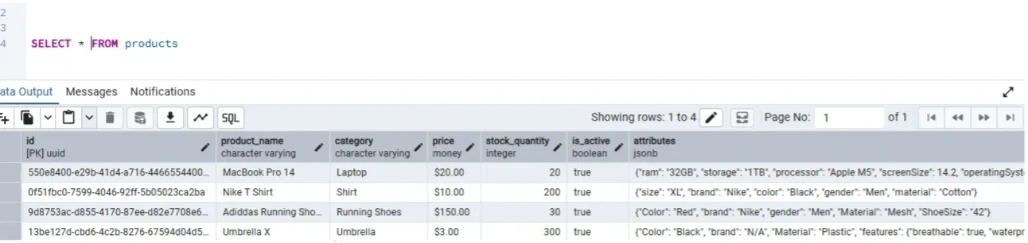
As you can see, the different attributes of different SKUs has been stored into attributes column.
You may want to index the attributes column for better query performance
CREATE INDEX idx_products_attributes
ON products
USING GIN (attributes);
This is the query to search any json property with named size and value of XL
SELECT *
FROM products
WHERE attributes @> '{"size": "XL"}';
And this is the result:
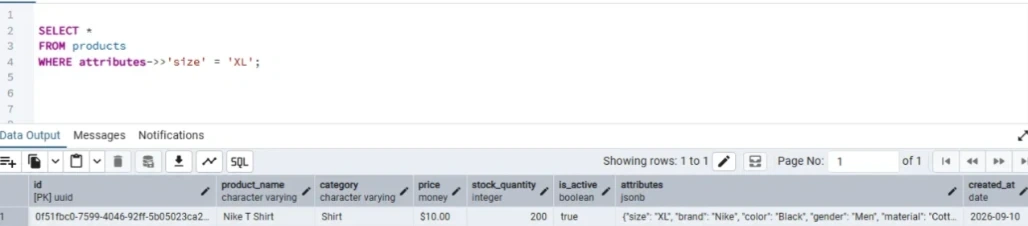
This is the query of filter by numeric result, I want data with property ShoeSize and the value is 42.
SELECT *
FROM products
WHERE attributes @> '{"shoeSize": 42}';
Using .NET and PostgreSQL together
I created a simple MVC .NET e-commerce project to demonstratre the PostgreSQL JSONB attribute search.
This is the Product model that match the products table in PostgreSQL. Pay attention to the datatype of Attributes is JsonDocument.
public class Product
{
    public Guid Id { get; set; }

    public string ProductName { get; set; } = string.Empty;

    public string Category { get; set; } = string.Empty;

    public decimal Price { get; set; }

    public int StockQuantity { get; set; }

    public bool IsActive { get; set; }

    public DateTime CreatedAt { get; set; }

    public JsonDocument Attributes { get; set; } = JsonDocument.Parse("{}");
}
DB Context is the same as general EF Core practice, so I will omit most of the code
  public class ApplicationDbContext : DbContext
  {

      public ApplicationDbContext(DbContextOptions<ApplicationDbContext> options) : base(options)
      {

      }
      public DbSet<Product> Products => Set<Product>();

      protected override void OnModelCreating(ModelBuilder modelBuilder)
      {
          modelBuilder.Entity<Product>(entity =>
          {
              entity.ToTable("products");

              entity.HasKey(x => x.Id);

              entity.Property(x => x.Id)
                  .HasColumnName("id");
//...
In appsettings.JSON, configure your postgres DB connection string.
  "ConnectionStrings": {

    "PostgreDatabase": "Host=localhost;Port=5432;Database=ecommerce_demo;Username=postgres;Password=xxx"
  }
The search UI look like this, It contains fields for the JSON property and value:
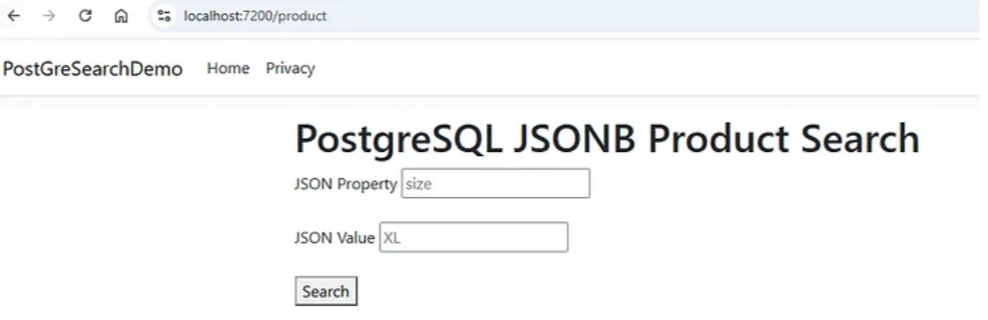
@model List<PostGreSearchDemo.Models.Product>

@{
    ViewData["Title"] = "PostgreSQL JSONB Search";
}

<h1>PostgreSQL JSONB Product Search</h1>

<form method="get">


    <div>
        <label>JSON Property</label>
        <input type="text" name="property" placeholder="size" />
    </div>

    <br />

    <div>
        <label>JSON Value</label>
        <input type="text" name="value" placeholder="XL" />
    </div>

    <br />

    <button type="submit">Search</button>

</form>

<hr />

@foreach (var product in Model)
{
    <div>
        <h3>@product.ProductName</h3>

        <p>
            Category: @product.Category
        </p>

        <p>
            Price: RM @product.Price
        </p>

        <p>
            Stock: @product.StockQuantity
        </p>

        <pre>@product.Attributes.RootElement.ToString()</pre>
    </div>

    <hr />
}
The method in Product Controller also quite straightforward. We pass the property and value arguments into the LINQ query, and EF Core handles the translation to the corresponding PostgreSQL query.
   public async Task<IActionResult> Index(string? property, string? value)
   {
       var query = _db.Products
           .Where(x => x.IsActive)
           .AsQueryable();


       if (!string.IsNullOrWhiteSpace(property) &&
           !string.IsNullOrWhiteSpace(value))
       {
           query = query.Where(x =>
               EF.Functions.JsonContains(
                   x.Attributes,
                   $"{{\"{property}\": \"{value}\"}}"));
       }

       var products = await query
           .OrderBy(x => x.ProductName)
           .ToListAsync();

       return View(products);
   }
So if I search the property operatingSystem and value macOS, and the result is look like this:
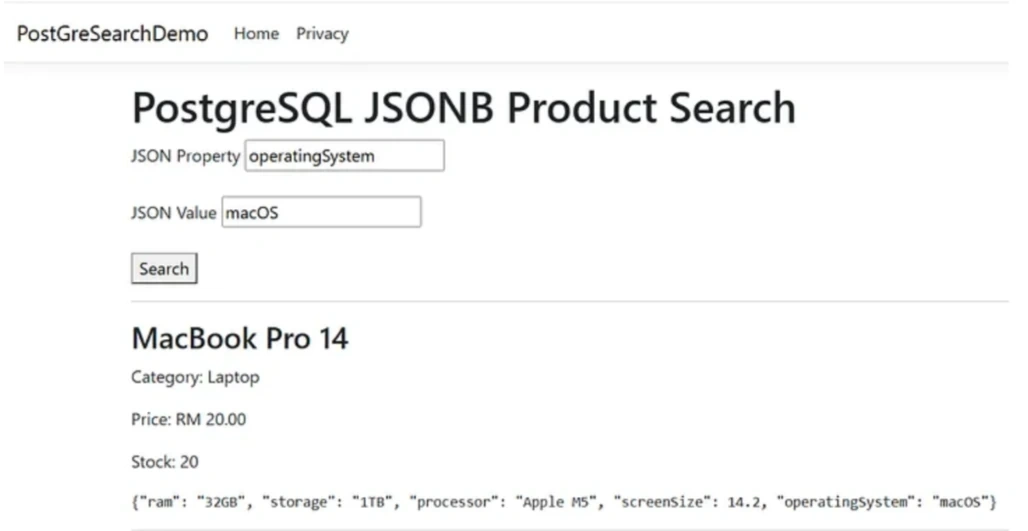
Of course, in a real-world e-commerce website, the UI would not normally require customers to know and enter the exact JSON attribute name for each SKU.
But this is just a simple demonstration of how PostgreSQL can support flexible attributes for different SKUs.
The UI can always be improved to provide a better customer experience. For example, the application could automatically generate the available attributes whenever the customer changes the category, such as Shirts, Shoes, or Tech Gadgets.
Alternatively, we could utilize the power of an LLM to parse the relevant information from a customer’s search query and map it to the appropriate attributes.
But that is outside the scope of this article. I will return with more comprehensive PostgreSQL demos once I have explored some of the other cool features of this database.
Join the conversation! Your thoughts help the community grow.