

The PnP team has introduced a new open source JavaScript library to access SharePoint objects and this library depends on REST API Services. Due to this, the component is useful from SharePoint 2013.
In my previous posts, I explained about this library with the sample codes. The information is available at the links, given below:
- Introduction to PnP-JS-Core
- Basic SharePoint web operations using PnP-JS-Core
- Filtering SharePoint Object Collections using PnP-JS-Core
In addition to this, I am adding a series of articles on using PnP library with the different JS frameworks. So far I have covered, integration with Angular JS, React JS and Knockout JS. In this article, we’ll see PnP JavaScript library with jQuery to achieve the same result (populating a sub site in a tabular format), which we obtained with other frameworks.
jQuery is one of the most widely used popular JavaScript frameworks and it is used to traverse HTML documents and provides a simplified syntax to manipulate the DOM structure in a Webpage.
What are the essential files required?
- jQuery.js used to download the jQuery library to manipulate DOM structure.
- Pnp.js PnP JavaScript library.
- Fetch.js is used by PnP js files to handle the Web requests and responses (Required for IE).
- ES6-Promise.js is used by PnP js files to handle the Web requests and responses (Required for IE).
Note: Retrieve JS & Promise JS files are required to run PnP methods in some Browsers (IE).
In our example, we have to create a sample.html file under Style Library or Site Assets. Here, I am creating the file under Site Assets Library.
Include Script Files
I have uploaded the required script files under Site Assets library.
- <script type="text/javascript" src="/siteassets/scripts/fetch.js"></script>
- <script type="text/javascript" src="/siteassets/scripts/promise.min.js"></script>
- <script type="text/javascript" src="/siteassets/scripts/pnp.min.js"></script>
- <script type="text/javascript" src="/siteassets/scripts/jquery.min.js"></script>
Include HTML
Add CSS styles, given below, and HTML snippet to the sample HTML file.
- <!-- To style table in html -->
- <style type="text/css">
- .web-table th{ background-color:#ddd; border:2px solid #fff;}
- .web-table td{ background-color:#eee; border:2px solid #fff;}
- .web-heading{ padding:2px;}
- </style>
- <div>
- <h2 class="web-heading">Sub Sites</h2>
- <div>
- <table width="100%" cellpadding="10" cellspacing="2" class="web-table" id="webTable">
- <thead>
- <tr>
- <th>Title</th>
- <th>Id</th>
- <th>Created</th>
- <th>Web Template</th>
- </tr>
- </thead>
- <tbody></tbody>
- </table>
- <p id="countid">No websites</p>
- </div>
- </div>
- <script type="text/javascript">
- <!- - Insert jQuery Code - - >
- </script>
Include PnP JS Code
- $pnp.sp.web.webs.get().then(function(result) {
- //jQuery Code
- }).catch(function(err) {
- alert(err);
- });
Insert the jQuery code to add the row to the table.
Include jQuery Code
- $(document).ready(function(){
- $pnp.sp.web.webs.get().then(function(result) {
- if(result.length > 0)
- $('#countid').html("Total subsites: "+ result.length);
- for(var i=0; i< result.length; i++){
- $("#webTable tbody").append( "<tr>"+
- "<td>"+result[i].Title+"</td>"+
- "<td>"+result[i].Id+"</td>"+
- "<td>"+result[i].Created+"</td>"+
- "<td>"+result[i].WebTemplate+"</td>"+ "</tr>");
- }
- }).catch(function(err){ alert(err);});
- });
Full Sample Code
Insert the code, given below, within Script Editor or Content Editor Web-part.
- <script type="text/javascript" src="/siteassets/scripts/pnp.min.js"></script>
- <script type="text/javascript" src="/siteassets/scripts/fetch.js"></script>
- <script type="text/javascript" src="/siteassets/scripts/es6-promise.js"></script>
- <script type='text/javascript' src='/SiteAssets/Scripts/jquery-3.0.0.min.js'></script>
- <style type="text/css">
- .web-table th{ background-color:#ddd; border:2px solid #fff;}
- .web-table td{ background-color:#eee; border:2px solid #fff;}
- .web-heading{ padding:2px;}
- </style>
- <div>
- <h2 class="web-heading">Sub Sites</h2>
- <div>
- <table width="100%" cellpadding="10" cellspacing="2" class="web-table" id="webTable">
- <thead>
- <tr>
- <th>Title</th>
- <th>Id</th>
- <th>Created</th>
- <th>Web Template</th>
- </tr>
- </thead>
- <tbody></tbody>
- </table>
- <p id="countid">No websites</p>
- </div>
- </div>
- <script type="text/javascript">
- $(document).ready(function(){
- $pnp.sp.web.webs.get().then(function(result) {
- if(result.length > 0)
- $('#countid').html("Total subsites: "+ result.length);
- for(var i=0; i< result.length; i++){
- $("#webTable tbody").append( "<tr>"+
- "<td>"+result[i].Title+"</td>"+
- "<td>"+result[i].Id+"</td>"+
- "<td>"+result[i].Created+"</td>"+
- "<td>"+result[i].WebTemplate+"</td>"+ "</tr>");
- }
- }).catch(function(err){ alert(err);});
- });
- </script>
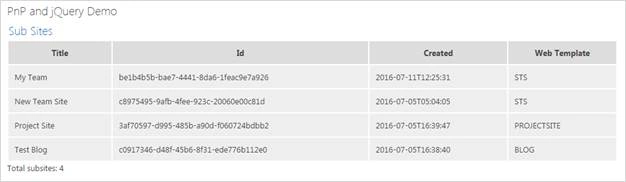
Conclusion
This article provides a simple example to list the sub sites in a table format, using jQuery framework.
Jeff SansNomPosted Jan 16, 2019, 4:03 AM
There is a now a faster way to achieve this with only one reference to polyfill js (for IE ) Https://github.com/SharePoint/PnP-JS-Core/wiki/Getting-Started:-Install-&-Use#option-1---polyfill-service
Vignesh ManiPosted Jul 28, 2016, 6:41 AM
Nice
Tarun DPosted Jul 28, 2016, 2:07 AM
Thanks for the nice share..
Vinodh NarayananPosted Jul 28, 2016, 12:04 AM
Good one
Prasanna MuraliPosted Jul 27, 2016, 9:36 PM
Nice share