

Introduction
This article explains how to communicate with a Programmable Logic Controller (PLC). I started my PLC communication in 2007. Since then I have developed several programs for PLC Communication using .Net.
For basic understanding of what is PLC use Google, because basically iam not a PLC Engineer or Electrical Engineer, but I will explain to you about how to connect PLC using .NET programs, how to read data from PLC, and how to write data to PLC. My sample programs are all based on MELSEC PLC using TCP/IP Communication.
There are different Kind of PLC available like MELSEC ,SIMENS and etc,For each PLC Communication there are different type of protocols available. Today in this demo program I have used TCP IP Communication for MELSEC PLC.
Here I said .Net Programs instead of any language of .Net. Yes that means that attached to this article are 4 ZIP files.
- ShanuMelsecPLCComponent.ZIP contains PLC Component DLL Source code. I started this PLC Communication program in 2007. At that time I was coding using VB.Net. I created my own Winsock component using VB.Net, I am still using that Winsock component MelsecPLC.dll in my projects for PLC Communication. In that component I have a simple function for Connect, Disconnect, Read, Write and DataArrival Events. In my sample project that I have attached I have also used the same DLL.
- ShanuPLCC#.NetSample.ZIP contains a C# Sample program to demonstrate how to Connect, Read and Write to PLC using my MelsecPLC.dll.
- ShanuPLCVB.NetSample.ZIP contains a VB.NET Sample program to demonstrate how to Connect, Read and Write to PLC using my MelsecPLC.dll
- ShanuPLCWPF.Net.ZIP contains a WPF Sample program to demonstrate how to Connect, Read and Write to PLC using my MelsecPLC.dll
Before we start PLC Communication Programming, I would like to explain the read and write process in PLC Communication.
Read Data from PLC
PLC Read Command: To read the data from PLC we need to send the command to PLC, basically the command we send will be like this "500000FF03FF000018000A04010000D*0095000001";
String cmd = "";
cmd = cmd + "5000" ; // sub HEAD (NOT)
cmd = cmd + "00" ; // network number (NOT)
cmd = cmd + "FF" ; //PLC NUMBER
cmd = cmd + "03FF" ; // DEMAND OBJECT MUDULE I/O NUMBER
cmd = cmd + "00" ; // DEMAND OBJECT MUDULE DEVICE NUMBER
cmd = cmd + "001C" ;// Length of demand data
cmd = cmd + "000A"; // CPU inspector data
cmd = cmd + "0401"; // Read command (to read the data from PLC we should "0401"
cmd = cmd + "0000" ;// Sub command
cmd = cmd +"D*" ;// device code
cmd = cmd + "009500"; //adBase
cmd = cmd + "0001"; //Device No ,It's a Address every PLC device will have an address we need to send the appropriate address to read the data.
Write Data from PLC
PLC Write Command: To write the data to PLC we need to send the command to PLC, basically the command we send will be like this: "500000FF03FF00001C000A14010000D*0095010002"
String cmd = "";
cmd = cmd + "5000";// sub HEAD (NOT)
cmd = cmd + "00";// network number (NOT)
cmd = cmd + "FF";//PLC NUMBER
cmd = cmd + "03FF";// DEMAND OBJECT MUDULE I/O NUMBER
cmd = cmd + "00";// DEMAND OBJECT MUDULE DEVICE NUMBER
cmd = cmd + "001C";// Length of demand data
cmd = cmd + "000A";// CPU inspector data
cmd = cmd + "1401";// Write command
cmd = cmd + "0000";// Sub command
cmd = cmd + "D*";// device code
cmd = cmd + "009501"; //adBase
cmd = cmd + "0002"; //BASE ADDRESS
You can see the difference. To read we use "0401" and "009500" but for the write we use "1401" and "009501". The detailed code will be listed below.
Using the Code
I have attached VB.Net, C# and WPF sample programs for the PLC Communication to this article but as an explanation here I have used C# code.
Here I have used my Component MelsecPLC.dll in my test project. First add the MelsecPLC.dll to your project.
1. Delcare MelsecPLC.dll in form
using MelsecPLC;
2. Variable Declarations
public MelsecPLC.Winsock winsock1; // Declare the MelsecPLC Winsock Component
string Jig01; // To store the PLC read data.
3. Connect (PLC Connection).
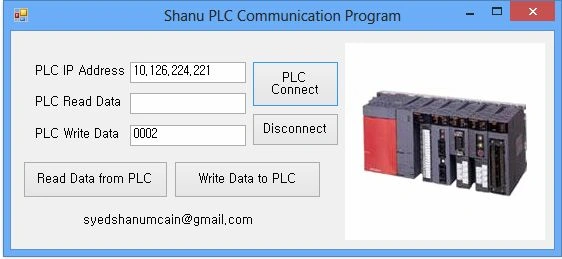
For the connection we need the PLC IP Address. Here my PLC IP Address is "10.126.224.221". Enter the Local port and Remote port. Here I have used "1027" for the local port and "8000" for the remote port.
In the form load we call the PLC Connect function and we create a MelsecPLC DataArrival event. The DataArrival event will be triggered when PLC sends data to the PC (our computer).
The details of the connect functions and DataArrival declaration in the form load follows:
private void Form1_Load(object sender, EventArgs e)
{
winsock1Connect();
winsock1.DataArrival += new MelsecPLC.Winsock.DataArrivalEventHandler(winsock1_DataArrival);
timer1.Enabled = true;
timer1.Start();
}
private void winsock1Connect()
{
try
{
if (winsock1.GetState.ToString() != "Connected")
{
winsock1.LocalPort = 1027;
winsock1.RemoteIP ="10.126.224.221";
int a = 8000;
winsock1.RemotePort = 8000;
winsock1.Connect();
}
}
catch (Exception ex)
{
}
}
4.DataArrival Event
In the Data Arrival Event we get the actual data sent by the PLC after a Read Signal is sent to the PLC.
This event will be triggered whenever the PLC sends data to the PC. To get the data from the PLC we use the winsock1.GetData() method.
private void winsock1_DataArrival(MelsecPLC.Winsock sender, int BytesTotal)
{
String s = String.Empty;
winsock1.GetData(ref s);
Jig01 = s;
}
5. Read Data From PLC
To read the data from the PLC we need to send the signal to the PLC for readiing the data. I have explained the read functions in my Article Introduction.
To send a read signal to the PLC we use the winsock1.Send() Method as in the following:
private void btnRead_Click(object sender, EventArgs e)
{
if (winsock1.GetState.ToString() != "Connected")
{
winsock1Connect();
}
//String cmd = "500000FF03FF000018000A04010000D*0095000001";
String cmd = "";
String OutAddress = "0001";
cmd = "";
cmd = cmd + "5000" ;// sub HEAD (NOT)
cmd = cmd + "00" ;// network number (NOT)
cmd = cmd + "FF" ;//PLC NUMBER
cmd = cmd + "03FF" ;// DEMAND OBJECT MUDULE I/O NUMBER
cmd = cmd + "00" ;// DEMAND OBJECT MUDULE DEVICE NUMBER
cmd = cmd + "001C" ;// Length of demand data
cmd = cmd + "000A";// CPU inspector data
cmd = cmd + "0401";// Read command
cmd = cmd + "0000" ;// Sub command
cmd = cmd +"D*" ;// device code
cmd = cmd + "009500"; //adBase
cmd = cmd + OutAddress; //BASE ADDRESS
winsock1.Send(cmd);
}
6. Write Data to PLC
To write the data to the PLC we need to send the signal to the PLC to write the data. I have explained the write functions in my Article Introduction.
To send a write signal to the PLC we use the winsock1.Send() Method as in the following:
private void btnWrite_Click(object sender, EventArgs e)
{
if (winsock1.GetState.ToString() != "Connected")
{
winsock1Connect();
}
String cmd = "";
String OutAddress = txtWrite.Text.Trim();
cmd = "";
cmd = cmd + "5000";// sub HEAD (NOT)
cmd = cmd + "00";// network number (NOT)
cmd = cmd + "FF";//PLC NUMBER
cmd = cmd + "03FF";// DEMAND OBJECT MUDULE I/O NUMBER
cmd = cmd + "00";// DEMAND OBJECT MUDULE DEVICE NUMBER
cmd = cmd + "001C";// Length of demand data
cmd = cmd + "000A";// CPU inspector data
cmd = cmd + "1401";// Write command
cmd = cmd + "0000";// Sub command
cmd = cmd + "D*";// device code
cmd = cmd + "009501"; //adBase
cmd = cmd + OutAddress; //BASE ADDRESS
winsock1.Send(cmd);
}
Points of Interest
I love to work and play with the Human Interface Program (HMI). I have worked with several HMI programs using C# .Net like PLC, Sensor Programing and Nutrunner tool communication Program. I want the end users reading this article to benefit by this program.
Gilles SavaryPosted Mar 25, 2019, 4:36 AM
Hello Syed ! Thank you for your PLC communication application. I tried to find without success in your "Shanu MelsecPLC Component.zip" file the source code of the MelsecPLC.dll. I would be very grateful if you could share it !!! Regards. Gilles
mihir shahPosted Oct 1, 2018, 4:01 AM
Hello Sir can you pls guide me for SIMENS PLC. i have two PLS one has RS232 Port and another has Ethernet Port. Thanks in advance.
Nguyễn TàiPosted Jul 27, 2018, 11:15 AM
Hi, can you help me. I can't find port of PLC. My pls is mitsubishi fx series
AniruddhaPosted Jan 19, 2018, 5:11 AM
Good one.In PLC they have language called Ladder Logic etc...Its about symbols...so how this will be implemneted in C#?Thanks for the Post
ali tavakoliPosted Jul 15, 2017, 10:19 AM
Hi Syed, I want use TCP IP Communication for Delta PLC.What should I do?
Nageswararao KVPosted Jun 24, 2017, 5:30 AM
Dear Syed Shanu ! Could you please help me send the code for XBG PLC / Master K series
Rabindra SenapatiPosted Apr 10, 2017, 10:55 AM
Dear Syed, I'm using schneider PLC, Can help me how to read and write data from PLC using C#. Since last two days i'm searching internet unable to find solution. It will be great help if you can support me. Thanks. (Rabindra)
lanz mendozaPosted Dec 13, 2016, 11:09 PM
How about the plc parameter?
SelenaPosted Dec 3, 2015, 2:02 PM
Hi Syed, I will be developing HMI for a metal forming industrial application. My plc is AB. I'm in between developing my program with vb.net or c#. Based on your experience, which one you think is better for industrial applications? Thank you for the informative article!
Asif PatankarPosted Sep 17, 2015, 11:56 PM
I will like to be in touch with you. Here is my email address [email protected]. Thank you again!
Asif PatankarPosted Sep 17, 2015, 11:53 PM
Hi! ! Very very sorry for late reply. My Head has changed the project for me. Now developing application which may require the help later. Current we are using AB PLC. Thank you for reply!
Asif PatankarPosted Aug 20, 2015, 6:58 AM
Hallo all! i am a newbie in this field. And i too have the same problem as to read data from PLC for counting. Can anyone help. Will be greatful. Thank you!
saif algiriPosted Aug 18, 2015, 10:30 PM
I am software engineer and currently developing ASP.NET website using C#. My boss asked me to read, write and update data in PLC(via website) but I have no idea about how to access PLC. Moreover, Where the data can be found? what do I need to perform these tasks. Please suggest some solutions.
Nirav PatelPosted Apr 1, 2015, 7:23 AM
Thanks
vinod KumbharPosted Dec 18, 2013, 4:09 AM
Hi Shanu Greetings. I am working on same Project bust using VB 6 and PLC Delta make Modbus Protocol.Can u guide me. i am using DLL file given on delta site. I am having difficulty in undustanding the code. Can u guide me . thanks in advande.
vinod KumbharPosted Dec 18, 2013, 4:07 AM
Great Code.
Syed ShanuPosted Jul 5, 2013, 7:16 PM
Hi ,Thanks Sam
Sam HobbsPosted Jul 5, 2013, 6:06 PM
I understand, Syed. You can consider my suggestion to be a suggestion for something you can do in the future.
Syed ShanuPosted Jul 5, 2013, 5:25 PM
Hi,Thanks for your comment.This is simple program that demonstrate how to communicate with Melsec PLC, for simple understand I not did coding standards.
Sam HobbsPosted Jul 5, 2013, 1:59 PM
Instead of constants such as "1401" you could have a string constant with a name. If you do that then it will make it easier for new programmers to use. You could also create a class with methods for doing things such as creating a write command.