

Introduction
Pipes in Angular allow us to display the data in the view after some transformation. It can be applied to different properties like string, integer, date, currency etc.
Prerequisites
- HTML, CSS and JS
- Basics of TypeScript.
- Components
Let us create a sample TestApp; for this, you should have installed the below for the development environment:
- Node
- Npm (comes when you install node)
- Angular CLI.
- Text Editor.
For creating a new application run the below command on your location.
> ng new TestApp
Create a new component.
> ng g c test
Once your command is completed you will have a TestApp folder created inside your sample folder.
Now, you will have your project folder called 'TestApp'.
Note
See my previous article “Getting started with Angular CLI” If you want the installation and introduction from the basics, start with the execution of the sample application.
Let us start with string operations pipes,
Open test.component.ts and add the below contents,
- import { Component, OnInit, Input, Output, EventEmitter } from '@angular/core';
- @Component({
- selector: 'app-test',
- templateUrl: './test.component.html',
- styleUrls: ['./test.component.css']
- })
- export class TestComponent implements OnInit {
- public myName1 = "mohammad irshad";
- public myName2 = "MOHAMMAD IRSHAD";
- constructor() {
- }
- ngOnInit() {
- }
- }
Open test.component.html and add the below contents,
- <h2>This is Test Component!</h2>
- <h3>Lower case: {{myName1}}</h3>
- <h3>Upper case: {{myName2}}</h3>
- <h3>Convert Lower to upper: {{myName1 | uppercase}}</h3>
- <h3>Convert Upper to Lower: {{myName1 | lowercase}}</h3>
Run the applications,
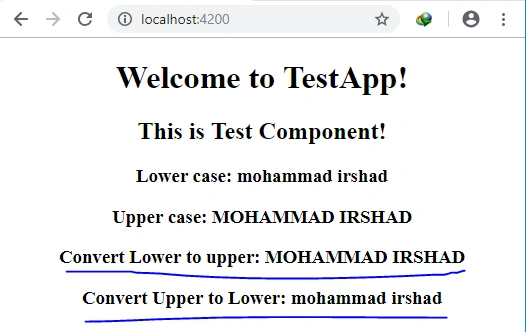
Other string pipes like titlecase, slice, JSON available builtin. Titlecase allows us to write string where the first character of all the words are in uppercase and remaining ones are in lower case. Slice pipe is used to get the string based on the index defined, JSON allows us to write the data in the form of the JSON with brackets inside of the key-value pair.
Transforming number value with pipe
Open test.component.html and add the below contents,
- <h2>This is Test Component!</h2>
- <h3>Number pipe in angular.</h3>
- <h3>{{1.23456 | number : '1.3-4'}}</h3>
- <h3>{{5.54545454 | number : '3.1-2'}}</h3>
Save and run the application,
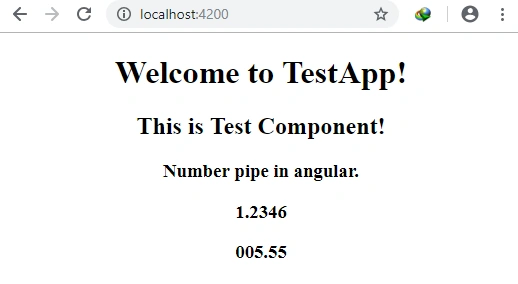
- n.p-q - where ‘n’ defines the minimum number of digits that will display before the decimal point. ‘p’ defines thee minimum digits after the decimal and ‘q’ defines the max digits after the decimal.
- percent pipe - allows us to write the number with percent at the end.
- Currency pipe - allows us to write the currency formats with the help of its code.
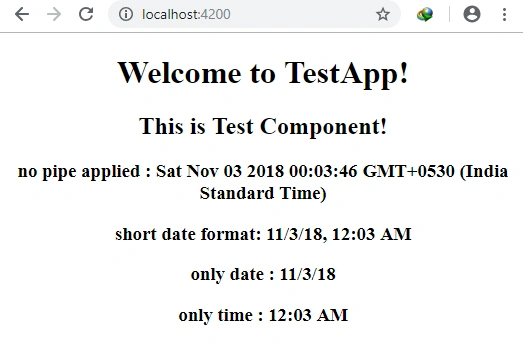
- Date pipes - Date pipe allow us to write the date in a different format like in short date, only date etc.
Open test.component.ts and add the below property,
- public date = new Date();
open test.component.html and add the below contents,
- <h2>This is Test Component!</h2>
- <h3>no pipe applied : {{date}}</h3>
- <h3>short date format: {{date | date : 'short'}}</h3>
- <h3>only date : {{date | date :'shortDate'}}</h3>
- <h3>only time : {{date | date :'shortTime'}}</h3>
Save and run the application,
Custom pipes in Angular
Let us add a custom pipe that will take string to transform before sending it to view. We will print the name if the name value is blank then it will display ‘no name’, if available then it will print the name string normally.
Open app.module.ts and add the below contents,
- import { BrowserModule } from '@angular/platform-browser';
- import { NgModule, Pipe } from '@angular/core';
- import {FormsModule} from '@angular/forms';
- import { AppComponent } from './app.component';
- import { TestComponent } from './test/test.component';
- @Pipe({
- name: "namePipe"
- })
- class NamePipe{
- transform(value : string, defaultValue : string) : string{
- if(value != ""){
- return value;
- } else {
- return defaultValue;
- }
- }
- }
- @NgModule({
- declarations: [
- AppComponent,
- TestComponent,
- NamePipe
- ],
- imports: [
- BrowserModule,
- FormsModule
- ],
- providers: [],
- bootstrap: [AppComponent]
- })
- export class AppModule { }
Open test.component.ts and add the below contents,
- import { Component, OnInit, Pipe } from '@angular/core';
- @Component({
- selector: 'app-test',
- templateUrl: './test.component.html',
- styleUrls: ['./test.component.css']
- })
- export class TestComponent implements OnInit {
- public name="Mohammad Irshad";
- public blankValueName = "";
- public defaultName = "No Name.";
- constructor() {
- }
- ngOnInit() {
- }
- }
Open test.component.html and add the below contents,
- <h2>This is Test Component!</h2>
- <h3>Custom pipe: </h3>
- <h3>{{name | namePipe : defaultName}}</h3>
- <h3>{{blankValueName | namePipe : defaultName}}</h3>
Save and run the application,
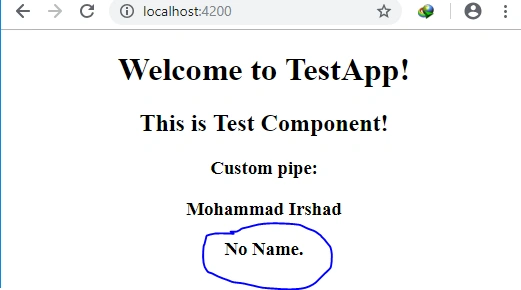
In this way you can add any logic that will perform the transformation of data with the help of default available pipes given by Angular or you can go with your custom pipes.
Rushi MehtaPosted Nov 13, 2018, 1:07 AM
Thanks for sharing