

Introduction
Types of Permissions
- Normal Permission
- Dangerous Permission
Normal Permissions
Dangerous Permissions
AndroidManifest.xml
First declare permission to access and read user Contacts as shown in code below:
- <?xml version="1.0" encoding="utf-8"?>
- <manifest xmlns:android="http://schemas.android.com/apk/res/android"
- package="com.example.gkumar.readcontactsapp">
- <uses-permission android:name="android.permission.READ_CONTACTS" />
- <application
- android:allowBackup="true"
- android:icon="@mipmap/ic_launcher"
- android:label="@string/app_name"
- android:supportsRtl="true"
- android:theme="@style/AppTheme">
- <activity android:name=".MainActivity">
- <intent-filter>
- <action android:name="android.intent.action.MAIN" />
- <category android:name="android.intent.category.LAUNCHER" />
- </intent-filter>
- </activity>
- </application>
- </manifest>
All the logic and procedure to fetch stored data means to fetch contacts. In this code, I have written code to fetch three fields like name, phone no., and even email. You can see the loops just to find these three fields by making queries via contentResolver object and collecting data in the cursor form.
activity_main.xml
- package com.example.gkumar.readcontactsapp;
- import android.Manifest;
- import android.content.ContentResolver;
- import android.content.DialogInterface;
- import android.content.pm.PackageManager;
- import android.database.Cursor;
- import android.net.Uri;
- import android.os.Build;
- import android.provider.ContactsContract;
- import android.support.v4.app.ActivityCompat;
- import android.support.v4.content.ContextCompat;
- import android.support.v7.app.AlertDialog;
- import android.support.v7.app.AppCompatActivity;
- import android.os.Bundle;
- import android.util.Log;
- import android.view.Gravity;
- import android.widget.TextView;
- public class MainActivity extends AppCompatActivity {
- private TextView contactTextView;
- public static final int REQUEST_READ_CONTACTS = 79;
- @Override
- protected void onCreate(Bundle savedInstanceState) {
- super.onCreate(savedInstanceState);
- setContentView(R.layout.activity_main);
- contactTextView = (TextView)findViewById(R.id.textView);
- if (ActivityCompat.checkSelfPermission(this, android.Manifest.permission.READ_CONTACTS)
- == PackageManager.PERMISSION_GRANTED) {
- getContacts();
- } else {
- requestLocationPermission();
- }
- }
- protected void requestLocationPermission() {
- if (ActivityCompat.shouldShowRequestPermissionRationale(this,
- android.Manifest.permission.READ_CONTACTS)) {
- // show UI part if you want here to show some rationale !!!
- } else {
- ActivityCompat.requestPermissions(this, new String[]{android.Manifest.permission.READ_CONTACTS},
- REQUEST_READ_CONTACTS);
- }
- }
- @Override
- public void onRequestPermissionsResult(int requestCode,
- String permissions[], int[] grantResults) {
- switch (requestCode) {
- case REQUEST_READ_CONTACTS: {
- if (grantResults.length > 0
- && grantResults[0] == PackageManager.PERMISSION_GRANTED) {
- getContacts();
- } else {
- // permission denied,Disable the
- // functionality that depends on this permission.
- }
- return;
- }
- }
- }
- public void getContacts() {
- String phoneNumber = null;
- String email = null;
- Uri CONTENT_URI = ContactsContract.Contacts.CONTENT_URI;
- String _ID = ContactsContract.Contacts._ID;
- String DISPLAY_NAME = ContactsContract.Contacts.DISPLAY_NAME;
- String HAS_PHONE_NUMBER = ContactsContract.Contacts.HAS_PHONE_NUMBER;
- Uri PhoneCONTENT_URI = ContactsContract.CommonDataKinds.Phone.CONTENT_URI;
- String Phone_CONTACT_ID = ContactsContract.CommonDataKinds.Phone.CONTACT_ID;
- String NUMBER = ContactsContract.CommonDataKinds.Phone.NUMBER;
- Uri EmailCONTENT_URI = ContactsContract.CommonDataKinds.Email.CONTENT_URI;
- String EmailCONTACT_ID = ContactsContract.CommonDataKinds.Email.CONTACT_ID;
- String DATA = ContactsContract.CommonDataKinds.Email.DATA;
- StringBuffer output = new StringBuffer();
- ContentResolver contentResolver = getContentResolver();
- Cursor cursor = contentResolver.query(CONTENT_URI, null,null, null, null);
- // Loop for every contact in the phone
- if (cursor.getCount() > 0) {
- while (cursor.moveToNext()) {
- String contact_id = cursor.getString(cursor.getColumnIndex( _ID ));
- String name = cursor.getString(cursor.getColumnIndex( DISPLAY_NAME ));
- int hasPhoneNumber = Integer.parseInt(cursor.getString(cursor.getColumnIndex( HAS_PHONE_NUMBER )));
- if (hasPhoneNumber > 0) {
- output.append("\n First Name:" + name);
- // Query and loop for every phone number of the contact
- Cursor phoneCursor = contentResolver.query(PhoneCONTENT_URI, null, Phone_CONTACT_ID + " = ?", new String[] { contact_id }, null);
- while (phoneCursor.moveToNext()) {
- phoneNumber = phoneCursor.getString(phoneCursor.getColumnIndex(NUMBER));
- output.append("\n Phone number:" + phoneNumber);
- }
- phoneCursor.close();
- // Query and loop for every email of the contact
- Cursor emailCursor = contentResolver.query(EmailCONTENT_URI, null, EmailCONTACT_ID+ " = ?", new String[] { contact_id }, null);
- while (emailCursor.moveToNext()) {
- email = emailCursor.getString(emailCursor.getColumnIndex(DATA));
- output.append("\nEmail:" + email);
- }
- emailCursor.close();
- }
- output.append("\n");
- }
- contactTextView.setText(output.toString());
- }
- }
- }
We have taken only a text view just to set contacts as shown below:
- <?xml version="1.0" encoding="utf-8"?>
- <RelativeLayout xmlns:android="http://schemas.android.com/apk/res/android"
- xmlns:tools="http://schemas.android.com/tools"
- android:layout_width="match_parent"
- android:layout_height="match_parent"
- tools:context="com.example.gkumar.readcontactsapp.MainActivity">
- <TextView
- android:id="@+id/textView"
- android:layout_width="wrap_content"
- android:layout_height="wrap_content"
- android:layout_alignParentLeft="true"
- android:layout_alignParentRight="true"
- android:layout_alignParentTop="true"
- android:layout_margin="10dp"
- android:textSize="16sp"
- android:gravity="center"
- android:text="Contacts Information" />
- </RelativeLayout>
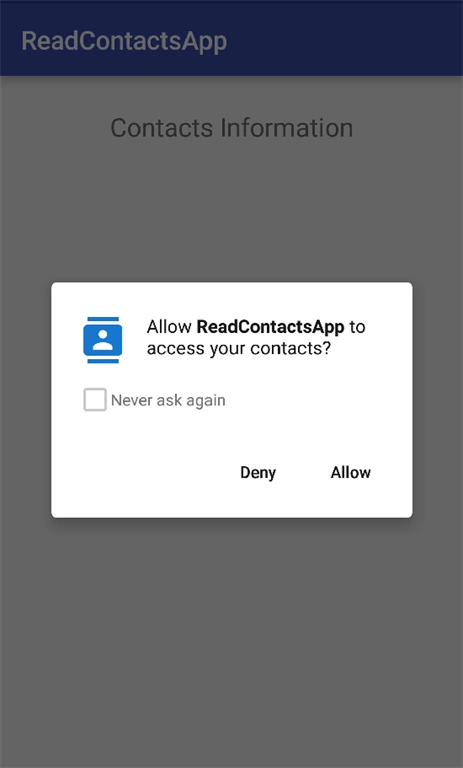
Running the Application

Summary
In this article, we just see the Implementation of the Permission Model via fetching and READ_CONTACTS contacts data. We have Implemented the Runtime permission that is dangerous by nature.
Read more articles on Android:
Ashish TiwariPosted May 4, 2016, 6:34 AM
Good article
Vignesh ManiPosted Apr 20, 2016, 3:56 PM
Nice