

Introduction
Permissions are the most important part of web development, dealing with who can view something who cannot. In this article, I will elaborate on how to use permission levels in SPFX development.
To check whether a user is a Tenant admin:
- this.context.pageContext.legacyPageContext['isSiteOwner'];
- this.context.pageContext.legacyPageContext.isSiteAdmin;
- webServerRelativeUrl: "/sites/PublishPractice"
- webAbsoluteUrl: "https://mytest.sharepoint.com/sites/PublishPractice"
- viewId: ""
- webPropertyFlags2: 0
- listId: ""
- listPermsMask: null
- listUrl: ""
- listTitle: null
- listBaseTemplate: -1
- listBaseType: -1
- driveInfo: {}
- vanityUrls: {}
- multiGeoInfo: [{…}]
- viewOnlyExperienceEnabled: false
- blockDownloadsExperienceEnabled: false
- idleSessionSignOutEnabled: false
- activityBasedTimeoutEnabled: false
- activityMonitorModuleLinkEnabled: false
- isUnauthorizedTenant: false
- cdnPrefix: "static.sharepointonline.com/bld"
- cdnBaseUrl: null
- siteAbsoluteUrl: "https://mytest.sharepoint.com/sites/PublishPractice"
- siteId: "{94bba8b7-43e4-4603-8d02-81c220aa2379}"
- showNGSCDialogForSyncOnTS: true
- supportPoundStorePath: true
- supportPercentStorePath: true
- siteSubscriptionId: "b13ba969-995d-4554-bbc3-233141a9cade"
- tenantDisplayName: "mytest"
- isMultiGeoTenant: false
- isMultiGeoODBMode: false
- webDomain: "sharepoint.com"
- IsIEDisabledForItemsScope: false
- isSPO: true
- farmLabel: "IND_201_Content"
- contentDBName: "Content_809195"
- serverRequestPath: "/_layouts/15/workbench.aspx"
- layoutsUrl: "_layouts/15"
- webId: "{d7b179ac-ba57-4f35-b75b-df24bf906b66}"
- webTitle: "PublishPractice"
- webTemplate: "53"
- webTemplateConfiguration: "BLANKINTERNET#0"
- webDescription: ""
- tenantAppVersion: "1"
- isAppWeb: false
- webLogoUrl: "_layouts/15/images/siteicon.png"
- webLanguage: 1033
- webLanguageName: "en-US"
- currentLanguage: 1033
- currentUICultureName: "en-US"
- currentCultureName: "en-US"
- currentCultureLCID: 1033
- env: "prod"
- env2: "prod"
- nid: 12479
- fid: 195205
- serverTime: "2020-04-13T14:29:06.3446430Z"
- siteClientTag: "0$$16.0.20001.12019"
- crossDomainPhotosEnabled: true
- openInClient: false
- webUIVersion: 15
- webPermMasks: {High: 2147483647, Low: 4294967295}
- pageListId: null
- pageItemId: -1
- pagePermsMask: null
- pagePersonalizationScope: 1
- userEmail: "[email protected]"
- userId: 17
- userLoginName: "[email protected]"
- userDisplayName: "Madhan Thurai NC"
- isAnonymousGuestUser: false
- isEmailAuthenticationGuestUser: false
- isExternalGuestUser: false
- isShareByLinkEnabled: false
- FolderAnonymousLinkPermission: 5
- systemUserKey: "i:0h.f|membership|[email protected]"
- alertsEnabled: true
- siteServerRelativeUrl: "/sites/PublishPractice"
- allowSilverlightPrompt: "True"
- themeCacheToken: "/sites/PublishPractice::0:16.0.20001.12019"
- themedCssFolderUrl: null
- themedImageFileNames: null
- modernThemingEnabled: true
- isSiteAdmin: true
- isSiteOwner: true
- ExpFeatures: (63) [-836791292, 1624570697, 620877909, 1736388636, 867936057, -1796975952, 1288360470, 57945375, 273224740, -1793982464, 87445392, -2138906472, 67451592, 545980736, 2159493, 1879736340, 369377650, 830086336, 20206087, 0, 0, 1212153856, -1883956681, -2080757274, -1806289405, -533232128, -115767270, -936371879, -1065350031, 384368717, 1236488464, 192, 0, 1268512236, 1563207295, -64208227, -1172788480, 113054989, -721582382, -1518442702, 561838596, -23925256, 342968415, -951444149, 1076429836, 1747342597, 414355587, -1341637787, 721486338, 599792128, 1164151212, -1308421888, 387990056, 1275278338, 202377090, 405274688, 537925760, 1048716, 1157627916, 0, 0, 0, 0]
- experimentData: "BgABAAAXIHAIAScHBgEBAAB3Bwc"
- experimentDataLookup: []
- killSwitches: {3487BA96-793D-453F-AA6E-5252E0D81ED6: true, 925090C8-8AA6-4C6A-8BFE-1EF2E43038F0: true, F5580BB6-8B44-4428-B490-36B777B4D5F8: true, C50B5771-669C-4853-A87F-1093166E3FE6: true, 00AA590F-D7AC-48DF-B8C9-0546E0AB9803: true, …}
- CorrelationId: "e761489f-b043-0000-38a7-f45d0822bba0"
- hasManageWebPermissions: true
- isNoScriptEnabled: true
- groupId: null
- groupHasHomepage: true
- groupHasQuickLaunchConversationsLink: false
- departmentId: null
- hubSiteId: null
- sensitivityLabel: null
- restrictedToRegion: null
- hasPendingWebTemplateExtension: false
- disableRecommendedItems: false
- isGroupRelatedSite: false
- isArchived: false
- IBSegments: null
- hasAutogeneratedWebLogo: true
- isHubSite: false
- isWebWelcomePage: false
- siteClassification: ""
- hideSyncButtonOnODB: false
- showNGSCDialogForSyncOnODB: false
- sitePagesEnabled: false
- sitePagesFeatureVersion: 0
- featureInfo: {SitePages: {…}, SitePagesResources: {…}, MixedReality: {…}, MixedRealityResources: {…}, RecommendedItems: {…}, …}
- DesignPackageId: "00000000-0000-0000-0000-000000000000"
- groupType: null
- groupColor: "#ca5010"
- siteColor: "#ca5010"
- headerEmphasis: 0
- headerLayout: 0
- searchScope: 0
- searchBoxInNavBar: 1
- searchBoxPlaceholderText: null
- navigationInfo: null
- clientPersistedCacheKey: {CurrentKey: {…}, PreviousKey: {…}}
- guestsEnabled: false
- MenuData: {SettingsData: Array(4), SignOutUrl: "https://mytest.sharepoint.com/sites/PublishPractice/_layouts/15/SignOut.aspx"}
- RecycleBinItemCount: -1
- listItemCount: -1
- PublishingFeatureOn: true
- PreviewFeaturesEnabled: true
- disableAppViews: false
- disableFlows: false
- serverRedirectedUrl: null
- formDigestValue: "0x14FD2B0BD9FA5893C41D8807652990AA6C57E33C559B52EE5CD810FF87C12B1FD6D06577151CA9B4CBA88383B59C8FEF43690A2550225FA745E2F398D01EDA07,13 Apr 2020 14:29:06 -0000"
- IsHomepageModernized: false
- NextStepsFirstRunEnabled: false
- maximumFileSize: 15360
- formDigestTimeoutSeconds: 1800
- canUserCreateMicrosoftForm: false
- canUserCreateVisioDrawing: true
- readOnlyState: null
- isTenantDevSite: false
- preferUserTimeZone: false
- userTimeZoneData: null
- userTime24: false
- userFirstDayOfWeek: null
- webTimeZoneData: {Description: "(UTC+05:30) Chennai, Kolkata, Mumbai, New Delhi", Bias: -330, Id: 23, DaylightBias: -60, DaylightDate: {…}, …}
- webTime24: false
- webFirstDayOfWeek: 0
- aadTenantId: "b13ba969-995d-4554-bbc3-233141a9cade"
- aadUserId: "b4a0dbf7-ad0e-4526-aa7f-b74a291cec9c"
- aadInstanceUrl: "https://login.windows.net"
- aadSessionId: "V2!10032000892FF6FA!13230631649"
- msGraphEndpointUrl: "https://graph.microsoft.com"
- msMruEndpointUrl: "https://ocws.officeapps.live.com"
- allowInfectedDownload: true
- organizationNewsSiteReference: []
- companyPortalReference: null
- knowledgeHubSiteDetails: null
- spfx3rdPartyServicePrincipalId: "f6141ed2-79ff-419a-afa7-01f1b3dfe9b0"
- completenessUrls: null
- socialBarEnabled: true
- substrateOneDriveDisabled: null
- isGroupifyDisabled: false
- Has2019Era: true
- userVoiceForFeedbackEnabled: true
- substrateOneDriveMigrated: null
- userPrincipalName: "[email protected]"
- spfxOBOFlowEnabled: true
- publicCdnBaseUrl: "https://publiccdn.sharepointonline.com"
- SideBySideToken: "16.0.20001.12019"
- farmSettings: {ExternalService_powerappswebhostname: "web.powerapps.com", ExternalService_powerappscreatehostname: "create.powerapps.com", ExternalService_flowhostname: "flow.microsoft.com", ExternalService_flowservicehostname: "service.flow.microsoft.com", ExternalService_popularplatformsenable: "1", …}
- __proto__: Object
- _spPageContextInfo
- function getmodernpagecontext(url) {
- var request = new XMLHttpRequest();
- return new Promise(function(resolve, reject) {
- request.onreadystatechange = function() {
- if (request.readyState !== 4) return;
- if (request.status >= 200 && request.status < 300) {
- resolve(request);
- } else {
- reject({
- status: request.status,
- statusText: request.statusText
- });
- }
- };
- request.open('GET', url, true);
- request.setRequestHeader("Content-Type", "application/json;charset=utf-8");
- request.setRequestHeader("ACCEPT", "application/json; odata.metadata=verbose");
- request.setRequestHeader("ODATA-VERSION", "4.0");
- request.send();
- });
- }
- //Get the Request location from the browser URL
- var path = location.href.replace(location.search, "") + "?as=json";
- //Returns the current user, item, page and context information
- getmodernpagecontext(path).then(function(response) {
- console.log(JSON.parse(response.response));
- });
- import { SPPermission } from '@microsoft/sp-page-context';
- let permission = new SPPermission(this.context.pageContext.web.permissions.value);
hasPermission returns true if the given permission is available for the current user. It holds single value.
hasAllPermissions returns true if given permissions are available for the current user. If a single permission is not available, it returns false. It holds an array of values.- const viewpage = permission.hasPermission(SPPermission.viewPages);
- const fullcontrol = permission.hasAllPermissions(SPPermission.fullMask,SPPermission.viewPages);
- const anycontrol = permission.hasAnyPermissions(SPPermission.fullMask,SPPermission.viewPages);
- emptyMask - Has no permissions on the Web site. Not available through the user interface.
- viewListItems - View items in lists, documents in document libraries, and view Web discussion comments.
- addListItems - Add items to lists, add documents to document libraries, and add Web discussion comments.
- editListItems - Edit items in lists, edit documents in document libraries, edit Web discussion comments in documents,* and customize web part Pages in document libraries.
- deleteListItems - Delete items from a list, documents from a document library, and Web discussion comments in documents.
- approveItems - Approve a minor version of a list item or document.
- openItems - View the source of documents with server-side file handlers.
- viewVersions - View past versions of a list item or document.
- deleteVersions - Delete past versions of a list item or document.
- cancelCheckout- Discard or check in a document that is checked out to another user.
- managePersonalViews - Create, change and delete personal views of lists.
- manageLists - Create and delete lists, add or remove columns in a list, and add or remove public views of a list.
- viewFormPages - View forms, views, and application pages, and enumerate lists.
- open - Allow users to open a Web site, list, or folder to access items inside that container.
- viewPages - View pages in a Web site.
- layoutsPage - View the layouts page?
- addAndCustomizePages - Add, change, or delete HTML pages or web part Pages, and edit the Web site using a SharePoint* Foundation–compatible editor.
- applyThemeAndBorder - Apply a theme or borders to the entire Web site.
- applyStyleSheets - Apply a style sheet (.css file) to the Web site.
- viewUsageData - View reports on Web site usage.
- createSSCSite - Create a Web site using Self-Service Site Creation.
- manageSubwebs - Create subsites such as team sites, Meeting Workspace sites, and Document Workspace sites.
- createGroups - Create a group of users that can be used anywhere within the site collection.
- managePermissions - Create and change permission levels on the Web site and assign permissions to users and groups.
- browseDirectories - Enumerate files and folders in a Web site using Microsoft Office SharePoint Designer 2007 and WebDAV interfaces.
- browserUserInfo - View information about users of the Web site.
- addDelPrivateWebParts - Add or remove personal web parts on a web part Page.
- updatePersonalWebParts - Update web parts to display personalized information.
- manageWeb - Use features that launch client applications; otherwise, users must work on documents locally and upload changes.
- useClientIntegration - Use SOAP, WebDAV, or Microsoft Office SharePoint Designer 2007 interfaces to access the Web site.
- useRemoteAPIs - Manage alerts for all users of the Web site.
- manageAlerts - Create e-mail alerts.
- createAlerts - Allows a user to change his or her user information, such as adding a picture.
- editMyUserInfo - Enumerate permissions on the Web site, list, folder, document, or list item.
- enumeratePermissions - Has all permissions on the Web site. Not available through the user interface.
- fullMask - full control
Let's be practical:
Open a command prompt and create a directory for the SPFx solution.
md spfx-SpfxPermissions
Navigate to the above-created directory.
cd spfx-SpfxPermissions
Run the Yeoman SharePoint Generator to create the solution.
yo @microsoft/sharepoint
Solution Name
Hit Enter for the default name (spfx-SpfxPermissions in this case) or type in any other name for your solution.
Selected choice - Hit Enter
Target for the component
Here, we can select the target environment where we are planning to deploy the client web part; i.e., SharePoint Online or SharePoint OnPremise (SharePoint 2016 onwards).
Selected choice - SharePoint Online only (latest).
Place of files
We may choose to use the same folder or create a subfolder for our solution.
Selected choice - same folder.
Deployment option
Selecting Y will allow the app to be deployed instantly to all sites and be accessible everywhere.
Selected choice - N (install on each site explicitly).
Permissions to access web APIs
Choose if the components in the solution require permission to access web APIs that are unique and not shared with other components in the tenant.
Selected choice - N (solution contains unique permissions)
Type of client-side component to create
We can choose to create a client-side web part or an extension. Choose the web part option.
Selected choice - WebPart
Web part name
Hit Enter to select the default name or type in any other name.
Selected choice - SpfxListView
Web part description
Hit Enter to select the default description or type in any other value.
Framework to use
Select any JavaScript framework to develop the component. Available choices are - No JavaScript Framework, React, and Knockout.
Selected choice - React
The Yeoman generator will perform a scaffolding process to generate the solution. The scaffolding process will take a significant amount of time.
Once the scaffolding process is completed, lock down the version of project dependencies by running the below command,
npm shrinkwrap
In SpfxPermissionsWebPart.ts
- public render(): void {
- const element: React.ReactElement<ISpfxPermissionsProps> = React.createElement(
- SpfxPermissions,
- {
- description: this.properties.description,
- context: this.context
- }
- );
- ReactDom.render(element, this.domElement);
- }
- import * as React from 'react';
- import { ISpfxPermissionsProps } from './ISpfxPermissionsProps';
- import { SPPermission } from '@microsoft/sp-page-context';
- interface Permissionstate {
- noadmin: boolean;
- siteadmin:boolean;
- tenantadmin:boolean;
- }
- export default class SpfxPermissions extends React.Component<ISpfxPermissionsProps, Permissionstate> {
- constructor(props: ISpfxPermissionsProps) {
- super(props);
- this.state = {
- noadmin: false,
- siteadmin:false,
- tenantadmin:false
- };
- }
- public componentDidMount(){
- this.UserSitePermission();
- }
- private UserSitePermission() {
- console.log(this.props.context.pageContext.web.permissions);
- console.log(this.props.context.pageContext.legacyPageContext);
- let sitecoladmin:boolean=this.props.context.pageContext.legacyPageContext.isSiteAdmin;
- let siteowner:boolean=this.props.context.pageContext.legacyPageContext['isSiteOwner'];
- let permission = new SPPermission(this.props.context.pageContext.web.permissions.value);
- let canEdit = permission.hasPermission(SPPermission.manageWeb);
- const fullcontrol = permission.hasAllPermissions(SPPermission.fullMask);
- const anycontrol = permission.hasAnyPermissions(SPPermission.fullMask);
- const viewpage = permission.hasPermission(SPPermission.viewPages);
- const nopermision = permission.hasPermission(SPPermission.emptyMask);
- this.setState({
- noadmin: nopermision,
- siteadmin:sitecoladmin,
- tenantadmin:siteowner
- });
- }
- public render(): React.ReactElement<ISpfxPermissionsProps> {
- if(this.state.siteadmin === true) {
- return (
- <div >
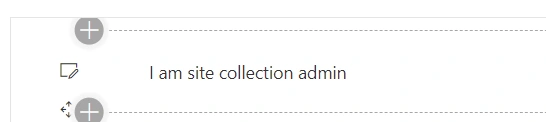
- I am site collection admin
- </div>
- );}
- else if(this.state.tenantadmin === true) {
- return (
- <div >
- I am Tenent admin
- </div>
- );}
- else {
- return (
- <div >
- I am not an Administrator
- </div>
- );}
- }}
- import { WebPartContext } from "@microsoft/sp-webpart-base";
- export interface ISpfxPermissionsProps {
- description: string;
- context:WebPartContext;
- }
Expected Output
Conclusion
We learned how to hide/show webpart based on user permissions in SPFx. I hope this helps someone. Happy coding :)
Mike ZimmermanPosted Dec 7, 2021, 9:47 PM
I was curious if anyone knows what these properties actually mean: allowInfectedDownload and isFraudTenant?
Aditya ReddyPosted Jul 15, 2020, 3:12 AM
This article has lot more information regarding permission, appreciate the patience in you for writing such a brief article.