

In this article, we will learn basic CRUD operations, using AngularJS and Web API with a sample Application.
I have uploaded the full source code @github and you may clone/download.
In this article, we are going to explore how to
- Use Database SQL Server.
- Use MVC Application.
- Use Entity Framework (Database First Approach).
- Use AngularJS.
- Use ASP.NET Web API.
Let’s get started with the steps
Create database
Before we get started with IDE, let’s create a new database named “StudentDB” and create a sample table named “tblStudent”. The script is given below.
- USE[StudentDB]
- GO
- /****** Object: Table [dbo].[tblStudent] Script Date: 11/24/2016 1:36:13 PM ******/
- SET ANSI_NULLS ON
- GO
- SET QUOTED_IDENTIFIER ON
- GO
- CREATE TABLE[dbo].[tblStudent](
- [StudentID][int] IDENTITY(1, 1) NOT NULL, [FirstName][nvarchar](50) NULL, [LastName][nvarchar](50) NULL, [Email][nvarchar](50) NULL, [Address][nvarchar](50) NULL, CONSTRAINT[PK_tblStudent] PRIMARY KEY CLUSTERED(
- [StudentID] ASC) WITH(PAD_INDEX = OFF, STATISTICS_NORECOMPUTE = OFF, IGNORE_DUP_KEY = OFF, _ ALLOW_ROW_LOCKS = ON, ALLOW_PAGE_LOCKS = ON) ON[PRIMARY]) ON[PRIMARY]
- GO // This is just a sample script. Paste your real code (javascript or HTML) here.
- if ('this_is' == /an_example/) {
- of_beautifier();
- } else {
- var a = b ? (c % d) : e[f];
- }
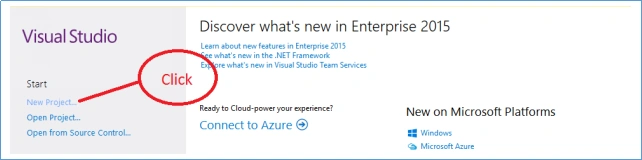
The below window will appear on screen:
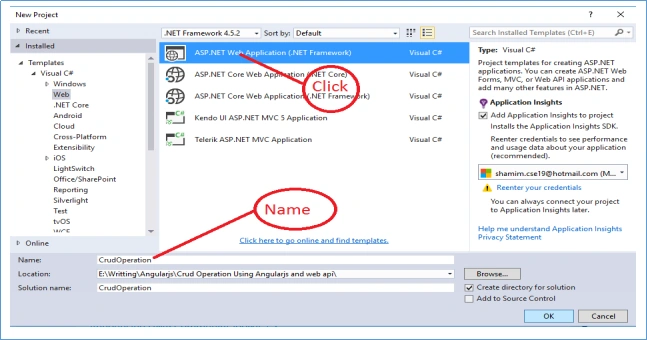
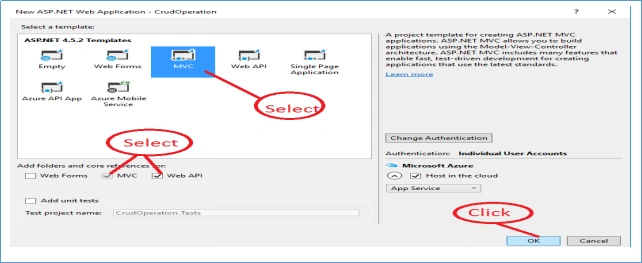
After clicking a new ASP.NET Project, Window will appear on the screen.
Solution creation is done with loading all the required files. Given below is the picture of solution structure.
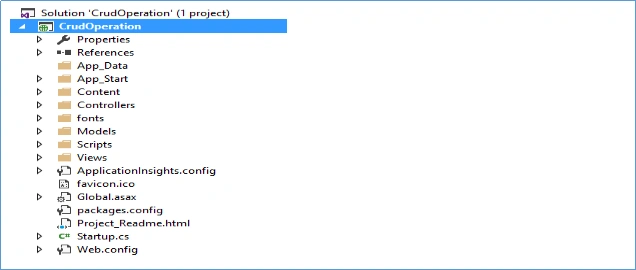
Let's go Explore Solution Structure
We know that ASP.NET MVC is a Web Application framework developed by Microsoft. This structure works with Model, View and Controller.
- Model
Classes represent the data of the solution and it enforces business.
- View
Simple world view means UI (User Interface) which dynamically generates HTML responses.
- Controller
A Controller is the link between the user and system. It handles incoming Browser requests and after processing, using model data or specific task returns a response to the Browser.
Now, we will Add AngularJS in our solution.
With right button, click on solution, click Manage NuGet Packages to add AngularJS reference.
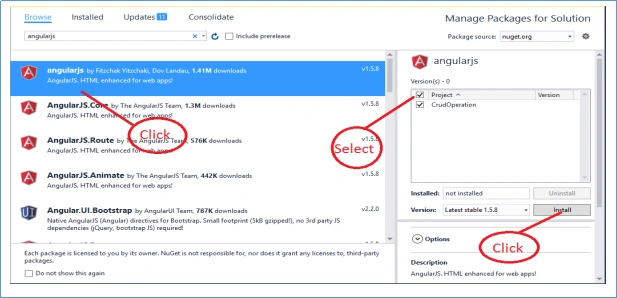
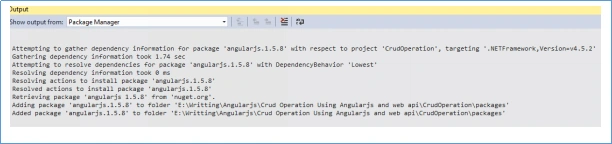
After clicking the Install button, load the AngularJS files. Kindly find the screenshot mentioned below.
Now, we will create ScriptsNg folder in solution, we will create 4 folders within ScriptsNg.
- Controller
- Directive
- Module
- Service
Controller
AngularJS Controller controls the data between model and view in an Application, keeping all Controller Script files within Controller folder.
Directive
AngularJS Directive extends HTML with a new attribute, keeping all Directive files within Directive folder.
Module
Modules are used to separate logic, say Services, controllers, Application etc. and keep the code clean, keep all the module files in module folder.
Service
Service is a function, keeping all the customized Service files within Service folder. Now, we will create a JS file named “app.js” within module folder. The code is mentioned below.
- var app;
- (function() {
- 'use strict'; //Defines that JavaScript code should be executed in "strict mode"
- app = angular.module('myapp', []);
- })();
- app.controller('StudentCtrl', ['$scope',
- function($scope) {
- $scope.Message = 'Hellow World';
- }
- ]);
- public class StudentController: Controller {
- // GET: Student
- public ActionResult Index() {
- return View();
- }
- }
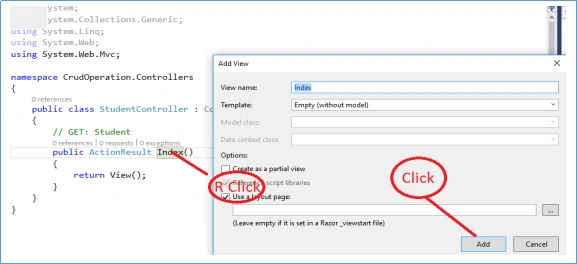
View has been created successfully. We will add some code within index view for checking if AngularJS will work. The code is mentioned below.
- <div ng-app="myapp">
- <div ng-controller="StudentCtrl"> {{Message}} </div>
- </div>
- <script src="~/Scripts/angular.min.js"></script>
- <script src="~/ScriptsNg/Module/app.js"></script>
- <script src="~/ScriptsNg/Controller/StudentCtrl.js"></script>

Entity Framework
After clicking References, we can see that Entity framework already exists in our solution.
Create Entity Data Model
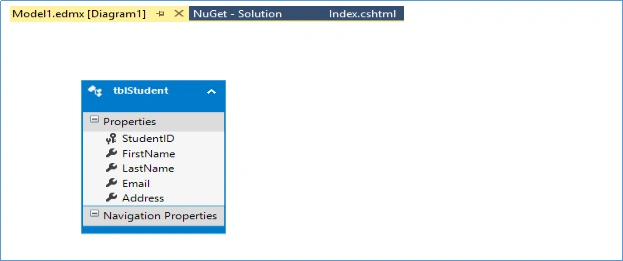
Right click on your model folder and click new, select ADO.NET Entity Data Model. Follow the steps given. Once you have done the process, we can see the edmx file and other files in your model folder. It is named StudentDBEntities and the screenshot of edmx model is mentioned below.
Now our solution is ready for crud operation.
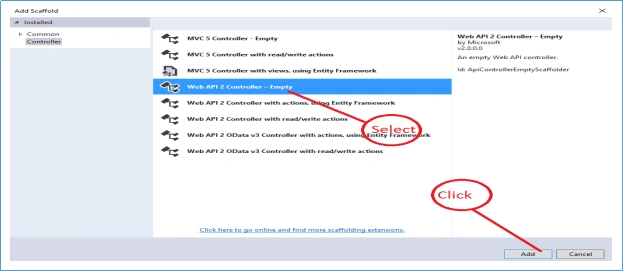
Now, we have created a folder named API in our solution. With right button, click add and click controller, which shows the Window, mentioned below.
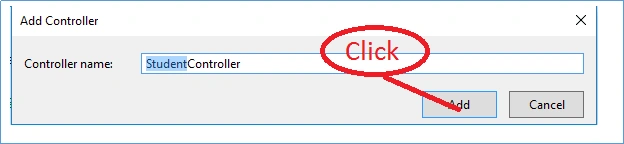
Add controller name. The image is shown below.
Our StudentController's API has been created.
For Save
- namespace CrudOperation.api {
- // Route
- [RoutePrefix("/api/Student")]
- public class StudentController: ApiController {
- // StudentDBEntities object point
- StudentDBEntities dbContext = null;
- // Constructor
- public StudentController() {
- // create instance of an object
- dbContext = new StudentDBEntities();
- }
- [ResponseType(typeof(tblStudent))]
- [HttpPost]
- public HttpResponseMessage SaveStudent(tblStudent astudent) {
- int result = 0;
- try {
- dbContext.tblStudents.Add(astudent);
- dbContext.SaveChanges();
- result = 1;
- } catch (Exception e) {
- result = 0;
- }
- return Request.CreateResponse(HttpStatusCode.OK, result);
- }
- }
- }
- app.controller('StudentCtrl', ['$scope', 'CrudService',
- function($scope, CrudService) {
- // Base Url
- var baseUrl = '/api/Student/';
- $scope.btnText = "Save";
- $scope.studentID = 0;
- $scope.SaveUpdate = function() {
- var student = {
- FirstName: $scope.firstName,
- LastName: $scope.lasttName,
- Email: $scope.email,
- Address: $scope.adress,
- StudentID: $scope.studentID
- }
- if ($scope.btnText == "Save") {
- var apiRoute = baseUrl + 'SaveStudent/';
- var saveStudent = CrudService.post(apiRoute, student);
- saveStudent.then(function(response) {
- if (response.data != "") {
- alert("Data Save Successfully");
- $scope.Clear();
- } else {
- alert("Some error");
- }
- }, function(error) {
- console.log("Error: " + error);
- });
- }
- }
- $scope.Clear = function() {
- $scope.studentID = 0;
- $scope.firstName = "";
- $scope.lasttName = "";
- $scope.email = "";
- $scope.adress = "";
- }
- }
- ]);
- app.service('CrudService', function($http) {
- var urlGet = '';
- this.post = function(apiRoute, Model) {
- var request = $http({
- method: "post",
- url: apiRoute,
- data: Model
- });
- return request;
- }
- this.put = function(apiRoute, Model) {
- var request = $http({
- method: "put",
- url: apiRoute,
- data: Model
- });
- return request;
- }
- this.delete = function(apiRoute) {
- var request = $http({
- method: "delete",
- url: apiRoute
- });
- return request;
- }
- this.getAll = function(apiRoute) {
- urlGet = apiRoute;
- return $http.get(urlGet);
- }
- this.getbyID = function(apiRoute, studentID) {
- urlGet = apiRoute + '/' + studentID;
- return $http.get(urlGet);
- }
- });
- <div ng-app="myapp">
- <div ng-controller="StudentCtrl">
- <form novalidate name="frmStudent" id="frmStudent" class="form-horizontal row-border"> <br />
- <div class="col-md-12">
- <div class="form-group"> <label class="col-md-4 control-label" for="input17"> First Name</label>
- <div class="col-md-7"> <input type="text" id="idFirstName" class="form-control" name="nameFirstName" ng-model="firstName" /> </div>
- </div>
- <div class="form-group"> <label class="col-md-4 control-label" for="input17"> Last Name</label>
- <div class="col-md-7"> <input type="text" id="idLastName" class="form-control" name="nameFirstName" ng-model="lasttName" /> </div>
- </div>
- <div class="form-group"> <label class="col-md-4 control-label" for="input17"> Email</label>
- <div class="col-md-7"> <input type="text" id="idEmail" class="form-control" name="nameEmail" ng-model="email" /> </div>
- </div>
- <div class="form-group"> <label class="col-md-4 control-label" for="input17"> Address</label>
- <div class="col-md-7"> <input type="text" id="idAddress" class="form-control" name="nameAdress" ng-model="adress" /> </div>
- </div>
- <div class="form-group">
- <div class="col-md-4"> </div>
- <div class="col-md-7"> <span id="save" class="btn btn-success margin-right-btn" ng-click="SaveUpdate()">
- <i class="icon-save"></i> {{btnText}}
- </span> </div>
- </div>
- </div>
- </form>
- </div>
- </div>
- <script src="~/Scripts/angular.min.js"></script>
- <script src="~/ScriptsNg/Module/app.js"></script>
- <script src="~/ScriptsNg/Controller/StudentCtrl.js"></script>
- <script src="~/ScriptsNg/Services/CrudService.js"></script>
In the code, mentioned above, we can see that there are some unfamiliar things that are used for AngularJS.
- ng-app="myapp"
Here, ng-app is the root element of the AngularJS and “myapp" is the name of app.js. - ng-controller="StudentCtrl"
Here, ng-controller directive adds a controller to your Application and StudentCtrl is the name of controller. We can write the code and make function and variables. - ng-model
Here, directive binds the value of HTML controls.
Note
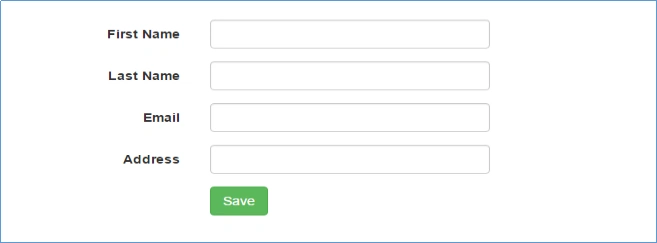
Keep in mind that AngularJS2 is a way to bind the data. After running, we get UI, mentioned below.
For Fetch Data form Database
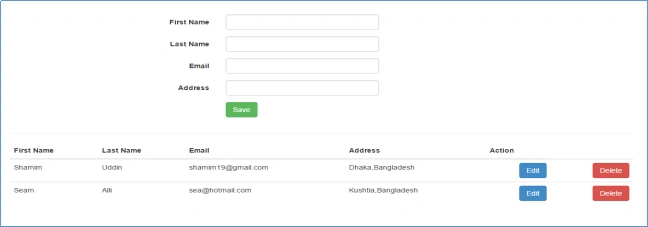
Our Save is done. Now, we will fetch the data from the database. We will add GetStudents method in StudentController's API Controller. The code is mentioned below.
- [ResponseType(typeof(tblStudent))]
- [HttpGet]
- public List < tblStudent > GetStudents() {
- List < tblStudent > students = null;
- try {
- students = dbContext.tblStudents.ToList();
- } catch (Exception e) {
- students = null;
- }
- return students;
- }
- $scope.GetStudents = function() {
- var apiRoute = baseUrl + 'GetStudents/';
- var student = CrudService.getAll(apiRoute);
- student.then(function(response) {
- debugger
- $scope.studnets = response.data;
- }, function(error) {
- console.log("Error: " + error);
- });
- }
- $scope.GetStudents();
- <table class="table table-hover general-table">
- <thead class="grid-top-panel">
- <tr>
- <th style="display:none">StudentID</th>
- <th>First Name</th>
- <th>Last Name</th>
- <th>Email</th>
- <th>Address</th>
- <th>Action</th>
- </tr>
- </thead>
- <tbody>
- <tr ng-repeat="dataModel in students">
- <td style="display:none">{{dataModel.StudentID}}</td>
- <td> {{dataModel.FirstName}}</td>
- <td> {{dataModel.LastName}}</td>
- <td>{{dataModel.Email}}</td>
- <td>{{dataModel.Address}}</td>
- <td style="text-align:right; color:white"> <span>
- <span id="save" class="btn btn-primary margin-right-btn"
- ng-click="GetStudentByID(dataModel)">
- Edit
- </span> </span>
- </td>
- <td style="text-align:right; color:white"> <span>
- <span id="save" class="btn btn-danger margin-right-btn"
- ng-click="DeleteStudent(dataModel)">
- Delete
- </span> </span>
- </td>
- </tr>
- </tbody>
- <tfoot></tfoot>
- </table>
For Update
We have to create two methods in StudentController’s API for update. First, we will get student info by studentID after changing student’s properties and we have to update.
- First Method GetStudentByID[Route("GetStudentByID/{studentID:int}")]
- [ResponseType(typeof(tblStudent))]
- [HttpGet]
- public tblStudent GetStudentByID(int studentID) {
- tblStudent astudent = null;
- try {
- astudent = dbContext.tblStudents.Where(x => x.StudentID == studentID).SingleOrDefault();
- } catch (Exception e) {
- astudent = null;
- }
- return astudent;
- }
- $scope.GetStudentByID = function(dataModel) {
- debugger
- var apiRoute = baseUrl + 'GetStudentByID';
- var student = CrudService.getbyID(apiRoute, dataModel.StudentID);
- student.then(function(response) {
- $scope.studentID = response.data.StudentID;
- $scope.firstName = response.data.FirstName;
- $scope.lasttName = response.data.LastName;
- $scope.email = response.data.Email;
- $scope.adress = response.data.Address;
- $scope.btnText = "Update";
- }, function(error) {
- console.log("Error: " + error);
- });
- }
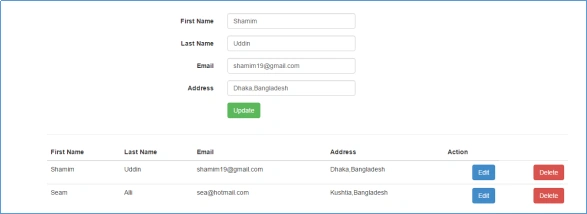
Second, we will update our student data, so we have to create UpdateStudent method. The code is mentioned below.
- [ResponseType(typeof(tblStudent))]
- [HttpPut]
- public HttpResponseMessage UpdateStudent(tblStudent astudent) {
- int result = 0;
- try {
- dbContext.tblStudents.Attach(astudent);
- dbContext.Entry(astudent).State = EntityState.Modified;
- dbContext.SaveChanges();
- result = 1;
- } catch (Exception e) {
- result = 0;
- }
- return Request.CreateResponse(HttpStatusCode.OK, result);
- }
- $scope.SaveUpdate = function() {
- var student = {
- FirstName: $scope.firstName,
- LastName: $scope.lasttName,
- Email: $scope.email,
- Address: $scope.adress,
- StudentID: $scope.studentID
- }
- if ($scope.btnText == "Save") {
- var apiRoute = baseUrl + 'SaveStudent/';
- var saveStudent = CrudService.post(apiRoute, student);
- saveStudent.then(function(response) {
- if (response.data != "") {
- alert("Data Save Successfully");
- $scope.GetStudents();
- $scope.Clear();
- } else {
- alert("Some error");
- }
- }, function(error) {
- console.log("Error: " + error);
- });
- } else {
- var apiRoute = baseUrl + 'UpdateStudent/';
- var UpdateStudent = CrudService.put(apiRoute, student);
- UpdateStudent.then(function(response) {
- if (response.data != "") {
- alert("Data Update Successfully");
- $scope.GetStudents();
- $scope.Clear();
- } else {
- alert("Some error");
- }
- }, function(error) {
- console.log("Error: " + error);
- });
- }
- }
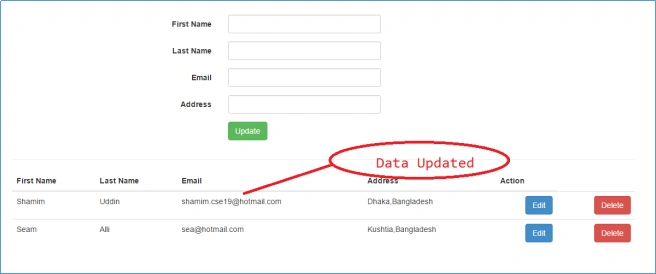
For Delete
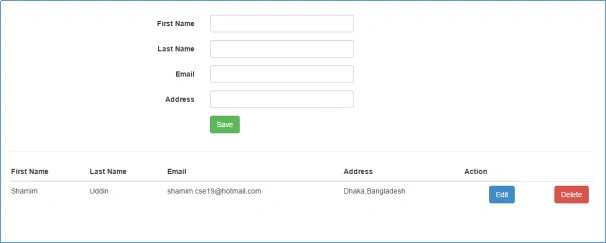
Now, we have to add delete method within StudentController's API. The code is mentioned below.
- [ResponseType(typeof(tblStudent))]
- [HttpDelete]
- public HttpResponseMessage DeleteStudent(int id) {
- int result = 0;
- try {
- var student = dbContext.tblStudents.Where(x => x.StudentID == id).FirstOrDefault();
- dbContext.tblStudents.Attach(student);
- dbContext.tblStudents.Remove(student);
- dbContext.SaveChanges();
- result = 1;
- } catch (Exception e) {
- result = 0;
- }
- return Request.CreateResponse(HttpStatusCode.OK, result);
- }
- $scope.DeleteStudent = function(dataModel) {
- debugger
- var apiRoute = baseUrl + 'DeleteStudent/' + dataModel.StudentID;
- var deleteStudent = CrudService.delete(apiRoute);
- deleteStudent.then(function(response) {
- if (response.data != "") {
- alert("Data Delete Successfully");
- $scope.GetStudents();
- $scope.Clear();
- } else {
- alert("Some error");
- }
- }, function(error) {
- console.log("Error: " + error);
- });
- }
Hope, this will be very helpful.
Sofique UddinPosted Mar 29, 2022, 3:46 PM
Thanks Dear sir, Shamim Uddin. I am Sofique Uddin From Gulshan-2, Dhaka, Bangladesh. If any help can I contact with you ?
Sofique UddinPosted Mar 29, 2022, 3:44 PM
Thanks Dear sir, Shamim Uddin
Chandana GurunathPosted Sep 21, 2021, 12:05 PM
Thank you so much sir for your help sir. Very clear and precise. God bless you and your family
Abd EldeenPosted Sep 22, 2019, 1:11 PM
There is some issue while right as we need to send the id . in both the method GetStudentByID and DeleteStudent there is some problem i know i am missing something about how our service will take the id to api method .. Definitely it means something by [Route("GetStudentByID/{studentID:int}")] ...please advise
Sentyrv VermaPosted Sep 7, 2019, 5:58 AM
Again there is some issue while right as we need to send the id . in both the method GetStudentByID and DeleteStudent there is some problem i know i am missing something about how our service will take the id to api method .. Definitely it means something by [Route("GetStudentByID/{studentID:int}")] this ..... Please Help sir anyBody so i can get it what is wrong while sending the id from model
Sentyrv VermaPosted Sep 7, 2019, 2:58 AM
Wow Sir What a Great Article Really Searching For Such Article That Includes Many Things To Work On . Clear Code Only The Issue Occurred When We Click On Edit It Goes to GetById Function The URL Which Is Made include the StudentID To access The API. There It Gives Some Error as I have Used This [Route("GetStudentByID/{studentID:int}")] .. The Problem I solved But I am Not Using This [Route("GetStudentByID/{studentID:int}")] in API of GetStudentByID made some changes in my urlGet Itself . I want to use this and know why I am Getting This Error Plz Help Sir It Will be very appreciating ThankYou...
Dotnet LearnerPosted Apr 4, 2019, 12:29 AM
Good Morning Sir, I have done every step you have mentioned above. Everything is working fine but my data from database is not shown in the table. The data in database isn't fetched in the table. Please help.
JosephsPosted Oct 13, 2018, 7:18 AM
How to implemented login page
Kishore MadanapaliPosted Jul 4, 2017, 12:19 AM
Can u pls post an example on ng grid for CRUD operations
Umamaheswara Rao DasariPosted Jan 3, 2017, 1:52 AM
Good Article with simple manner...
Jasbeer SinghPosted Dec 21, 2016, 1:43 AM
Best one to start with. Good appraoch
Satish Kumar VadlavalliPosted Dec 14, 2016, 5:02 AM
Great work ya, simple yet super