

Introduction
This article shows by example how to upload a file and validate it. We can apply the validation when uploading the file using Data Annotation validators.
The following is the procedure for creating this application.
Step 1
Create the Web API application.
- Start Visual Studio 2012 and Select "New Project" from the Start window.
- In the Template window select "Installed template" -> "Visual C#"-> "Web"
- Choose "ASP.NET MVC4 Web application".
- Click on the "OK" button.

- From the MVC 4 Project Window select "Web API".

Step 2
In the "HomeController.cs" file add the new "ActionResult" method.
- In the Solution Explorer.
- Select the "Controller Folder" -> "HomeController".
The code of the "HomeController.cs" file is as in the following:
- using System;
- using System.Collections.Generic;
- using System.IO;
- using System.Linq;
- using System.Web;
- using System.Web.Mvc;
- using Upload.Models;
- namespace Upload.Controllers
- {
- public class HomeController : Controller
- {
- public ActionResult Index()
- {
- return View();
- }
- public ActionResult RecordUpload()
- {
- return View();
- }
- [HttpPost]
- public ActionResult RecordUpload(RModel fregister)
- {
- if (ModelState.IsValid)
- {
- var Nameofrecord = Path.GetFileName(fregister.file.FileName);
- var sourcepath = Path.Combine(Server.MapPath("~/Content"), Nameofrecord);
- fregister.file.SaveAs(sourcepath);
- ViewBag.Message = "Your file Uploaded successfully";
- ModelState.Clear();
- }
- return View();
- }
- }
- }
Here the "ActionResult" class encapsulates the action of the "RecordUpload" method and the "HttpPost" attribute represents an attribute that restricts an action method, in other words "RecordUpload".
Step 3
We create a View "RecordUpload.cshtml" as in the following:
-
In the "HomeController" file.
-
Right-click on the "RecordUpload" method.
-
Select "Addview".

Without any change click on the "OK" button.

Write this code in this view.
- @model Upload.Models.RModel
- @{
- ViewBag.Title = "Upload File using Type Strongly view";
- }
- <script src="~/Scripts/jquery-1.8.2.min.js" type="text/javascript"></script>
- <script src="../../Scripts/jquery.validate.min.js" type="text/javascript"></script>
- <script src="../../Scripts/jquery.validate.unobtrusive.min.js" type="text/javascript"></script>
- <script type="text/jscript">
- function FindFileSize(fileid) {
- try {
- var fSize = 0;
- if ($.browser.msie) {
- var obj = new ActiveXObject("Scripting.FileSystemObject"); var filePath = $("#" + fileid)[0].value;
- var fileo = obj.getFile(filePath);
- var fSize = fileo.size;
- fSize = fSize / 1048576;
- }
- else {
- fSize = $("#" + fileid)[0].files[0].size
- fSize = fSize / 1048576;
- }
- return fSize;
- }
- catch (e) {
- alert("Error occured :" + e);
- }
- }
- function getNameFromPath(strFilesource) {
- var OBJ = new RegExp();
- var sName = OBJ.exec(strFilsource);
- if (sName == null) {
- return null;
- }
- else {
- return sName[0];
- }
- }
- $(function () {
- $("#record").change(function () {
- var record = getNameFromPath($(this).val());
- if (record != null) {
- var suffix = file.substr((file.lastIndexOf('.') + 1));
- switch (suffix) {
- case 'jpg':
- case 'png':
- case 'gif':
- case 'pdf':
- flag = true;
- break;
- default:
- flag = false;
- }
- }
- if (flag == false) {
- $(".lifile > span").text("Extension of file that can be upload jpg,png,gif,pdf extension file");
- return false;
- }
- else {
- var size = GetFileSize('file');
- if (size > 3) {
- $(".lifile > span").text("The Uploading file Size 3 MB");
- }
- else {
- $(".lifile > span").text("");
- }
- }
- });
- });
- </script>
- <h2>Uploading File using model validation</h2>
- <h3 style="color: green">@ViewBag.Message</h3>
- @using (Html.BeginForm("RecordUpload", "Home", FormMethod.Post, new { enctype = "multipart/form-data" }))
- {
- <fieldset>
- <legend></legend>
- <ol>
- <li>
- @Html.LabelFor(l => l.YourName)
- @Html.TextBoxFor(l => l.YourName, new { maxlength = 50 })
- @Html.ValidationMessageFor(l => l.YourName)
- </li>
- <li>
- @Html.LabelFor(l => l.TypeAddress)
- @Html.TextAreaFor(l => l.TypeAddress, new { maxlength = 200 })
- @Html.ValidationMessageFor(l => l.TypeAddress)
- </li>
- <li class="lifile">
- @Html.TextBoxFor(l => l.file, new { type = "file" })
- @Html.ValidationMessageFor(l => l.file)
- </li>
- </ol>
- <input type="submit" value="Submit" />
- </fieldset>
- }
Step 4
Create a new model class.
-
In the Solution Explorer.
-
Right-click on the "Model" folder then select "Add" -> "class".
-
Name this class "RModel.cs".
-
Click on the "OK" button.
Write this code:
- using System;
- using System.Collections.Generic;
- using System.Linq;
- using System.Web;
- using System.ComponentModel.DataAnnotations;
- using System.Web.Mvc;
- using System.Text.RegularExpressions;
- namespace Upload.Models
- {
- public class RModel
- {
- [Required(ErrorMessage = "Type your Full Name")]
- [Display(Name = "YourName")]
- public string YourName { get; set; }
- [Required(ErrorMessage = "Type Address")]
- [Display(Name = "TypeAddress")]
- [MaxLength(250)]
- public string TypeAddress { get; set; }
- [Required(ErrorMessage = "Upload the File")]
- [Display(Name = "Upload")]
- [ValidateFile]
- public HttpPostedFileBase file { get; set; }
- }
- public class ValidateFileAttribute : ValidationAttribute
- {
- public override bool IsValid(object value)
- {
- int MaxContentLength = 1024 * 1024 * 3;
- string[] AllowedFileExtensions = new string[] { ".jpg", ".gif", ".png", ".pdf" };
- var file = value as HttpPostedFileBase;
- if (file == null)
- return false;
- else if (!AllowedFileExtensions.Contains(file.FileName.Substring(file.FileName.LastIndexOf('.'))))
- {
- ErrorMessage = "Upload File Photo Type: " + string.Join(", ", AllowedFileExtensions);
- return false;
- }
- else if (file.ContentLength > MaxContentLength)
- {
- ErrorMessage = "The Size of Photo is too large : " + (MaxContentLength / 1024).ToString() + "MB";
- return false;
- }
- else
- return true;
- }
- }
- }
In this code "YourName", "TypeAddress" and "Upload" are required fields. If any are empty then it gives an error message. Here we will provide some
extensions of files that specify what file extensions can be uploaded and defines the maximum size of the files. Files of the specified length and less can uploaded otherwise it gives an error message.
Step 5
Open the _Layout.cshtml file.
- In the Solution Explorer.
- Select the "View" folder then select "Shared" -> "_Layout.cshtml".
Change its code as:
- <!DOCTYPE html>
- <html lang="en">
- <head>
- <meta charset="utf-8" />
- <title>@ViewBag.Title - ASP.NET WebAPI Application</title>
- <link href="~/favicon.ico" rel="shortcut icon" type="image/x-icon" />
- <meta name="viewport" content="width=device-width" />
- @System.Web.Optimization.Styles.Render("~/Content/css")
- @System.Web.Optimization.Scripts.Render("~/bundles/modernizr")
- </head>
- <body>
- <header>
- <div class="content-wrapper">
- <div>
- <p class="site-title">@Html.ActionLink("Web API Strongly file Upload", "Illustration", "Home")</p><br />
- </div>
- <div style=" clear:both">
- <nav>
- <ul id="menu">
- <li>@Html.ActionLink(" Upload File", "RecordUpload", "Home")</li>
- </ul>
- </nav>
- </div>
- </div>
- </header>
- <div id="body">
- @RenderSection("featured", required: false)
- <section class="content-wrapper main-content clear-fix">
- @RenderBody()
- </section>
- </div>
- <footer>
- <div class="content-wrapper">
- <div class="float-left">
- <p>© @DateTime.Now.Year - My ASP.NET WebAPI Application</p>
- </div>
- </div>
- </footer>
- @Scripts.Render("~/bundles/jquery")
- @RenderSection("scripts", required: false)
- </body>
- </html>
Step 6
Now execute the application.
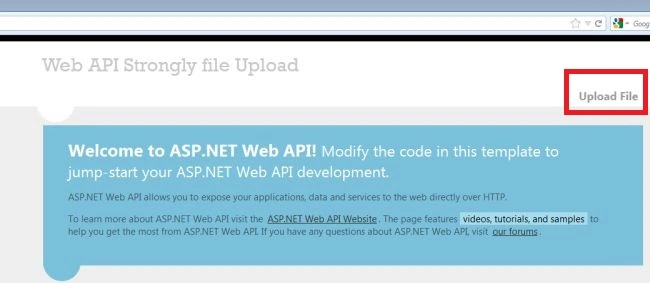
Click on the UploadFile tag.

Fill in all fields and click on the "Submit" button.

Now we check the Required field validation. We left one field empty and click on the "Submit" button.

It displays the error message.

Then when we upload a different extension file then it again shows the error message.
Ravi PatelPosted Jun 17, 2020, 9:35 AM
Nice explanation but title should be-> Perform Validation When Uploading File in ASP.Net MVC instead of Web API