

In this article, I described how to pass a table to a function parameter in SQL Server. In this article, you create a table, student, then create a user-defined table type and pass the table type as a parameter to a function. So let's have a look at a practical example of how to pass a table as a function parameter in SQL Server. The example is developed in SQL Server 2012 using the SQL Server Management Studio.
Here is how to implement passing a user-defined table type to a function.
1. Create a Student Table in SQL Server
Create a table named Student.
- CREATE TABLE [dbo].[Student]
- (
- [StudentID] [int] NULL,
- [StudentName] [varchar](30) NULL,
- [StudentFees] [int] NULL
- )
2. Create a User-Defined Table Type in SQL Server
Now create a user-defined table type to be used as a table-valued parameter in the function.
- CREATE TYPE dbo.StudentType AS TABLE
- (
- [StudentID] [int] ,
- [StudentName] [varchar](30) ,
- [StudentFees] [int]
- )
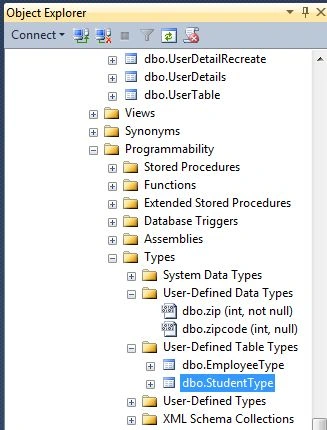
Database->Programmability->Types->User Define Table Types
3. Creating a Function in SQL Server
Now create the StudentDetailFunctionFunction. This function will accept a table-valued parameter.
READONLY keyword - This keyword is required to declare a table-valued parameter.
- ALTER FUNCTION StudentDetailFunction( @StudentDetail dbo.StudentType READONLY )
- RETURNS VARCHAR(50)
- AS
- BEGIN
- DECLARE @Studentname VARCHAR(50)
- SELECT @Studentname= StudentName FROM @StudentDetail
- RETURN @Studentname
- END
4. Execute the SQL Server Function
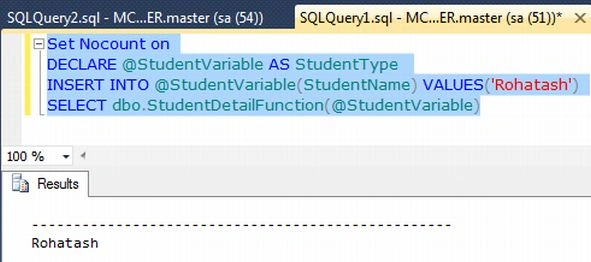
Now you can declare a variable @StudentVariable which contains the value of the table columns.
- DECLARE @StudentVariable AS StudentType
- INSERT INTO @StudentVariable(StudentName) VALUES('Rohatash')
- SELECT dbo.StudentDetailFunction(@StudentVariable)
Vaibhav AsherPosted Jun 15, 2021, 9:28 AM
Thanks for this example Rohatash! My question is - what role does the Student table ([dbo].[Student]) play in this?