

Overview
In my previous article Return Data Using Intent Object in Android Applications, I discussed how to return the data using the intent object between two activities. If you are new to app creation in Android, refer to the following articles,
- Android Programming - Day One
- Android Programming - Day Two
- How To Display a Dialog Window in Android
- How To Display a Progress Dialog Window in Android
- Intent in Android
Introduction
In this article, I will explain about passing the data between two or more activities, using the Intent object in Android applications.
Coding
I made some changes in the design of the existing file, activity_my_second.xml.
- <LinearLayout
- xmlns:android="http://schemas.android.com/apk/res/android"
- xmlns:tools="http://schemas.android.com/tools" android:layout_width="fill_parent"
- android:layout_height="fill_parent"
- android:orientation="vertical">
- <TextView android:text="@string/MySecond_Activity"
- android:layout_width="fill_parent"
- android:layout_marginTop="20dp"
- android:layout_height="wrap_content" />
- <Button android:layout_height="wrap_content"
- android:layout_width="fill_parent"
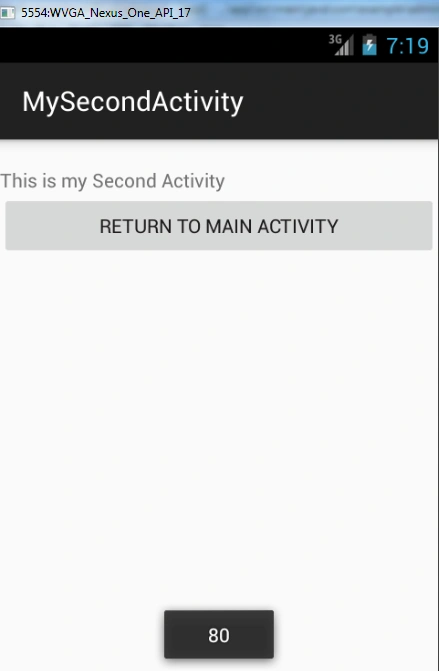
- android:text="Return to Main Activity"
- android:id="@+id/btnOk"
- android:onClick="onClick" />
- </LinearLayout>
In MySecondActivity.java class, add a method onClick() and get the data passed from the main activity, using getIntent() and getStringExtra().
- package com.example.administrator.intentexampleapp;
- import android.content.Intent;
- import android.net.Uri;
- import android.support.v7.app.ActionBarActivity;
- import android.os.Bundle;
- import android.view.Menu;
- import android.view.MenuItem;
- import android.view.View;
- import android.widget.EditText;
- import android.widget.Toast;
- public class MySecondActivity extends ActionBarActivity {
- @Override
- protected void onCreate(Bundle savedInstanceState) {
- super.onCreate(savedInstanceState);
- setContentView(R.layout.activity_my_second);
- // Here we get the data passed in using getStringExtra() method.
- Toast.makeText(this,getIntent().getStringExtra("string1"),Toast.LENGTH_SHORT).show();
- // Here we the data passed in using getIntExtra() method.
- Toast.makeText(this,Integer.toString(getIntent().getIntExtra("Marks1",80)),Toast.LENGTH_SHORT).show();
- // Get the Bundle object
- Bundle bundle=getIntent().getExtras();
- // Here we get the data using the getString() method.
- Toast.makeText(this, bundle.getString("string2"),Toast.LENGTH_SHORT).show();
- // Here we get the data using the geInt() method.
- Toast.makeText(this,Integer.toString(bundle.getInt("Marks2")), Toast.LENGTH_SHORT).show();
- }
- public void onClick(View view)
- {
- //create an instance of the Intent object to return data.
- Intent data= new Intent();
- // Here we use the putExtra() method to return some value
- data.putExtra("Marks3",70);
- // Here we use the setData() method to return some value
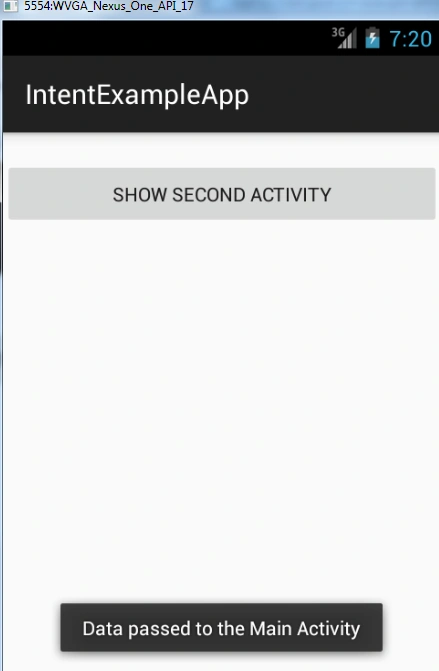
- data.setData(Uri.parse("Data passed to the Main Activity"));
- // Here we use result with OK
- setResult(RESULT_OK,data);
- //Destroy the current activity
- finish();
- }
- }
- <LinearLayout xmlns:android="http://schemas.android.com/apk/res/android"
- xmlns:tools="http://schemas.android.com/tools"
- android:layout_width="fill_parent"
- android:layout_height="fill_parent"
- android:orientation="vertical">
- <Button
- android:layout_width="fill_parent"
- android:layout_height="50dp"
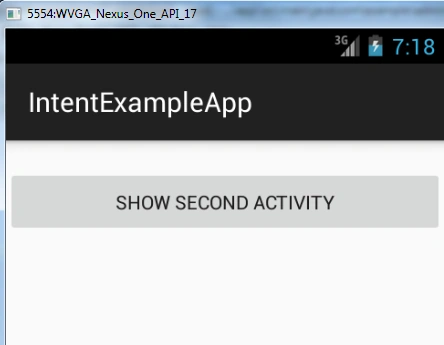
- android:text="Show second activity"
- android:layout_marginTop="20dp"
- android:onClick="showSecondActivity" />
- </LinearLayout>
- package com.example.administrator.intentexampleapp;
- import android.support.v7.app.ActionBarActivity;
- import android.os.Bundle;
- import android.view.View;
- import android.content.Intent;
- import android.widget.Toast;
- public class MainActivity extends ActionBarActivity {
- int request_Value=1;
- @Override
- protected void onCreate(Bundle savedInstanceState) {
- super.onCreate(savedInstanceState);
- setContentView(R.layout.activity_main);
- }
- public void showSecondActivity(View view)
- {
- //Created an instance of second activity using Intent.
- Intent intent= new Intent("android.intent.action.MySecondActivity");
- //Here we use putExtra() to add new name/value pairs.
- intent.putExtra("string1","This is first string");
- intent.putExtra("Marks1",80);
- //Here we use a Bundle object to add new name and values pairs
- Bundle bundle = new Bundle();
- bundle.putString("string2", "This is second string");
- bundle.putInt("Marks2", 60);
- // Attach the Bundle object to the Intent object
- intent.putExtras(bundle);
- startActivityForResult(intent, request_Value);
- }
- public void onActivityResult(int requestCode, int resultCode, Intent data){
- if(requestCode == request_Value){
- //if the result is OK
- if(resultCode == RESULT_OK){
- // Here we get the result using getIntExtra() method
- Toast.makeText(this,Integer.toString(data.getIntExtra("Marks3",0)),Toast.LENGTH_SHORT).show();
- //Here we get the result using getData() method.
- Toast.makeText(this,data.getData().toString(),Toast.LENGTH_SHORT).show();
- }
- }
- }
- }
- //Here we use putExtra() to add new name/value pairs.
- intent.putExtra("string1","This is first string");
- intent.putExtra("Marks1",80);
- //Here we use a Bundle object to add new name and values pairs
- Bundle bundle = new Bundle();
- bundle.putString("string2", "This is second string");
- bundle.putInt("Marks2", 60);
- // Attach the Bundle object to the Intent object
- intent.putExtras(bundle);
- startActivityForResult(intent, request_Value);
- // Here we get the data passed in using getStringExtra() method.
- Toast.makeText(this,getIntent().getStringExtra("string1"),Toast.LENGTH_SHORT).show();
- // Here we the data passed in using getIntExtra() method.
- Toast.makeText(this,Integer.toString(getIntent().getIntExtra("Marks1",80)),Toast.LENGTH_SHORT).show();
- // Get the Bundle object
- Bundle bundle=getIntent().getExtras();
- // Here we get the data using the getString() method.
- Toast.makeText(this, bundle.getString("string2"),Toast.LENGTH_SHORT).show();
- // Here we get the data using the geInt() method.
- Toast.makeText(this,Integer.toString(bundle.getInt("Marks2")), Toast.LENGTH_SHORT).show();
- //create an instance of the Intent object to return data.
- Intent data= new Intent();
- // Here we use the putExtra() method to return some value
- data.putExtra("Marks3",70);
- // Here we use the setData() method to return some value
- data.setData(Uri.parse("Data passed to the Main Activity"));
- // Here we use result with OK
- setResult(RESULT_OK,data);
- //Destroy the current activity
- finish();
- // Here we get the result using getIntExtra() method
- Toast.makeText(this,Integer.toString(data.getIntExtra("Marks3",0)),Toast.LENGTH_SHORT).show();
- //Here we get the result using getData() method.
- Toast.makeText(this,data.getData().toString(),Toast.LENGTH_SHORT).show();
Amit VermaPosted Jul 29, 2016, 8:05 AM
good article post
Vignesh ManiPosted Jul 27, 2016, 12:08 PM
Nice
ArnavPosted Jul 26, 2016, 6:54 AM
Nice article
Prasanna MuraliPosted Jul 25, 2016, 9:20 PM
Nice share
kalu singh raoPosted Jul 25, 2016, 2:25 PM
Good article