

Introduction
In the previous article, we learned about the AWS Lambda structure and how a lambda function can be invoked. Before we go further, there are a couple of things very important to consider while doing local development and production deployment.
As we read, while working with AWS Lambda function, we have the following code syntax.
- exports.main = function(event, context, callback) {
- console.log("value1 = " + event.key1);
- console.log("value2 = " + event.key2);
- callback(null, "some success message");
- // or
- // callback("some error type");
- }
And if the above code resides in index.js, then there are two more files named (event.json and function.json) for AWS Lambda.
- json
Anything in this file is treated as input to your Lambda function as explained in the previous article and can be accessed as event.<parametername>The event.key1 will display value1.

- function.json
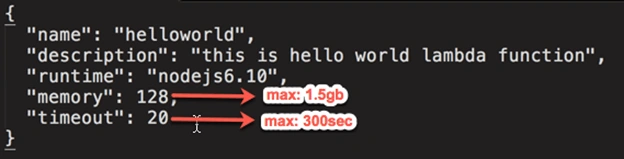
This file configures your Lambda function when deployed. This makes you get rid of the manual configuration of the function. The following is a sample.
This way, we can set our test data in event.json and can execute our Lambda function whereas in the production environment, we can pass data, for example as POST in the HTTP request (AWS API Gateway Endpoint) and that can be accessed via the same way event <parameter>
We will learn about invoking AWS Lambda through AWS API Gateway in a later section.
In this section, we will learn how a Lambda function can be invoked from AWS CLI (Command Line Interface).
Make sure that AWS CLI is installed and follow these instructions to install.
- Install the AWS Command Line Interface on Linux
- Install the AWS Command Line Interface on Microsoft Windows
- Install the AWS Command Line Interface on macOS
Once installed, execute the following command in your terminal (Mac OS) and command prompt (Windows). You should get the following kind of output.

Our next step is to invoke the following command to invoke a Lambda function.
- $ aws lambda invoke \
- --invocation-type RequestResponse \
- --function-name helloworld \
- --region us-west-2 \
- --payload '{"key1":"value1", "key2":"value2", "key3":"value3"}' \
In the above code structure, we specified invocation type, function name, and payload.
The payload can be specified as a filename, as shown below.
--payload file://eventdata.txt \
The preceding invoke-command specifies RequestResponse as the invocation type, which returns a response immediately in response to the function execution. Alternatively, you can specify Event as the invocation type to invoke the function asynchronously.
The function executes and returns the object you passed in the callback is:
- callback(null, "some success message")
You can monitor the activity of your Lambda function in the AWS Lambda console as well.
This way we learned how we can pass data to our Lambda function and invoke using AWS CLI.
I hope you liked it!
Join the conversation! Your thoughts help the community grow.