

Paramiko Setup for Python SFTP Dependency
Use Case: To set up the Paramiko library as an AWS Lambda layer
Solution
To setup paramiko library as Lambda Layer, follow the below steps:
Step 1. Download Paramiko from https://pypi.org/project/paramiko/#files
Step 2. Extract Files in Linux > tar -xvdf paramiko-3.2.0.tar.gz
Step 3. Create a zip folder from Extracted files.
Step 4. If you got site-package, rename it with Python.
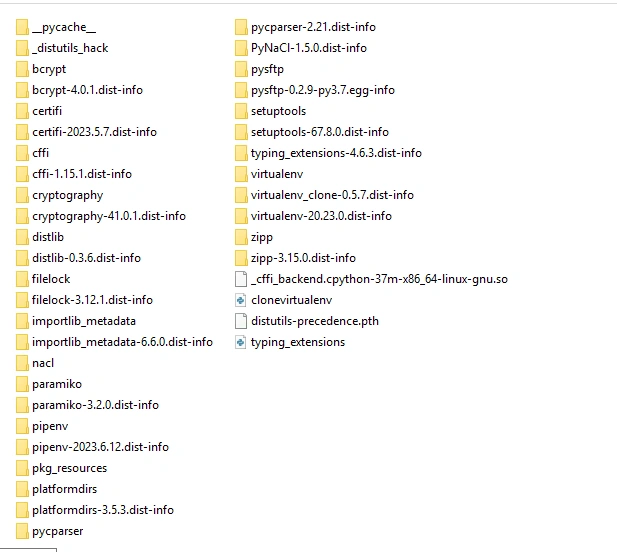
After doing this activity, create a python.zip. The folder structure should be similar to the one below.

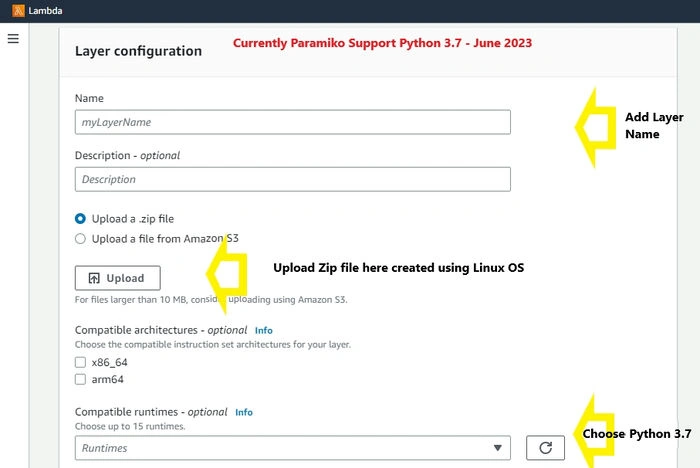
Step 5. Go to AWS Lambda Layer, and follow the instructions mentioned in the image.
Step 6. Add a Layer to your Lambda function

FAQs
Issue. Unable to import module ‘lambda_fucntion’: No module named pysftp or Paramiko
Possible Solution
- See your folder structure. Please follow the folder structure mentioned in step 4.

- Check your Python version; it should be python3.7
Feel free to put your query in the comment box.
Santiago VictorinoPosted Nov 24, 2023, 4:35 PM
Thank you very much for the article, currently we were getting the following error "[ERROR] Runtime.ImportModuleError: Unable to import module 'main': /lib64/libc.so.6: version `GLIBC_2.28' not found (required by /opt /python/cryptography/hazmat/bindings/_rust.abi3.so)", we solved it using the package that you uploaded on the forum, but we would like to understand where you downloaded it from and how you assembled the packages since with the normal download it generates an error