

Program Overview
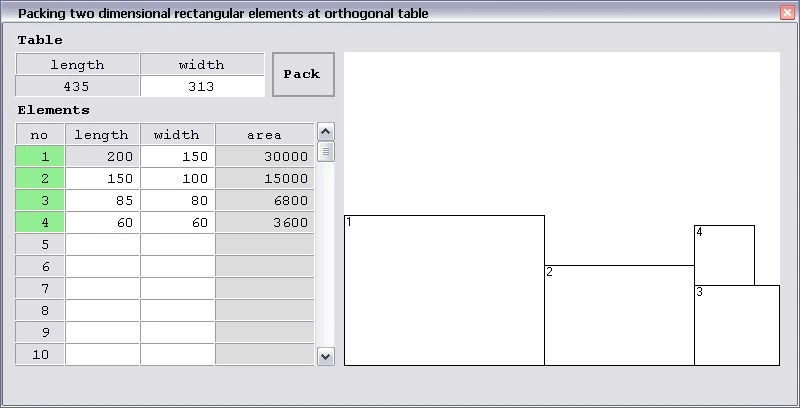
This program is made for packing two dimensional rectangular elements at orthogonal table in sequence along X axis of table, with horizontal orientation exclusively. User interface is simple. At the top left are two fields for entering Table dimension and Pack button for starting packing process, below is table for entering Elements dimensions, and on the right is graphical representation of packed elements at table. For it to work it is necessary to have installed .NET framework 4.0.
Download links
Full solution with executable version of program and open source code with detailed comments download at links.
Problem Introduction
Solving problem of packing two dimensional rectangular elements at orthogonal table involves packing a certain number of elements at one table with fixed dimensions so that the table surface is maximally filled with elements and the time needed for that operation is as short as possible.
Considering the time necessary for solving this problem, it is classified as NP hard by mathematical nomenclature. Even though it is the 21st century and with all advances in math theory, there is no complete math solution for this problem. Here is shown development and implementation of one out of many possible algorithms as solutions for this problem, developed by using Heuristic methods and does not
represent final solution of this problem based on a comprehensive mathematical analysis.
Problem Solving Theory
Theory References
Observing process of packing elements
For purpose of observation there is a need for:
ONE TABLE { Tn(L, W), n=1 }
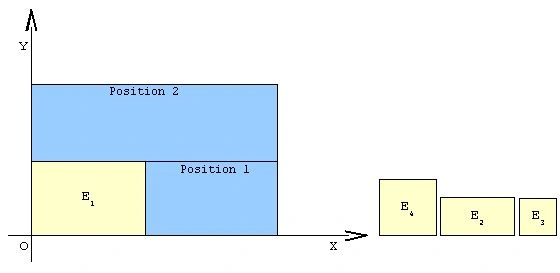
AND FINIT SEQUENCE OF ELEMENTS { En(l, w), nЄZ and n>0}
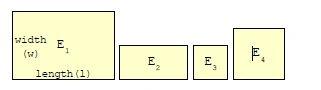
TABLE and ELEMENTS are characterized by it's LENGTH and WIDTH.
These two characteristics with it's values are called DIMENSIONS.
Therm 'LENGTH' do not imply greater value in the relation to therm 'WIDTH'.
Allowed range for value of dimensions:
T(L, W), {LЄR and L>0} , {WЄR and W>0}
E(l, w), {lЄR and l>0 and l<=L} , {wЄR and w>0 and w<=W}
LENGTH of element can't be greater than LENGTH of TABLE.
WIDTH of element can't be greater than WIDTH of TABLE.
Because of precision, whole packing process shall be observed within the XY orthogonal coordinate system.
When placed inside coordinate sistem, TABLE and ELEMENTS obtains third characteristic ORIENTATION – POSITION OF SIDES OF TABLE OR ELEMENT, RELATIVE TO X OR Y AXIS. Considering numerus positions that table or elements can take, there are two distinctive for which ORIENTATION gets defined value : HORIZONTAL and VERTICAL.
HORIZONTAL orientation is case when longer side of table or element is parallel to X axis.
VERTICAL orientation is case when longer edge of table or element is parallel to Y axis.
Graphical presentation of five cases of TABLE with packed ELEMENTS inside XY orthogonal coordinate system.
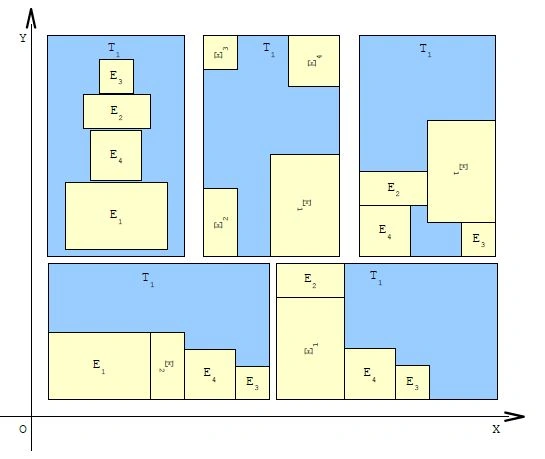
After these five attempts of packing elements there are several important conclusions:
- Table can be positioned anywhere inside coordinate system horizontally or vertically.
- Orientation and layout of the elements before packing are irrelevant.
- Elements can be rotated and packed horizontally or vertically.
- Packing elements at the table can be random or in sequence along the X or Y axis at free surface of table, called POSITION for packing.
- Therm 'POSITION', free surface of the table, denotes part of the table that is not already occupied with some other packed element and where can be placed any of remaining elements. There can not be overlapping of elements at surface of the table.
- Shape of the POSITON does not necessarily have to be rectangular as elements.
- Selection of the next element that is going to be packed, depends on the possibility of element to be fitted inside observed position.
- When there is more than one element that can be placed at selected position the choice is random.
- Packing elements should be compact, side by side, matching dimensions of elements and dimensions of positions so that utilization of the surface of table is maximum.
- Process of packing is finished when:
- There is no more elements to be packed, all elements are packed on the table.
- Table is completely filled, sum of areas of packed elements is equal to the area of the table.
- There is no more positions on the table for packing elements, at remaining free surface of the table is not possible to fit any of remaining elements.
Developing algorithm
Algorithm that should be developed upon above observations is too complex, so for further study of this problem it is necessary to introduce some restriction.
- Before packing process starts, table shall be placed at the origin of coordinate system with horizontal orientation.
- Before packing process starts, all elements must be horizontally oriented and sorted in descending order by size of it's area then by length then by width.
- Elements can not rotate during packing process.
- Elements must be packed in sequence along X axis of table, with horizontal orientation exclusively.
- Coordinates of the first position are always coordinates of the origin, since that at the beginning of packing process table is empty and it's whole surface is free.
- Conditions for finding new free positions according to demand for a way of packing elements.
- Position must be rectangular shaped, with determined coordinates of lower left corner, and dimension that corresponds at least to one of the remaining elements. At least one of the remaining elements should be able to fit in position.
- Coordinates of new position can only be the same as coordinates of lover right or upper left corner of previously packed element.
- If the position have different shape than rectangular it is necessary to adjust it. It is done by making new positions out of old one, which must fulfill previously two conditions. If newly created positions do not fulfill conditions they are discarded.
- Order of positions is determined by sorting values of coordinates of lover left corner of position, in ascending order, first by Y than by X axis. This way elements are packed in the way as specified.
- When there is no more free positions, packing process ends.
- Conditions for selecting next element for packing
- Selection of next element that is going to be packed depends of the next characteristic of packed element - FITTING FACTOR and it's calculated numeral value for selected position, which defines possibility of element to be fitted inside observed position. The greater value of this characteristic means that element better fits to the observed position. BEST FIT therm describes FITTING FACTOR value of element with equal length and width as observed position, a 100% filled position.
- Next element that is going to be packed, is selected upon calculated value for FITTING FACTOR for selected position.
- Initial fitting factor of all elements for the observed position is zero.
- If element with it's dimensions can fit inside position, fitting factor is increased by one.
- If element have equal length as position, fitting factor is increased by one, favoring element that fits exactly across the length of position.
- If element have equal width as position, fitting factor is increased by one, favoring element that fits exactly across the width of position.
- When fitting factor is calculated for all elements, they are sorted in descending sort order first by fitting factor value, than by value of area, then by value of length, then by value of width.
- First element in sorted sequence is selected and if it's fitting factor is greater than zero, it is placed at selected position so that the bottom left corner of the element matches the lower left corner of position.
- If value of fitting factor of first element in sorted sequence is equal zero, selected position is discarded due to lack of fitting element.
- When there is no more elements, packing process ends.
- Selection of next element that is going to be packed depends of the next characteristic of packed element - FITTING FACTOR and it's calculated numeral value for selected position, which defines possibility of element to be fitted inside observed position. The greater value of this characteristic means that element better fits to the observed position. BEST FIT therm describes FITTING FACTOR value of element with equal length and width as observed position, a 100% filled position.
- This algorithm do not need check if table is completely filled for stopping process.
Graphical presentation of packing process step by step, according to above restriction.
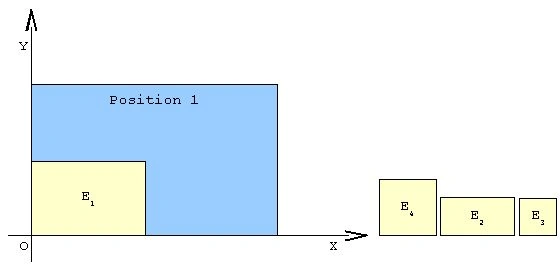
- Table is placed at the origin of coordinate system and elements are sorted in descending order by size of its area.
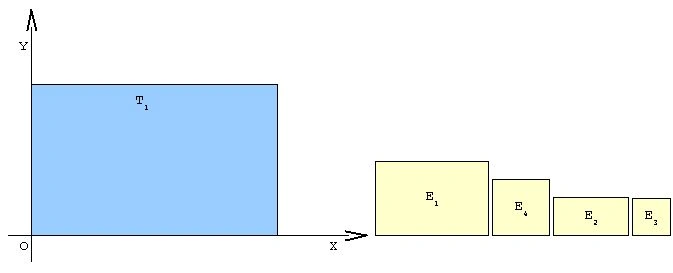
- Selecting first position and packing one element in it.
- Since that at the beginning of packing process table is empty, first free position, Position 1, is whole area of table with it's lower left corner placed at origin.
- Coordinates of Position 1 are coordinates of the origin.
- Calculated value for fitting factor for all four elements is one, so the one with the greater size of area is selected to be packed, and it is element E1.
- Selected element E1 is placed at coordinates of selected Position 1.
- Finding new positions after placing element.
- Free surface on table does not meet the requirement for new position because of it's shape and it needs to be adjusted. Accordingly to request for packing direction, along X axis of table, with horizontal orientation exclusively, Position 1 is splited into two rectangular shapes with horizontal line from the upper right corner of the last placed element to the right edge of Position 1.
- Now there are two new positions, Position 1 and Position 2, with it's coordinates that are aligned accordingly to condition for sorting positions. Previous Position 1 is erased from the list of positions.
- Coordinates of new Position 1 are coordinates of lower right corner of E1.
- Coordinates of new Position 2 are coordinates of upper left corner of E1.
- Free surface on table does not meet the requirement for new position because of it's shape and it needs to be adjusted. Accordingly to request for packing direction, along X axis of table, with horizontal orientation exclusively, Position 1 is splited into two rectangular shapes with horizontal line from the upper right corner of the last placed element to the right edge of Position 1.
- Packing new element.
- Selected position is Position 1.
- Calculated value for fitting factor for all three elements is one, so the one with the greater size of area is selected to be packed, and it is element E4.
- Selected element E4 is placed at coordinates of selected Position 1.
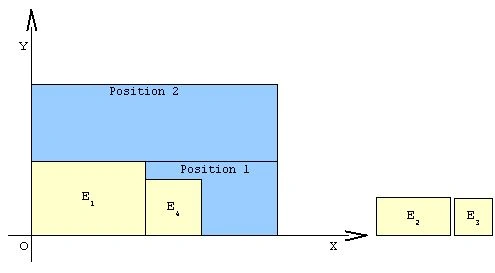
- Selected position is Position 1.
- Finding new positions
- Situation on the table is similar to situation after placing first element, so the steps are also similar. Divide Position 1 into two rectangular shapes with horizontal line from the upper right corner of the last placed element to the right edge of Position 1.
- There are now two new positions and one old, with it's coordinates that are aligned accordingly to condition for sorting positions.
- Position 1 with coordinates at lower right corner of E4.
- Position 2 with coordinates at upper left corner of E4.
- Position 3, former position 2, with coordinates at upper left corner of E1.
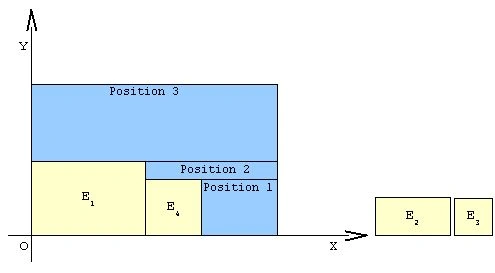
- Situation on the table is similar to situation after placing first element, so the steps are also similar. Divide Position 1 into two rectangular shapes with horizontal line from the upper right corner of the last placed element to the right edge of Position 1.
- INADEQUATE POSITION CASE !
- Position 2 is inadequate because of it's width and shall be discarded. There is no element left that can fit across width of Position 2.
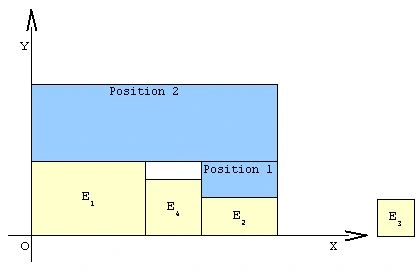
- After erasing position 2, Position 1 shall be adjusted as shown below.
- Colored in white is part of discarded Position 2, and unused space of table.
- Position 3 is now Position 2.
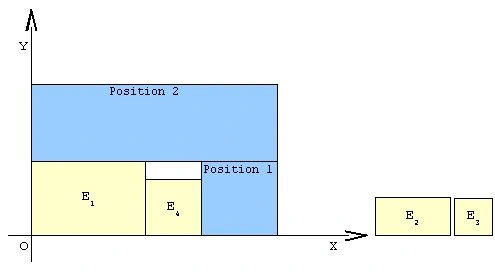
- Position 2 is inadequate because of it's width and shall be discarded. There is no element left that can fit across width of Position 2.
- Process is continued by packing the last two elements and finding new positions.
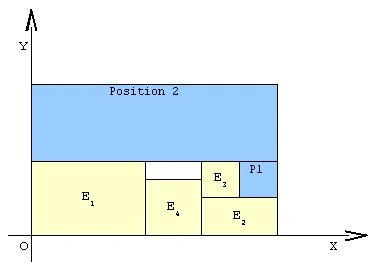
- Process has ended because there is no more free elements. All elements are packed.
Finally packed elements on table
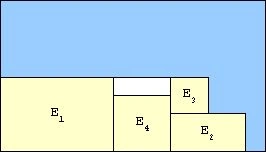
After analysis here is written universal algorithm
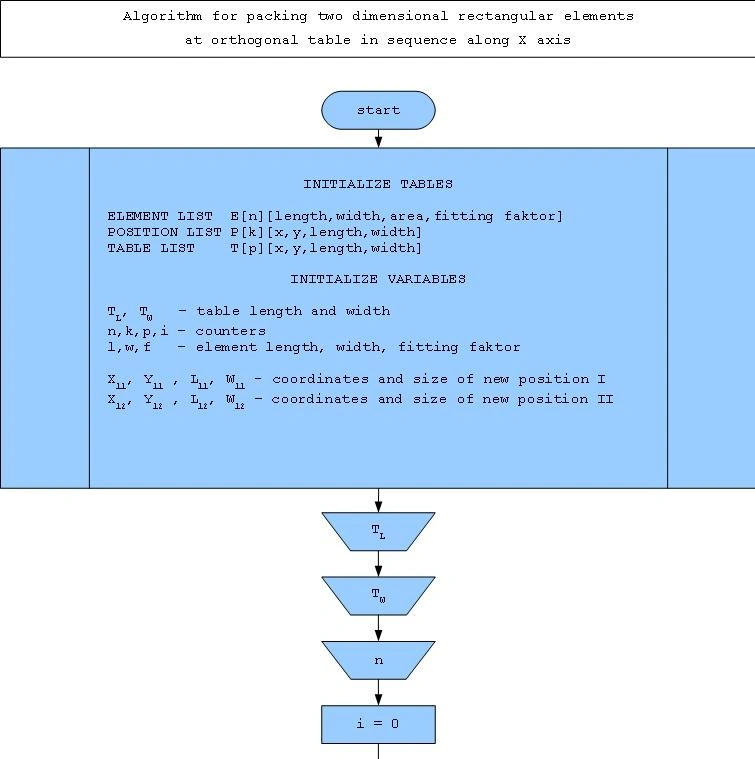
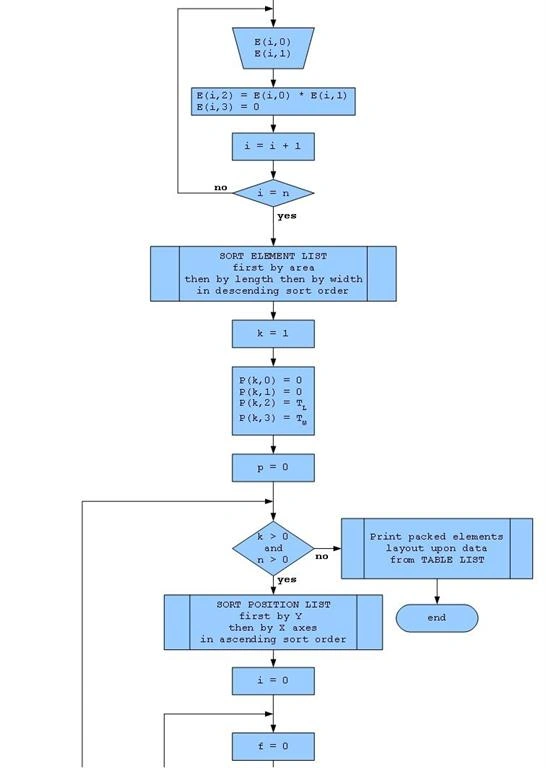
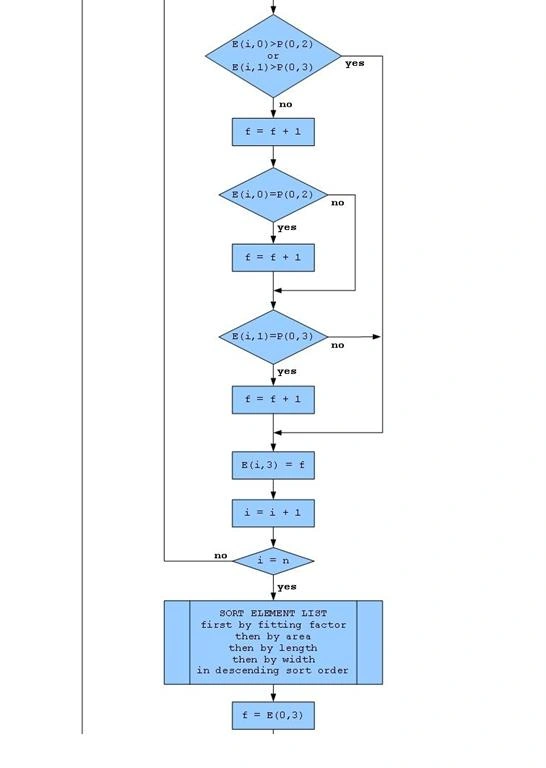
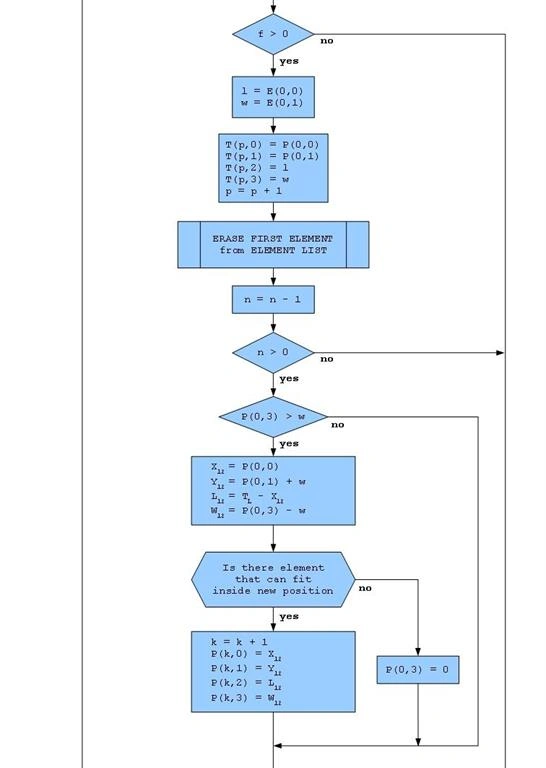
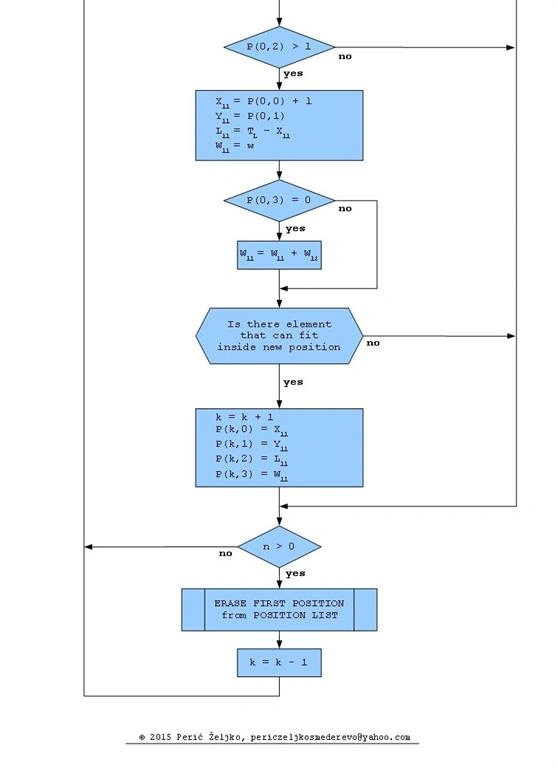
Implementation of algorithm shown above in programming language C# 4.0, .Net framework 4.0 as independent class with it's public method that requires three arguments and returns one:
public DataGridView Pack_Elements(int Table_length, int Table_width, DataGridView Elements)
DataGridView with it's values that is going to be passed as argument to method, has to be the same structure as DataGridView ELEMENT_LIST declared inside class.
Values that are going to be passed to method, must be arranged and sorted accordingly to packing process demands,
length of table and elements must be greater than width, so that elements are packed with horizontal orientation.
If there is need for different orientation values should be arranged accordingly.
After finishing packing process, method returns DataGridView TABLE_LIST as argument to caller method, that contains coordinates of positions and dimensions of packed elements, that can be used for graphical presentation of packed elements at orthogonal table. Program code below is just an example made for learning. For a more detailed analysis it is better to download full project with open source code.
Code
- using System;
- using System.ComponentModel;
- using System.Windows.Forms;
- namespace Packing_two_dimensional_rectangular_elements_at_orthogonal_table
- {
- public class Pack_Elements_Along_X_Horizontally
- {
- //
- // Tables
- //
- DataGridView ELEMENT_LIST;
- DataGridView POSITION_LIST;
- DataGridView TABLE_LIST;
- //
- // Variables
- //
- int Tl, Tw; // table length and width
- int n, k, p, i; // counters
- int x, l, w, a, f; // element index, length, width, area and fitting factor
- int Lmin, Wmin; // smalest element length and width
- int X11, Y11, L11, W11, A11; // new position I coordinates, length, width and area
- int X12, Y12, L12, W12, A12; // new position II coordinates, length, width and area
- int p_X; // old position X
- int p_Y; // old position Y
- int Pl; // old position length
- int Pw; // old position width
- bool P_ok; // new position 'is adequate' state flag
- const string format = "0000000000"; // number format
- //
- //
- //
- void Initialize_Tables()
- {
- //
- // Create table ELEMENT_LIST
- //
- ELEMENT_LIST = new DataGridView();
- //
- // Add columns
- //
- // DataGridView.Columns.Add("Column Name", "Column Header Text");
- //
- ELEMENT_LIST.Columns.Add("E_Index", "Element index");
- ELEMENT_LIST.Columns.Add("E_Length", "Element length");
- ELEMENT_LIST.Columns.Add("E_Width", "Element width");
- ELEMENT_LIST.Columns.Add("E_Area", "Element area");
- ELEMENT_LIST.Columns.Add("E_Fitting", "Element fiting faktor");
- //
- // Add SortCompare event handler
- //
- ELEMENT_LIST.SortCompare +=
- new System.Windows.Forms.DataGridViewSortCompareEventHandler(E_SortCompare);
- //
- //
- //
- //
- // Create table POSITION LIST
- //
- POSITION_LIST = new DataGridView();
- //
- // Add columns
- //
- // DataGridView.Columns.Add("Column Name", "Column Header Text");
- //
- POSITION_LIST.Columns.Add("P_X", "Position X");
- POSITION_LIST.Columns.Add("P_Y", "Position Y");
- POSITION_LIST.Columns.Add("P_Length", "Position length");
- POSITION_LIST.Columns.Add("P_Width", "Position width");
- //
- // Add SortCompare event handler
- //
- POSITION_LIST.SortCompare +=
- new System.Windows.Forms.DataGridViewSortCompareEventHandler(P_SortCompare);
- //
- //
- //
- //
- // Create table TABLE LIST
- //
- TABLE_LIST = new DataGridView();
- //
- // Add columns
- //
- // DataGridView.Columns.Add("Column Name", "Column Header Text");
- //
- TABLE_LIST.Columns.Add("E_I", "Element index");
- TABLE_LIST.Columns.Add("E_X", "Element X");
- TABLE_LIST.Columns.Add("E_Y", "Element Y");
- TABLE_LIST.Columns.Add("E_Length", "Element length");
- TABLE_LIST.Columns.Add("E_Width", "Element width");
- //
- //
- //
- }
- void Initialize_Variables()
- {
- Tl = 0;
- Tw = 0;
- n = 0;
- k = 0;
- p = 0;
- i = 0;
- x = 0;
- l = 0;
- w = 0;
- a = 0;
- f = 0;
- Lmin = 0;
- Wmin = 0;
- X11 = 0;
- Y11 = 0;
- L11 = 0;
- W11 = 0;
- A11 = 0;
- X12 = 0;
- Y12 = 0;
- L12 = 0;
- W12 = 0;
- A12 = 0;
- p_X = 0;
- p_Y = 0;
- Pl = 0;
- Pw = 0;
- P_ok = false;
- }
- void E_SortCompare(object sender, DataGridViewSortCompareEventArgs e)
- {
- //
- // SortCompare event handler
- //
- //
- // Sort table by selected column then by forth then by second
- // then by third then by first column in the selected Sort Direction
- //
- // Compare values inside cells in selected column
- e.SortResult = System.String.CompareOrdinal(
- e.CellValue1.ToString(), e.CellValue2.ToString());
- // If values are equal
- // Compare values inside cells in forth column
- if (e.SortResult == 0)
- {
- e.SortResult = System.String.CompareOrdinal(
- ELEMENT_LIST.Rows[e.RowIndex1].Cells[3].Value.ToString(),
- ELEMENT_LIST.Rows[e.RowIndex2].Cells[3].Value.ToString());
- // If values are equal
- // Compare values inside cells in second column
- if (e.SortResult == 0)
- {
- e.SortResult = System.String.CompareOrdinal(
- ELEMENT_LIST.Rows[e.RowIndex1].Cells[1].Value.ToString(),
- ELEMENT_LIST.Rows[e.RowIndex2].Cells[1].Value.ToString());
- // If values are equal
- // Compare values inside cells in third column
- if (e.SortResult == 0)
- {
- e.SortResult = System.String.CompareOrdinal(
- ELEMENT_LIST.Rows[e.RowIndex1].Cells[2].Value.ToString(),
- ELEMENT_LIST.Rows[e.RowIndex2].Cells[2].Value.ToString());
- // If values are equal
- // Compare values inside cells in first column
- // in oposite sort direction than selected
- if (e.SortResult == 0)
- {
- e.SortResult = System.String.CompareOrdinal(
- ELEMENT_LIST.Rows[e.RowIndex2].Cells[0].Value.ToString(),
- ELEMENT_LIST.Rows[e.RowIndex1].Cells[0].Value.ToString());
- }
- }
- }
- }
- e.Handled = true;
- }
- void P_SortCompare(object sender, DataGridViewSortCompareEventArgs e)
- {
- //
- // SortCompare event handler
- //
- // Sort table by selected column then by first column
- // in the selected Sort Direction
- //
- // Compare values inside cells in selected column
- e.SortResult = System.String.CompareOrdinal(
- e.CellValue1.ToString(), e.CellValue2.ToString());
- // If values are equal
- // Compare values inside cells in first column
- if (e.SortResult == 0)
- {
- e.SortResult = System.String.CompareOrdinal(
- POSITION_LIST.Rows[e.RowIndex1].Cells[0].Value.ToString(),
- POSITION_LIST.Rows[e.RowIndex2].Cells[0].Value.ToString());
- }
- e.Handled = true;
- }
- public DataGridView Pack_Elements(int Table_length, int Table_width, DataGridView Elements)
- {
- //
- // Packing elements in sequence along X axis of table,
- // with horizontal orientation exclusively.
- //
- // Algorithm has optimisation for adjusting area
- // of positions along X axes
- //
- //
- // This method needs three arguments and returns one argument.
- // Table_length, Table_width and DataGridView Elements.
- //
- // Structure of DataGridView that is going to be passed as argument,
- // from caller method, must be the same as structure of
- // DataGridView ELEMENT_LIST.
- //
- // Method returns DataGridView TABLE_LIST with data
- // of packed elements: index, x, y, length and width.
- //
- //
- //
- //
- Initialize_Tables();
- //
- //
- //
- Initialize_Variables();
- //
- // Set table length and width
- //
- Tl = Table_length;
- Tw = Table_width;
- //
- // Copy element dimensions from DataGridView Elements
- // to ELEMENT_LIST table and format it's values
- //
- // Set elements counter to zero
- n = 0;
- // Set table row counter to zero
- i = 0;
- // Fill ELEMENT_LIST
- for (i = 0; i < Elements.RowCount; i++)
- {
- if (Elements[1, i].Value != null)
- {
- ELEMENT_LIST.Rows.Add();
- ELEMENT_LIST[0, i].Value = (int.Parse(Elements[0, i].Value.ToString())).ToString(format);
- ELEMENT_LIST[1, i].Value = (int.Parse(Elements[1, i].Value.ToString())).ToString(format);
- ELEMENT_LIST[2, i].Value = (int.Parse(Elements[2, i].Value.ToString())).ToString(format);
- ELEMENT_LIST[3, i].Value = (int.Parse(Elements[3, i].Value.ToString())).ToString(format);
- ELEMENT_LIST[4, i].Value = (int.Parse(Elements[4, i].Value.ToString())).ToString(format);
- // Increase elements counter by one
- n++;
- }
- }
- //
- // Sort elements in descending sort order
- // first by area then by length then by width of elements
- //
- ELEMENT_LIST.Sort(ELEMENT_LIST.Columns[3], ListSortDirection.Descending);
- // Set position coordinates to origin
- p_X = 0;
- p_Y = 0;
- //
- // Enter coordinates and dimensions
- // of first position in table 'POSITION_LIST'
- //
- POSITION_LIST.Rows.Add(p_X.ToString(format), // X coordinate
- p_Y.ToString(format), // Y coordinate
- Tl.ToString(format), // table lenght
- Tw.ToString(format)); // table width
- // Set position counter to one
- k = 1;
- // Set counter of packed elements to zero
- p = 0;
- //
- // Pack elements while there is free positions and
- // elements for packing
- //
- while (k > 0 && n > 0)
- {
- // Sort positions in ascending sort order first by Y, and then by X axes
- POSITION_LIST.Sort(POSITION_LIST.Columns[1], ListSortDirection.Ascending);
- // Get length and width of first position in 'POSITION_LIST'
- Pl = int.Parse(POSITION_LIST[2, 0].Value.ToString());
- Pw = int.Parse(POSITION_LIST[3, 0].Value.ToString());
- // Calculate fitting factor for each element for the first position
- for (i = 0; i < n; i++)
- {
- // Element length
- l = int.Parse(ELEMENT_LIST[1, i].Value.ToString());
- // Element width
- w = int.Parse(ELEMENT_LIST[2, i].Value.ToString());
- // Set fitting factor initial value
- f = 0;
- // Does element fits inside position
- if (Pl < l || Pw < w)
- {
- // If not
- f = 0;
- }
- else
- {
- // If yes
- f++;
- //
- if (Pl == l)
- {
- // If element fits exactly across lenght of position
- f++;
- }
- //
- if (Pw == w)
- {
- // If element fits exactly across width of position
- f++;
- }
- }
- // Enter fitting factor value inside ELEMENT_LIST table
- ELEMENT_LIST[4, i].Value = f.ToString(format);
- }
- //
- // Sort elements in descending sort order first by fitting factor value,
- // then by area then by length then by width of elements
- //
- ELEMENT_LIST.Sort(ELEMENT_LIST.Columns[4], ListSortDirection.Descending);
- //
- // Get fitting factor value for the first element
- //
- f = int.Parse(ELEMENT_LIST[4, 0].Value.ToString());
- //
- // If fitting factor is greater than zero
- // element can be packed inside selected position
- //
- if (f > 0)
- {
- //
- // Get coordinates of selected position
- //
- p_X = int.Parse(POSITION_LIST[0, 0].Value.ToString());
- p_Y = int.Parse(POSITION_LIST[1, 0].Value.ToString());
- // Get index, length and width of packed element
- x = int.Parse(ELEMENT_LIST[0, 0].Value.ToString());
- l = int.Parse(ELEMENT_LIST[1, 0].Value.ToString());
- w = int.Parse(ELEMENT_LIST[2, 0].Value.ToString());
- //
- // Enter coordinates of position,
- // element dimensions and index,
- // at TABLE LIST
- //
- TABLE_LIST.Rows.Add();
- TABLE_LIST[0, p].Value = x.ToString(); // index
- TABLE_LIST[1, p].Value = p_X.ToString(); // position x
- TABLE_LIST[2, p].Value = p_Y.ToString(); // position y
- TABLE_LIST[3, p].Value = l.ToString(); // element length
- TABLE_LIST[4, p].Value = w.ToString(); // element width
- // Increase packed elements counter by one
- p++;
- // Erase packed element from list of elements
- ELEMENT_LIST.Rows.RemoveAt(0);
- // Decrease elements counter by one
- n--;
- //
- // If there is free elements left
- // seek for new positions
- //
- if (n > 0)
- {
- //
- // Sort elements in descending sort order,
- // first by area then by length then by width of elements
- //
- // This step is necessary for faster searching
- // for element that can fit inside new positions
- //
- // And the elements are sorted accordingly to demand of
- // second restriction in algorithm development
- // for the next step in packing process
- //
- ELEMENT_LIST.Sort(ELEMENT_LIST.Columns[3], ListSortDirection.Descending);
- // Set new position 'is adequate' state flag
- P_ok = true;
- //
- // New position II with coordinates
- // at upper left corner of previous
- // packed element
- //
- if (Pw > w)
- {
- //
- // Initialize local variables
- //
- X12 = 0;
- Y12 = 0;
- L12 = 0;
- W12 = 0;
- A12 = 0;
- // Set new position 'is adequate' state flag
- P_ok = false;
- //
- // Coordinates of new position II
- //
- X12 = p_X;
- Y12 = p_Y + w;
- //
- // Length, width and area of new position II
- //
- L12 = Tl - X12;
- W12 = Pw - w;
- A12 = L12 * W12;
- //
- // Find is there element left that can fit inside position
- //
- // Set ELEMENT_LIST table counter value
- i = n - 1;
- //
- // Get area of the last element in table
- //
- a = int.Parse(ELEMENT_LIST[3, i].Value.ToString());
- while (a <= A12 && i > -1)
- {
- //
- // Get next element area
- //
- a = int.Parse(ELEMENT_LIST[3, i].Value.ToString());
- //
- // Get element length and width value
- //
- Lmin = int.Parse(ELEMENT_LIST[1, i].Value.ToString());
- Wmin = int.Parse(ELEMENT_LIST[2, i].Value.ToString());
- //
- // If element can fit
- // at observed position,
- // set new position II at list of positions
- //
- if (L12 >= Lmin && W12 >= Wmin)
- {
- POSITION_LIST.Rows.Add(X12.ToString(format),
- Y12.ToString(format),
- L12.ToString(format),
- W12.ToString(format));
- // Increase positions counter by one
- k++;
- // Set new position 'is adequate' state flag
- P_ok = true;
- // Set counter value to loop exit value
- i = -1;
- }
- // Decrease elements counter by one
- i--;
- }
- }
- //
- // New position I with coordinates
- // at lower right corner of previous
- // packed element
- //
- if (Pl > l)
- {
- //
- // Initialize local variables
- //
- X11 = 0;
- Y11 = 0;
- L11 = 0;
- W11 = 0;
- A11 = 0;
- //
- // Coordinates of new position I
- //
- X11 = p_X + l;
- Y11 = p_Y;
- //
- // Length, width and area of new position I
- //
- L11 = Tl - X11;
- W11 = w;
- A11 = L11 * W11;
- //
- // If position two is inadeqate,
- // adjust width of position one
- //
- if (!P_ok)
- {
- W11 = W11 + W12;
- A11 = L11 * W11
- }
- //
- // Find is there element left that can fit inside position
- //
- // Set element counter value
- i = n - 1;
- //
- // Get area of the last element in table
- //
- a = int.Parse(ELEMENT_LIST[3, i].Value.ToString());
- while (a <= A11 && i > -1)
- {
- //
- // Get next element area
- //
- a = int.Parse(ELEMENT_LIST[3, i].Value.ToString());
- //
- // Get element length and width value
- //
- Lmin = int.Parse(ELEMENT_LIST[1, i].Value.ToString());
- Wmin = int.Parse(ELEMENT_LIST[2, i].Value.ToString());
- //
- // If there is element that can fit
- // at position,
- // set new position I at list of positions
- //
- if (L11 >= Lmin && W11 >= Wmin)
- {
- POSITION_LIST.Rows.Add(X11.ToString(format),
- Y11.ToString(format),
- L11.ToString(format),
- W11.ToString(format));
- // Increase positions counter by one
- k++;
- // Set counter value to loop exit value
- i = -1;
- }
- // Decrease elements counter by one
- i--;
- }
- }
- }
- }
- //
- // Is there free elements left for packing
- //
- if (n > 0)
- {
- //
- // Erase first position from list
- //
- POSITION_LIST.Rows.RemoveAt(0);
- // Decrease positions counter by one
- k--;
- }
- }
- //
- // End of packing process
- //
- return TABLE_LIST;
- }
- }
- }
This article shows that by using common algorithm development and programming knowledge, we can find a solution for very complex mathematical problem without need of knowing complex math theory for describing such problem.
Algorithm and program code developed inside this article solves only one type of packing problem, packing two dimensional rectangular elements at orthogonal table in sequence along X axis of table, with horizontal orientation exclusively and can be easily changed to solve the same problem with different element orientation, or withthe possibility that elements can rotate during packing process or to change axes along with elements that will be packed.
It can also be a good starting point for any deeper mathematical analysis of such problem.
Fron GeorgePosted Nov 13, 2018, 4:38 AM
Hey man, what if you want to use numbers that are not integer. Like 1.2, or 5.7
Kapi ShivharePosted Jun 26, 2016, 12:26 PM
Nice
Gowtham RajamanickamPosted May 25, 2016, 1:16 AM
Good one..
Munesh SharmaPosted May 25, 2016, 12:28 AM
good one
Sonu ChaudharyPosted May 24, 2016, 12:47 PM
Nice Sharing..
Debasis SahaPosted May 24, 2016, 5:21 AM
Good one..
Gowtham RajamanickamPosted May 24, 2016, 1:17 AM
nice article
Munesh SharmaPosted May 22, 2016, 10:57 AM
nice
Kuppurasu NagarajPosted May 22, 2016, 5:19 AM
Nice Sharing..
Vignesh ManiPosted May 21, 2016, 9:19 AM
nice
Debasis SahaPosted May 20, 2016, 10:48 AM
Nice One..
Thiruppathi RPosted May 20, 2016, 4:51 AM
Good One...