
Introduction
In this article, we will explore two layout management techniques in Python Tkinter, namely the pack() method and place() function in Python. These techniques help us organize and position widgets within a GUI window. Tkinter is the most popular package for designing Python Application GUIs. It is based on the 3 layout managers that use geometric methods to give the position of widgets in the application as follows-pack, place, and grid. Here we are discussing the pack method and place function.
What is Pack() method?
The Pack() method and Place () function are two layout managers that are available in Python Tkinter. It is used to help in organizing the layout and to give the positioning of widgets on the GUI window pack() method is simple. It is easy to use to manage the layout, which places widgets at the top and bottom left or right side of the container. It mainly depends upon the widget are packed in order is automatically adjust the size of the widgets, to give the fit size for the available spaces. It always ensures that there is no overlapping between the widget. The pack() is useful when you want to quickly create a simple layout without thinking about the placement of the widgets.
Compared to the place() and grid() options, the pack() method offers relative positioning for widgets. It allows for simple vertical and horizontal positioning of widgets, limited to left, right, top, and bottom positions, as well as relative offsets within a frame.
What are the Option for the Pack() method?
The 'Pack()' method provides various options, including
- The basic option is side and also includes padding for positioning the widgets.
- Fill is used for filling the entire container, and it will pack the inside widget container.
- Expand is used for assigning additional space for the widget container.
Padding Option in Pack() Method
- pad-x: (external padding along the x-axis).
- pad-y: (external padding along the y-axis).
- ipad-x: (internal padding along the x-axis).
- ipad-y: (internal padding along the y-axis)
<widgets>.pack(<options>)
Example
from tkinter import *
VidhiShukla_root = Tk()
VidhiShukla_root.geometry('200x150')
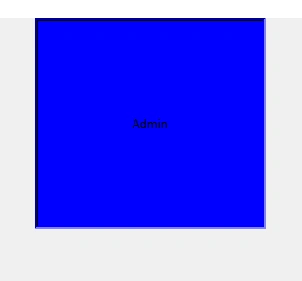
title_label = Label(text="Admin", bg="blue",  padx=95,pady=95,borderwidth=3, relief=SUNKEN)
title_label.pack()
VidhiShukla_root.mainloop()
What are the advantages of the Pack method?
- Easy to use: This method is very easy to use, not requiring you to specify the exact coordinates for the widgets.
- Automatic resizing: This method automatically resizes widgets, and it makes a responsive layout.
- Simple and intuitive layout: This method allows you to create simple, this is useful for creating layouts that are easy to understand and navigate.
- Speed: This method uses a simpler algorithm to calculate the layout., this method is generally faster than the grid.
What is Place() function?
The 'place' function is layout management and organizing widgets by placing them in a specific position. In place() we have three general geometrical managers. This function allows you to set the position and size of the window. It is used for the all standard widget, the place() is not a good idea for use on Windows and layouts, but simply it works too much.
Syntax
widget.place(options)
What are the Options for the Place() function?
- (x,y): horizontal and vertical offset in pixels.
- (rel-x,rel-y): horizontal and vertical offset in the parent.
- (height,width-height): and width in pixels.
- (rel height, rel width-height): and width in the parent widget.
Example
from tkinter import *
import tkinter
screen = Tk()
screen.title("LOG-IN")
screen.geometry("1920x1080")
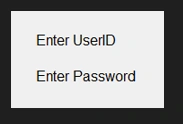
Label(screen, text="Enter UserID", font="20").place(x=500, y=75)
Label(screen, text="Enter Password", font="20").place(x=500, y=115)
screen.mainloop()
Output
What are the advantages of the Place() function?
- Precise control: With the
placemethod, you can specify the exact coordinates and size of a widget within a parent widget; it gives control of widgets. - Relative positioning: The
placemethod allows you to position widgets relative to other widgets or the edges of the parent widget, which can be very useful for creating responsive layouts that adapt to changes in the size of the parent widget. - Overlapping widgets: Unlike the
packandgridmethods, theplacemethod allows you to place widgets on top of each other, which can be helpful for creating complex layouts that require overlapping widgets. - Grid-like layout: Although the
placemethod is not a grid-based layout manager; it can be used to create grid-like layouts by specifying the coordinates of each widget. - Compatibility: The
placethe method is supported by all major platforms and is compatible with all versions of Python and Tkinter.
Conclusion
Here we learn about how to manage the basic and standard layout of widgets in Python tkinter, and also about the options of Place() and Pack(); with the help of the place and pack method very easy to set the layout while it is, may take some time to master, the pack and place method can greatly enhance the user experience of your Python applications.
FAQ
Q. What is the difference between the place and pack methods in Tkinter?
A. The place method allows you to place widgets in specific positions relative to the parent widget, while the pack method arranges widgets in a vertical or horizontal box. The place method gives you precise control over the layout.
Q. Can you use both place and pack methods in the same GUI application?
A. Yes, you can use both place and pack methods in the same GUI application. However, it is usually best to use only one layout manager for each container widget to avoid conflicts.
Q. How do you specify the position and size of a widget using the place method?
A. You can specify the position and size of a widget using the place method by setting the x, y, width, and height options of the widget. For example, widget. place(x=10, y=20, width=100, height=50) will place the widget at position (10, 20) and set its width and height to 100 and 50, respectively.
Q. How do you pack widgets into a container using the pack method?
A. You can pack widgets into a container using the pack method by calling the pack method of each widget in the container. For example, widget1.pack(side="top") and widget2.pack(side="bottom") will pack widget1 at the top of the container and widget at the bottom.
Guest UserPosted Jul 12, 2023, 7:32 PM
Thank you ??
Brahma Prakash ShuklaPosted Jul 12, 2023, 3:31 AM
Nice Article.