

Introduction
Forms are one of the most important parts of any business or enterprise application. Forms are used in many ways. They can be used during login, used in registering any new details, and so many other countless requirements. Forms are very important in guiding the end user towards effectively and efficiently going through the application workflow.
As a developer what we have to take care of includes:
- Data binding in the form.
- Change tracking.
- Validation
- Visual feedback
- Error messages.
- Form submission.
For a better experience in applications having forms, we should take care of all the above points.
Prerequisites
- HTML, CSS, JavaScript
- Angular – Template, components, data binding, services, routing
Basic knowledge of Angular and understanding the above requirements is enough to start with Angular forms.
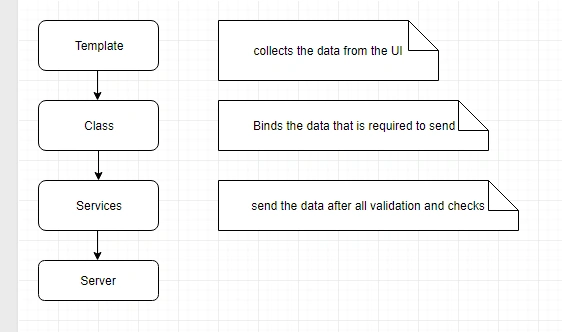
Template
The Component template contains the HTML view to collect the data from the end user.
Class
The component class handles the data binding and sends the data through to the service.
To achieve this Angular provides us with two approaches,
- Template-Driven forms
- Reactive/model driven Forms.
Template driven forms are used when most of the code is written in the component HTML template.
Reactive forms are used when most of the code is written in the component class.
For working with Angular forms we have to enable the type of form used. Let us start with Template-driven forms.
Enable template driven forms
Angular doesn’t give you functionality to use ngModel and other form-related tasks directly. We need to export them according to our usage,
- import { BrowserModule } from '@angular/platform-browser';
- import { NgModule } from '@angular/core';
- import {FormsModule} from '@angular/forms';
- import { platformBrowserDynamic } from '@angular/platform-browser-dynamic';
- @NgModule({
- declarations: [
- AppComponent,
- ],
- imports: [
- BrowserModule,
- FormsModule
- ],
- bootstrap: [AppComponent]
- })
- export class AppModule { }
We have enabled template driven forms by adding FormsModule to our application.
Some of the key points of the template-driven forms are:
- The template-driven form is easy to use and it is similar to the Angular js forms.
- It mostly relies on the two-way data binding. Angular takes care of this binding with a ngModel directive.
- Most of the code is the part of HTML and some of the logic resides in the component code.
- In this approach, Angular provides ngForm directives which automatically track the forms and form elements, state, and validity along with ngModel directive.
- Drawback – end to end testing with the browser is possible. The form validation logic cannot be unit tested.
- Very difficult if complex forms and validations are required in usage.
- If we have a simple form creation with unit test handling with the browser then go with the template-driven approach.
- For complex forms with complex validity and unit test requirement, go with reactive forms.
Let us start with the simple application.
- Go to your project folder.
- Install latest angular cli.
Run command : npm install -g @angular/@cli@latest
- Create new project > ng new TDFApplicatioin (template driven form application)
- > cd TDFApplication.
open app-component.ts and add the below contents,
- import { Component } from '@angular/core';
- @Component({
- selector: 'app-root',
- templateUrl: './app.component.html',
- styleUrls: ['./app.component.css']
- })
- export class AppComponent {
- groups=['A+', 'A-', 'B+', 'B-', 'O+', 'O-'];
- }
Open app-component.html and add the below contents,
- <h3>
- Student Registration!
- </h3>
- <p>Enter the below fields for student details.</p>
- <div>
- <form>
- <div>
- <label>Enter name : </label>
- <input type="text">
- </div>
- <div>
- <label>Enter Email : </label>
- <input type="email">
- </div>
- <div>
- <label>Enter Phone no : </label>
- <input type="tel">
- </div>
- <div>
- <div>
- select blood group:
- </div>
- <div>
- <select>
- <option selected>A+</option>
- <option *ngFor="let group of groups">{{group}}</option>
- </select>
- </div>
- </div>
- <div>
- <div>Select course:</div>
- <div>
- <input type="radio" name="course" value="BCA">BCA
- </div>
- <div>
- <input type="radio" name="course" value="B.Tech">B.Tech
- </div>
- <div>
- <input type="radio" name="course" value="BE">BE
- </div>
- <div>
- <input type="radio" name="course" value="B.sc">B.sc
- </div>
- </div>
- <br>
- <div>
- <input type="checkbox"> <label>Send me updates.</label>
- </div>
- <div>
- <button type="submit">Submit</button>
- </div>
- </form>
- </div>
Now, we are done with creating forms and the next step is to capture the data input by the user to send it to the server.
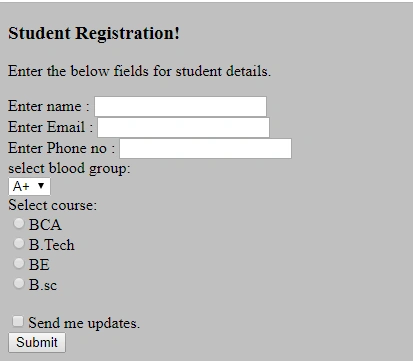
In our next article, we will see how the data will be bind in template driven form approach.
Sani YadavPosted Apr 17, 2020, 12:44 PM
Nicely done
Akhilesh TripathiPosted Dec 6, 2018, 6:06 AM
Good Explain..