
This article shows how to integrate the outlook from visual studio. We can do the manipulation with outlook with c# language. We can create contacts in outlook contacts, tasks in outlook tasks from visual studio. Microsoft provides the Com components libraries. To complete this task The Microsoft Outlook 11.0 Outlook Library reference should be added to our project from com components tab. When we add a reference to our project the Microsft.Office.Core and Outlook assemblies will be added.
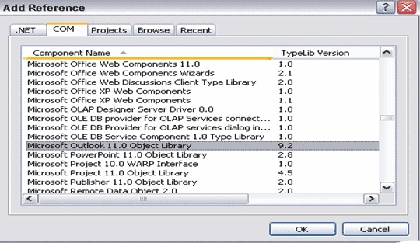
The outlook namespace consists of all outlook classes like application, contact item, task item, appointment item, and Journal item. Every class deals with the folders in outlook application. In this article, we are going to create contact in default contact folder. In the same way we can create tasks, appointment etc in outlook from visual studio with c# code.
A brief introduction to outlook.
.pst File
Microsoft Outlook (non-Exchange Server) uses files with the extension .pst to store your e-mail messages, calendar, contacts, and other information to your computer. These files mobilize you to restore data that is lost or damaged because of a hardware failure and move or transfer data to a different hard disk drive.
MapiFolders
Outlook uses MAPI folders to keep track of your e-mail messages, contacts, appointments, tasks, notes, and journal entries. Outlook keeps these files in one of two places, depending on the type of e-mail server you use. Your MAPI file is either in a personal storage folder (.pst) on your hard disk drive or in a mailbox located on the server, if you are using Outlook with Microsoft Exchange server.
For accessing those MAPI folders first we have to instantiate the Outlook Application object. We are referring the outlook name space couple of times .so, rename outlook namespace rename like this.
- using OutLook = Microsoft.Office.Interop.Outlook;
- OutLook._Application outlookObj = new OutLook.Application();
- OutLook.MAPIFolder fldContacts = (OutLook.MAPIFolder)outlookObj.Session.GetDefaultFolder(OutLook.OlDefaultFolders.olFolderContacts);
- OutLook.ContactItem newContact = (OutLook.ContactItem)fldContacts.Items.Add(OutLook.OlItemType.olContactItem);
- newContact.FirstName = txtFirstName.Text.Trim().ToString();
- newContact.LastName = txtLastName.Text.Trim().ToString();
- newContact.Email1Address = txtEmail.Text.Trim().ToString();
- newContact.Business2TelephoneNumber = txtPhone.Text.Trim().ToString();
- newContact.BusinessAddress = txtAddress.Text.Trim().ToString();
We can save this new contact item by invoking the save method on contact item object.
- newContact.Save();
If we need to create a custom folder in default contacts folder of outlook application, we can follow below steps.
- public bool CheckCustomFolderExisits()
- {
- OutLook._Application outlookObj = new OutLook.Application();
- OutLook.MAPIFolder fldContacts = (OutLook.MAPIFolder)outlookObj.Session.GetDefaultFolder(OutLook.OlDefaultFolders.olFolderContacts);
- //VERIFYING THE CUSTOM SUB FOLDER IN CONTACTS FOLDER IN OUT LOOK.
- foreach (OutLook.MAPIFolder subFolder in fldContacts.Folders)
- {
- if (subFolder.Name == "CustomeFolderName")
- {
- CustomFolder= subFolder;
- return true;
- }
- else
- return false;
- }
- return false;
- }
If not create folder in default contacts folder as below.
- public void CreateCustomFolder()
- {
- OutLook._Application outlookApp = new OutLook.Application();
- OutLook.MAPIFolder cntctFolder =(OutLook.MAPIFolder)outlookApp.Session.GetDefaultFolder(OutLook.OlDefaultFolders.olFolderContacts);
- //VERIFYING THE CUSTOM FOLDER IN OUT LOOK .
- foreach (OutLook.MAPIFolder subFolder in cntctFolder.Folders)
- {
- if (subFolder.Name == " CustomeFolderName ")
- {
- CustomFolder= subFolder;
- }
- }
- //IF CUSTOM FOLDER DOES NOT EXIST CREATE A NEW FOLDER WITH NAME CUSTOM FOLDER NAME.
- if (CustomFolder == null)
- {
- CustomFolder = contactsFolder.Folders.Add("CustomeFolderName ", Microsoft.Office.Interop.Outlook.OlDefaultFolders.olFolderContacts);
- }
- }
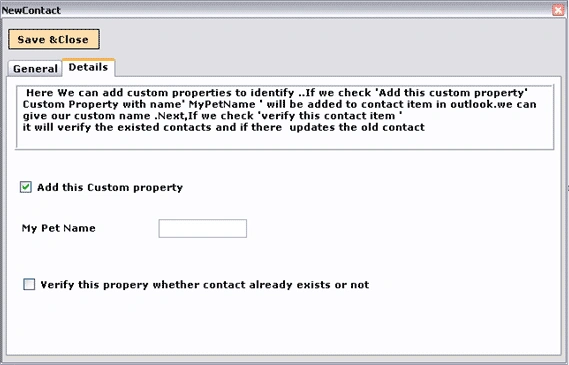
I want to add custom properties to contact item the contact item has a list property called user properties where we can add custom properties to identify the contact.
In our code example, the grid shows the contacts in different folders in outlook application. The folders in our outlook application are displayed in a combo.
This code gets the contacts from contacts folder in outlook application.
- foreach (Microsoft.Office.Interop.Outlook._ContactItem contactItem in fldContacts.Items)
- {
- MyContact contact = new MyContact();
- contact.FirstName = (contactItem.FirstName == null) ? string.Empty:contactItem.FirstName;
- contact.LastName = (contactItem.LastName == null) ? string.Empty :contactItem.LastName;
- contact.EmailAddress = contactItem.Email1Address;
- contact.Phone = contactItem.Business2TelephoneNumber;
- contact.Address = contactItem.BusinessAddress;
- contacts.Add(contact);
- }
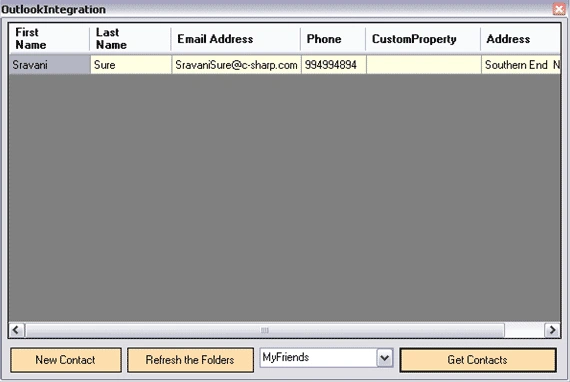
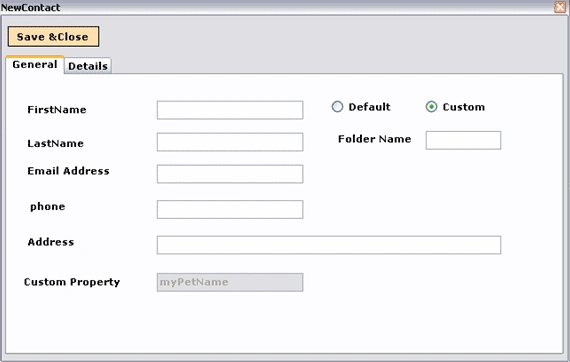
The code example allows creating a contact in default folder or custom folder by selecting the custom folder option. The custom Property added in example is 'myPetName'. We can add custom property to contact item like this.
Notice here, the user properties takes the outlookuserpropertytype as parameter.
- newContact.UserProperties.Add("myPetName",OutLook.OlUserPropertyType.olText, true, OutLook.OlUserPropertyType.olText);
- newContact.UserProperties["myPetName"].Value = txtProp1.Text.Trim().ToString();
Here in this method, it finds the existed contact with user property value.
- private OutLook._ContactItem FindContactItem(MyContact contact, OutLook.MAPIFolder folder)
- {
- object missing = System.Reflection.Missing.Value;
- foreach (OutLook._ContactItem contactItem in folder.Items)
- {
- OutLook.UserProperty userProperty = contactItem.UserProperties.Find("myPetName", missing);
- if (userProperty != null)
- {
- if (userProperty.Value.Equals(txtProp1.Text.Trim().ToString()))
- return contactItem;
- }
- }
- return null;
- }
Outlook Security Access
When we are accessing the outlook contacts the outlook application will prompt for message as shown.
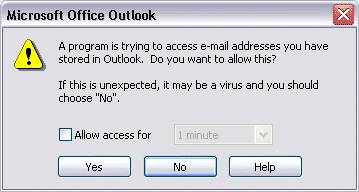
It is a safeguard Microsoft put in to help prevent viruses from mailing everyone in your contacts in outlook. We allow access for 1 minute or more than one minute if there are lots of contacts.
The sample attached can be downloaded and you can learn how the code works.
Note: VS 2005 and Outlook is required to run this application.
Shubham SainiPosted May 7, 2021, 5:27 PM
You can have a look at integrating outlook using exchange services in c# . You can get reference from https://code2night.com/Blog/MyBlog/Microsoft-Outlook-Get-and-Add-Contacts-AspNet-MVC
ajay rathiPosted May 8, 2020, 4:55 AM
I am getting An unhandled exception of type 'System.Runtime.InteropServices.COMException' occurred in OutlookIntegrationEx.exe Additional information: Retrieving the COM class factory for component with CLSID {0006F03A-0000-0000-C000-000000000046} failed due to the following error: 80080005. Please provide the solution.i am getting this error at line Outlook._Application outlookObj = new Outlook.Application();
Avinash VermaPosted Oct 8, 2015, 2:49 AM
An unhandled exception of type 'System.Runtime.InteropServices.COMException' occurred in OutlookIntegrationEx.exe Additional information: Retrieving the COM class factory for component with CLSID {0006F03A-0000-0000-C000-000000000046} failed due to the following error: 80080005.
Carlo MPosted May 2, 2013, 5:56 AM
Hello, Can someone tell me if the attachments of a public folder postitem are also read when reading the items of a public folder. If this is the case, is there a way to prevent this. The reason why I'm asking this is that I've written a c# application to retrieve the items from a public folder and this application is very slow. Thanks for the help.
Saurabh GuptaeditedPosted Feb 22, 2012, 5:22 AMEdited Feb 22, 2012, 5:25 AM
Outlook integration with sharepoint 2010 tasks using C# Users can connect the sharepoint task list to their outlook..the issue is that all the task appears there including those which are not assigned to the particular user...this is confusing..further as the other tasks do appear user are able to manupulate them... How to work around these two issues..? Has anyone resolved this...
teddy RipochePosted Oct 25, 2011, 9:58 AM
Hi, I woul d like to know how we can give permission on "THE CUSTOM FOLDER " Thanks & Regards,
shankar manickavasagamPosted Jun 27, 2011, 6:21 AM
hai, I'm getting in trouble for read an outlook email which is selected in our inbox folder. i want to select(mail highlighted) particular mail and read the contents of that mail. Please send any code or send any link regarding this... Thanks in advance M.Shankar
Juan PerezPosted Oct 5, 2010, 3:03 PM
<p>Hi guys, how are you?. these days I was making an application in c #, to read emails from Outlook 2007, my application works in console mode, but I needed to do as a windows service, and I came across a big problem, not run the application, but it turns out that I turned , and I'll leave the answer so they can use in the future.<br>first of all I am using dotnet 2010, windows 7, outlook 2007.<br><br>I used the code of this page to read mails from Outlook</p><p>To create the service, when they believe the service the service account must be in user mode, so when I installed it will say your account and password, also very importantly, the user of windows where configure outlook, this must be the user which run the service so you can run smoothly.</p> <p>I hope they serve, for any questions, feel free to contact me, my e-mail is:</p> <p>[email protected]</p>
Stephen StaplePosted Sep 16, 2010, 5:54 AM
Hi I have downloaded the sample files and unzipped them. Tried opening in Visual Studio 2005. If I open OutlookIntegrationEx.sln, I get these errors: Cannot find wrapper assembly for type library "Microsoft.Office.Core". Cannot find wrapper assembly for type library "Outlook".
Dinesh KumarPosted Dec 15, 2009, 1:12 PM
with out Microsoft.Office.Interop.Outlook.dll how we can do this?
MihaeditedPosted Oct 22, 2009, 8:00 AMEdited Oct 22, 2009, 8:02 AM
Hi!<br><br>Very helpful article!<br><br>I have one question: It's possible to access outook contacts in windows service? It throws me exception: Cannot complete the operation. You are not connected. <br>Exception is throw when I want to get outlook contact folder :<br><font size="1"> </font><font><font><font size="2"><font face="Verdana, Arial, Helvetica, sans-serif"><span style="font-size: 10pt; font-family: Verdana;"><font size="1">OutLook.<span style="color: teal;">MAPIFolder</span> fldContacts = (OutLook.<span style="color: teal;">MAPIFolder</span>)outlookObj.Session.GetDefaultFolder(OutLook.<span style="color: teal;">OlDefaultFolders</span>.olFolderContacts);<br><br><br></font><br>Any ideas?<br><br>Regards,<br>MM<br></span></font></font></font></font>
hema kPosted Aug 25, 2009, 1:30 AM
Hi ram,<br><br><br> This article is very help to me. is there any possible to suppress the Outlook error message through code after when we add a contact. pls tell me.
ogegoon adelantePosted Aug 4, 2009, 3:46 PM
Great! This is exactly what I am looking for.... No need for me to read the MSDN :o) I have upgraded your code to VS.net 2008 and replaced the COM references by the Microsoft.Office.Interop.Outlook delivered by MS (available in the .Net tab of the Add references window). It works like a charm ! O.
saiPosted Mar 24, 2009, 7:33 AM
Hi, My requirement is Integration of outlook into my application. Inorder to start the integration, first we are adding the COM library references of outlook into my referencs. Actually my requirement is I dont know which version of outlook client has installed on his workstyation? For my programming purpose if I add outtlook 2007 Dll (outlook 12.0 library) then the client who has outlook 2003 (outlook 11.0 library) can't access my application.It will throw exceptions. How can I fix this problem? Can I add outlook references dynamically based on installed outlook version? How to solve this please help me? Regards ---------- Sai kumar bayyavarapu
Jo CuppensPosted Mar 17, 2008, 1:11 PM
this code is not working with the libary from outlook 2007
inderjeet singhPosted Mar 3, 2008, 4:46 AM
How we can integrate outlook from web applications
anandPosted Sep 24, 2007, 1:35 AM
Hi Rambabu, In the current project iam in,iam getting the outlook security access window which you have shown at the end of the article.I want to supress that window through code. can you pls guide me how we can supress.. Regards.. Anand swaroop
faiyaz GaniharPosted Feb 21, 2007, 7:01 AM
When we are accessing the out look contacts the out look application will prompt to allow access for . What if i want to suppress this prompt through code
Jyothi GummadiPosted Nov 6, 2006, 3:33 PM
Hi Ram, we have developed a softphone application on windows using vs 2003. the application talks with outlook and all contacts from outlook will import in to softphone when outlook is taken as default database for contacts. in some machines the outlook fails to import contacts beyond 200. there is no error message or exception thrown. the outlook jst fails to import. could you please help me what could be the reason for failure. And the machines where it fails is not any differnent from the normal machines in configuration. Thanks & Regards, Jyothi Gummadi