

Issue
In our SharePoint 2016 farm, the outgoing emails are not working on a couple of servers. This includes alerts emails, sharing emails, workflow emails, etc.
One of the Web fronts (KFSP1) in SharePoint 2016 Server is unable to send the email using the exchange relay.
Troubleshooting
We checked the following settings:
- Outgoing email settings properly configured.
- The Server is properly registered with Exchange Relay
- Checked the CSP(Software firewall), No SMTP port (25) blocked by CSP.
- No Antivirus blocking
- No Firewall blocking.
- When we checked the ULS logs we found these entries.
Time: 05/18/2018 10:52:26.19
Attempting to send mail to recipients: [email protected]. Mail Subject: You have successfully created an alert for 'Documents-10182017-1'. Stack Trace:
at Microsoft.SharePoint.Email.SPSmtpClient.SendOnce(MailMessage msg, Boolean useAlternateServer)
at Microsoft.SharePoint.Email.SPSmtpClient.Send(MailMessage msg)
at Microsoft.SharePoint.Email.SPSmtpClient.TrySend(MailMessage msg)
at Microsoft.SharePoint.Email.SPMailMessageHelper.TrySendMailMessage(SPSmtpClient smtpClient, MailMessage mailMessage, SPUserToken currentUserToken, Nullable`1 currentUserInfo, Boolean useEwsIfFromCurrentUser, Boolean doNotSaveCopy)
at Microsoft.SharePoint.SPManagedCodeInterop.SendEmail(Guid webApplicationId, SPSite site, String from, String replyTo, String sender, String[]& to, String[]& cc, String[]& bcc, Object& headers, String subject, String body, Boolean isBodyHtml, Int32 bodyCodePage, String
Failed attempt 1 sending mail to recipients: [email protected]. Mail Subject: You have successfully created an alert for 'Documents-10182017-1'. Error: SmtpException while sending email: System.Net.Mail.SmtpException: Syntax error, command unrecognized. The server response was: Server configuration rejects your message from that IP address
at System.Net.Mail.MailCommand.CheckResponse(SmtpStatusCode statusCode, String response)
at System.Net.Mail.MailCommand.Send(SmtpConnection conn, Byte[] command, MailAddress from, Boolean allowUnicode)
at System.Net.Mail.SmtpTransport.SendMail(MailAddress sender, MailAddressCollection recipients, String deliveryNotify, Boolean allowUnicode, SmtpFailedRecipientException& exception)
at System.Net.Mail.SmtpClient.Send(MailMessage message)
at Microsoft.SharePoint.Email.SPSmtpClient.SendOnce(MailMessage msg, Boolean useAlternateServer)
at Microsoft.SharePoint.Email.SPSmtpClient.Send(MailMessage msg)
SPSmtpClient Failure: Failed attempt 3 sending mail to recipients: [email protected]. Mail Subject: You have successfully created an alert for 'Documents-10182017-1'. Error: SmtpException while sending email: System.Net.Mail.SmtpException: Syntax error, command unrecognized. The server response was: Server configuration rejects your message from that IP address
at System.Net.Mail.MailCommand.CheckResponse(SmtpStatusCode statusCode, String response)
SPSMTPClient.TrySend::Exception caught; return value from TrySend will be false. Exception: System.Net.Mail.SmtpException: Syntax error, command unrecognized. The server response was: Server configuration rejects your message from that IP address
at System.Net.Mail.MailCommand.CheckResponse(SmtpStatusCode statusCode, String response)
Failed to send an email using SMTP.
These entries are clearly telling us, SharePoint is trying to send the email using the exchange (SMTP) but exchange is rejecting the message which is coming from our server's IP. "The server response was: Server configuration rejects your message from that IP address".
- We also tried to send the email using the command line, and we tried on both working and non working servers. On KFSP1 (faulty server)
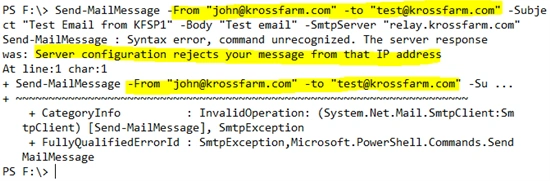
- When we tried to send the email on working servers, this is what we got.
- And I saw the email in my mailbox.
Now we approached the Exchange team and asked them about the why exchange is rejecting SharePoint requests. The exchange team gave us the IP address which iwa being used to send the message. They told us that IP is not registered with exchange relay. Ah, when we checked, that IP belongs to web application rather than base server IP.
Cause
In SharePoint 2016, we changed our policy and have a dedicated IP for each web application. Now every web front end has 4 (1 for server and 3 for web applications) IP addresses bound with Network Interface Card (NIC). All the IPs are properly bound with NIC and configured in IIS. Same settings, we applied to all WFEs but don’t know why only one WFE having the issue and using the wrong IP to send the email.
With Exchange, we can only ask Server's IP (Source IP) for the exchange relay registration.
Actually, the problem is with the IP address itself. In Windows Server 2008 and above, there is a policy change from MSFT which is, source IP address on a NIC will always be the lowest numerical IP in the list (bind NIC) instead of the first IP bind to NIC for server communication. That's it.
When we checked further and found that our server's base IP (19.168.0.26) is not the lowest in the numerical value, so SharePoint used the Lowest IP to send the email which is in our case Team web app (19.168.0.21).
List of IPs on the Server
| Servers Base IP | 19.168.0.26 |
| Team | 19.168.0.21 |
| MySite | 19.168.0.22 |
Resolution
In order to Resolve this issue, we have to re-register our IPs with Servers. This means we have to remove all the IPs from the server and re-add them using the command line tool Netsh.
- First, we have to remove all the IPS from the NIC using GUI.
- Now open the PowerShell windows and register the IPs.
- Server's base IP should be the 1st one in the registration.
- Netsh Interface IPv4 Add Address "NICTeam1" 19.168.0.26
- Where NicTeam1 is the name of the NIC card on the server.
- Now register all remaining IPS like this. (Make Sure User the SkipAsSource= true parameter otherwise, we will see the same issue.
Netsh Interface IPv4 Add Address "NICTeam1" 19.168.0.21 255.255.255.0 SkipAsSource=True
Netsh Interface IPv4 Add Address "NICTeam1" 19.168.0.22 255.255.255.0 SkipAsSource=True
Netsh Interface IPv4 Add Address "NICTeam1" 19.168.0.23 255.255.255.0 SkipAsSource=True
- Once completed, you can test it to see if all the IPs are registered properly. Run the following command for verification.
- netsh int ipv4 show ipaddresses level=verbose
- In the Output, please make sure Server's base IP's SkipAsSource Status = False and all others are true.
Join the conversation! Your thoughts help the community grow.