

Introduction to topic
This topic includes issues in the operations of a mobile operating system. So, the things to be discussed in our topic are,
- Issues in operations of mobile OS
(All problems occurred in relevant mobile OS.)
- Possible solutions.
(Solutions of all problems discussed in the above point.)
- Case study of problems that occur.
(Case studies of all problems that occurred.)
- Role of SQA in the problem solution.
(Role of SQA to solve all these problems)
OS to be discussed is “ANDROID".
Introduction to the organization
| Developer | Google· Open Handset Alliance |
| Written in | C, C++, Java |
| OS family | Unix |
| Source model | Open source and in most devices |
| Initial release | September 23, 2008; 7 years ago |
| Available in | 70 languages |
| Package manager | Google Play, APK |
| Default user interface | Graphical (Multi-touch) |
| Website | https://www.android.com |
Introduction
As per Wikipedia,
"Android is a mobile operating system developed by Google, based on the Linux kernel and used for touch screen mobiles, Smartphones, and tablets. Google has further developed Android technology for televisions, cars and for wrist watches, each with a unique interface. Android is also used on notebooks, games, digital cameras, and other electronic devices".
Android has been the bestselling OS on tablets since 2013.
Android has following launches of new platforms including,
VERSIONS
- Angel Cake (Alpha)
- Battenberg (Beta)
- Cupcake
- Donut
- Éclair
- Froyo
- Gingerbread
- HoneyComb
- Ice Cream Sandwich
- Jelly Bean
- Kitkat
- Lollipop
- Marshmallow
- Nougat
- Android O
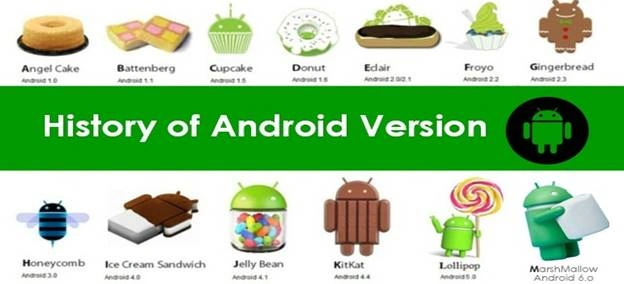
We will identify 30 problems and categorize them in the 7 main categories mentioned below.
Battery
- Overheating of battery
- Battery Bug
Apps / Play Store
- Play Store Crashing
- Flashlight Android app Problem
- Problem Downloading Android Apps
- Background running apps
- Backlight turns on and off on its own
Gallery or Contacts
- Contact images can’t be shown
- Gallery images are not shown
- Corrupt Images
- Can’t delete or edit some contacts
- Android Not Reading micro SD Card
Boot up
- Slow boot up of android OS
- Android rebooting problem
- Android device crashes on boot
Security issues
- SMS Trojans
- Viruses
- Malwares
Performance
- Slow performance
- Often gets stuck
- Slow processing`
- The phone doesn't respond at all
- Phone overheating
- Use a third-party launcher but it occasionally switches back to the default one
- Backlight turns on and off on its own
- A small popup menu doesn't appear after holding the power button
- Rooting Problems
USB
- Android USB Connection Problems
- Android USB Storage Full Problem
- Can’t Connect Android to a Windows PC
Explanation of some of the main problems identified
| Description | |
| 1- Overheating | Overheating is a side effect of Android devices mostly caused due to high utilization of ram and also due to 3D games. |
| 2- Slow Performance | · It's performance is slow due to bad memory management.· Background running apps.· Internal storage is full which slows down the mobile performance. |
| 3- Security Issues | Cybercriminals have increasingly targeted Android-based and other mobile devices with SMS Trojans, Malwares, and Viruses. Specifically, these threats can be divided into several categories:
|
| 4- Android Not Reading micro SD Card | When we use Android Phones for a quite a long time, we may find that the internal storage is full which also slows down the mobile processing speed. To release the internal memory, people tend to insert an external SD card into the Smartphone, in the meantime, to increase the storage of the phone. However, some users usually complain that the SD card can't be detected or read by the device. |
| 5- Gallery Images are not shown | One of the main problems in Android OS is sometimes gallery images are not shown. |
Role of SQA in problem solution
SQA helps us to find solutions and solve problems that occur in the Android operating system.
A technique named Fishbone diagram helps us a lot to know what is the cause of the main problems.
Possible Solutions
Overheating
To avoid overheating problem, the following precautions are used:
- Always use original battery and charger
- Minimize the use of 3D apps and games on low processer mobiles
- Always use authorized apps to avoid any problem in OS
Slow Processing
Slow processing is mostly due to the high rate of work on the Operating System. Due to slow processing mobile phones often get stuck and do not respond properly. Possible solutions are as follows.
- Use any cache cleaner to delete extra or temporary files.
- Use Memory management software to manage internal or external Memory.
- Sometimes overcharging or overheating causes slow processing so always plugged out the phone when a battery is full charged.
- Use small or appropriate antivirus software’s to remove malware or Trojans.
- Don’t play with Operating system files.
- For developers always turned off USB debugging mode when their development is done.
- To ensure good performance by OS close extra background running apps.
- Turned off Bluetooth or WIFI when they are not in use.
- Don’t play high graphics or large size games. (If you want to play than ensure that your RAM is enough to play this type of games)
Security Issues
As we discussed earlier, there are two types of security threats. So here we discuss how to tackle these threats.
- App-Based Threats
These threats are mostly due to unauthorized apps so, the following precautions should be taken.
- Always use authorize apps to reduce any security issues.
- Before the installation of any app. carefully read about all the permissions that the app wants. So you are clear about the accessibility and scope of the app.
- Don’t open those files in which operating systems warn you to open.
- Web-Based threats.
These threats are caused by the use of the web.
- Use an authenticated web browser.
- Use ad blockers.
- Cybercriminals mostly target android apps so always use the site with Https protocol to ensure more security.
Gallery Images are not shown
This is one of the common issues in android operating systems and in android phones. When gallery images are not shown in your phone then check whether your internal memory has enough space to show these images. Also, take a look at images in the following ways.
- Ensure that the image file is not corrupted.
- Image size is not so large to open.
- Image format must be supported by Android OS
- Go to image properties and uncheck hidden checkboxes (if checked).
The following things should be checked by the SD card or slot of the SD card.
- The SD card is not broken.
- The card slot is not rusted.
- Wire in card slot is not twisted.
- The SD card is formatted properly.
- Android phones must support that type of SD card.
Android not reading Micro SD card
The following things should be checked by the SD card or slot of the SD card.
- SD card is not clean
- There some malware in SD card
- OS does not support that type of card
- The SD card is not broken.
- The card slot is not rusted.
- Wire in card slot is not twisted.
- The SD card is formatted properly.
- Android phones must support that type of SD card.
Case study of problems
As we discussed earlier, we have come to know that most problems that occur in Android OS are due to apps. These apps cause problems in many ways like they spread viruses in operating systems and unauthorized apps harm the Android OS. Excess use of apps slows down processing speed and affects performance.
Android users may also face problems like images are not shown and sometimes mobile phones get stuck or SD card is not detected. Other problems include USB connection problems that Android phone is not connected to Windows PC.
Join the conversation! Your thoughts help the community grow.