
We will start this article with a simple application where we will learn how to open and view text and image files using the OpenFileDialog class. In doing so, we will learn some basics of GDI+ drawing, menus and panel control. I assume you have some familiarity with the .NET framework and how to develop Windows applications using C# and hence I am not delving into the basics of these topics.
The application that I am going to explain has two menu options: File and Help. File has three sub-menu options: Openfile,Closefile and exit. Openfile option allows you to open either a text file or an image file. Help has a dummy sub-option Learning .NET, which I leave upon the readers to attach events and play around with. I will explain every option in more details as we explore the code. In section_ one of the code, I will define and initialize the different classes to draw Menus, a RichTextBox, a PictureBox and a Panel. A Panel is a control that contains other controls. It holds the two controls: RichTextBox and PictureBox in this case. A RichTextBox control allows you to load a Rich Text Format (RTF) or a plain text file and do editing on it.A PictureBox control is used to display graphics from GIF, JPEG or bitmaps etc.
- //section_one
- using System;
- using System.Drawing;
- using System.ComponentModel;
- using System.Windows.Forms;
- using System.IO;
- using System.Resources;
- namespace FileDisplay
- {
- //windows_forms inherits from the Form class
- public class windows_forms : Form //class in System.Windows.Forms
- {
- // Container is the class in System.ComponentModel namespace
- private Container components;
- //MenuItem is the class in System.Windows.Forms namespace
- private MenuItem file;
- private MenuItem openfile;
- private MenuItem openTextfile;
- private MenuItem openImagefile;
- private MenuItem closefile;
- private MenuItem exit;
- private MenuItem help;
- private MenuItem abouthelp;
- //MainMenu is the class in System.Windows.Forms namespace
- private MainMenu mainMenu1;
- //RichTextBox, PictureBox, Panel are the classes in System.Windows.Forms namespace
- private RichTextBox fileLoadArea;
- private PictureBox pictureBox1;
- private Panel mainPanel;
- public windows_forms() //constructor
- {
- InitializeComponent();
- }
- private void InitializeComponent()
- {
- //initializing the classes
- this.mainMenu1 = new MainMenu();
- this.file = new MenuItem();
- this.openfile = new MenuItem();
- this.openTextfile = new MenuItem();
- this.openImagefile = new MenuItem();
- this.closefile = new MenuItem();
- this.exit = new MenuItem();
- this.help = new MenuItem();
- this.abouthelp = new MenuItem();
- this.fileLoadArea = new RichTextBox();
- this.pictureBox1 = new PictureBox();
- this.mainPanel = new Panel();
- this.SuspendLayout();
- // mainMenu1
- this.mainMenu1.MenuItems.AddRange(new MenuItem[]
- {
- this.file, this.help});
- // file
- this.file.Index = 0;
- this.file.MenuItems.AddRange(new MenuItem[]
- {
- this.openfile, this.closefile, this.exit});
- this.file.Text = "File";
- // openfile
- this.openfile.Index = 0;
- this.openfile.MenuItems.AddRange(new MenuItem[]
- {
- this.openTextfile, this.openImagefile});
- this.openfile.Text = "OpenFile";
- // openTextfile
- this.openTextfile.Index = 0;
- this.openTextfile.Text = "OpenTextFile...";
- this.openTextfile.Click += new System.EventHandler(this.onFileOpen);
- // openImagefile
- this.openImagefile.Index = 1;
- this.openImagefile.Text = "&OpenImageFile...";
- this.openImagefile.Click += new System.EventHandler(this.onImageOpen);
- // closefile
- this.closefile.Index = 1;
- this.closefile.Text = "CloseFile";
- this.closefile.Click += new System.EventHandler(this.onFileClose);
- // exit
- this.exit.Index = 2;
- this.exit.Text = "exit";
- this.exit.Click += new System.EventHandler(this.onWindowClose);
- // help
- this.help.Index = 1;
- this.help.MenuItems.AddRange(new MenuItem[]
- {
- this.abouthelp
- });
- this.help.Text = "Help";
- // abouthelp
- this.abouthelp.Index = 0;
- this.abouthelp.Text = "Learning .NET";
- // fileLoadArea
- this.fileLoadArea.Dock = DockStyle.Fill;
- this.fileLoadArea.Name = "fileLoadArea";
- this.fileLoadArea.Size = new Size(600, 400);
- this.fileLoadArea.Text = "";
- // pictureBox1
- this.pictureBox1.Location = new Point(32, 40);
- this.pictureBox1.Name = "pictureBox1";
- this.pictureBox1.Size = new Size(600,400);
- // mainPanel
- //Control class is in System.Windows.Forms namespace
- this.mainPanel.Controls.AddRange(new Control[]
- {
- this.fileLoadArea,
- this.pictureBox1
- });
- this.mainPanel.Dock = DockStyle.Fill;
- this.mainPanel.Name = "mainPanel";
- this.mainPanel.Size = new Size(600, 400);
- // windows_forms
- this.ClientSize = new System.Drawing.Size(600, 500);
- this.Controls.AddRange(new Control[]
- {
- this.mainPanel
- });
- this.Menu = this.mainMenu1;
- this.Name = "windows_forms";
- this.Text = "Learning Windows Forms";
- mainPanel.Hide();
- this.ResumeLayout();
- }
- //section_one:end
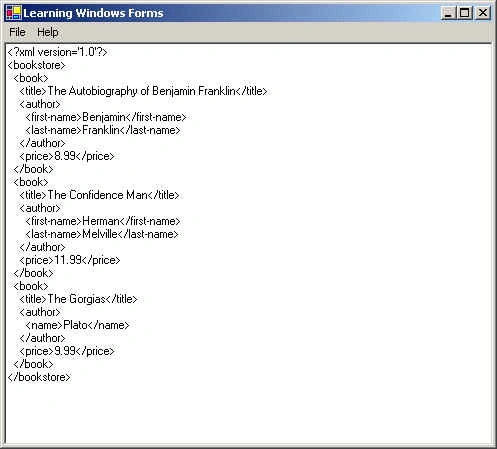
The onFileOpen event handler opens a text file (plain text or Rich Text files) based on the option selected. It hides the PictureBox control and shows the RichTextBox control where the file is loaded.
An instance of the OpenFileDialog class (present in System.Windows.Forms namespace) presents a dialog box to assist you in opening a file. It has a number of methods and properties like InitialDirectory to set the directory to start with and RestoreDirectory (when true) restores the directory to the same initial directory, if the user has modified it while searching for the files and Filter which takes a string and determines the choices that appears when the dialog box is displayed. If then extracts the filename and calls ReadFileInfo() method with the filename.
- //section_two
- //Handler for the TextFileOpen command
- private void onFileOpen(object sender, EventArgs e)
- {
- if (pictureBox1 != null)
- pictureBox1.Hide();
- fileLoadArea.Text = "";
- mainPanel.Show();
- fileLoadArea.Show();
- OpenFileDialog openFileDialog1 = new OpenFileDialog();
- openFileDialog1.InitialDirectory = "d:\\";
- openFileDialog1.RestoreDirectory = true;
- openFileDialog1.Filter = "Text Files (*.txt)|*.txt|Rich Text Format (*.rtf)|*.rtf)|" + " All Files (*.*)|*.*";
- if (openFileDialog1.ShowDialog() == DialogResult.OK)
- {
- String fileName = openFileDialog1.FileName;
- if (fileName.Length != 0)
- {
- try
- {
- ReadFileInfo(fileName);
- }
- catch
- {
- MessageBox.Show(String.Format("{0} is not " + "a valid image file", fileName), "Error", MessageBoxButtons.OK, MessageBoxIcon.Error);
- }
- }
- }
- }
Depending on whether the file is RTF or plain, RichTextBox control calls its method LoadFile to load the file.
- private void ReadFileInfo(String filename)
- {
- try
- {
- FileStream fs = new FileStream(filename, FileMode.Open, FileAccess.Read);
- FileInfo fInfo = new FileInfo(filename);
- string fext = fInfo.Extension.ToUpper();
- if (fext.Equals(".RTF"))
- fileLoadArea.LoadFile(fs, RichTextBoxStreamType.RichText);
- else
- fileLoadArea.LoadFile(fs, RichTextBoxStreamType.PlainText);
- fs.Close();
- }
- catch (Exception e)
- {
- Console.WriteLine("Exception" + e.StackTrace);
- }
- }
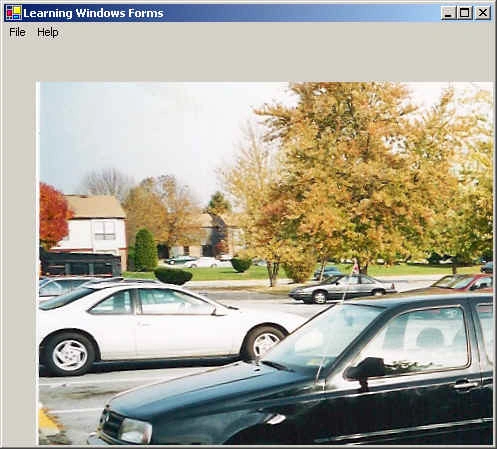
In this case, it takes as its filter string a set of image file extensions. The Bitmap constructor of the Bitmap class (in System.Drawing namespace) converts the string filename to a bitmap and stores the image in the BackgroundImage property of PictureBox control. It then calls the Show() method of PictureBox control to show the image.
- // Handler for the ImageFileOpen command
- private void onImageOpen(object sender, EventArgs e)
- {
- if (fileLoadArea != null)
- {
- fileLoadArea.Hide();
- }
- mainPanel.Show();
- OpenFileDialog ofd = new OpenFileDialog();
- ofd.Filter = "Image Files (*.bmp)|*.bmp|JPEG Files (*.jpeg)|*.jpeg|" + " All Files (*.*)|*.*";
- if (ofd.ShowDialog() == DialogResult.OK)
- {
- String fileName = ofd.FileName;
- if (fileName.Length != 0)
- {
- try
- {
- pictureBox1.BackgroundImage = new Bitmap(fileName);
- pictureBox1.Show();
- }
- catch
- {
- MessageBox.Show(String.Format("{0} is not " + "a valid image file", fileName), "Error", MessageBoxButtons.OK, MessageBoxIcon.Error);
- }
- }
- }
- }
- // method to drive the File/Close button
- private void onFileClose(object sender, System.EventArgs e)
- {
- mainPanel.Hide();
- }
- // method to drive the Window/Close button
- private void onWindowClose(object sender, System.EventArgs e)
- {
- // Handler for the Close command
- Close();
- }
- public static void Main(string[] args)
- {
- Application.Run(new windows_forms());
- }
- protected override void Dispose(bool disposing)
- {
- if (disposing)
- {
- if (components != null)
- {
- components.Dispose();
- }
- }
- base.Dispose(disposing);
- }
- }
- }
- //Section two end
Viewing a text file
Viewing an Image
meenoo sharmaPosted Apr 18, 2007, 5:44 AM
hello, In my application i need to open and view a text file. whenever i try to use Openfile() of OpenFIleDialog, it gives an error of definition not found. Could you please help me in this? Thanks Regards Meenoo