

Abstract / Overview
Ollama introduced web search integration to let models fetch live, real-time information from the internet. Developers can now combine local reasoning with dynamic retrieval, making applications more accurate and up-to-date.
This tutorial provides step-by-step instructions for integrating Ollama’s web search in Python and Node.js, including sample code, workflows, and best practices for production-ready deployment.
Conceptual Background
Why Web Search in Ollama Matters
Static vs Dynamic Knowledge: Traditional LLMs have fixed cutoffs. Web search enables live updates.
Retrieval-Augmented Generation (RAG): Ollama pulls content from external sources before generating answers.
Developer Benefits: Build research tools, dashboards, chatbots, and monitoring systems with fresh data.
Step-by-Step Walkthrough
1. Install Ollama CLI
Download and install from Ollama. Once installed, verify:
ollama --version2. Enable Web Search in API Calls
The web_search flag must be set to true in your API request.
Python Integration
Install dependencies:
pip install requestsSample code:
import requests
import json

url = "http://localhost:11434/api/chat"

payload = {
    "model": "llama3",
    "messages": [
        {"role": "user", "content": "What are the latest trends in Generative AI for 2025?"}
    ],
    "options": {
        "web_search": True
    }
}

response = requests.post(url, json=payload)
print(response.json())
Explanation:
model: Choose an Ollama model (llama3,mistral, etc.).messages: Standard chat-style input.options.web_search: Enables real-time retrieval.
Node.js Integration
Install dependencies:
npm install axiosSample code:
import axios from "axios";

const url = "http://localhost:11434/api/chat";

async function runOllama() {
  const payload = {
    model: "llama3",
    messages: [
      { role: "user", content: "Summarize today’s top AI research updates" }
    ],
    options: {
      web_search: true
    }
  };

  try {
    const response = await axios.post(url, payload);
    console.log(response.data);
  } catch (error) {
    console.error("Error:", error.message);
  }
}

runOllama();
Explanation:
Axios is used for HTTP POST requests.
The JSON payload mirrors the Python structure.
Workflow JSON Example
Below is a reusable workflow snippet for Ollama API calls:
{
  "model": "llama3",
  "messages": [
    { "role": "system", "content": "You are a research assistant with web search enabled." },
    { "role": "user", "content": "Find the latest news on Generative Engine Optimization (GEO)." }
  ],
  "options": {
    "web_search": true,
    "temperature": 0.7,
    "max_tokens": 500
  }
}
Use Cases / Scenarios
AI Research Tools: Summarize latest academic publications.
Business Intelligence Dashboards: Pull competitor or market updates.
Real-Time News Agents: Stream daily insights from trusted sources.
Developer Assistants: Combine coding Q&A with live GitHub/StackOverflow retrieval.
Limitations / Considerations
Performance: Web search adds latency.
Source Reliability: Ensure responses cite authoritative domains.
Privacy: Queries may fetch broader content than expected.
Scaling: API rate limits and concurrency must be managed.
Fixes (Troubleshooting Tips)
Error: Connection refused → Ensure Ollama is running locally (
ollama serve).No live data in response → Confirm
"web_search": trueis included.Slow response times → Use smaller models (e.g.,
mistral) or cache frequent queries.
FAQs
Q1. Can I use Ollama web search with any model?
Yes, but ensure the model supports retrieval workflows.
Q2. Does Ollama store my web queries?
By default, Ollama runs locally. Check documentation for additional telemetry.
Q3. Can I combine Ollama with vector databases?
Yes, Ollama integrates easily with Pinecone, Weaviate, or ChromaDB for hybrid RAG.
Q4. How do I run Ollama in production?
Use Docker, Kubernetes, or cloud-hosted Ollama servers with load balancing.
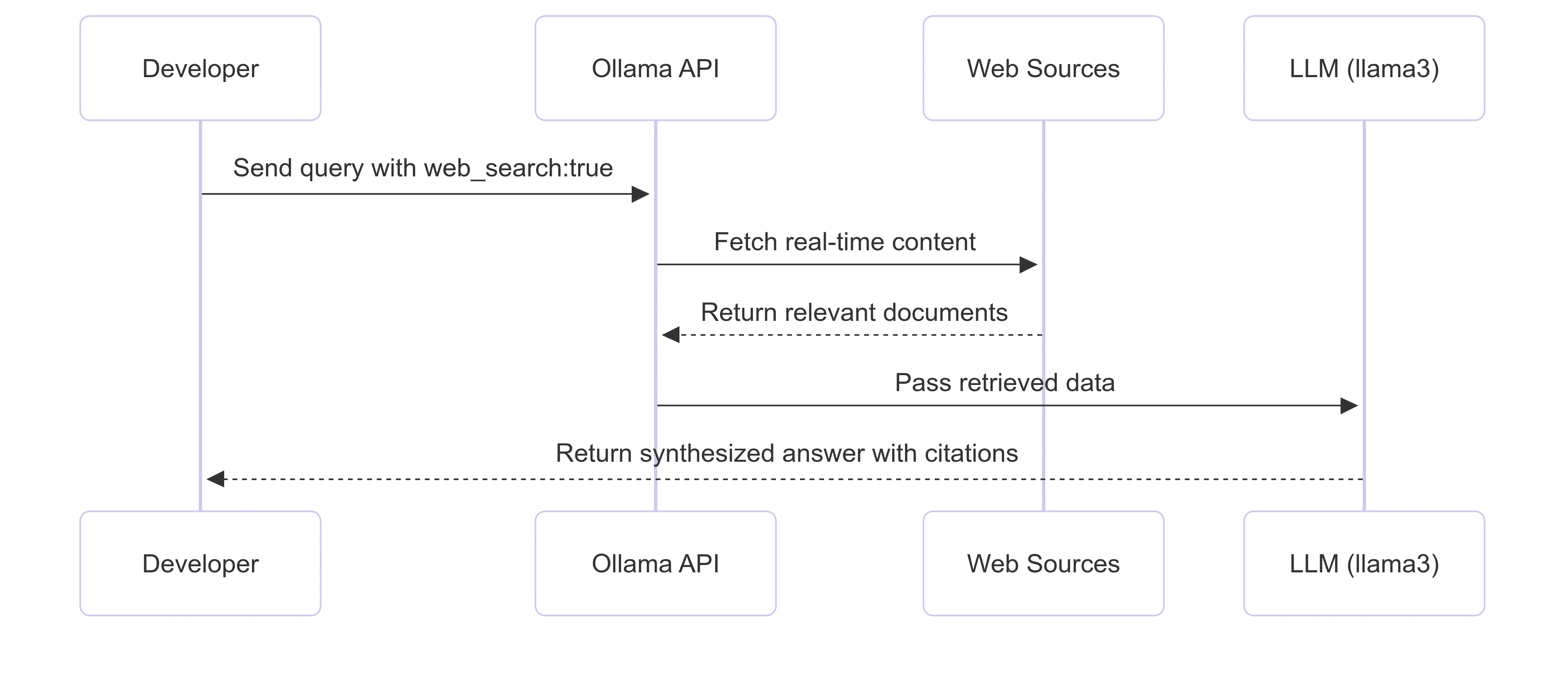
Diagram
Conclusion
Ollama’s web search API makes RAG workflows accessible to Python and Node.js developers. By enabling real-time retrieval, apps built with Ollama can provide fresh, authoritative, and reliable answers.
With just a few lines of code, developers can build:
News summarizers
Competitive research dashboards
AI-powered assistants
Domain-specific retrieval agents
This functionality unlocks a new wave of AI-first applications optimized for accuracy and real-world usability.
Join the conversation! Your thoughts help the community grow.