


NumPy Sort Functions
There is a wide variety of sorting functions in NumPy. These NumPy Sort functions arrange the data in a particular order.
1. numpy.sort()
The sort() function returns a sorted copy of the input array. It has the following parameters −
numpy.sort(a, axis, kind, order)
- a: Array to be sorted
- axis: The axis along which the array is to be sorted. If none, the array is flattened, sorting on the last axis
- kind: Default is quicksort
- Order: If the array contains fields, the order of the fields to be sorted
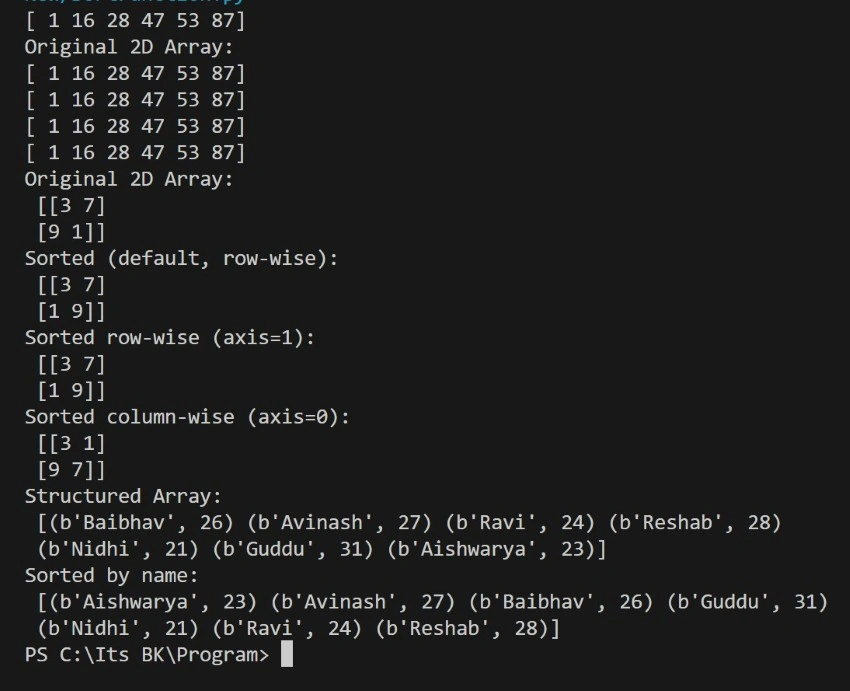
Example
import numpy as np

# 1D Array Sorting
arr = np.array([16, 1, 47, 53, 87, 28])
print(np.sort(arr))

# 2D Array Sorting
a = np.array([[3, 7], [9, 1]])
print("Original 2D Array:\n", a)

print("Sorted (default, row-wise):\n", np.sort(a))
print("Sorted row-wise (axis=1):\n", np.sort(a, axis=1))
print("Sorted column-wise (axis=0):\n", np.sort(a, axis=0))

# Structured Array with Order Parameter
dt = np.dtype([('name', 'S10'), ('age', int)])
a = np.array([("Baibhav", 26), ("Avinash", 27), ("Ravi", 24), ("Reshab", 28), ("Nidhi", 21), ("Guddu", 31), ("Aishwarya", 23)], dtype=dt)

print("Structured Array:\n", a)
print("Sorted by name:\n", np.sort(a, order='name'))
Output
2. numpy.argsort()
- This function returns the indices of the sorted array. We can perform this along a particular axis.
- This indices array is used to construct the sorted array.
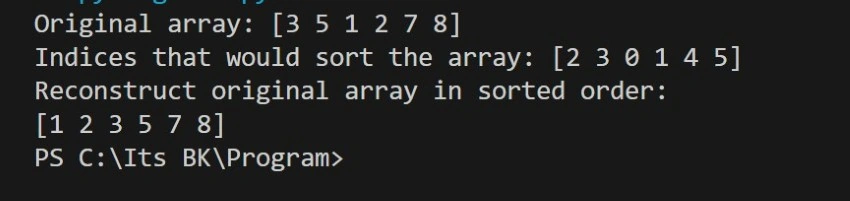
Example
import numpy as np

x = np.array([3, 5, 1, 2, 7, 8])
print("Original array:", x)

y = np.argsort(x)
print("Indices that would sort the array:", y)

print("Reconstruct original array in sorted order:")
print(x[y])
Output
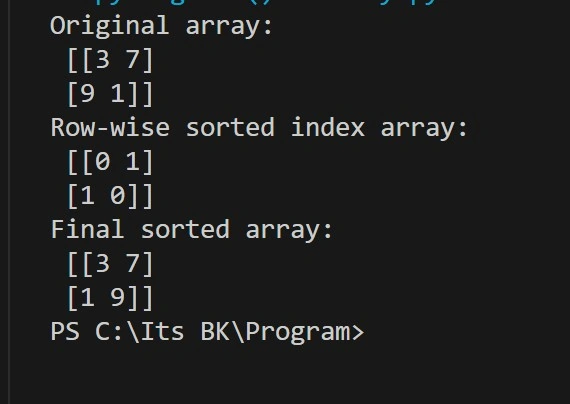
numpy.argsort() on 2D Array Example
import numpy as np

a = np.array([[3, 7], [9, 1]])
print("Original array:\n", a)

b = np.argsort(a)
print("Row-wise sorted index array:\n", b)

# Construct sorted array from index array b
f = np.zeros((2, 2), dtype='int')

for i in range(2):
    for j in range(2):
        f[i, j] = a[i, b[i, j]]

print("Final sorted array:\n", f)
Output
3. numpy.lexsort()
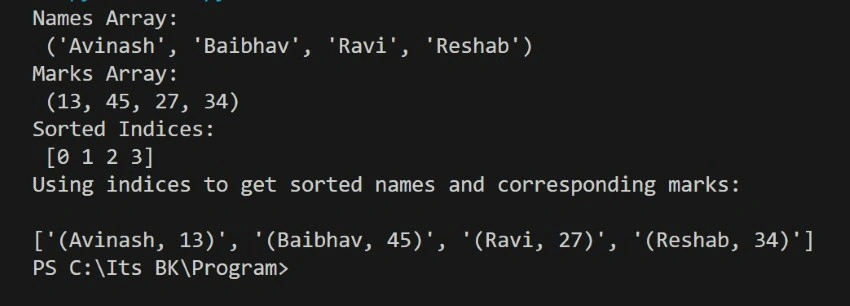
This function returns the indices of array elements indirectly sorted by using a key sequence. This function returns the index of array elements indirectly sorted by using a key sequence.
Example
import numpy as np
nm = ('Avinash', 'Baibhav', 'Ravi', 'Reshab')
print("Names Array:\n", nm)
marks = (13, 45, 27, 34)
print("Marks Array:\n", marks)
# Lexicographic sort by name first, then marks
ind = np.lexsort((marks, nm))
print("Sorted Indices:\n", ind)
print("Using indices to get sorted names and corresponding marks:\n")
final = [f"({nm[i]}, {marks[i]})" for i in ind]
print(final)
Output
Numpy Search Functions
- NumPy search operation to determine the position of a given element or value inside an array.
- There are functions to find the maximum, minimum, or a value satisfying a particular condition. The search is considered successful if the value is found.
The following functions come in the search category
- numpy.max(), numpy.argmax(): return the maximum element and indices of the maximum element, respectively.
- numpy.min(), numpy.argmin(): return the minimum element and indices of the minimum element, respectively.
- numpy.nanargmax(): returns index of the maximum element after ignoring ‘Not a Number’ (NaN) values
- numpy.nanargmin(): returns index of the minimum element after ignoring ‘Not a Number’ (NaN) values
- numpy.nonzero(): returns the indices of non-zero elements in the input array
- numpy.where(): returns the indices of elements in an input array where the given condition is satisfied.
- numpy.extract(): returns the elements satisfying any condition.
argmax() and argmin()
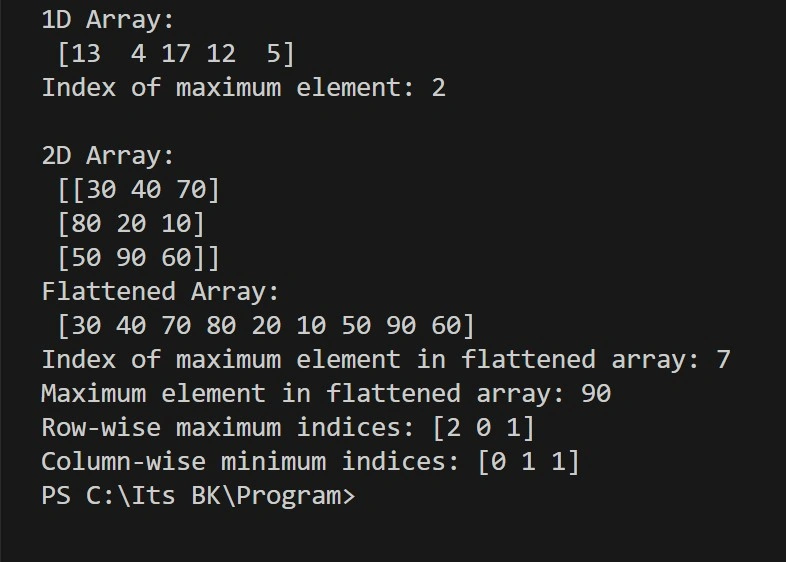
numpy.argmax() and numpy.argmin() are functions that return the index (position) of the largest or smallest value in a NumPy array.
- argmax(): gives the index of the maximum value
- argmin(): gives the index of the minimum value
These functions are helpful when you want to know where the highest or lowest number is located in your data.
Example
import numpy as np

# 1D array
a = np.array([13, 4, 17, 12, 5])
print("1D Array:\n", a)
print("Index of maximum element:", np.argmax(a))

# 2D array
a1 = np.array([[30, 40, 70], [80, 20, 10], [50, 90, 60]])
print("\n2D Array:\n", a1)

# Flattened array and max index
print("Flattened Array:\n", a1.flatten())
print("Index of maximum element in flattened array:", np.argmax(a1))
print("Maximum element in flattened array:", a1.flatten()[np.argmax(a1)])

# Row-wise maximum indices
maxindex = np.argmax(a1, axis=1)
print("Row-wise maximum indices:", maxindex)

# Column-wise minimum indices
minindex = np.argmin(a1, axis=0)
print("Column-wise minimum indices:", minindex)
Output
nanargmax() and nanargmin()
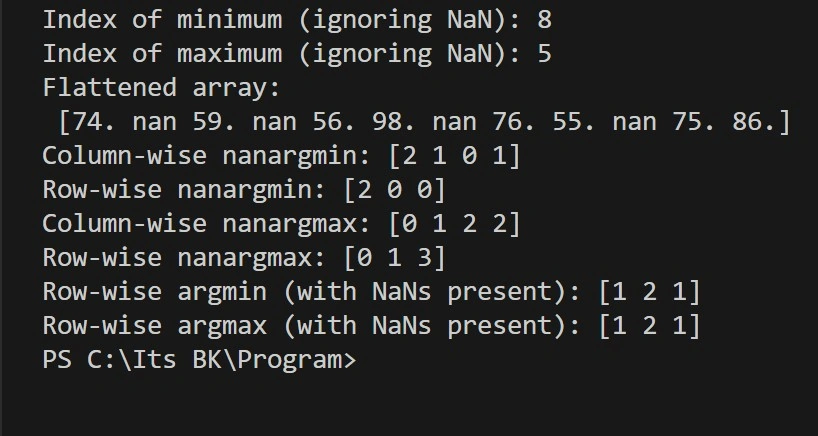
numpy.nanargmax() and numpy.nanargmin() are just like argmax() and argmin(), but they ignore any NaN (Not a Number) values in the array.
- nanargmax(): returns the index of the maximum value, ignoring NaNs
- nanargmin(): returns the index of the minimum value, ignoring NaNs
These functions are useful when your data may have missing values (NaN) and you still want to find the highest or lowest number without errors.
Example
import numpy as np

# Array with NaN values
arr = np.array([
    [74, np.nan, 59, np.nan],
    [56, 98, np.nan, 76],
    [55, np.nan, 75, 86]
])

# nanargmin and nanargmax on flattened array
print("Index of minimum (ignoring NaN):", np.nanargmin(arr))
print("Index of maximum (ignoring NaN):", np.nanargmax(arr))

# Flattened array
print("Flattened array:\n", arr.flatten())

# nanargmin and nanargmax along axes
print("Column-wise nanargmin:", np.nanargmin(arr, axis=0))
print("Row-wise nanargmin:", np.nanargmin(arr, axis=1))

print("Column-wise nanargmax:", np.nanargmax(arr, axis=0))
print("Row-wise nanargmax:", np.nanargmax(arr, axis=1))

# argmin and argmax without handling NaNs (may raise error if NaN present)
# Use np.nan_to_num or masking to avoid issues
print("Row-wise argmin (with NaNs present):", np.argmin(arr, axis=1))
print("Row-wise argmax (with NaNs present):", np.argmax(arr, axis=1))
Output
numpy.nonzero()
numpy.nonzero() returns the indices of all non-zero elements in an array.
- It tells you where the non-zero values are located.
- The result is a tuple of arrays, one for each dimension, showing the positions of non-zero elements.
Use it when you want to find and work with non-zero values in an array.
Example 1
import numpy as np

# 1D Array
arr = np.array([0, 56, 89, 0, 23])

# Find indices of non-zero elements
ind = np.nonzero(arr)

print("Indices of non-zero elements:", ind)
print("Non-zero elements:", arr[ind])

# Output:
# Indices of non-zero elements: (array([1, 2, 4]),)
# Non-zero elements: [56 89 23]
Example 2
import numpy as np

# 2D Array
a = np.array([[30, 40, 0], [0, 20, 10], [50, 0, 60]])

# Find indices of non-zero elements
ind = np.nonzero(a)

print("Indices of non-zero elements:", ind)
print("Non-zero elements:", a[ind])

# Output:
# Indices of non-zero elements: (array([0, 0, 1, 1, 2, 2]), array([0, 1, 1, 2, 0, 2]))
# Non-zero elements: [30 40 20 10 50 60]
numpy.where() and np.extract()
1. numpy.where()
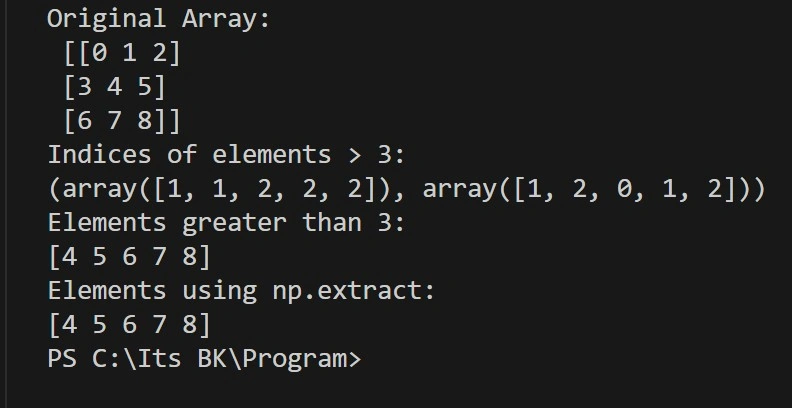
numpy.where() returns the indices of elements in an array that satisfy a given condition.
- It helps you locate values in the array that match your condition.
- You can also use it to replace values conditionally.
Use it when you want to filter or find positions based on a condition.
import numpy as np

# Create 3x3 array
x = np.arange(9).reshape(3, 3)
print("Original Array:\n", x)

# Find indices where elements are greater than 3
print("Indices of elements > 3:")
y = np.where(x > 3)
print(y)

# Print elements at those indices
print("Elements greater than 3:")
print(x[y])

# Using np.extract to get the same result
ele = np.extract(x > 3, x)
print("Elements using np.extract:")
print(ele)
Output
2. numpy.extract()
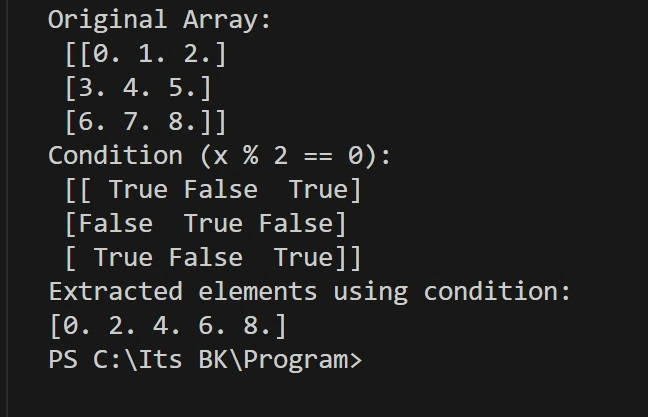
np.extract(condition, array) returns elements from the array where the given condition is True. It’s used to filter values based on a condition.
import numpy as np

# Create a 3x3 array of float numbers from 0 to 8
x = np.arange(9.).reshape(3, 3)
print("Original Array:\n", x)

# Define a condition: select elements divisible by 2
condition = np.mod(x, 2) == 0
print("Condition (x % 2 == 0):\n", condition)

# Extract elements using the condition
print("Extracted elements using condition:")
print(np.extract(condition, x))
# Using np.where to get the indices of elements that satisfy the condition
indices = np.where(condition)
Output
Numpy Counting Functions
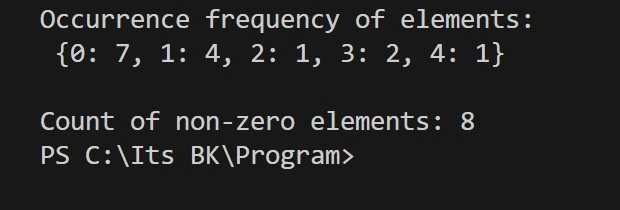
NumPy Counting Functions are used to count how many times something appears in an array. These functions help you find:
- How many times does each number or value appear
- How many values are not zero
- How many times does a letter or word appear in a list of strings
They are useful when you want to analyze or summarize data quickly.
import numpy as np

# Input array
a = np.array([0, 3, 0, 1, 0, 1, 2, 1, 0, 0, 0, 0, 1, 3, 4])

# Counting the frequency of unique elements
unique, counts = np.unique(a, return_counts=True)
D = {int(k): int(v) for k, v in zip(unique, counts)}  # convert np.int64 to int
print("Occurrence frequency of elements:\n", D)

# Counting non-zero elements
non_zero_count = np.count_nonzero(a)
print("\nCount of non-zero elements:", non_zero_count)
Output
Counting: occurrence of substrings
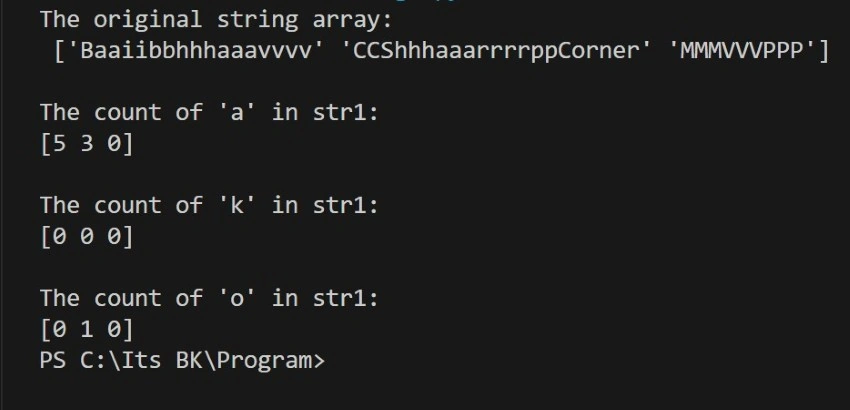
import numpy as np

# Original array of strings
str1 = np.array(['Baaiibbhhhaaavvvv', 'CCShhhaaarrrrppCorner', 'MMMVVVPPP'])
print("The original string array:\n", str1)

# Count occurrences of 'a'
print("\nThe count of 'a' in str1:")
y = np.char.count(str1, 'a')
print(y)

# Count occurrences of 'k'
print("\nThe count of 'k' in str1:")
z = np.char.count(str1, 'k')
print(z)

# Count occurrences of 'o'
print("\nThe count of 'o' in str1:")
x = np.char.count(str1, 'o')
print(x)
Output
Summary
This article demonstrated efficient ways to sort, search, and count array elements using NumPy. Whether handling simple 1D arrays, 2D matrices, or structured arrays with conditions, NumPy’s rich set of tools makes operations intuitive and fast for data processing.
Join the conversation! Your thoughts help the community grow.