

NuGet is the official package manager for the .NET Framework and .NET Core. It enables developers to easily add, update, and manage reusable code libraries (known as packages) within their projects. It works with .nupkg files (NuGet packages) and integrates with Visual Studio, CLI, and project files. Think of NuGet like the Play Store for .NET libraries. Instead of writing everything from scratch, we can install pre-built, tested components written by others or ourselves.
Imagine you’re building a car. Instead of making your own engine, tires, or GPS system from scratch, you order ready-made parts from trusted suppliers. Similarly, in .NET, if you need a logging system (like Serilog) or database tool (Entity Framework), NuGet lets you grab it instantly with a command or a click.
How the NuGet Package Manager Works in .NET: From Library Creation to Dependency Restoration
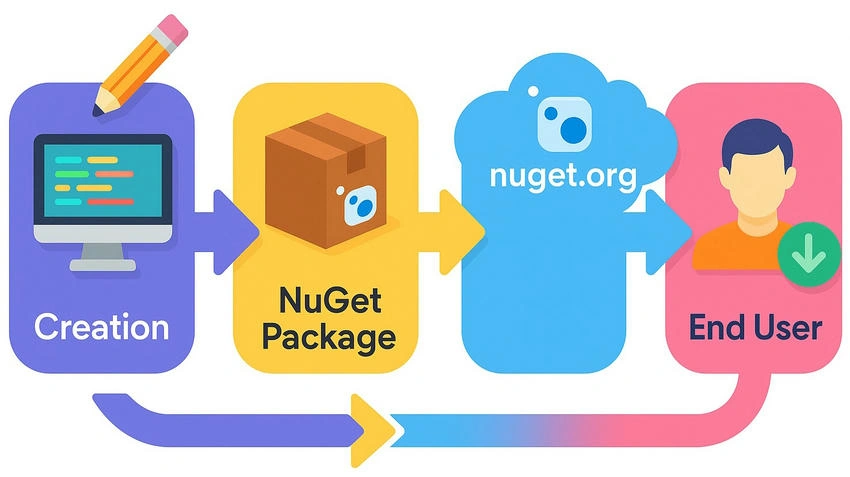
- Create a Library: The process begins with a developer writing reusable .NET code in a Class Library project. This could be anything from a utility library, logging tool, data validation framework, or custom functionality. The goal is to encapsulate logic that can be reused across multiple applications.
- Pack the Library: Once the code is ready, the developer runs the dotnet pack command to generate a .nupkg file, which is the NuGet package. This file includes compiled DLLs, metadata (such as name, version, and dependencies), and documentation about the package.
- Publish the Package: The .nupkg file is then uploaded to a NuGet repository, such as nuget.org, Azure Artifacts, or a private or internal server. This makes the package accessible to other developers for discovery and use.
- Discover the Package: Other developers (consumers) can now find the published package through Visual Studio’s NuGet Package Manager, command-line tools (dotnet CLI), or by browsing NuGet.org. They search by package name, tags, or functionality.
- Install the Package: Once found, the consumer installs the package using either the Visual Studio UI, the Package Manager Console, or a CLI command like the dotnet add package. This adds the library reference to their project and downloads the necessary files.
- Resolve Dependencies: If the NuGet package relies on other packages, NuGet will automatically identify and install all required dependencies to ensure everything works properly. This process is handled internally by NuGet.
- Use the Package in Code: After installation, developers can utilize the package’s features by adding the appropriate statements and calling the provided methods or classes within their application logic.
- Update the Package: As the package author releases newer versions with improvements or bug fixes, developers can update their project’s reference using tools like dotnet list package-- outdated and dotnet add package MyLib-- version x.y.z.
- Restore Packages: During builds or CI/CD pipelines, dotnet restore ensures all packages (and their specific versions) are downloaded and referenced correctly. This step is crucial for maintaining project consistency across environments.
What’s Inside a NuGet Package?
A NuGet package is essentially a .nupkg file, which is just a ZIP archive with structured contents. Here's what it typically includes.
- Compiled DLLs: The actual .NET assemblies (your reusable code).
- .nuspec file: Metadata like package name, version, author, description, dependencies.
- Readme or docs: Optional markdown or text files for usage instructions.
- Icons or logos: For display in the NuGet Gallery.
- Symbol files (.pdb): For debugging support (optional).
- Target framework folders: To support multiple .NET versions.
When we install a NuGet package, we're not just bringing in that one package, we're also bringing in its dependencies, and sometimes dependencies of those dependencies. These are called transitive dependencies.
Transitive Dependencies
A transitive dependency is a package that our project doesn’t directly install, but it comes along because another package depends on it.
we install Package A, which depends on Package B, and B depends on Package C —
Even though we didn’t install C directly, it still ends up in our project. That’s transitive dependency.
Imagine you order a laptop online (direct dependency). The laptop comes with a charger and a power cord in the box. We didn’t order the charger or cord separately, but they were needed by the laptop, so they’re included.
- Laptop: Package A (your main dependency).
- Charger: Package B (its dependency).
- Power cord: Package C (a transitive dependency of the charger).
We don’t need to order the charger or cord manually. They're included because they're required.
Transitive Dependency Example with Newtonsoft.Json
Let’s say we install .NET and add the package Newtonsoft.Json. This is a direct dependency on our project. But it may also pull in transitive dependencies packages that Newtonsoft.Json itself depends on.
What Does Newtonsoft.Json Depend On?
Currently, Newtonsoft.Json is mostly self-contained, it doesn’t bring many dependencies. However, depending on the version and how it’s compiled, it can bring in these transitive dependencies in some cases.
| Dependency (transitive) | Why it may appear |
|---|---|
| System.Runtime.Serialization.Primitives | Needed for some .NET Standard compatibility |
| System.Memory | For performance optimization (in older versions) |
| System.Buffers | For low-level memory buffers |
| System.Threading.Tasks.Extensions | For async features on lower .NET targets |
These are not always visible in the .csproj, but NuGet resolves and downloads them when required by the version you choose.
Essential NuGet Packages for .NET Beginners
| Package Name | Description | Common Use Cases | Install Command |
|---|---|---|---|
| Newtonsoft.Json | Popular JSON serializer and parser | Read/write JSON in APIs and configs | dotnet add package Newtonsoft.Json |
| Microsoft.EntityFrameworkCore | ORM for .NET to work with databases | Query databases using C# and LINQ | dotnet add package Microsoft.EntityFrameworkCore |
| Serilog | Simple and structured logging | Log information to the console or a file | dotnet add package Serilog.AspNetCore |
| Microsoft.AspNetCore.Mvc | MVC framework for ASP.NET Core | Build web applications using the MVC pattern | dotnet add package Microsoft.AspNetCore.Mvc |
| xunit | Unit testing framework | Write and run tests for your code | dotnet add package xunit |
Why Use NuGet Package Manager in .NET?
- Saves Development Time: Quickly reuse existing solutions (e.g., JSON handling, logging, data access) instead of writing from scratch.
- Access to Thousands of Open-Source Libraries: Connects to nuget.org and private feeds, giving you access to packages built by Microsoft, the open-source community, or your own team.
- Easy Installation, Update, and Removal: Install, update, or remove packages with a single CLI command or through Visual Studio’s GUI.
- Automatic Dependency Management: Installs transitive dependencies automatically and resolves version conflicts behind the scenes.
- Keeps Projects Clean and Lightweight: Stores packages in a shared cache, adds only references to your project, and avoids checking large DLLs into source control.
- Supports CI/CD and Build Pipelines: Enables consistent builds with dotnet restore in DevOps pipelines, Docker images, and automated deployments.
- Enables Internal Package Sharing: Lets teams build reusable libraries, version them, and share across apps via private feeds.
- Secure Access with Private Repositories: Supports token-based authentication for secure access to internal packages via Azure Artifacts, GitHub, or custom feeds.
- Without NuGet: The Pain: We'd have to manually download DLLs, check for .NET compatibility, manage versions and dependencies ourselves, and risk using outdated or untrusted code.
Conclusion
Learning NuGet deepened my understanding of how .NET manages reusable code efficiently. Using packages is simple, and NuGet handles versioning and dependencies smoothly. It was eye-opening to see how transitive dependencies are resolved automatically. Restoring packages across builds keeps projects clean, stable, and consistent.
Join the conversation! Your thoughts help the community grow.