

File I/O is provided by simple wrappers around standard POSIX functions. To implement the files' I/O related operations, we are required to use the “fs” in built module in our application using the require operation. All the methods have asynchronous and synchronous forms.
- Node.js: V8 JavaScript Engine - Day One
- Node.js: Modules - Day Two
- Node.js: Event And Event Emitter - Day Three
- Node.js: Callbacks - Day Four
Synchronous Methods
In Synchronous methods, there is not any concept of callback. When using the synchronous form, any exceptions are immediately thrown. We can use try/catch to handle the exceptions or allow them to bubble up.
Example: I have a text file that contains the following data.
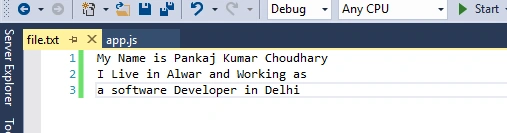
Now, I will read this file using synchronous and asynchronous method.
- var fs = require('fs');
- var fileData = fs.readFileSync('file.txt');
- //Synchronous Read
- console.log("File Synchronous Read Start");
- console.log( fileData.toString());
- console.log("!! Finish");
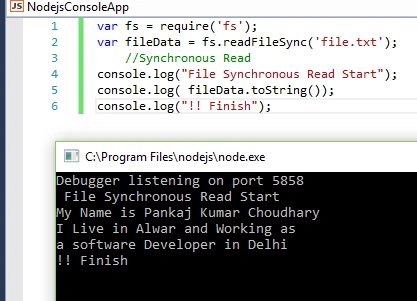
In this example, we implement the “fs” in built module and read the data of the text file using the “readFileSync” method. Name of “readFileSync” contains “Sync” postfix that indicates that file read operation is synchronous. Now, we read same file in asynchronous manner.
Asynchronous Method
The asynchronous method always takes a callback function as its last argument. The arguments passed to the callback function depend on the method, but the first argument is always reserved for an exception and second parameter is data or may be dependant upon method. If the operation was completed successfully, then the first argument will be null or undefined. Now, we read file in asynchronous manner.
Example
- var fs = require('fs');
- //Asynchronous Read
- console.log("File Asynchronous Read Start");
- var fileData = fs.readFile('file.txt', function(error, data) {
- if (error) {
- return console.error(error);
- }
- console.log(data.toString());
- });
- console.log("!! Finish");
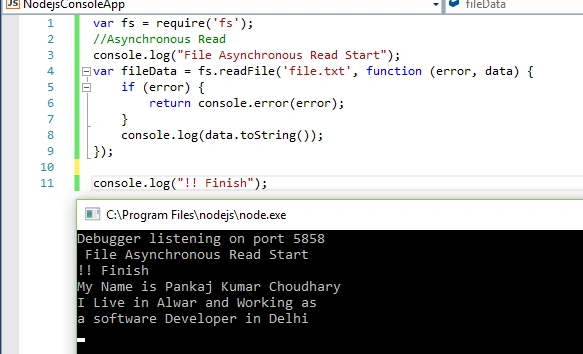
Basic Operations in Files
Now, let's read the basic operations of file system like open, read, write, close, delete, truncate files.
Open File
In Node.js, we can use “open” method for opening a file in asynchronous or synchronous mode.
Syntax
fs.open(path, flags[, mode], callback)
Parameters
| Parameter | Description |
| Path | Data type is string. Define the path of file that will be open |
| Flags | Data type is string. Define the behavior of file to be opened. |
| Mode | Data type is integer, define the permissions for file, but only if the file was created. |
| Callback | Define callback function for method. |
Flags
| Flag | Description |
| R | Open file for reading. An exception occurs if the file does not exist. |
| r+ | Open file for reading and writing. An exception occurs if the file does not exist. |
| rs+ | Open file for reading and writing in synchronous mode. |
| W | Open file for writing. The file is created (if it does not exist) or truncated (if it exists). |
| Wx | Like 'w' but fails if path exists. |
| W+ | Open file for reading and writing. The file is created (if it does not exist) or truncated (if it exists). |
| Wx+ | Like 'w+' but fails if path exists. |
| A | Open file for appending. The file is created if it does not exist. |
| Ax | Like 'a' but fails if path exists. |
| A+ | Open file for reading and appending. The file is created if it does not exist. |
| Ax+ | Like 'a+' but fails if path exists. |
Example
- var fs = require('fs');
- console.log("file opened successfully!!");
- fs.open('file.txt', 'r', function(error, data) {
- if (error) {
- console.log("Error occur");
- };
- console.log(data);
- });
- console.log("finish!!");
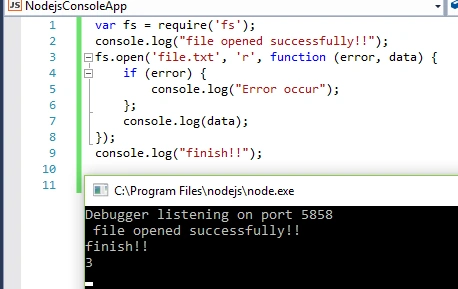
Read File: Using “readFile” method, we can read the data from a file. The syntax of this method is given below.
Syntax
Fs.readFile(file[,option],callback)
Parameter
| Parameters | Description |
| File | Filename or Descriptor name |
| Options | Define encoding and flag, default value of encoding is “null” and default value of flag is “r”. |
| Callback | Function call after completion of task, contain two parameter error and data. |
Example
I have the following data into “file.txt” file.
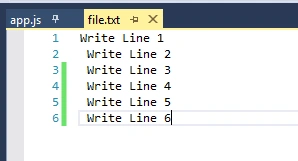
Now, using the below code, I read the data from this file.
- var fs = require('fs');
- //Asynchronous Read
- console.log("File Asynchronous Read Start");
- var fileData = fs.readFile('file.txt', "utf-8", function(error, data) {
- if (error) {
- return console.error(error);
- }
- console.log(data);
- });
- console.log("!! Finish");
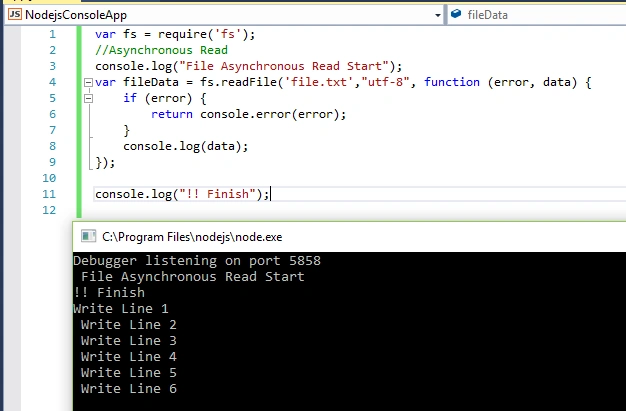
Write File: Using “writeFile” method we can write data into file. The syntax of this method is given below.
Syntax
Fs.writeFile(file, data[,options],callback)
Parameters
| Parameter | Description |
| Path | Path of file |
| Data | Data to written in file, data may be string or buffer |
| Options | This parameter hold the encoding, flag and mode information, default value of encoding is “utf8”, flag is 0o666 and for mode is “w”. |
| Callback | Function that will call after completion of task, this parameter contain single parameter error. |
Example
- var fs = require('fs');
- //Data for file
- var data = "Write Line 1 \n Write Line 2 \n Write Line 3";
- fs.writeFile("file.txt", data, function(error) {
- if (error) {
- console.log(error);
- }
- });
- console.log("Data Written Completed");
- console.log("Read the Data");
- fs.readFile("file.txt", "utf-8", function(error, data) {
- if (error) {
- console.log(error);
- }
- console.log(data);
- });
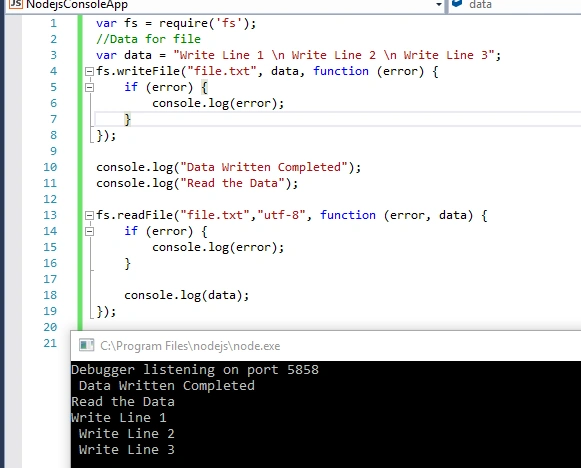
Now, we check the data of “file.txt” file.
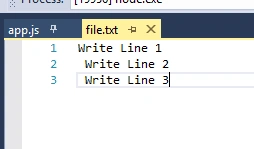
We can see that data is successfully written into file.
Append the Data
Using “fs.appendFile()” method, we can append the data into file.
Syntax
Fs.appendFile(file,data[,options],callback)
Parameters
| Parameter | Description |
| Path | Path of file |
| Data | Data to append in file, data may be string or buffer |
| Options | This parameter hold the encoding, flag and mode information, default value of encoding is “utf8”, flag is 0o666 and for mode is “a”. |
| Callback | Function that will call after completion of task, this parameter contain single parameter error. |
Example
- var fs = require('fs');
- //Data for file
- fs.readFile("file.txt", "utf-8", function(error, data) {
- if (error) {
- console.log(error);
- }
- console.log(data);
- console.log("Data Before Append");
- });
- var data = "Write Line 7 \n Write Line 8 \n Write Line 9";
- fs.appendFile("file.txt", data, function(error) {
- if (error) {
- console.log(error);
- }
- });
- console.log("Data Written Completed");
- console.log("Read the Data");
- fs.readFile("file.txt", "utf-8", function(error, data) {
- if (error) {
- console.log(error);
- }
- console.log(data);
- });
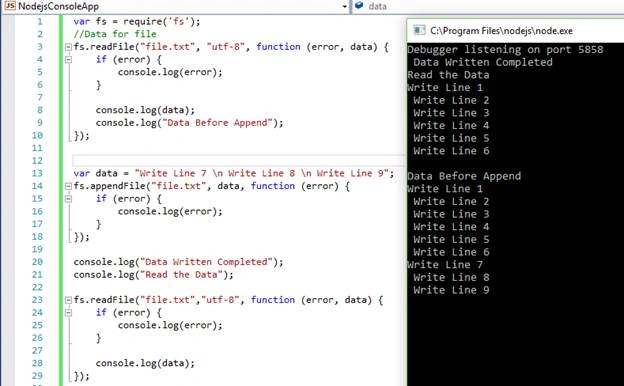
Get File Status
Using “fs.stat()” method, we can get file all file related information or some specific information.
Syntax: Fs.stat(file,callback)
Parameters
| Parameter | Description |
| File | Path of file |
| Callback | Function call after the completion of task, this function takes two parameter error and stat |
Example
- var fs = require('fs');
- //Data for file
- fs.stat("file.txt", function(error, status) {
- if (error) {
- console.log(error);
- }
- console.log(status);
- });
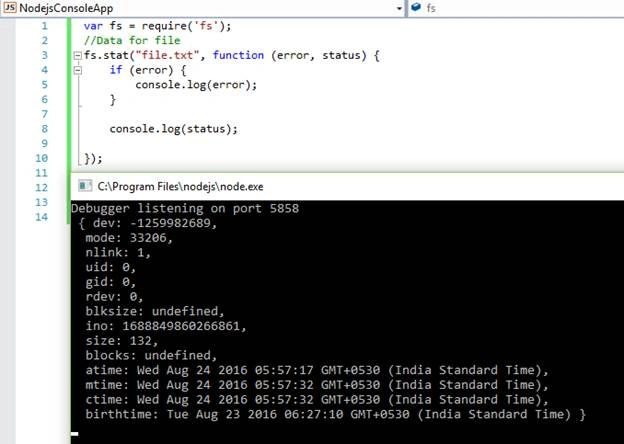
In the above image, atime, mtime, and ctime define the access, modify, and change time.
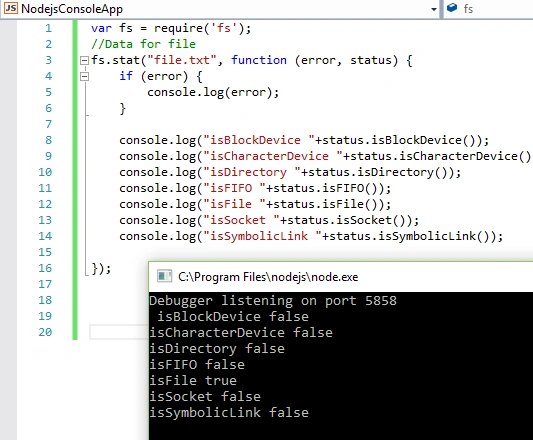
“fs.stat()” method returns all the information related to file. We can also get type of file using the synchronous counterparts part of stat object.
Example
- var fs = require('fs');
- //Data for file
- fs.stat("file.txt", function(error, status) {
- if (error) {
- console.log(error);
- }
- console.log("isBlockDevice " + status.isBlockDevice());
- console.log("isCharacterDevice " + status.isCharacterDevice());
- console.log("isDirectory " + status.isDirectory());
- console.log("isFIFO " + status.isFIFO());
- console.log("isFile " + status.isFile());
- console.log("isSocket " + status.isSocket());
- console.log("isSymbolicLink " + status.isSymbolicLink());
- });
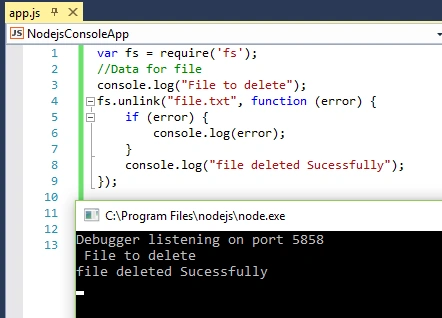
Delete File: Using “fs.unlink” file, we can delete a file.
Syntax
Fs.unlink(path, callback)
| Parameter | Description |
| File | Path of file |
| Callback | Function call after the completion of task, this function takes one parameter error |
Example
- var fs = require('fs');
- //Data for file
- console.log("File to delete");
- fs.unlink("file.txt", function(error) {
- if (error) {
- console.log(error);
- }
- console.log("file deleted Sucessfully");
- });
Close the file
Using “fs.close” method, we can close an opened file.
Syntax: Fs.close(fd,callback)
Parameter
| Parameter | Description |
| Fd | Data type is integer, fd is file descriptor returned by fs.open() method |
| Callback | Function executed after the completion of task, take one argument that is error. |
Example
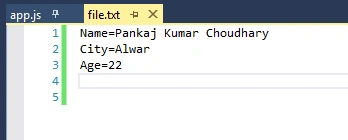
I have the following data into “file.txt” file.
Code to read this data is below.
- var fs = require('fs');
- var Buffr = new Buffer(2048);
- fs.open("file.txt", "r", function(error, data) {
- if (error) {
- console.log(error);
- }
- console.log("File opened in raed mode");
- fs.read(data, Buffr, 0, Buffr.length, 0, function(eror, data_) {
- if (eror) {
- console.log(eror);
- }
- console.log(Buffr.slice(0, data_).toString());
- console.log("File Read Successfully");
- })
- fs.close(data, function(error_) {
- if (error_) {
- console.log(error_);
- }
- console.log("File Closed");
- })
- })
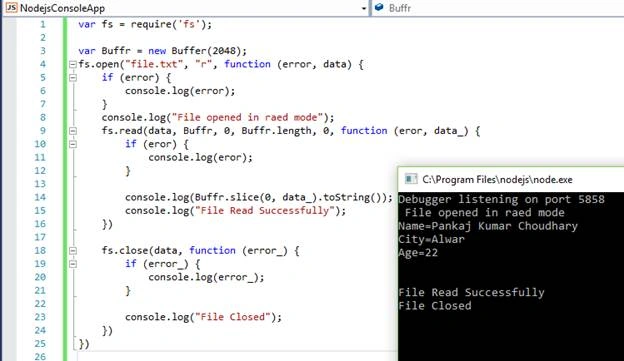
Today, we learned the basic file operations in Node.js. All these operations are asynchronous. Node.js also provides the synchronous method for each operation. I hope you liked the article. Thanks for reading this article.
Ankur VermaPosted Sep 29, 2016, 5:25 AM
Very nice....
Vignesh ManiPosted Aug 28, 2016, 8:58 AM
Good one
Delpin Susai RajPosted Aug 28, 2016, 3:05 AM
Nice
RakeshPosted Aug 28, 2016, 2:09 AM
Good one
SubashPosted Aug 27, 2016, 3:56 AM
Nice
Anu VPosted Aug 26, 2016, 11:57 PM
Nice..