

NLog is a .Net Library that enables you to add high-quality logs for your application.
NLog can also be downloaded using Nugget in Visual Studio.
Targets
- Targets are used to display, store, or pass log messages to another destination.
- There are the following two kinds of targets:
Those that receive and handle the message.
and the other that buffers or routes the message to another target.
- So the targets can be:
File
ConsoleDataBaseEmailMessageEventLog
And many more and in this article, we will see how to write the logs to a database and a file.
Layout
- Layout is one of the attributes of most of the targets.
- If we don't specify a layout then there is a default layout.${longdate}|${level:uppercase=true}|${logger}|${message}
- The rules that we specify in the layout are pieces of additional information that will be sent to the target along with the log.
- The additional information can include:
Current date and time in various formatsLog levelSource NameInformation about exceptions and much more.
Log Level
- Each Tracing message is associated with a Log Level.
The following are the allowed log levels (in descending order).
- Off.
- Fatal.
- Error.
- Warn.
- Info.
- Debug.
- Trace.
So let's go ahead and create a Sample application to use NLOG.
- We will use NLOG along with an MVC 4 application and SQL Server database.
Creating the Database to Log Errors
The following shows how to create the database to log errors:
- CREATE TABLE [dbo].[NLog_Error](
- [Id] [int] IDENTITY(1, 1) NOT NULL,
- [TimeStamp][DateTime2] NOT NULL,
- [Level] [nvarchar](50) NOT NULL,
- [Host] [nvarchar](max) NOT NULL,
- [Type] [nvarchar](50) NOT NULL,
- [Logger] [nvarchar](50) NOT NULL,
- [Message] [nvarchar](max) NOT NULL,
- [stacktrace] [nvarchar](max) NOT NULL,
- CONSTRAINT [PK_NLogError] PRIMARY KEY CLUSTERED ([Id] ASC) WITH (
- PAD_INDEX = OFF, STATISTICS_NORECOMPUTE = OFF,
- IGNORE_DUP_KEY = OFF, ALLOW_ROW_LOCKS = ON,
- ALLOW_PAGE_LOCKS = ON
- ) ON [PRIMARY]
- ) ON [PRIMARY] TEXTIMAGE_ON [PRIMARY]
- Creating an MVC application .
Solution
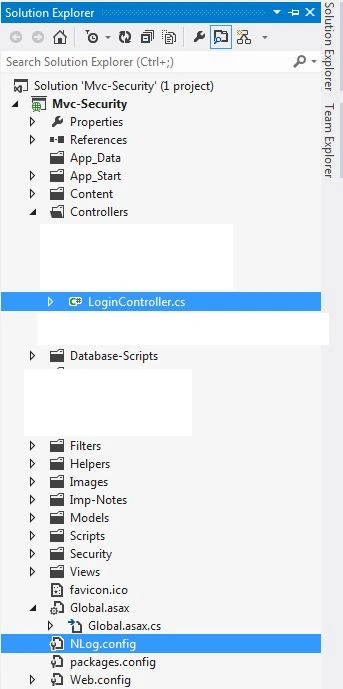
- Create the configuration file for NLog as shown (NLog.config).
NLog.config
- <?xml version="1.0" encoding="utf-8" ?>
- <nlog
- xmlns="http://www.nlog-project.org/schemas/NLog.xsd"
- xmlns:xsi="http://www.w3.org/2001/XMLSchema-instance"
- autoReload="true" throwExceptions="false"
- internalLogFile="C:\NLogErrors\log.txt" >
- <extensions>
- <!-- load NLog.Extended to enable ASP.NET-specific functionality -->
- <add assembly="NLog.Extended" />
- </extensions>
- <!--Define Various Log Targets-->
- <targets >
- <target name="console" xsi:type="ColoredConsole"
- layout="${message}" />
- <!--Write logs to File-->
- <target name="file" xsi:type="File" fileName="C:\NLogErrors\ErrorLogFile.log"
- layout="
- --------------------- ${level}(${longdate})${machinename}-------------------- ${newline}
- ${newline}
- Exception Type:${exception:format=Type}${newline}
- Exception Message:${exception:format=Message}${newline}
- Stack Trace:${exception:format=Stack Trace}${newline}
- Additional Info:${message}${newline}
- " ></target>
- <!--Write Logs to Database-->
- <target xsi:type="Database" name="db-Details">
- <!-- SQL command to be executed for each entry -->
- <commandText>INSERT INTO [NLog_Error](TimeStamp,Level,Host,Type,Logger,Message,stackTrace)
- VALUES(getutcdate(),@level,@host,@type,@logger,@message,@stacktrace)</commandText>
- <!-- parameters for the command -->
- <parameter name="@level" layout="${level}" />
- <parameter name="@host" layout="${machinename}" />
- <parameter name="@type" layout="${exception:format=type}" />
- <parameter name="@logger" layout="${logger}" />
- <parameter name="@message" layout="${message}" />
- <parameter name="@stacktrace" layout="${exception:stacktrace}" />
- <!-- connection string -->
- <dbProvider>System.Data.SqlClient</dbProvider>
- <connectionString>Data Source=MachineName;Initial Catalog=MyDataBase;Integrated Security=True;</connectionString>
- </target>
- </targets>
- <!--End Targets-->
- <rules>
- <logger name="*" minlevel="trace" writeTo="file" />
- <logger name="*" minlevel="trace" writeTo="db-Details" />
- </rules>
- </nlog>
- using System;
- using System.Collections.Generic;
- using System.Linq;
- using System.Web;
- using System.Web.Mvc;
- using Mvc_Security.Security;
- using Mvc_Security.Models;
- using System.Web.Script.Serialization;
- using System.Web.Security;
- using Newtonsoft.Json;
- using NLog;
- using System.Threading;
- namespace Mvc_Security.Controllers
- {
- public class LoginController: Controller
- {
- Logger loggerx = LogManager.GetCurrentClassLogger();
- // GET: /Login/
- public ActionResult Index()
- { return View(); }
- public ActionResult Login()
- { return View(); }
- [HttpPost]
- public ActionResult Login(User model, String returnUrl)
- {
- try
- {
- int x = 0;
- int y = 5;
- int z = y / x;
- }
- catch (Exception ex)
- {
- loggerx.ErrorException("Error occured in Login controller", ex);
- //logger.Error(ex);
- }
- }


shravan kumarPosted Feb 2, 2019, 12:40 AM
Thanks for making my work simple
Amit TyagiPosted Jun 18, 2018, 4:28 AM
Nice exploration for logging
Vijay KumarPosted Jun 8, 2018, 6:52 AM
Nice article
Bhuvanesh MohankumarPosted May 6, 2016, 4:20 PM
Good to read...
Muhammad Aqib ShehzadPosted Feb 1, 2016, 1:22 PM
nice one
Josh YatesPosted Jan 29, 2016, 5:57 PM
Do you have a sample project to download using nLog?
Karthik Muthu KaruppanPosted May 4, 2015, 2:26 PM
nice
Tom MohanPosted May 2, 2015, 11:34 AM
Good show
Debasish TutuPosted May 1, 2015, 3:36 AM
Thanks nitin
NitinPosted May 1, 2015, 3:33 AM
good one
Debasish TutuPosted May 1, 2015, 3:30 AM
Thanks anupam...will try to keep up d same
Anupam SinghPosted May 1, 2015, 12:06 AM
Thanks for sharing, nicely explained
Debasish TutuPosted Apr 30, 2015, 9:39 PM
Welcome Santhakumar sir
Santhakumar MunuswamyPosted Apr 30, 2015, 3:07 PM
Thanks for sharing