

In this article we will learn how to use a Controller in AngularJS. Ng-Controller is a very useful feature in AngularJS for creating a single-page application.
ngController
Ng-Controller works as plain JavaScript functions that are related to a specific scope to add logic to a view. Views are HTML pages that show the data using two-way data binding in Angular.
MVC components in angular
- Model: the Model is scope properties; scopes are attached to the DOM where scope properties are accessed through bindings.
- View: the template (HTML with data bindings) that is rendered into the View.
- Controller: The ngController directive specifies a Controller class; the class contains business logic behind the application to decorate the scope with functions and values
Read more here
Before going further let's discuss a little bit about Angular Scope.
Scope: $Scope works like an object that connects the Controller to the View, it is the Controller's job to initialize the data that the view needs to display. This can be done by making changes in $scope. $scope uses two-way data binding to bind the Model data to the View.
Two-Way Data Binding: This is the most important feature of AngularJS. Two-way data binding means it updates the view when the model changes, it synchronizes the data between the Model and the View.
In the screenshot you can see how two-way data binding works.
Getting Started
- Start Visual Studio
- Create a new website
- Provide the name and location of website
- Click "Next"
Let's add a simple controller first.
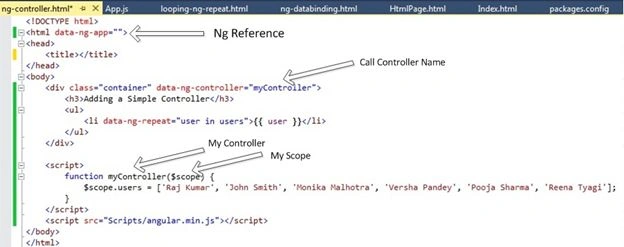
The output displays like this:
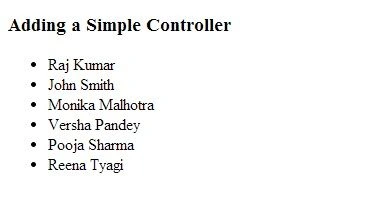
Let's create a Controller using a JavaScript file. First of all add a new JavaScript file to the project and provide a name accordingly.
App.js
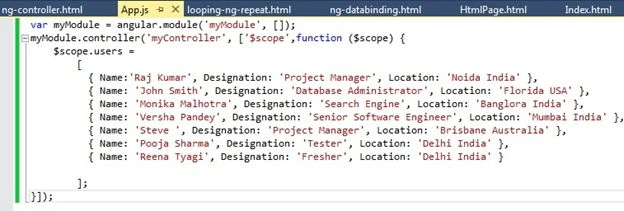
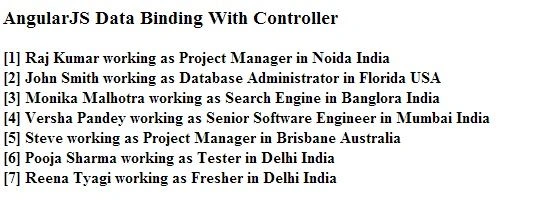
Now call this .js file in the HTML page and display the users list in the page.
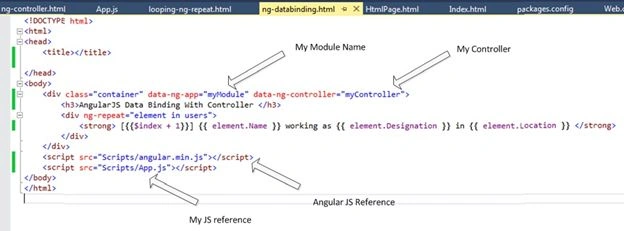
The output looks like this:
Hamid KhanPosted Sep 7, 2017, 12:00 PM
Very nice..........................
kalu singh raoPosted Jul 16, 2016, 3:40 AM
Nice...