

For making controls readonly, Angular has ng-readonly directive.
In this example, we have a form. In that form, we have textbox and two buttons, Edit and Update. Once a user clicks on Edit, user can enter text. Once they click on Update, all textbox will become readonly. Look at the below example.
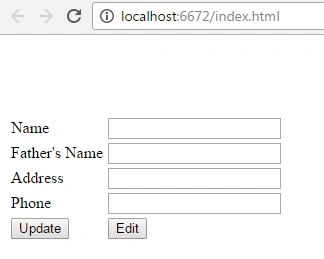
Script.js
- var testApp = angular
- .module("testModule", [])
- .controller("testController", function($scope) {
- $scope.makeReadOnly = true;
- $scope.update_Click = function() {
- $scope.makeReadOnly = true;
- }
- $scope.edit_Click = function() {
- $scope.makeReadOnly = false;
- }
- });
Index.html
- <html ng-app="testModule">
- <head>
- <title></title>
- <script src="scripts/angular.min.js"></script>
- <script src="scripts/js/script.js"></script>
- </head>
- <body>
- <div ng-controller="testController">
- <table>
- <tr>
- <td>Name</td>
- <td><input type="text" id="txtName" ng-model="testViewModel.name" ng-readonly="makeReadOnly" /></td>
- </tr>
- <tr>
- <td>
- Father's Name</td>
- <td><input type="text" id="txtfName" ng-model="testViewModel.fName" ng-readonly="makeReadOnly" /></td>
- </tr>
- <tr>
- <td>
- Address</td>
- <td><input type="text" id="txtAddress" ng-model="testViewModel.address" ng-readonly="makeReadOnly" /></td>
- </tr>
- <tr>
- <td>
- Phone</td>
- <td><input type="text" id="txtPhone" ng-model="testViewModel.phone" ng-readonly="makeReadOnly" /></td>
- </tr>
- <tr>
- <td>
- <input type="button" id="btnUpdate" ng-click="update_Click()" value="Update" />
- </td>
- <td>
- <input type="button" id="btnEdit" ng-click="edit_Click()" value="Edit" />
- </tr>
- </table>
- </div>
- </body>
- </html>
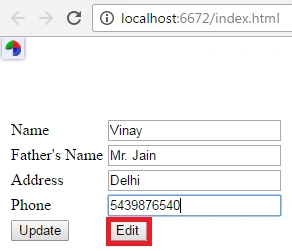
The above image shows if the user clicks on edit, user can enter data.
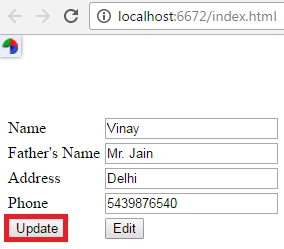
Above image shows, if user clicks on update, textbox becomes readonly because ng-readonly value is now true.
ng-readonly Definition
ng-readonly directive is specially designed for making controls readonly. It works if the ng-readonly value is true. If you want to remove readonly feature, make it false.
Sourabh MishraPosted Oct 2, 2017, 2:35 AM
Watch in Video mode https://www.youtube.com/edit?o=U&video_id=xtQuPlm1uDc
Atul RawatPosted Sep 29, 2016, 3:05 AM
Nice article