
Microsoft is going to announce new Visual Studio 2016, but now you can use Visual Studio “15” Preview to test some new features which are going to be launched in Visual Studio 2016. So let’s see what new features Microsoft is going to announce.
In Visual Studio “15” Preview Microsoft announce first new feature with name “Open Folder”. Firstly, download Visual Studio “15” Preview.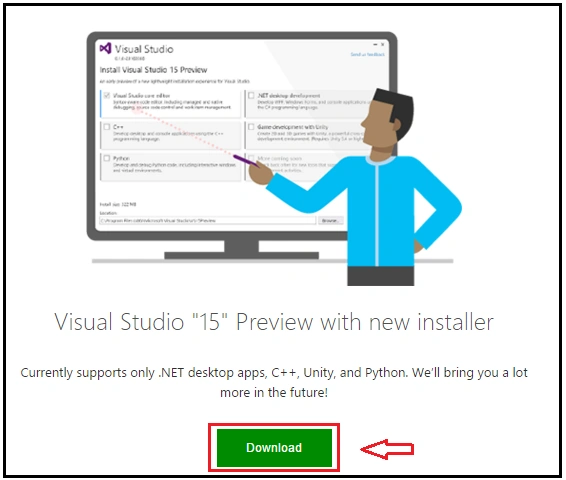
Through Visual Studio “15” Preview, you can open any folder of that application/project where you are working across multiple tools and many platforms.
For any developer, Visual Studi is introducing a new way to work with code. From Visual Studio “15” Preview, you can freely open a folder that means there is no need to spend more time creating a new solution/project.
By this functionality, you can recover your file as it is by syntax highlighting and navigation. You can quickly solve your coding problem as well.
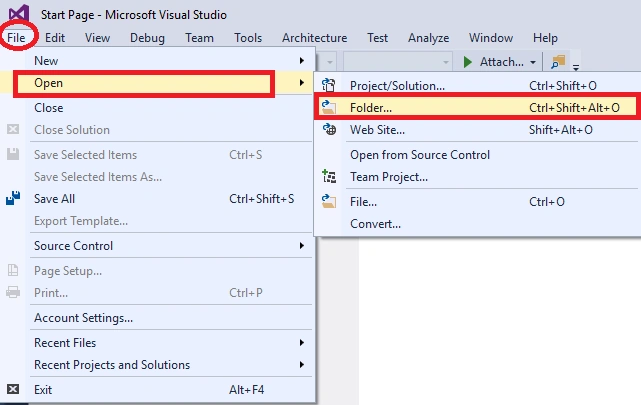
So, there are two ways to open a folder in Visual Studio. Firstly, open Visual Studio, in the File menu select “Open” and then “Folder”.
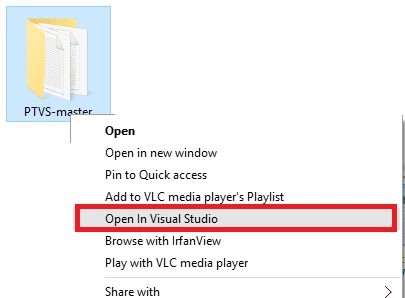
And the second one is that, in windows explorer right click on any folder and click on “Open in Visual Studio”.
By these two options you can open any folder in Visual Studio.
Most popular languages will have Syntax Highlighting and navigation features; open any project folder in Visual Studio.
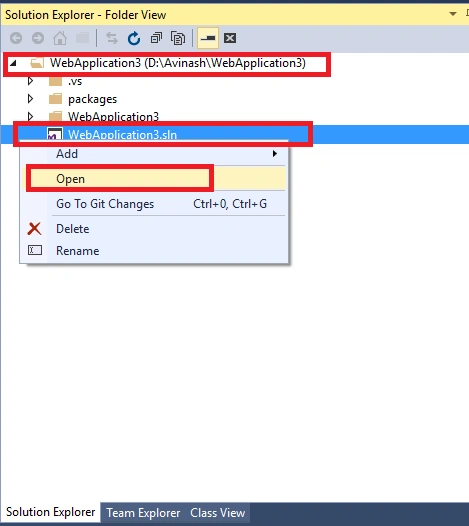
In the following screenshot you can see Syntax Highlighting and navigation feature. Now in this project you can open any file like Python, JavaScript, HTML and CSS and so on. Accordingly, you can change code of your particular file.
I hope you enjoyed this article. Stay tuned with me for more articles on all other Microsoft technologies.
Thanks.
Connect (“Nitin Pandit”);

New Feature "Open Folder" In Visual Studio 2016
Join the conversation! Your thoughts help the community grow.
Sign in to leave a comment
It is the same account you read, post and publish with — and you will come straight back to this page.
Bhuvanesh MohankumarPosted May 3, 2016, 12:51 PM
Good one..
Amit DavePosted May 3, 2016, 10:33 AM
Keep up the Good work!
Hari ShankerPosted May 2, 2016, 12:37 AM
nice share
NitinPosted May 1, 2016, 1:28 PM
Thanks for sharing
Amit KumarPosted May 1, 2016, 3:51 AM
Nice share one
Asfend YarPosted May 1, 2016, 1:46 AM
hurrah
Pankaj Kumar ChoudharyPosted May 1, 2016, 1:15 AM
Nice article sir....
Kuppurasu NagarajPosted Apr 30, 2016, 2:19 PM
Nice Sharing..
Rahul Kumar SaxenaPosted Apr 30, 2016, 1:49 PM
good Show
Nitin PanditPosted Apr 30, 2016, 1:49 PM
Thanks to All :)
Vignesh ManiPosted Apr 30, 2016, 12:47 PM
Nice
Pramod ThakurPosted Apr 30, 2016, 11:42 AM
thanks for sharing :)
Ammar ShaukatPosted Apr 30, 2016, 11:02 AM
thanks,
Vivek KumarPosted Apr 30, 2016, 7:48 AM
Nice sharing
Gowtham KPosted Apr 30, 2016, 7:03 AM
Thanks for the sharing this awesome information
Tk MahantaPosted Apr 30, 2016, 7:00 AM
Really Nice Option
Debasis SahaPosted Apr 30, 2016, 4:33 AM
Nice one.
Thiruppathi RPosted Apr 30, 2016, 4:09 AM
Wow nice
Jeetendra GundPosted Apr 30, 2016, 3:38 AM
Awesome..
KeyurPosted Apr 30, 2016, 2:11 AM
This is what a Visual Studio Lover need...