

Abstract: We practically show examples of 15 different .NET8/9 build modes, including Framework-Dependent and Framework-Independent, how to bundle an app into a single-file, how to trim app bundles from unused libraries, and how to build an Ahead-of-time (AOT) precompiled app.
1. .NET8/9 toolset supports different build/publish/deployment modes
I was experimenting with different project properties/flags, and I developed several proof-of-concept build projects showcasing different build/publish/deployment modes available in .NET8/9, using Microsoft tools.
1.2. Articles in this series
For technical reasons, I will organize this text into several articles.
- .NET8/9 – Testing different Build/Deployment modes – Part 1
- .NET8/9 – Testing different Build/Deployment modes – Part 2
- .NET8/9 – Testing different Build/Deployment modes – Part 3
- .NET8/9 – Testing different Build/Deployment modes – Part 4
- .NET8/9 – Testing different Build/Deployment modes – Part 5
- .NET8/9 – Testing different Build/Deployment modes – Part 6
2. Analyzing Build Results
I will use dotPeek by JetBrains ([5]), a powerful Decompiler, to have a look into some of the more interesting build types. That product is free. I do not know how they make money from it, but it is free.
3. Build 2- Framework-dependent, Single File
- NOTE: All these build results are with the .NET framework version around .NET 8.0.0. With the change in the .NET version, file sizes changed (typically smaller). But build types are still the same. It looks like they improved/changed their build tools.
- Location: c:\tmpNetBundle\BundleExample01\ConsoleApp1\Framework_SingleFile_Win-X64\
- Publish mode: 1)Release; 2)framework-dependent; 3)Platform-specific-win-x64; 4)Single-file; 5)Untrimmed; 6)NotR2R; 7)PdbEmbeded; 8)binariesNotInSingleFile; 9)assembliesNotCompressed; 10)NotAot
- Build result Content: -4 files, -13.6MB
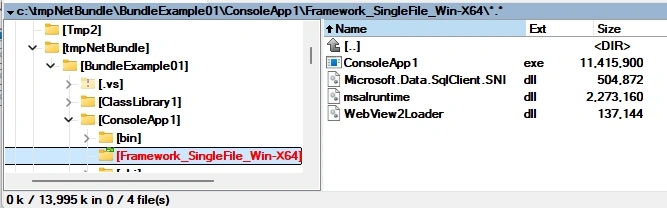
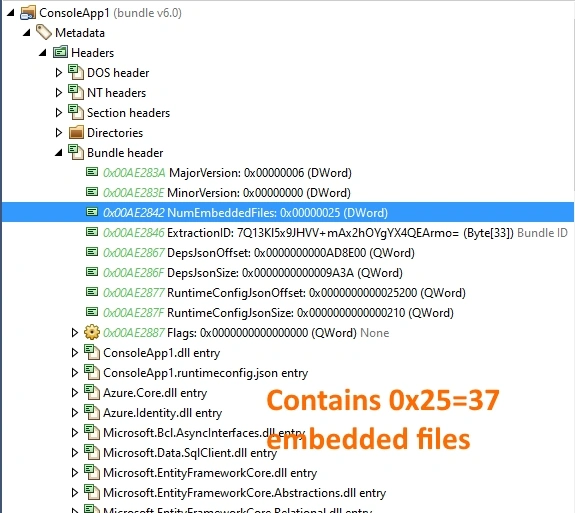
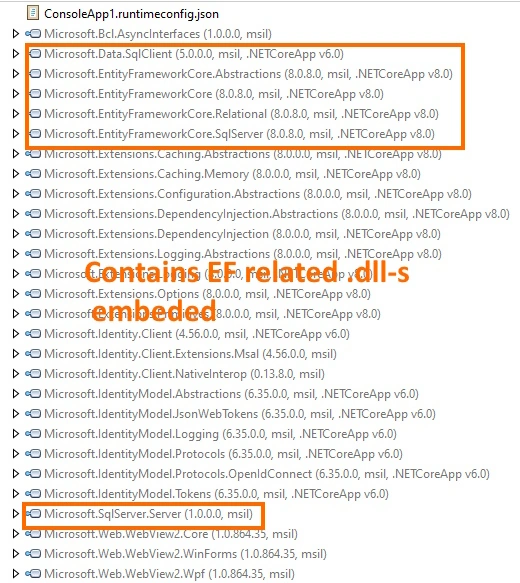
Here are some screenshots from the detPeek decompiler and from the file system.

Comments
- This is really the build/publish mode I was looking for initially. I wanted all assemblies bundled in a single file, but it was dependent on the .NET8 framework/runtime installed on the machine.
- Funny thing, but this is not itself an assembly! It is a kind of container for files/assemblies.
- When I was using that RedGate product called SmartAssembly for bundling 10 years ago, I would get. As a result, a completely regular assembly, with all classes contained in participating assemblies, extracted and inserted (with their namespaces) into a new assembly. I was expecting to see the same here, just from Microsoft tools. Logic is sound and should work in this case, too, but they opted for another approach.
- Still, they could have enabled trimming/pruning on the level of this container file. We can clearly see unneeded assembles embedded, like EF-related libraries. Obviously, it would need to be trimming/pruning on the .dll level, not class level, because that is how things are organized here. But it looks doable to me.
- This is quite interesting, but it requires time to be studied properly.
4. Build 13- Framework-independent (Self-Contained), Single File, Untrimmed
- NOTE: All these build results are with the .NET framework version around .NET 8.0.0. With the change in the .NET version, file sizes changed (typically smaller). But build types are still the same. It looks like they improved/changed their build tools.
- Location: c:\tmpNetBundle\BundleExample01\ConsoleApp2C\SelfContained_SingleFile_win-x64\
- Publish mode: 1)Release; 2)self-contained; 3)Platform-specific-win-x64; 4)Single-file; 5)Untrimmed; 6)NotR2R; 7)PdbEmbeded; 8)binariesInSingleFile; 9)assembliesCompressed; 10)NotAot
- Build result Content: -1 file; -76 MB.
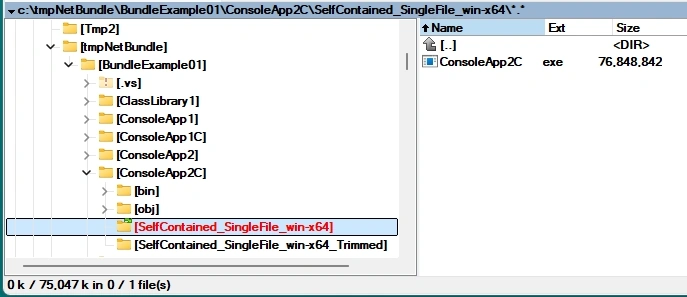
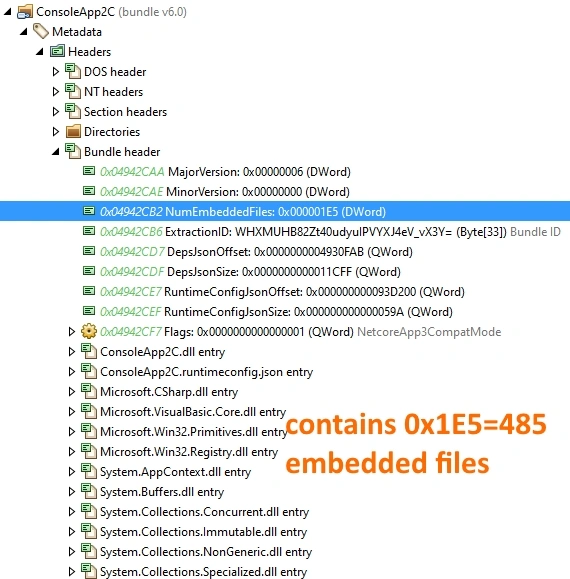
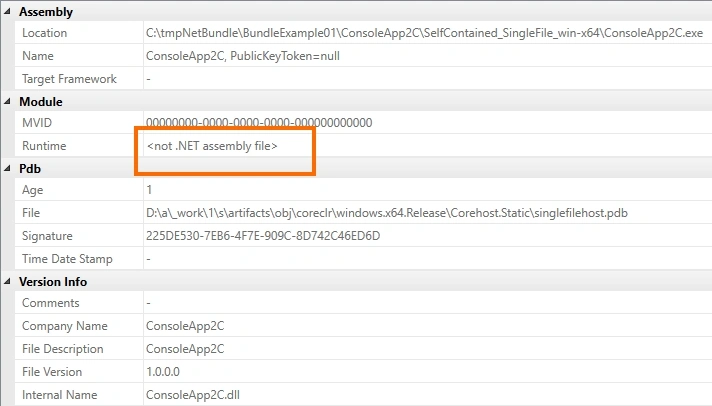
Here are some screenshots from the detPeek decompiler. It seems that the decompiler automatically decompresses files. I assume that the assembliesCompressed flag worked.
Comments
- So, this is the famous “self-contained” build, meaning it does not depend on the previous installation of .NET8 framework/runtime. Some call it “Framework-independent”, because it carries all the necessary .NET8 engine files with itself, all packaged nicely in one file, ready for deployment.
- Again, it is a file container for 485 files.
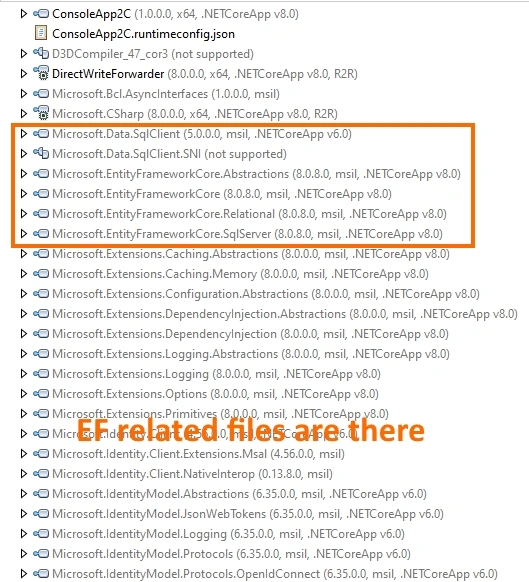
- This one is an untrimmed version, as we can see embedded EF-related libraries.
- Yes, it runs without problems on my machine.
5. Build 14- Framework-independent (Self-Contained), Single File, Trimmed
- NOTE: All these build results are with the .NET framework version around .NET 8.0.0. With the change in the .NET version, file sizes changed (typically smaller). But build types are still the same. It looks like they improved/changed their build tools.
- Location: c:\tmpNetBundle\BundleExample01\ConsoleApp2C\SelfContained_SingleFile_win-x64_Trimmed\
- Publish mode: 1)Release; 2)self-contained; 3)Platform-specific-win-x64; 4)Single-file; 5)Trimmed; 6)NotR2R; 7)PdbEmbeded; 8)binariesInSingleFile; 9)assembliesCompressed ; 10)NotAot
- Build result Content: -1 file; -20.4MB.
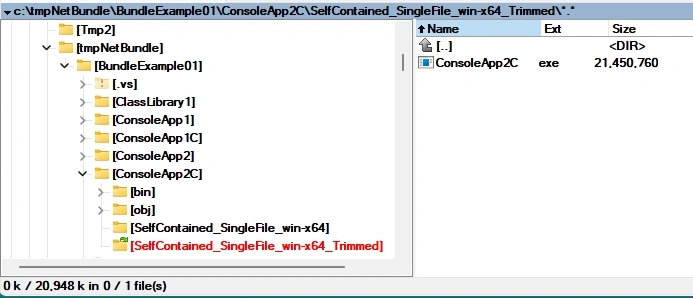
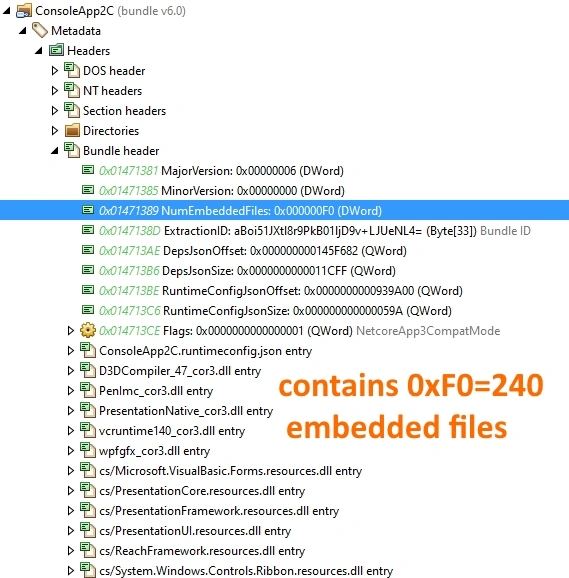
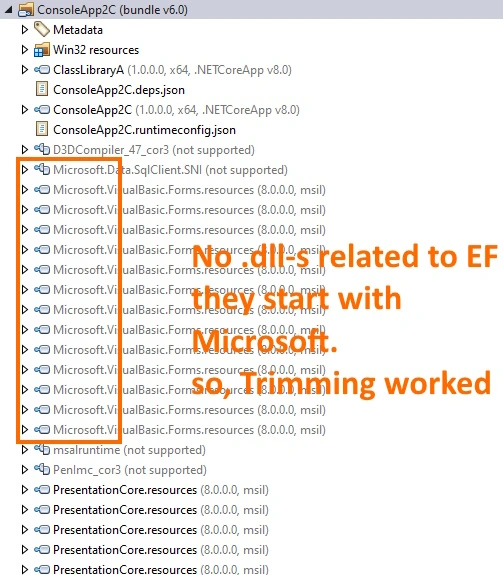
Here are some screenshots from the detPeek decompiler. It seems that the decompiler automatically decompresses files.

Comments
- So, again, this is the famous, “self-contained” build, meaning it does not depend on the previous installation of .NET8 framework/runtime. Some call it “Framework-independent”, because it carries all the necessary .NET8 engine files with itself, all packaged nicely in one file, ready for deployment.
- Again, it is a file container for 240 files.
- This one is a trimmed version, as we can NOT see embedded EF-related libraries. So, trimming removed some 245 files worth around ~50MB. That all was related to EF/SQL-Server support, which is not really needed.
- Yes, it runs without problems on my machine.
6. Build 17- Framework-independent (Self-Contained), Single File, Trimmed, ReadyToRun
- Note. All these build results are with the .NET framework version around .NET 8.0.0. With the change in the .NET version, file sizes changed (typically smaller). But build types are still the same. It looks like they improved/changed their build tools.
- Location: c:\tmpNetBundle\BundleExample01\ConsoleApp3C\SelfContained_SingleFile_win-x64_Trimmed_ReadyToRun\
- Publish mode: 1)Release; 2)self-contained; 3)Platform-specific-win-x64; 4)Single-file; 5)Trimmed; 6)ReadyToRun; 7)PdbEmbeded; 8)binariesInSingleFile; 9)assembliesCompressed ; 10)NotAot
- Build result Content: -1 file; -22MB.
Here are some screenshots from the detPeek decompiler. It seems that the decompiler automatically decompresses files.


Comments
- So, this is I think “the top dog” build for .NET8, with the most options activated. I haven’t really seen if it is recommended or not by Microsoft.
- So, again, this is the famous, “self-contained” build, meaning it does not depend on the previous installation of .NET8 framework/runtime. Some call it “Framework-independent”, because it carries all the necessary .NET8 engine files with itself, all packaged nicely in one file, ready for deployment.
- Again, it is a file container for 241 files.
- This one is a trimmed version, as we can NOT see embedded EF-related libraries.
- In addition, this one is “ReadyToRun” format, which is a form of ahead-of-time (AOT) compilation. R2R means that the code is ready to run right away without jitting.
- The decompiler marks precompiled assemblies with “R2R”.
- Yes, it runs without problems on my machine.
- This is quite interesting, but it requires time to be studied properly.
7. Build 19- Native Ahead-Of-Time Compilation
- NOTE: All these build results are with the .NET framework version around .NET 8.0.0. With the change in the .NET version, file sizes changed (typically smaller). But build types are still the same. It looks like they improved/changed their build tools.
- Location: c:\tmpNetBundle\BundleExample01\ConsoleApp5\win-x64_Trimmed_AOT\
- Publish mode: 1)Release; 2)self-contained; 3)Platform-specific-win-x64; 4)Un-bundled; 5)Trimmed; 6)NotR2R; 7)PdbEmbeded; 8)binariesNotInSingleFile; 9)assembliesNotCompressed; 10)PublishAot
- Build result Content: -10 file; -19.5MB.

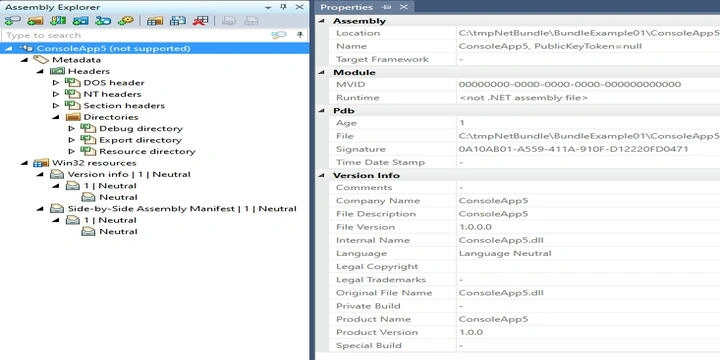
Here are some screenshots from the detPeek decompiler and from the file system.
Comments
- So, this is the famous pure native Ahead-Of-Time (AOT) compiled build
- It is “Framework-independent”; it does not depend on the previous installation of .NET8 framework/runtime
- It has been automatically Trimmed during the build process
- detPeek decompiler can not really open it
- Yes, it runs without problems on my machine.
- Somehow, it would be nice if it could all this be packaged into one file for deployment.
- This is quite interesting, but it requires time to be studied properly.
8. Milestone – That was the .NET 8.0.0 framework so far
In this series of articles so far, we showed 15 different ways to build a .NET8 application, depending on the options wanted. There are probably more options or combinations of build properties/flags, but we can call this proof-of-concept testing successful and broad enough. According to the documentation, most of the build/publish options are working properly.
I was in this article aiming for some “intermediate level of practical skills” that a modern C#/.NET developer should have. Of course, this is a very interesting topic for every software engineer to get familiar with.
One very interesting technology offered as a part of .NET8 environment it ReadyToRun build option, which is a form of ahead-of-time (AOT) compilation. More details can be found at [7]. Looks to me like a serious topic, but I do not see the point of really studying it in detail unless you work in Microsoft in their .NET runtime/core department. An average C#/.NET engineer just needs to know how to activate properly the build options and benefits of it.
We also showed how to do a native Ahead-Of-Time compilation deployment model. That can be attractive in some cases, too.
9. To be continued
This will be continued in the next article of the series.
10. References
[1] .NET application publishing overview
https://learn.microsoft.com/en-us/dotnet/core/deploying/
[2] Self-contained deployment runtime roll forward
https://learn.microsoft.com/en-us/dotnet/core/deploying/runtime-patch-selection
[3] https://www.red-gate.com/products/smartassembly/
[5] https://www.jetbrains.com/decompiler/
[7] https://devblogs.microsoft.com/dotnet/conversation-about-ready-to-run/
Join the conversation! Your thoughts help the community grow.