

Before you proceed and read the second part, I recommend you to read:
Thus, you can follow along. If you already have some understanding of the regular expressions, you can continue to follow along from this article, but I still recommend you to check out Part 1. You may learn something new.
Prerequisites
You must have a basic understanding of C# and Object-Oriented Programming.
Let’s Continue
In the previous part, we learned some basic constructs of the regular expressions, some basic concepts, need, and importance of regular expressions in real world applications. We discussed the regular expressions engine, some basic understanding of Regex class, and some handy examples to get your hands dirty for the practice.
Now, we are ready to continue our learning session on .NET Regular Expressions Demystified Series.
A common mistake that some developers do is copying a regular expression somewhere from the internet and using it directly in the C# program. Please do remember, there are many different regular expression syntaxes, which are designed and used by the different programming languages. If your regular expression is not returning what you are expecting, make sure that you are using the right syntax, designed for C#.
As the name explains a character class is nothing but a single unit that represents a group of special characters in Regex.
In Regex, character classes are defined by the character types, all alphanumeric characters are defined in one class, all digit characters are defined in another class.
There are two types of character classes in .NET regular expressions.
Common Confusing Point
Character Classes
- One of those is already defined.
- One of those can be defined.
Predefined Classes
| \w | Matches any word character. This can be any alphanumeric or digit. Its character’s range is equivalent to [A-Za-z_0-9]. Represents all the uppercase, lowercase alphanumeric characters, and all digits’ literal from 0-9. |
| \W | Matches any character, which is not a word. This can be any non-word character like ‘*’, ‘?’, ‘&‘and ‘$’ etc. Its character’s range is equivalent to [^A-Za-z0-9]. The cap sign at the front represents negation, which means this class matches any character that is not [a-zA-Z0-9]. |
| \s | Matches any single whitespace character. Normally, this class represents a space, newline, return, tab, and vertical tab, |
| \S | Matches any single non-whitespace character. This class is a negation of \s. It matches any character, which is not white space, returns a new line, tab, and vertical tab. |
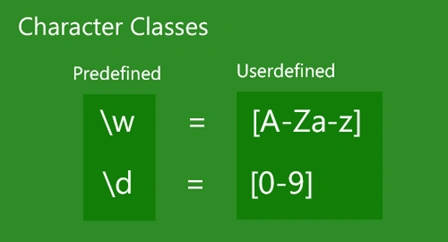
| \d | This class represents any single decimal digit. Its character’s range is equivalent to [0-9]. |
| \D | This class represents any non-digit character. This class is a negation of \d. Its character range is equivalent to [^0-9]. |
Example
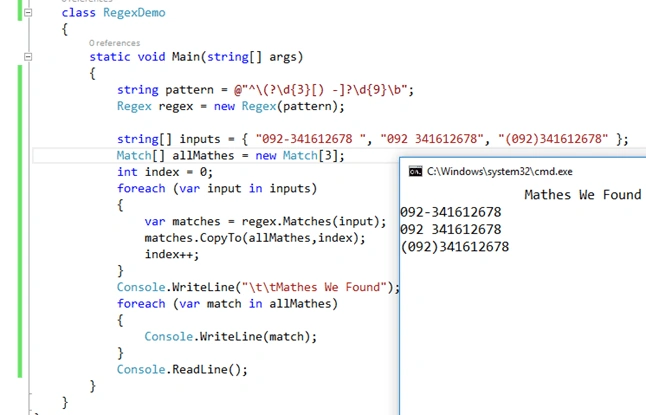
@"^\(?\d{3}[) -]?\d{9}\b" finds a 12 digit standard Pakistan phone number in following three formats.
- "092 341787878"
- "092-341787878"
- "(092)341787878"
Constructs for defining Custom Classes
- [characters]:
Matches any single character, which resides inside these braces.
- [^characters]:
Matches any single character, which does not reside inside these braces.
- [first-last]:
Matches any single character, which is between the first and last character of these braces.
Why we define
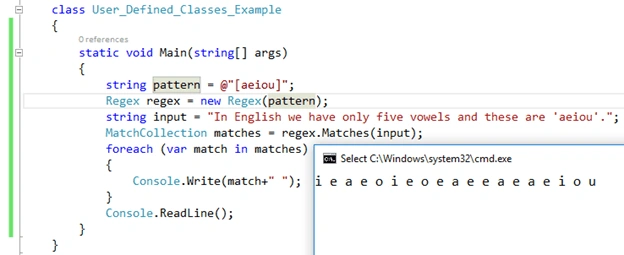
We define our own character classes because we want more control and flexibility. For example, if you have to find all the vowels in a document, you define “[aeiou]” class for it. What if you want to find all the characters between ‘e’ to ‘j’, you define another class for it [e-j].
 Example
"[aeiou]" matches any vowel.
Example
"[aeiou]" matches any vowel.
 Negation Example
"[^aeiou]" matches any character, which is not a vowel.
Negation Example
"[^aeiou]" matches any character, which is not a vowel.
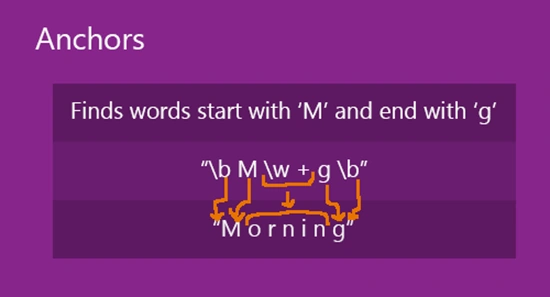
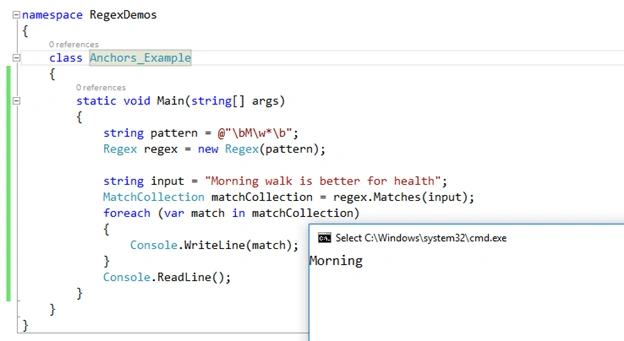
 Anchors are also called atomic-zero-width assertions. An anchor doesn’t represent a character; it represents the position of a character in the string without consuming any character. For example, the cap sign ‘^’ anchor represents the beginning of the string, and the dollar sign ‘$’ represents the ending of the string. The ‘\b’ represents both the beginning and end of a word in the string. Given below is a list of some anchors, which I referenced from MSDN.
Anchors
| ^ | Represents the beginning of the whole string or line. |
| & | Represents the ending of the whole string or before \n at the end for line. |
| \A | Matches the beginning of the string. (input string as a whole) |
| \z | Matches the ending of the string. (input string as a whole) |
| \b | Matches both the beginning and end of a word. |
| \Z | Matches the ending of the string or before the \n at the end of the string. |
Quantifiers
| + | Match the previous element 1 or more time |
| * | Match the previous element 0 or more time |
| ? | Match the previous element 0 or 1 time |
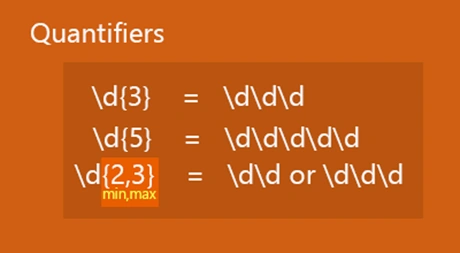
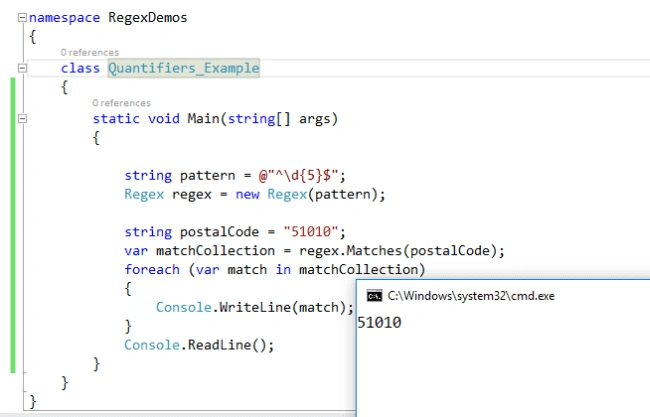
| {n} | Finds the match for the previous element exactly n times. |
| {n, } | Finds the match for the previous element n and more times. |
| {n, m} | Finds the match for the previous element at least n times but no more than m time. Match the previous element from n to m times. |
Grouping Constructs
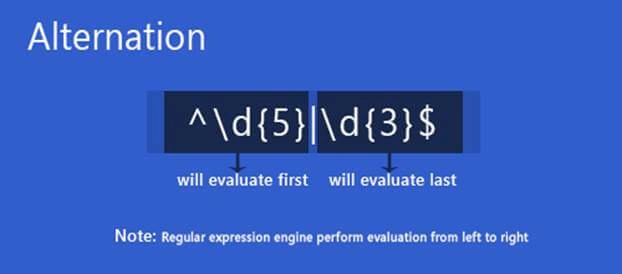
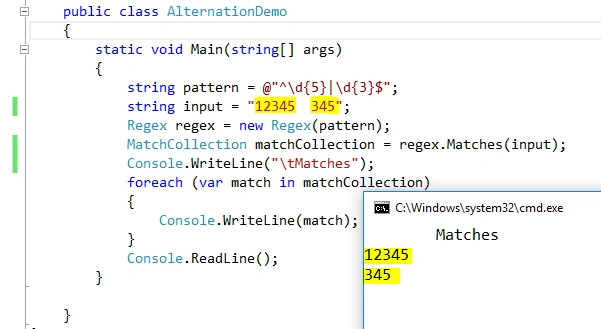
- public class AlternationDemo
- {
- static void Main(string[] args)
- {
- string pattern = @ "^\d{5}|\d{3}$";
- string input = "12345 345";
- Regex regex = new Regex(pattern);
- MatchCollection matchCollection = regex.Matches(input);
- Console.WriteLine("\tMatches");
- foreach(var match in matchCollection) {
- Console.WriteLine(match);
- }
- Console.ReadLine();
- }
- }
Hussain PatelPosted Nov 2, 2016, 9:45 AM
Nice article
Anu VPosted Aug 9, 2016, 3:02 AM
Nice
Vignesh ManiPosted Aug 2, 2016, 5:37 AM
Nice one
Ganesh SattawanPosted Aug 2, 2016, 2:09 AM
Good one