

Introduction
Sometimes we have complex scenarios where the forms may contain some subforms and so on. In such a scenario FormGroup class can also be used to group together some different form controls.
Prerequisites
- HTML, CSS, and JS
- Basics of angular
Implementation
- Create a TestApp project using Angular CLI.
- Create a test component which will contain the forms and related field:
- Open test.component.ts and edit with below contents:
- import { Component, OnInit } from '@angular/core';
- import { FormGroup, FormControl, FormControlName } from '@angular/forms';
- @Component({
- selector: 'app-test',
- templateUrl: './test.component.html',
- styleUrls: ['./test.component.css']
- })
- export class TestComponent implements OnInit {
- registrationForm: any;
- graduationData: any;
- pgData: any;
- constructor() { }
- ngOnInit() {
- this.graduationData = ['BCA', 'BBA', 'BE', 'B.Tech', 'B.Sc'];
- this.pgData = ['MCA', 'MBA', 'M.Tech', 'M.Sc'];
- this.registrationForm= new FormGroup({
- userName : new FormControl('Irshad'),
- password : new FormControl(''),
- email : new FormControl(''),
- phone : new FormControl(''),
- address : new FormGroup({
- country : new FormControl(''),
- state : new FormControl(''),
- city : new FormControl(''),
- pin : new FormControl('')
- }),
- qualification : new FormGroup({
- graduation : new FormControl(''),
- pg : new FormControl('')
- })
- });
- }
- }
- <div class="container-fluid">
- <h3>Registration Form</h3>
- <form [formGroup]="registrationForm">
- <div class="row">
- <div class="col-sm-6">
- <div class="form-group">
- <label>UserName</label>
- <input formControlName="userName" type="text" class="form-control">
- </div>
- </div>
- <div class="col-sm-6">
- <div class="form-group">
- <label>Password</label>
- <input formControlName="password" type="Password" class="form-control">
- </div>
- </div>
- </div>
- <div class="row">
- <div class="col-sm-6">
- <div class="form-group">
- <label>Email Address</label>
- <input formControlName="email" type="email" class="form-control">
- </div>
- </div>
- <div class="col-sm-6">
- <div class="form-group">
- <label>Phone</label>
- <input formControlName="phone" type="Phone" class="form-control">
- </div>
- </div>
- </div>
- <div formGroupName="address">
- <div class="row">
- <div class="col-sm-6">
- <div class="form-group">
- <label>Country</label>
- <input formControlName="country" type="text" class="form-control">
- </div>
- </div>
- <div class="col-sm-6">
- <div class="form-group">
- <label>State</label>
- <input formControlName="state" type="text" class="form-control">
- </div>
- </div>
- </div>
- <div class="row">
- <div class="col-sm-6">
- <div class="form-group">
- <label>City</label>
- <input formControlName="city" type="text" class="form-control">
- </div>
- </div>
- <div class="col-sm-6">
- <div class="form-group">
- <label>Pin</label>
- <input formControlName="pin" type="text" class="form-control">
- </div>
- </div>
- </div>
- </div>
- <div formGroupName="qualification">
- <div class="row">
- <div class="col-sm-6">
- <div class="form-group">
- <label>Graduation</label>
- <select formControlName="graduation" class="form-control">
- <option value="">Please select</option>
- <option *ngFor="let value of graduationData">{{value}}</option>
- </select>
- </div>
- </div>
- <div class="col-sm-6">
- <div class="form-group">
- <label>PG</label>
- <select formControlName="pg" class="form-control">
- <option value="">Please select</option>
- <option *ngFor="let value of pgData">{{value}}</option>
- </select>
- </div>
- </div>
- </div>
- </div>
- <div class="row">
- <div class="col-sm-6">
- <button class="btn btn-primary" type="submit">Register</button>
- </div>
- </div>
- </form>
- {{registrationForm.value | json}}
- </div>
We need to define the formGroupName directive to assign the address/qualification formGroup, so that the Angular treat the whole div tag as a formGroup and maps the form controls to within the address/qualification formGroupName to the formGroup.
Save and Run the application
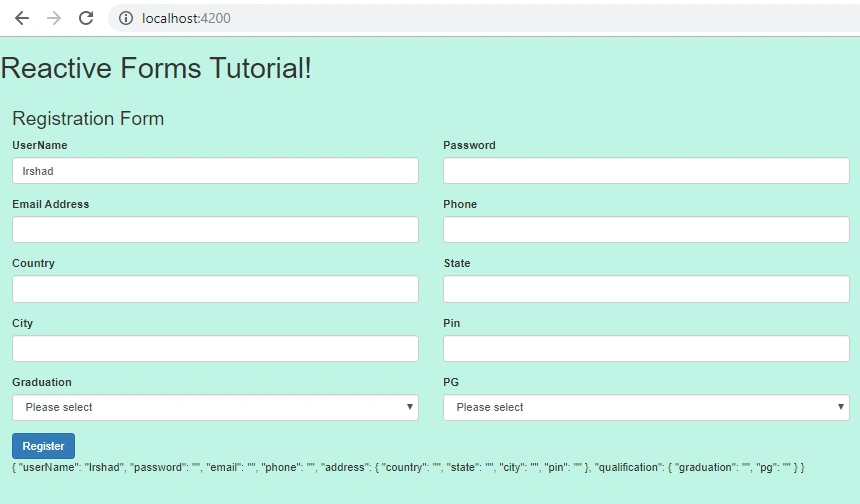

You can see the values that we have printed via interpolation in JSON pipe notation.
Thank you.
Sani YadavPosted Apr 17, 2020, 8:38 AM
Good Article
Mageshwaran RPosted Nov 15, 2019, 12:16 AM
Super Article..
Mageshwaran RPosted Nov 15, 2019, 12:15 AM
Nice Article..
Sourav Kumar DasPosted Nov 6, 2019, 10:35 PM
Nice useful Article.