

Introduction
- For(Initialization; Condition; Increment / Decrement) {
- For(Initialization; Condition; Increment / Decrement) {}
- }
- class triangle {
- x: number;
- constructor(x: number, ) {
- document.getElementById("one");
- for (var i = 1; i <= 10; i++) {
- for (var j = 0; j <= i; j++) {
- var y = x * i;
- var span = document.createElement("span");
- span.innerText = "*";
- document.body.appendChild(span);
- }
- span.innerText = "\n";
- document.body.appendChild(span);
- }
- }
- }
- var p = new triangle(1);
Step 5
Write the code in the app.js file as:
- var triangle = (function() {
- function triangle(x) {
- document.getElementById("one");
- for (var i = 1; i <= 10; i++) {
- for (var j = 0; j <= i; j++) {
- var y = x * i;
- var span = document.createElement("span");
- span.innerText = "*";
- document.body.appendChild(span);
- }
- span.innerText = "\n";
- document.body.appendChild(span);
- }
- }
- return triangle;
- })();
- var p = new triangle(1);
Step 6
Write the following code in the default.htm file:
- < !DOCTYPEhtml >
- <
- html lang = "en"
- xmlns = "http://www.w3.org/1999/xhtml" >
- <
- head >
- <
- meta charset = "utf-8" / >
- <
- title > Example Of Print Triangle < /title>
- <
- link rel = "stylesheet"
- href = "app.css"
- type = "text/css" / >
- <
- /head>
- <
- body >
- <
- h1 id = "one" > Print Triangle < /h1>
- <
- div style = "color: #0094ff"
- id = "content" >
- <
- script src = "app.js" > < /script>
- <
- /div>
- <
- /body>
- <
- /html>
Step 7
Now run the application and the output will look like:
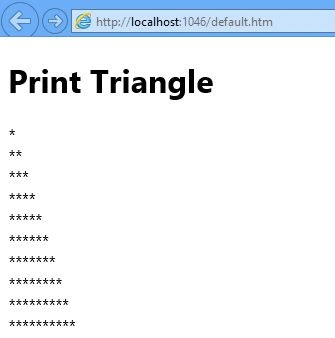 In this article, I explained how to use a nested for loop in TypeScript.
Gowtham RajamanickamPosted Apr 12, 2016, 2:19 AM
Good One, Thanks for sharing