

This step by step tutorial shows how to create our first Tablet PC application.
1. Create a new Windows application using Visual Studio .NET. I call my project "HelloTabletPC".
2. To use the Tablet PC functionality in our application, we have to add reference to the Tablet PC API, which provides access to the library that contains the functionality to access Tablet PC. As you can see from following Figure, I select Microsoft Tablet PC API on the Add Reference dialog and click OK.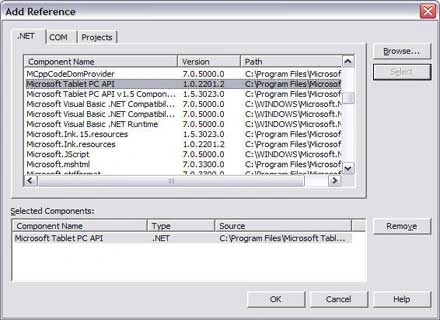
Which adds Microsoft.Ink namespace to our References list as you can see from the following figure.
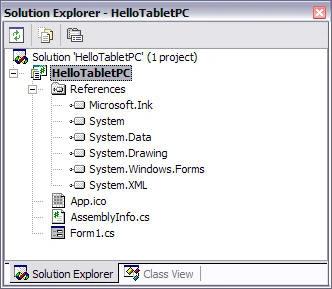
3. The Tablet PC Ink functionality of Tablet PC is defined in the Microsoft.Ink namespace. So we include the namespace in our application by adding the following line of code.
using
Microsoft.Ink;4. Now we write code to enable Ink overlay on the form so we can use Ink or mouse to write on the Form. On the Form's load event handler, we write the following code:
InkOverlay inkOverlay = new InkOverlay();inkOverlay.Handle= this.Handle;
inkOverlay.Enabled = true; This code enables the ink overlay on the form. Which means you can use pen to write on the Form.
5. Now using pen, I write the following on the form. You can even use the mouse.

That's it.
Bahubali GanePosted Apr 21, 2016, 2:51 AM
for microsoft.ink file refer site here : https://www.dllme.com/dll/download/6422/Microsoft.Ink.dll
Bahubali GanePosted Apr 21, 2016, 2:50 AM
C:\Program Files\Reference Assemblies\Microsoft\Tablet PC\v1.7
Bahubali GanePosted Apr 21, 2016, 2:50 AM
go through following link u will get microsoft.ink.dll file and paste that file in following location in ur pc
ahmed hamednaallaPosted Sep 9, 2012, 4:23 PM
i am not finding reference Tablet PC API in vs 2010
Mayur GujrathiPosted May 4, 2011, 1:39 AM
i am not finding reference Tablet PC API in vs 2008
Mayur GujrathiPosted May 4, 2011, 1:28 AM
using pen means what?