

Introduction
In this article, I am going to explain how to do CRUD operations in ASP.NET MVC AngularJS using WEB API 2 with Stored Procedure.
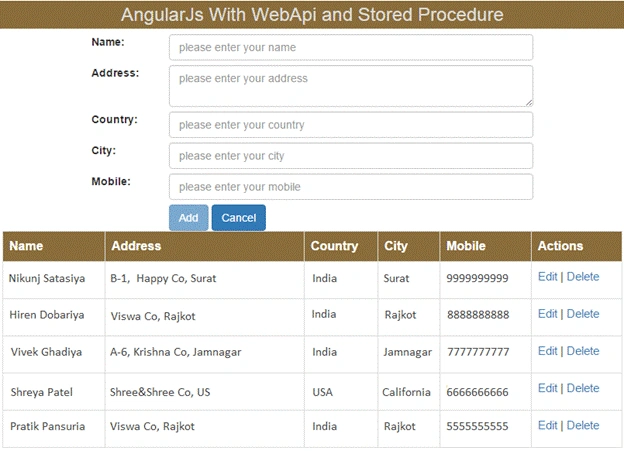
So, you should follow these steps to create a web application.
Step 1
Create a new database table. You can follow this query.
- CREATE TABLE [dbo].[Employee] (
- [Id] INT IDENTITY (1, 1) NOT NULL,
- [Name] NVARCHAR (50) NOT NULL,
- [Address] NVARCHAR (50) NOT NULL,
- [Country] NVARCHAR (50) NOT NULL,
- [City] NVARCHAR (50) NOT NULL,
- [Mobile] NVARCHAR (10) NOT NULL,
- PRIMARY KEY CLUSTERED ([Id] ASC)
- );
Step 2
Create a stored procedure.
- CREATE PROCEDURE sp_InsUpdDelEmployee
- @id INT ,
- @name NVARCHAR(50) ,
- @address NVARCHAR(50) ,
- @country NVARCHAR(50) ,
- @city NVARCHAR(50) ,
- @mobile NVARCHAR(50) ,
- @type VARCHAR(10)
- AS
- BEGIN
- IF ( @type = 'Ins' )
- BEGIN
- INSERT INTO Employee
- VALUES ( @name, @address, @country, @city, @mobile )
- END
- IF ( @type = 'Upd' )
- BEGIN
- UPDATE Employee
- SET Name = @name ,
- [Address] = @address ,
- Country = @country ,
- City = @city ,
- Mobile = @mobile
- WHERE Id = @id
- END
- IF ( @type = 'Del' )
- BEGIN
- DELETE FROM Employee
- WHERE Id = @id
- END
- IF ( @type = 'GetById' )
- BEGIN
- SELECT *
- FROM Employee
- WHERE Id = @id
- END
- SELECT *
- FROM Employee
- END
Step 3
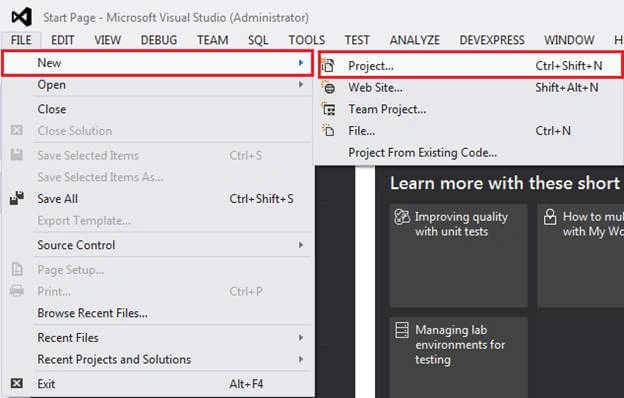
Open Visual Studio and click File > New > Project.
Step 4
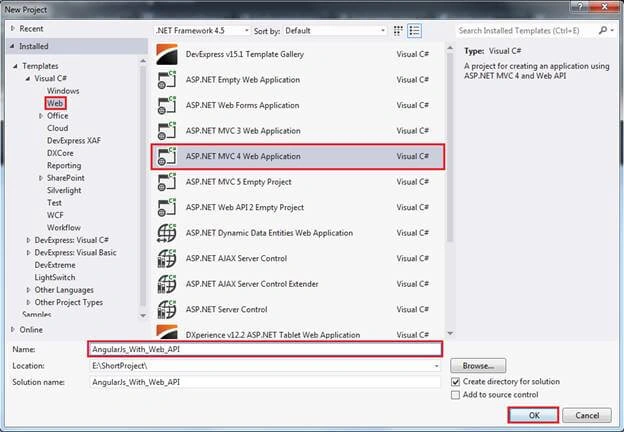
Click on Web from the left-side panel and select ASP.NET MVC4 Web Application, give name, and click OK.
Step 5
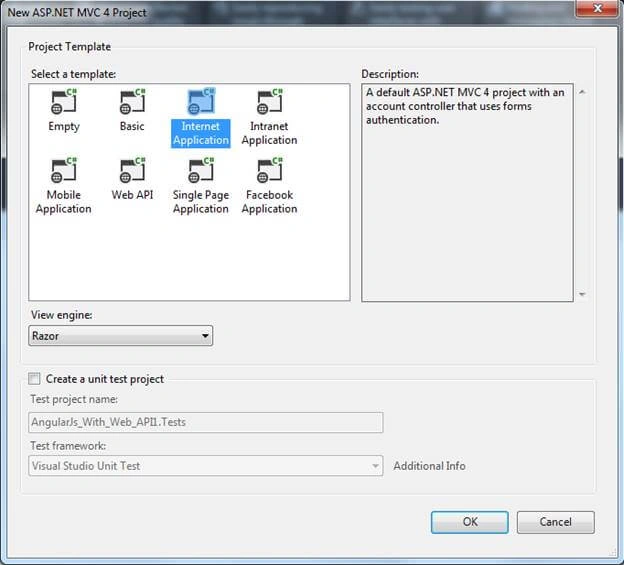
Select Internet Application.
Step 6
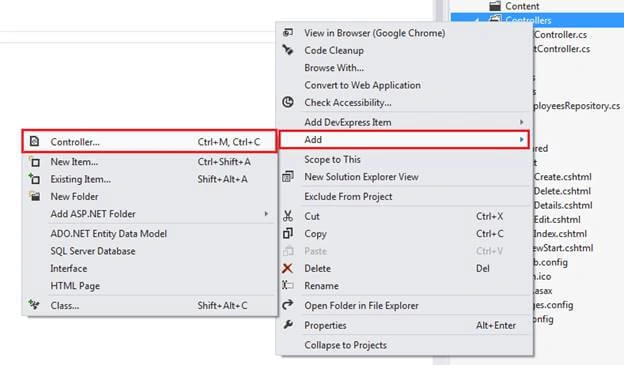
Right-click on Controller and click Add > Controller.
Step 7
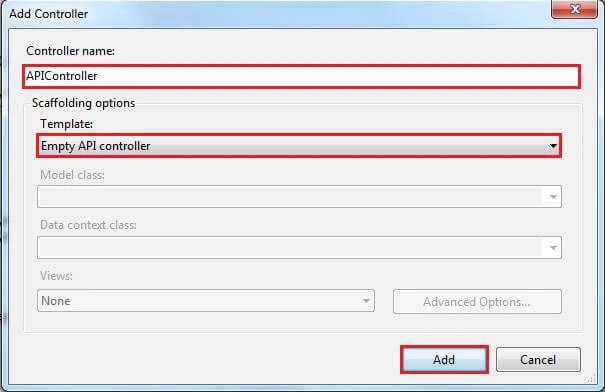
Give a name to your Controller and select Empty API Controller.
Step 8
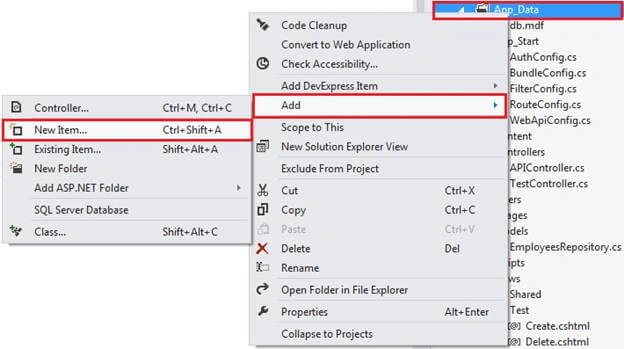
Right-click on App_Data Folder and select Add > New Item.
Step 9
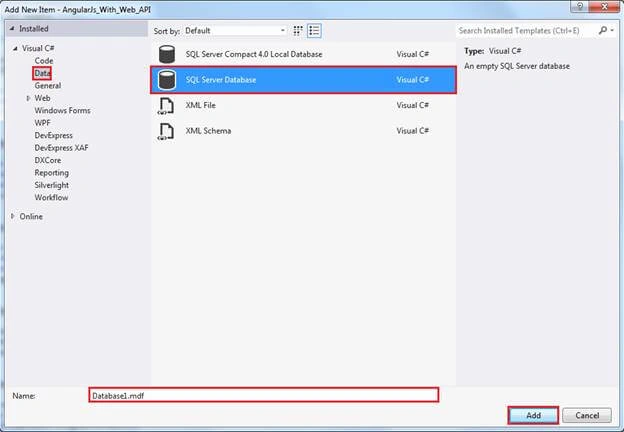
Select SQL Server database, give a name to the database, and click OK.
Step 10
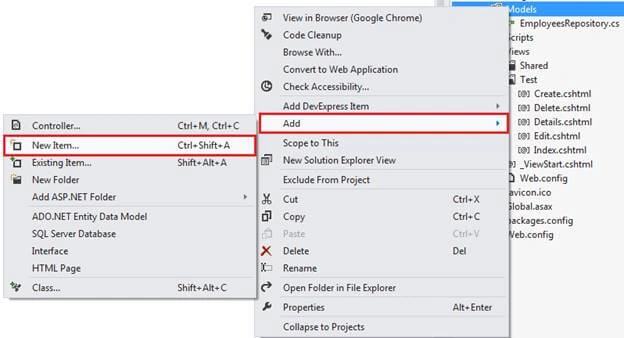
Right-click on Models and click Add > New Item.
Step 11
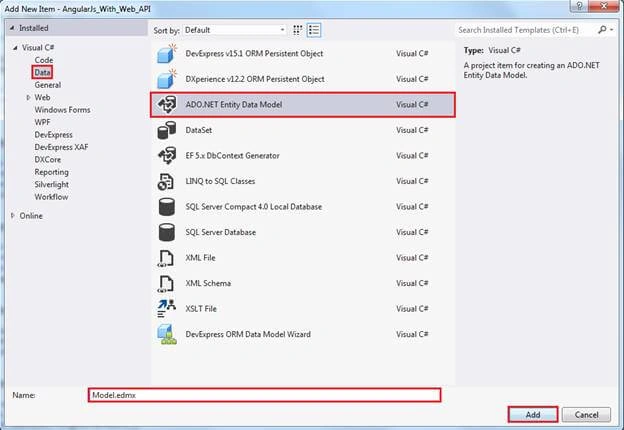
Select ADO.NET Entity Data Model.
Step 12
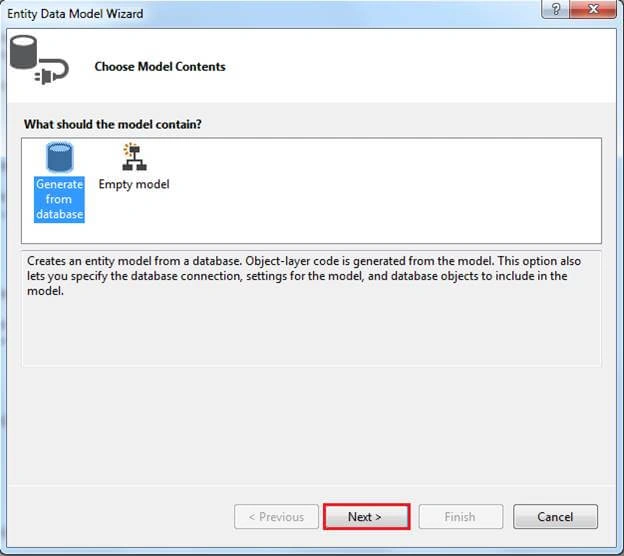
Select Generate from Database and click Next.
Step 13
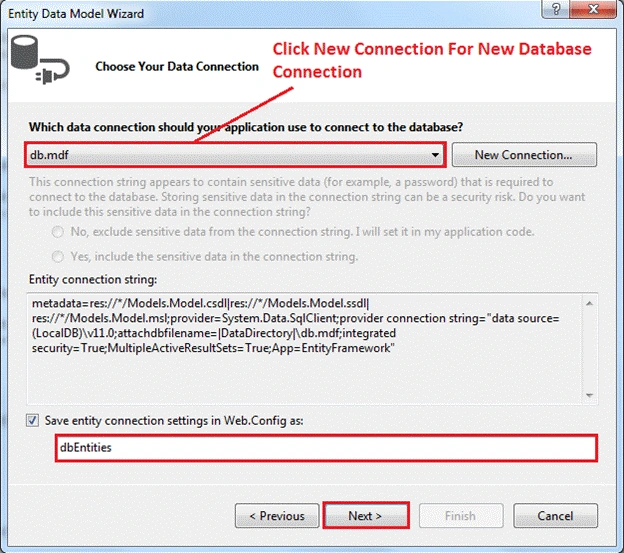
Choose Database Connection and Click Next.
Step 14
Select Created Table and Created Stored Procedure.
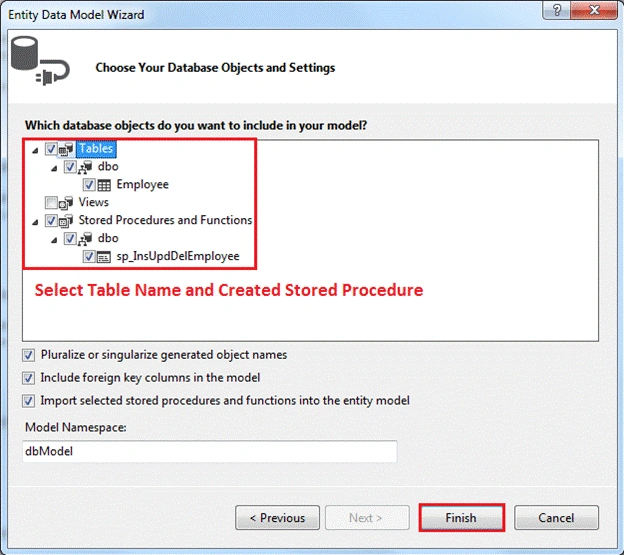
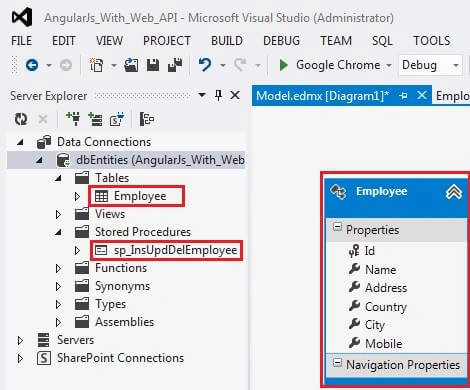
Entity Data Model
Step 15
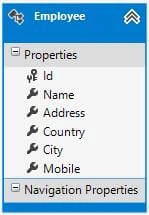
Write Following code in Model
- namespace AngularJs_With_Web_API.Models
- {
- using System;
- using System.Collections.Generic;
- public partial class Employee
- {
- public int Id { get; set; }
- public string Name { get; set; }
- public string Address { get; set; }
- public string Country { get; set; }
- public string City { get; set; }
- public string Mobile { get; set; }
- }
- }
Step 16
Now, Write Following code in BundleConfig.cs File
- using System.Web;
- using System.Web.Optimization;
- namespace AngularJs_With_Web_API
- {
- public class BundleConfig
- {
- // For more information on Bundling, visit http://go.microsoft.com/fwlink/?LinkId=254725
- public static void RegisterBundles(BundleCollection bundles)
- {
- bundles.Add(new ScriptBundle("~/js").Include(
- "~/js/angular.js",
- "~/js/app.js"));
- bundles.Add(new StyleBundle("~/css").Include(
- "~/css/bootstrap.css"));
- }
- }
- }
Step 17
Now, If talking about VIEW then Write Following code in Index.cshtml File
- @Scripts.Render("~/js")
- @Styles.Render("~/css")
- <html ng-app="myApp">
- <head><title>AngularJs With WebApi and Stored Procedure</title></head>
- <body>
- <div ng-controller="employeeController" class="container">
- <div class="row">
- <div class="col-md-12">
- <h3 class="header">AngularJs With WebApi and Stored Procedure</h3>
- </div>
- </div>
- <div class="row">
- <div class="col-md-12">
- <strong class="error">{{error}}</strong>
- <form name="addemployee" style="width: 600px; margin: 0px auto;">
- <div class="form-group">
- <label for="cname" class="col-sm-2 control-label">Name:</label>
- <div class="col-sm-10 space">
- <input type="text" class="form-control" id="cname" placeholder="please enter your name" ng-model="newemployee.Name" required />
- </div>
- </div>
- <div class="form-group">
- <label for="address" class="col-sm-2 control-label">Address:</label>
- <div class="col-sm-10 space">
- <textarea class="form-control" id="address" placeholder="please enter your address" ng-model="newemployee.Address" required></textarea>
- </div>
- </div>
- <div class="form-group">
- <label for="country" class="col-sm-2 control-label">Country:</label>
- <div class="col-sm-10 space">
- <input type="text" class="form-control" id="country" placeholder="please enter your country" ng-model="newemployee.Country" required />
- </div>
- </div>
- <div class="form-group">
- <label for="city" class="col-sm-2 control-label">City:</label>
- <div class="col-sm-10 space">
- <input type="text" class="form-control" id="city" placeholder="please enter your city" ng-model="newemployee.City" required />
- </div>
- </div>
- <div class="form-group">
- <label for="mobile" class="col-sm-2 control-label">Mobile:</label>
- <div class="col-sm-10 space">
- <input type="text" class="form-control" id="mobile" placeholder="please enter your mobile" ng-model="newemployee.Mobile" required />
- </div>
- </div>
- <br />
- <div class="form-group space">
- <div class="col-sm-offset-2 col-sm-10">
- <input type="submit" value="Add" ng-click="add()" ng-show="addShow" ng-disabled="!addemployee.$valid" class="btn btn-primary" />
- <input type="submit" value="Update" ng-click="update()" ng-show="updateShow" ng-disabled="!addemployee.$valid" class="btn btn-primary" />
- <input type="button" value="Cancel" ng-click="cancel()" class="btn btn-primary" />
- </div>
- </div>
- <br />
- </form>
- </div>
- </div>
- <div class="row">
- <div class="col-md-12">
- <div class="table-responsive">
- <table class="table table-bordered table-hover" style="width: 800px; margin-left: 170px;">
- <tr>
- <th>Name</th>
- <th>Address</th>
- <th>Country</th>
- <th>City</th>
- <th>Mobile</th>
- <th>Actions</th>
- </tr>
- <tr ng-repeat="employee in employees">
- <td>
- <p>{{ employee.Name }}</p>
- </td>
- <td>
- <p>{{ employee.Address }}</p>
- </td>
- <td>
- <p>{{ employee.Country }}</p>
- </td>
- <td>
- <p>{{ employee.City }}</p>
- </td>
- <td>
- <p>{{ employee.Mobile }}</p>
- </td>
- <td>
- <p><a ng-click="edit()" href="javascript:void(0);">Edit</a> | <a ng-click="delete()" href="javascript:void(0);">Delete</a></p>
- </td>
- </tr>
- </table>
- </div>
- </div>
- </div>
- </div>
- </body>
- </html>
Step 18
Now, Write Following code in App.js File.
- var app = angular.module('myApp', []);
- app.controller('employeeController', ['$scope', '$http', employeeController]);
- // Angularjs Controller
- function employeeController($scope, $http) {
- // Declare variable
- $scope.loading = true;
- $scope.updateShow = false;
- $scope.addShow = true;
- // Get All Employee
- $http.get('/api/EmployeeAPI/').success(function (data) {
- $scope.employees = data;
- }).error(function () {
- $scope.error = "An Error has occured while loading posts!";
- });
- //Insert Employee
- $scope.add = function () {
- $scope.loading = true;
- $http.post('/api/EmployeeAPI/', this.newemployee).success(function (data) {
- $scope.employees = data;
- $scope.updateShow = false;
- $scope.addShow = true;
- $scope.newemployee = '';
- }).error(function (data) {
- $scope.error = "An Error has occured while Adding employee! " + data;
- });
- }
- //Edit Employee
- $scope.edit = function () {
- var Id = this.employee.Id;
- $http.get('/api/EmployeeAPI/' + Id).success(function (data) {
- $scope.newemployee = data;
- $scope.updateShow = true;
- $scope.addShow = false;
- }).error(function () {
- $scope.error = "An Error has occured while loading posts!";
- });
- }
- $scope.update = function () {
- $scope.loading = true;
- console.log(this.newemployee);
- $http.put('/api/EmployeeAPI/', this.newemployee).success(function (data) {
- $scope.employees = data;
- $scope.updateShow = false;
- $scope.addShow = true;
- $scope.newemployee = '';
- }).error(function (data) {
- $scope.error = "An Error has occured while Saving employee! " + data;
- });
- }
- //Delete Employee
- $scope.delete = function () {
- var Id = this.employee.Id;
- $scope.loading = true;
- $http.delete('/api/EmployeeAPI/' + Id).success(function (data) {
- $scope.employees = data;
- }).error(function (data) {
- $scope.error = "An Error has occured while Saving employee! " + data;
- });
- }
- //Cancel Employee
- $scope.cancel = function () {
- $scope.updateShow = false;
- $scope.addShow = true;
- $scope.newemployee = '';
- }
- }
Step 19
Now, Write Following code in ControllerFile.
- using System;
- using System.Collections.Generic;
- using System.Linq;
- using System.Web;
- using System.Web.Mvc;
- namespace AngularJs_With_Web_API.Controllers
- {
- public class TestController : Controller
- {
- public ActionResult Index()
- {
- return View();
- }
- }
- }
Step 20
Now, Write Following code in WebApiConfig.cs File
- using System;
- using System.Collections.Generic;
- using System.Linq;
- using System.Web.Http;
- namespace AngularJs_With_Web_API
- {
- public static class WebApiConfig
- {
- public static void Register(HttpConfiguration config)
- {
- config.Routes.MapHttpRoute(
- name: "DefaultApi",
- routeTemplate: "api/{controller}/{id}",
- defaults: new { id = RouteParameter.Optional }
- );
- // Uncomment the following line of code to enable query support for actions with an IQueryable or IQueryable return type.
- // To avoid processing unexpected or malicious queries, use the validation settings on QueryableAttribute to validate incoming queries.
- // For more information, visit http://go.microsoft.com/fwlink/?LinkId=279712.
- //config.EnableQuerySupport();
- }
- }
- }
Step 21
Now, Write Following code in API Controller
- using AngularJs_With_Web_API.Models;
- using System;
- using System.Collections.Generic;
- using System.Linq;
- using System.Net;
- using System.Net.Http;
- using System.Web.Http;
- using System.Data;
- using System.Data.Entity.Infrastructure;
- namespace AngularJs_With_Web_API.Controllers
- {
- public class EmployeeAPIController : ApiController
- {
- // Get All The Employee
- [HttpGet]
- public List Get()
- {
- List emplist = new List();
- using (dbEntities db = new dbEntities())
- {
- var results = db.sp_InsUpdDelEmployee(0, "", "", "", "", "", "Get").ToList();
- foreach (var result in results)
- {
- var employee = new Employee()
- {
- Id = result.Id,
- Name = result.Name,
- Address = result.Address,
- Country = result.Country,
- City = result.City,
- Mobile = result.Mobile
- };
- emplist.Add(employee);
- }
- return emplist;
- }
- }
- // Get Employee By Id
- public Employee Get(int id)
- {
- using (dbEntities db = new dbEntities())
- {
- Employee employee = db.Employees.Find(id);
- if (employee == null)
- {
- throw new HttpResponseException(Request.CreateResponse(HttpStatusCode.NotFound));
- }
- return employee;
- }
- }
- // Insert Employee
- public HttpResponseMessage Post(Employee employee)
- {
- if (ModelState.IsValid)
- {
- using (dbEntities db = new dbEntities())
- {
- var emplist = db.sp_InsUpdDelEmployee(0, employee.Name, employee.Address, employee.Country, employee.City, employee.Mobile, "Ins").ToList();
- HttpResponseMessage response = Request.CreateResponse(HttpStatusCode.Created, emplist);
- return response;
- }
- }
- else
- {
- return Request.CreateErrorResponse(HttpStatusCode.BadRequest, ModelState);
- }
- }
- // Update Employee
- public HttpResponseMessage Put(Employee employee)
- {
- List emplist = new List();
- if (!ModelState.IsValid)
- {
- return Request.CreateErrorResponse(HttpStatusCode.BadRequest, ModelState);
- }
- using (dbEntities db = new dbEntities())
- {
- try
- {
- emplist = db.sp_InsUpdDelEmployee(employee.Id, employee.Name, employee.Address, employee.Country, employee.City, employee.Mobile, "Upd").ToList();
- }
- catch (DbUpdateConcurrencyException ex)
- {
- return Request.CreateErrorResponse(HttpStatusCode.NotFound, ex);
- }
- }
- return Request.CreateResponse(HttpStatusCode.OK, emplist);
- }
- // Delete employee By Id
- public HttpResponseMessage Delete(int id)
- {
- using (dbEntities db = new dbEntities())
- {
- List emplist = new List();
- var results = db.sp_InsUpdDelEmployee(id, "", "", "", "", "", "GetById").ToList();
- if (results.Count == 0)
- {
- return Request.CreateResponse(HttpStatusCode.NotFound);
- }
- try
- {
- emplist = db.sp_InsUpdDelEmployee(id, "", "", "", "", "", "Del").ToList();
- }
- catch (DbUpdateConcurrencyException ex)
- {
- return Request.CreateErrorResponse(HttpStatusCode.NotFound, ex);
- }
- return Request.CreateResponse(HttpStatusCode.OK, emplist);
- }
- }
- // Prevent Memory Leak
- protected override void Dispose(bool disposing)
- {
- using (dbEntities db = new dbEntities())
- db.Dispose();
- base.Dispose(disposing);
- }
- }
- }
Summary
In this article, I clearly explained how to perform CURD operations in ASP.NET MVC with AngulerJS using Web API and also explain how to use Stored Procedure. I hope this article will help the beginners.
Andrew GlasgowPosted Oct 8, 2018, 10:15 PM
This really helped me. One question. For the public Employee Get(int id) , why do you use "db.Employees.Find(id)" instead of executing stored proc like the first part of the delete? Is it better to do this way?
Kartik VaghasiyaPosted Jun 22, 2018, 11:34 PM
Very good article nikunj..
sreenivasa kPosted Dec 19, 2017, 1:11 AM
Nice article and thanks for sharing
Sagar Pandurang KapPosted Dec 18, 2017, 11:45 PM
Nice kind of explaination easy to understand.
Hiten PandyaPosted Dec 18, 2017, 11:42 PM
Good Share..................................