

Introduction
In the previous article, we have learned about the core concepts of Redux, along with their implementation. Now, in this article, we will be learning about various functions provided by the Redux library with their importance and usage.
Multiple Reducers
Redux has the pattern of a single store principle to maintain one immutable store; however, it also has the concept of multiple reducers.
The multiple reducers concept is to handle single functionality per reducer.
For example, we can have 2 reducers. One is to manage the user login and other is to update the user details
So, I am updating my index.js code as below.
- const redux = require('redux')
- console.log("Index js in redux app")
- const LOGIN = 'LOGIN'
- const USER_DETAIL = 'USER_DETAIL'
- // action
- function loggedIn(user, pwd) {
- return {
- type: LOGIN,
- username: user,
- password: pwd,
- loggedInStatus: ""
- }
- }
- function updateUserName(FirstName,LastName,UserName){
- return{
- type:USER_DETAIL,
- FirstName : FirstName,
- LastName:LastName,
- UserName:UserName
- }
- }
- function callLoginApi(username, password) {
- if (username === 'admin' && password === 'admin') {
- return "Login Success";
- } else {
- return 'Invalid email and password';
- }
- }
- const initialState = {
- username: "test",
- password: "test",
- loggedInStatus: "",
- FirstName : "",
- LastName : "",
- UserName :""
- }
- const reducer = (state = initialState, action) => {
- switch (action.type) {
- case LOGIN:
- return {
- ...state,
- username: action.username,
- password: action.password,
- loggedInStatus: callLoginApi(action.username, action.password)
- }
- case USER_DETAIL:
- return {
- ...state,
- FirstName: action.FirstName,
- LastName: action.LastName,
- UserName: action.UserName
- }
- default:
- return state
- }
- }
- const store = redux.createStore(reducer)
- console.log("Initial State", store.getState())
- const unsubscribe = store.subscribe(() => console.log('Updated state', store.getState()))
- store.dispatch(loggedIn("user", "user"))
- store.dispatch(loggedIn("testing", "testing"))
- store.dispatch(loggedIn("admin", "admin"))
- store.dispatch(updateUserName("priyanka", "jain","[email protected]"))
- store.dispatch(updateUserName("test", "test","[email protected]"))
- unsubscribe()
The output will display as below.
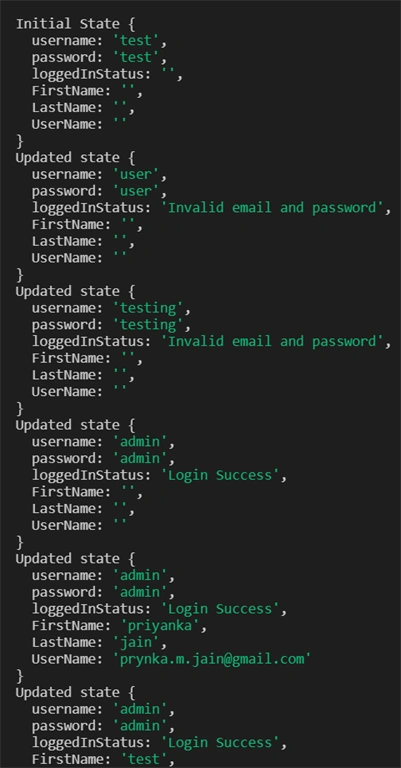
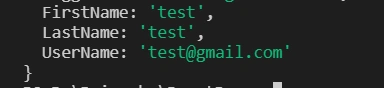
As per the above code, we have defined 2 cases in the reducer. Now, we will see it by creating multiple reducers as below,
- const redux = require('redux')
- console.log("Index js in redux app")
- const LOGIN = 'LOGIN'
- const USER_DETAIL = 'USER_DETAIL'
- // action
- function loggedIn(user, pwd) {
- return {
- type: LOGIN,
- username: user,
- password: pwd,
- loggedInStatus: ""
- }
- }
- function updateUserName(FirstName, LastName, UserName) {
- return {
- type: USER_DETAIL,
- FirstName: FirstName,
- LastName: LastName,
- UserName: UserName
- }
- }
- function callLoginApi(username, password) {
- if (username === 'admin' && password === 'admin') {
- return "Login Success";
- } else {
- return 'Invalid email and password';
- }
- }
- const initialLoginState = {
- username: "test",
- password: "test",
- loggedInStatus: ""
- }
- const initialUserState = {
- FirstName: "",
- LastName: "",
- UserName: ""
- }
- const loginReducer = (state = initialLoginState, action) => {
- switch (action.type) {
- case LOGIN:
- return {
- ...state,
- username: action.username,
- password: action.password,
- loggedInStatus: callLoginApi(action.username, action.password)
- }
- default:
- return state
- }
- }
- const UserReducer = (state = initialUserState, action) => {
- switch (action.type) {
- case USER_DETAIL:
- return {
- ...state,
- FirstName: action.FirstName,
- LastName: action.LastName,
- UserName: action.UserName
- }
- default:
- return state
- }
- }
Now after updating the code, we have 2 initial states and 2 reducer methods but there is a problem that store accepts only 1 reducer method so to solve that issue we have a function in library named combineReducer(),
combineReducer()
The combineReducers helper function turns an object whose values are different reducing functions into a single reducing function you can pass to createStore.
The result of the reducer calls every child reducer and collects its result into a single state object. The state produced by combineReducer() namespace the state of each reducer under their keys are passed to combine Reducer().
Syntax
combineReducer({key1: reducerName1,key2:reducerName2})
A state can be controlled by key names by using different keys for the reducers in the passed objects.
For example, for the above code, you can call the following
- const rootReducer = combineReducer({
- login : loginReducer,
- userDetail : UserReducer
- })
- const store = createStore(rootReducer)
Now, the final code goes as below.
- const redux = require('redux')
- console.log("Index js in redux app")
- const createStore = redux.createStore
- const combineReducer = redux.combineReducers
- const LOGIN = 'LOGIN'
- const USER_DETAIL = 'USER_DETAIL'
- // action
- function loggedIn(user, pwd) {
- return {
- type: LOGIN,
- username: user,
- password: pwd,
- loggedInStatus: ""
- }
- }
- function updateUserName(FirstName, LastName, UserName) {
- return {
- type: USER_DETAIL,
- FirstName: FirstName,
- LastName: LastName,
- UserName: UserName
- }
- }
- function callLoginApi(username, password) {
- if (username === 'admin' && password === 'admin') {
- return "Login Success";
- } else {
- return 'Invalid email and password';
- }
- }
- const initialLoginState = {
- username: "test",
- password: "test",
- loggedInStatus: ""
- }
- const initialUserState = {
- FirstName: "",
- LastName: "",
- UserName: ""
- }
- const loginReducer = (state = initialLoginState, action) => {
- switch (action.type) {
- case LOGIN:
- return {
- ...state,
- username: action.username,
- password: action.password,
- loggedInStatus: callLoginApi(action.username, action.password)
- }
- default:
- return state
- }
- }
- const UserReducer = (state = initialUserState, action) => {
- switch (action.type) {
- case USER_DETAIL:
- return {
- ...state,
- FirstName: action.FirstName,
- LastName: action.LastName,
- UserName: action.UserName
- }
- default:
- return state
- }
- }
- const rootReducer = combineReducer({
- login : loginReducer,
- userDetail : UserReducer
- })
- const store = createStore(rootReducer)
- console.log("Initial State", store.getState())
- const unsubscribe = store.subscribe(() => console.log('Updated state', store.getState()))
- store.dispatch(loggedIn("user", "user"))
- store.dispatch(loggedIn("admin", "admin"))
- store.dispatch(updateUserName("priyanka", "jain", "[email protected]"))
- store.dispatch(updateUserName("test", "test", "[email protected]"))
- unsubscribe()
It will display the output as below.
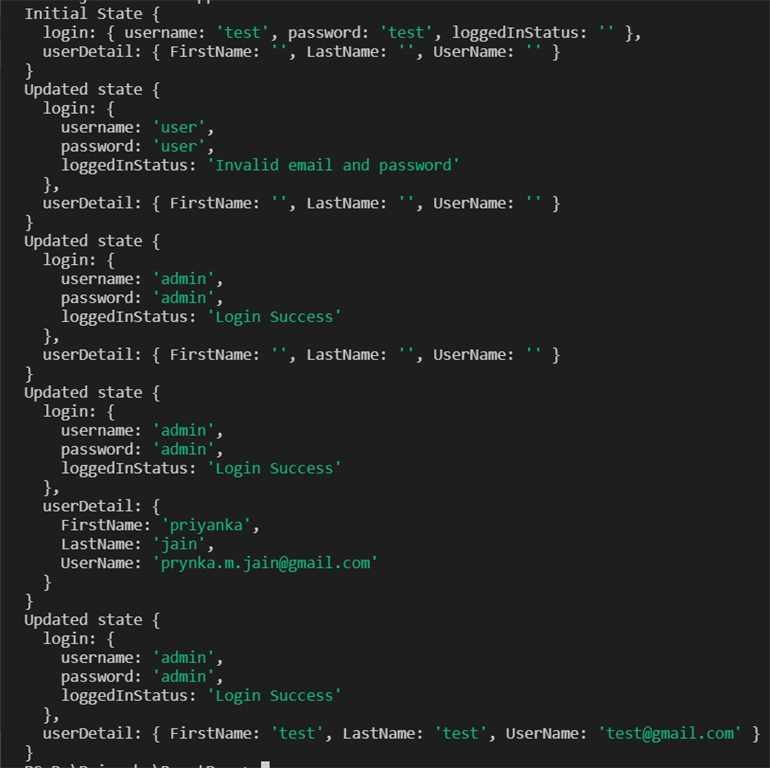
So, this way, we can implement multiple reducers in Redux. It may be used to maintain AuthReducer, ProfileReducer and so on.
Important points while using combineReducer()
There are some basic rules that must be followed while using combineReducer() Like,
- For any action in the reducer, it must return a state given as a first argument.
- It should never return undefined so while writing code should have proper return statement and error should be managed properly else combineReducer will throw it instead of letting the error manifest itself somewhere else.
Summary
In this article, we have learned about the multiple reducers concept and how it can be implemented using the combineReducer() method in Redux. You can download the source code attached along with this article. Now in the next article we will be learning about Middleware in Redux along with Async actions.
Murali KrishnanPosted Jan 8, 2020, 1:00 AM
Hi Your content is nice.If you can give with proper separation then it will more useful for maintain the code and project implementation
Syed ShakeerPosted Nov 22, 2019, 4:06 PM
Good Explanation with easy example.