

Step 1. Create a New WCF Service Project (WCF Service Library)
- On the File menu, click New Project.
- In the New Project dialog box under Project types, expand Visual C#, click WCF, and select WCF Service Library. In the Name box, type "DemoMultipartWCF". In the Solution name, type "WCFDemo" and then click OK.
- Now, delete the default created Interface, Class perspective "IService1.cs" and "Service1.cs".
- Add a New Interface by right-clicking on DemoMultipartWCF(project) > Add > New Item and selecting "WCF Service". Name it as "Users. svc", and click ADD.
Step 2. Create an Interface and implement its body.
- Create a New Interface in IUsers.cs File (Paste the code, given below)
[OperationContract] [WebInvoke( Method = "POST", ResponseFormat = WebMessageFormat.Json, BodyStyle = WebMessageBodyStyle.WrappedResponse, UriTemplate = "UpdateUserDetail" )] bool UpdateUserDetail(Stream stream); - Implement the body of the UpdateUserDetail Interface in Users.svc file (Paste the code, given below)
public bool UpdateUserDetail(Stream stream)
{
return false;
}
Step 3. Create a MultipartParser to read the requested form data
Create a New folder named "DataContract" in your project, and add the "CommonDC" class to the folder. Paste the code, given below, in the "CommonDC.cs File" class.
Uses Of All Below Method
- Parse (Stream stream, Encoding encoding): This method is used to check the input stream in UTF8 (Unicode Transformation Format).
- ParseParameter (Stream stream, Encoding encoding): This method is used to parse the parameter from the stream
- IndexOf(byte[] searchWithin, byte[] serachFor, int startIndex): This method is separate from all the requested parameters, which are in the stream.
- ToByteArray(Stream stream): This method is used to convert the stream to byteArray
public class MultipartParser
{
    private byte[] requestData;
    // Require Namespace: using System.IO;
    public MultipartParser(Stream stream)
    {
        // Require Namespace: using System.Text;
        this.Parse(stream, Encoding.UTF8);
        ParseParameter(stream, Encoding.UTF8);
    }

    public MultipartParser(Stream stream, Encoding encoding)
    {
        this.Parse(stream, encoding);
    }

    private void Parse(Stream stream, Encoding encoding)
    {
        this.Success = false;
        // Read the stream into a byte array
        byte[] data = ToByteArray(stream);
        requestData = data;
        // Copy to a string for header parsing
        string content = encoding.GetString(data);
        // The first line should contain the delimiter
        int delimiterEndIndex = content.IndexOf("\r\n");
        if (delimiterEndIndex > -1)
        {
            string delimiter = content.Substring(0, content.IndexOf("\r\n"));
            // Require Namespace: using System.Text.RegularExpressions;
            // Look for Content-Type
            Regex re = new Regex(@"(?<=Content\-Type:)(.*?)(?=\r\n\r\n)");
            Match contentTypeMatch = re.Match(content);
            // Look for filename
            re = new Regex(@"(?<=filename\=\"")(.* ? )( ?  =  \"")");
            Match filenameMatch = re.Match(content);
            // Did we find the required values?
            if (contentTypeMatch.Success && filenameMatch.Success)
            {
                // Set properties
                this.ContentType = contentTypeMatch.Value.Trim();
                this.Filename = filenameMatch.Value.Trim();
                // Get the start & end indexes of the file contents
                int startIndex = contentTypeMatch.Index + contentTypeMatch.Length + "\r\n\r\n".Length;
                byte[] delimiterBytes = encoding.GetBytes("\r\n" + delimiter);
                int endIndex = IndexOf(data, delimiterBytes, startIndex);
                int contentLength = endIndex - startIndex;
                // Extract the file contents from the byte array
                byte[] fileData = new byte[contentLength];
                Buffer.BlockCopy(data, startIndex, fileData, 0, contentLength);
                this.FileContents = fileData;
                this.Success = true;
            }
        }
    }

    private void ParseParameter(Stream stream, Encoding encoding)
    {
        this.Success = false;
        // Read the stream into a byte array
        byte[] data;
        if (requestData.Length == 0)
        {
            data = ToByteArray(stream);
        }
        else
        {
            data = requestData;
        }
        // Copy to a string for header parsing
        string content = encoding.GetString(data);
        // The first line should contain the delimiter
        int delimiterEndIndex = content.IndexOf("\r\n");
        if (delimiterEndIndex > -1)
        {
            string delimiter = content.Substring(0, content.IndexOf("\r\n"));
            string[] splitContents = content.Split(new[] { delimiter }, StringSplitOptions.RemoveEmptyEntries);
            foreach (string t in splitContents)
            {
                // Look for Content-Type
                Regex contentTypeRegex = new Regex(@"(?<=Content\-Type:)(.*?)(?=\r\n\r\n)");
                Match contentTypeMatch = contentTypeRegex.Match(t);
                // Look for name of parameter
                Regex re = new Regex(@"(?<=name\=\"")(.*)");
                Match name = re.Match(t);
                // Look for filename
                re = new Regex(@"(?<=filename\=\"")(.* ? )( ?  =  \"")");
                Match filenameMatch = re.Match(t);
                // Did we find the required values?
                if (name.Success || filenameMatch.Success)
                {
                    // Set properties
                    //this.ContentType = name.Value.Trim();
                    int startIndex;
                    if (filenameMatch.Success)
                    {
                        this.Filename = filenameMatch.Value.Trim();
                    }
                    if (contentTypeMatch.Success)
                    {
                        // Get the start & end indexes of the file contents
                        startIndex = contentTypeMatch.Index + contentTypeMatch.Length + "\r\n\r\n".Length;
                    }
                    else
                    {
                        startIndex = name.Index + name.Length + "\r\n\r\n".Length;
                    }
                    //byte[] delimiterBytes = encoding.GetBytes("\r\n" + delimiter);
                    //int endIndex = IndexOf(data, delimiterBytes, startIndex);
                    //int contentLength = t.Length - startIndex;
                    string propertyData = t.Substring(startIndex - 1, t.Length - startIndex);
                    // Extract the file contents from the byte array
                    //byte[] paramData = new byte[contentLength];
                    //Buffer.BlockCopy(data, startIndex, paramData, 0, contentLength);
                    MyContent myContent = new MyContent();
                    myContent.Data = encoding.GetBytes(propertyData);
                    myContent.StringData = propertyData;
                    myContent.PropertyName = name.Value.Trim().TrimEnd('"');
                    if (MyContents == null) MyContents = new List < MyContent > ();
                    MyContents.Add(myContent);
                    this.Success = true;
                }
            }
        }
    }

    private int IndexOf(byte[] searchWithin, byte[] serachFor, int startIndex)
    {
        int index = 0;
        int startPos = Array.IndexOf(searchWithin, serachFor[0], startIndex);
        if (startPos != -1)
        {
            while ((startPos + index) < searchWithin.Length)
            {
                if (searchWithin[startPos + index] == serachFor[index])
                {
                    index++;
                    if (index == serachFor.Length)
                    {
                        return startPos;
                    }
                }
                else
                {
                    startPos = Array.IndexOf < byte > (searchWithin, serachFor[0], startPos + index);
                    if (startPos == -1)
                    {
                        return -1;
                    }
                    index = 0;
                }
            }
        }
        return -1;
    }

    private byte[] ToByteArray(Stream stream)
    {
        byte[] buffer = new byte[32768];
        using(MemoryStream ms = new MemoryStream())
        {
            while (true)
            {
                int read = stream.Read(buffer, 0, buffer.Length);
                if (read <= 0) return ms.ToArray();
                ms.Write(buffer, 0, read);
            }
        }
    }

    public List < MyContent > MyContents
    {
        get;
        set;
    }

    public bool Success
    {
        get;
        private set;
    }

    public string ContentType
    {
        get;
        private set;
    }

    public string Filename
    {
        get;
        private set;
    }

    public byte[] FileContents
    {
        get;
        private set;
    }
}

public class MyContent
{
    public byte[] Data
    {
        get;
        set;
    }

    public string PropertyName
    {
        get;
        set;
    }

    public string StringData
    {
        get;
        set;
    }
}
Step 4. Implement Pre-Required Method like SaveImageFile & GetEncoder.
Create a Method to save the image file.
public static bool SaveImageFile(byte[] ImageFileContent, string ImagePathWithImageName)
{
    try {
        //Require Namespace: using System.Drawing
        Image image;
        //Read Image File
        using(MemoryStream ms = new MemoryStream(ImageFileContent)) {
            image = Image.FromStream(ms);
        }
        Bitmap bmp = new Bitmap(image);
        //Require Namespace: System.Drawing.Imaging
        ImageCodecInfo jgpEncoder = GetEncoder(ImageFormat.Jpeg);
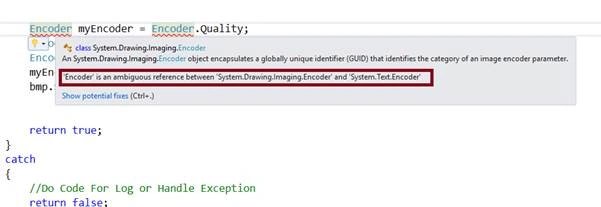
        //We need to write Encoder with Root otherwise it is an ambiguous between "System.Drawing.Imaging.Encoder" and "System.Text.Encoder"
        System.Drawing.Imaging.Encoder myEncoder = System.Drawing.Imaging.Encoder.Quality;
        EncoderParameters myEncoderParameters = new EncoderParameters(1);
        EncoderParameter myEncoderParameter = new EncoderParameter(myEncoder, 40 L);
        myEncoderParameters.Param[0] = myEncoderParameter;
        bmp.Save(ImagePathWithImageName, jgpEncoder, myEncoderParameters);
        return true;
    } catch {
        //Do Code For Log or Handle Exception
        return false;
    }
}
Note. We need to write Encoder with Root, elsetheret is an ambiguity between "System.Drawing.Imaging.Encoder" and "System.Text.Encoder".
Create a method to retrieve the image codecs.
public static ImageCodecInfo GetEncoder(ImageFormat format)
{
    ImageCodecInfo[] codecs = ImageCodecInfo.GetImageDecoders();
    foreach(ImageCodecInfo codec in codecs) {
        if (codec.FormatID == format.Guid) {
            return codec;
        }
    }
    return null;
}
What is the use of ImageCodecInf?
It provides the necessary storage members and methods to retrieve all the pertinent information about the installed image codecs.
Step 5. Implement our interface - UpdateUserDetail
Now, it's time to implement our interface - UpdateUserDetail. (Paste the code, given below)
public bool UpdateUserDetail(Stream stream) {
    try {
        //Create an Object of byte[]
        byte[] buf = new byte[10000000];
        //Initialise an Object of MultipartParser Class With Requested Stream
        MultipartParser parser = new MultipartParser(stream);
        //Check that we have not null value in requested stream
        if (parser != null && parser.Success) {
            //Fetch Requested Formdata (content)
            //(for this example our requested formdata are UserName[String])
            foreach(var item in parser.MyContents) {
                    //Check our requested fordata
                    if (item.PropertyName == "UserName") {
                        string RequestedName = item.StringData;
                    }
                }
                //Create a GUID for Image Name
            string ImageName = Guid.NewGuid().ToString();
            //Image Path
            string SaveImagePath = "D:/DemoProject/DemoMultipartWCF/DemoMultipartWCF/MyFile/";
            //Ensure That WE have the right path and Directory
            if (!Directory.Exists(SaveImagePath)) {
                //If Directory Not Exists Then Create a Directory
                Directory.CreateDirectory(SaveImagePath);
            }
            //Fetch File Content & Save that Image HERE (for this example our requested FileContent is ProfilePicture[File])
            string ImagePathWithImageName = SaveImagePath + ImageName + ".bmp";
            SaveImageFile(parser.FileContents, ImagePathWithImageName);
            return true;
        }
        return false;
    } catch {
        //Do Code For Log or Handle Exception
        return false;
    }
}
Step 6. Ensure the following setting
Now, all is done. Ensure you have the following setting in your Web .config.
<system.serviceModel>
    <bindings>
        <basicHttpBinding>
            <binding maxReceivedMessageSize="999999999" maxBufferSize="999999999" maxBufferPoolSize="9999999999" name="ITransactionProcessor">
                <readerQuotas maxDepth="32" maxArrayLength="999999999" maxStringContentLength="999999999" />
                <security mode="TransportWithMessageCredential" /> </binding>
        </basicHttpBinding>
    </bindings>
    <behaviors>
        <serviceBehaviors>
            <behavior>
                <!-- To avoid disclosing metadata information, set the values below to false before deployment -->
                <serviceMetadata httpGetEnabled="true" httpsGetEnabled="true" />
                <!-- To receive exception details in faults for debugging purposes, set the value below to true. Set to false before deployment to avoid disclosing exception information -->
                <serviceDebug includeExceptionDetailInFaults="true" /> </behavior>
        </serviceBehaviors>
        <endpointBehaviors>
            <behavior name="web">
                <webHttp helpEnabled="true" /> </behavior>
        </endpointBehaviors>
    </behaviors>
    <protocolMapping>
        <add binding="basicHttpsBinding" scheme="https" /> </protocolMapping>
    <serviceHostingEnvironment aspNetCompatibilityEnabled="true" multipleSiteBindingsEnabled="true" />
    <services>
        <service name="DemoMultipartWCF.Users">
            <endpoint name="UsersXML" address="" binding="basicHttpBinding" contract="DemoMultipartWCF.IUsers"></endpoint>
            <endpoint name="UsersJSON" address="json" binding="webHttpBinding" contract="DemoMultipartWCF.IUsers" behaviorConfiguration="web"></endpoint>
        </service>
    </services>
    <client>
        <endpoint address="https://ics2wstest.ic3.com/commerce/1.x/transactionProcessor" binding="basicHttpBinding" bindingConfiguration="ITransactionProcessor" contract="com.cybersource.api.ITransactionProcessor" name="portXML" /> </client>
</system.serviceModel>
Now, it's complementary time.
How to test this WCF Service?
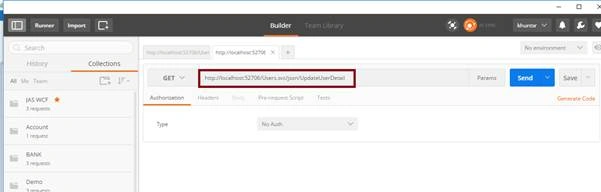
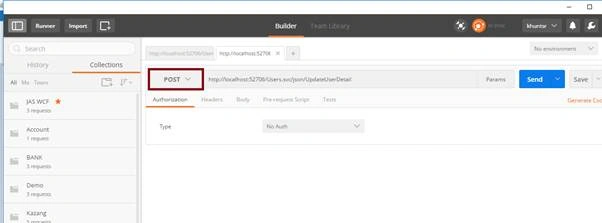
Select POST Method.
Select Body and Fill Form Data. (Requested Data: Username & Requested File: ProfilePicture [browse and select the image]).
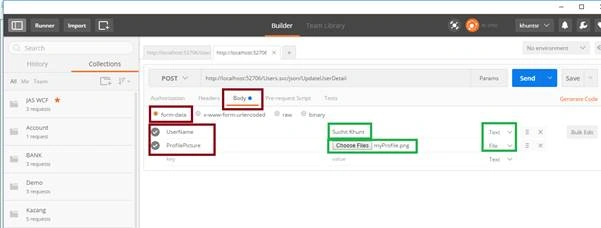
Now, just hit Send and here we go.
Martin KlarqvistPosted Apr 19, 2022, 11:27 AM
In case the filename contains "international characters", there is an error when trying to open the file after. For example, if the filename is "boat.png" - it works. If the file name is "b?t.png" - the file is created on the server, but can't be view afterwards...
Vanraj ChudasamaPosted May 7, 2021, 2:08 PM
Parser.FileContents in getting null please ans
amit poddarPosted May 29, 2020, 11:34 AM
Hey What is the requested URL. on First Image of Postman, Image is kind of blurry.
Ankit KanojiaPosted Mar 12, 2020, 2:23 AM
Thank you so much shaikh dawood for being interactive on article post
Ankit KanojiaPosted Mar 12, 2020, 2:22 AM
Thank you so much Vignesh Mani
Ankit KanojiaPosted Mar 12, 2020, 2:21 AM
Pratik N are you still getting an error? You found resolution or not? in case of not found then elaborate the issue to me I will make it resolve.
Ankit KanojiaPosted Mar 12, 2020, 2:13 AM
Reena Philip please add 'Content-Type:multipart/form-data' in your header parameter in POSTMAN
Ankit KanojiaPosted Mar 12, 2020, 2:12 AM
Thank you so much, Pratik for being interactive for this article discussion.
Ankit KanojiaPosted Mar 12, 2020, 2:11 AM
Thank you so much Kumail Raza for being interactive
Ankit KanojiaPosted Mar 12, 2020, 2:10 AM
Thank you so much Hiren Patel
Ankit KanojiaPosted Mar 12, 2020, 2:10 AM
Thank you so much Reena Philip
Ankit KanojiaPosted Mar 12, 2020, 2:10 AM
Thank you so much Le Dany
Ankit KanojiaPosted Mar 12, 2020, 2:10 AM
Thank you so much sudhakar singh
Hiren PatelPosted Jan 3, 2019, 11:25 AM
Very helpfull article Mr. Suchit
Pratik NPosted Dec 30, 2018, 6:28 AM
I am getting 2 kind of errors: 1st when file size is greater then I am getting 413 error and 2nd error when image file size is about 30KB then Postman is not assigning the filecontent to stream. I am using same project which u posted.
Reena PhilipPosted Jun 10, 2018, 3:40 AM
Downloaded the Demo project and trued uploading file from Postman. But giving error 415(Cannot process the message because of the content type) ? Please help to fix this.
Kumail RazaPosted May 29, 2018, 5:11 AM
Why the solutions not work. File not gets update;
Le DanyPosted Apr 19, 2018, 3:19 AM
Hello, How can I use it with multiple file upload at the same time
sudhakar singhPosted Mar 16, 2018, 1:57 AM
Nice article for uploading single file, Here how can i send multiple file , i am stuck for sending more than one file. Is there any solution ? thanks in advance.
sri kanthPosted Feb 7, 2018, 8:26 AM
Getting error 415 error in postman please suggest how to do above example in postman
khushbu parekhPosted Jan 29, 2018, 12:28 AM
Can you upload the code for getting mulitple images name, file contentes?
shaikh dawoodPosted Jan 18, 2018, 2:13 AM
Getting below error while using in postman
shaikh dawoodPosted Jan 18, 2018, 2:13 AM
415 cannot process the message because the content type 'multipart/form-data' boundry-------------------------------------------------
Vignesh ManiPosted Aug 28, 2016, 9:13 AM
Nice