

Pre-requisite to understand this
To fully understand mTLS in Azure, you should be familiar with:
Basic TLS / SSL concepts
Certificates, private keys, Certificate Authorities (CA)
Difference between one-way TLS and mutual TLS (mTLS)
Azure fundamentals:
Azure Key Vault
Azure Application Gateway / Azure Load Balancer
Azure App Service / AKS
HTTP request/response flow
Basic PKI concepts (Root CA, Intermediate CA)
Introduction
Mutual TLS (mTLS) is an authentication mechanism where both client and server authenticate each other using X.509 certificates.
In Azure, mTLS is commonly implemented using:
Azure Key Vault for certificate storage and lifecycle management
Azure Application Gateway / Azure Front Door / API Management for TLS termination
Backend services (AKS, App Service, VM) that validate client certificates
Azure provides native integration with Key Vault, which simplifies certificate rotation, security, and access control.
What problem can we solve with mTLS?
mTLS addresses several security challenges inherent in service-to-service communication. Traditional mechanisms such as API keys, shared secrets, or OAuth tokens can be leaked, replayed, or misused if compromised. IP whitelisting is inflexible and difficult to maintain in dynamic cloud environments. mTLS solves these problems by providing cryptographic proof of identity for both parties, eliminating shared secrets and significantly reducing the attack surface. It protects against man-in-the-middle attacks and ensures that only services with valid, trusted certificates can communicate.
Problems with traditional authentication:
API keys can be leaked
OAuth tokens can be stolen
IP whitelisting is brittle
Password-based authentication is insecure for service-to-service communication
mTLS solves:
Strong service identity verification
Zero Trust security model
Prevents unauthorized service access
Eliminates shared secrets
Protects against Man-in-the-Middle (MITM) attacks
Typical use cases in Azure:
In Azure, mTLS is widely used for securing internal microservice communication, especially in AKS-based architectures where services need strong identity verification without relying on external identity providers. It is also commonly adopted for B2B integrations, where partner systems authenticate using client certificates instead of credentials. Financial, healthcare, and regulated industries use mTLS to meet strict compliance requirements. Additionally, mTLS is often applied to protect internal APIs exposed through Azure API Management or Application Gateway, ensuring that only authorized workloads or applications can access sensitive endpoints.
How to implement this?
Certificate Authority Setup
Implementing mTLS in Azure starts with establishing a trusted Certificate Authority, which can be an internal enterprise CA, an external trusted CA, or certificates managed through Azure Key Vault. The CA issues server certificates for Azure gateways and client certificates for calling services. These certificates, along with their private keys, are securely stored in Azure Key Vault, which provides lifecycle management, rotation, and access control through Azure RBAC and Managed Identities. Azure Application Gateway, API Management, or Front Door is then configured to terminate TLS using the server certificate retrieved from Key Vault and to enforce client certificate authentication by trusting specific CA chains. When a client sends a request, it presents its certificate during the TLS handshake, which the gateway validates against the trusted CA. The request is then forwarded to the backend service, which can optionally perform additional validation such as checking the certificate thumbprint, issuer, or subject before processing the request.
Certificates involved:
Server certificate (used by Azure gateway)
Client certificates (issued to calling services)
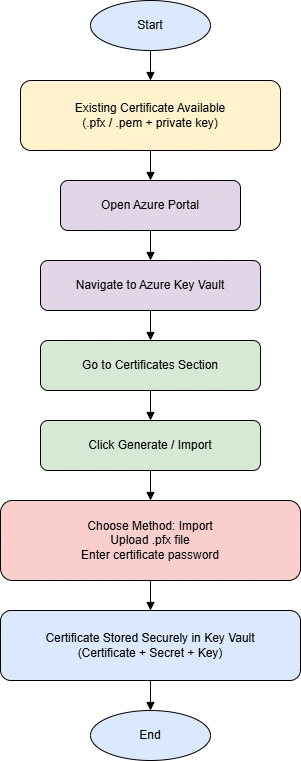
The flowchart shows how an existing TLS certificate (.pfx) is securely imported into Azure Key Vault and stored as a managed certificate with controlled access.
Azure mTLS flow with Certificate Authority
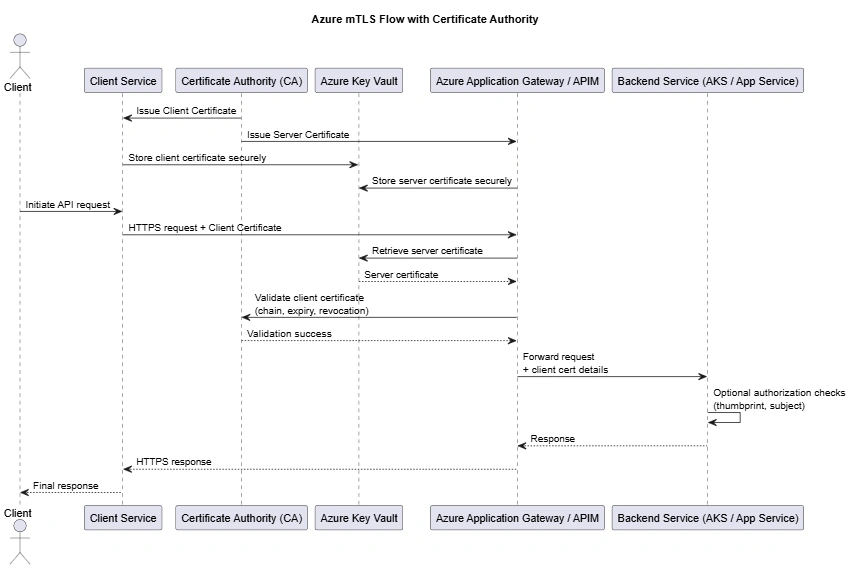
Client and server certificates are issued by a trusted CA
Certificates are stored securely in Azure Key Vault
Client initiates HTTPS request with its certificate
Azure gateway presents server certificate
Gateway validates client certificate against trusted CA
Request is forwarded to backend service
Backend processes request after optional certificate checks
Advantages
Strong security (cryptographic authentication)
Automatic certificate rotation
Seamless Azure integration
No shared secrets
Auditable & compliant
Scales well for microservices
Summary
Mutual TLS in Azure provides a robust and enterprise-grade approach to securing service-to-service communication by ensuring that both clients and servers authenticate each other using certificates. By leveraging a trusted Certificate Authority, Azure Key Vault for secure certificate management, and Azure gateways for TLS termination and enforcement, organizations can implement a scalable and highly secure architecture. mTLS reduces the risk of credential leakage, supports Zero Trust principles, and is particularly well-suited for microservices, B2B integrations, and regulated workloads running in Azure.
In short: Azure + mTLS = Secure, scalable, and enterprise-grade service-to-service authentication
Join the conversation! Your thoughts help the community grow.