

In this article, we will learn how to perform CRUD operations using ASP.NET MVC and MongoDB. In my previous articles, I explained the basic functions of MongoDB that are required to insert, update, and delete the data. The purpose of this series of articles is to learn how we use MongoDB with .NET applications. In the last few articles, we have learned MongoDB with C# Console applications. You can check my previous articles here -
You can check how to set up the MongoDB environment from Here.
Step for CRUD Operation
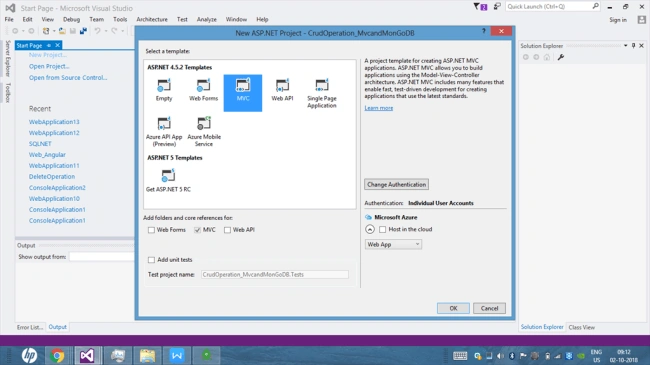
Step 1


Choose the Template tpe as MVC.
Step 2
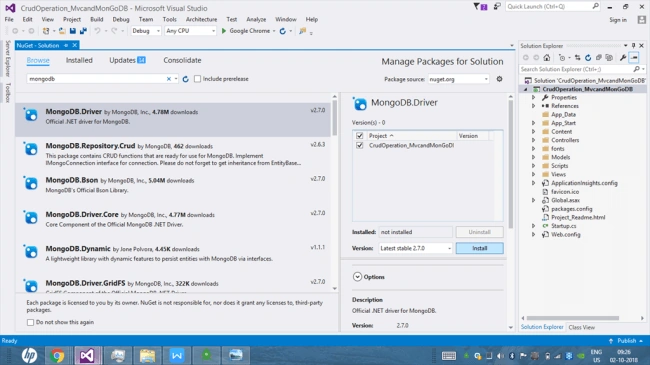
- using MongoDB.Driver;
- using MongoDB.Bson;
Step 3
- <add key="connectionString" value="mongodb://localhost"/>
Step 4
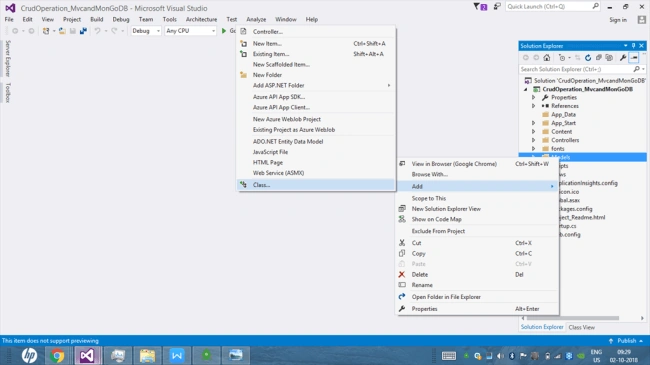
Now, add the following lines.
- public String Id { get; set; }
- public string Name { get; set; }
- public string Department { get; set; }
- public string Address { get; set; }
- public string City { get; set; }
- public string Country { get; set; }
Step 5
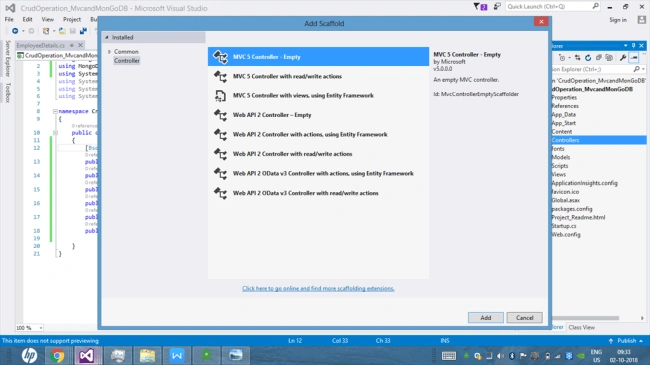
Step 6
- using CrudOperation_MvcandMonGoDB.Models;
Add these lines in the action method to insert data into database
- [HttpPost]
- public ActionResult Index(EmployeeDetails Emp)
- {
- if (ModelState.IsValid)
- {
- string constr = ConfigurationManager.AppSettings["connectionString"];
- var Client = new MongoClient(constr);
- var DB = Client.GetDatabase("Employee");
- var collection = DB.GetCollection<EmployeeDetails>("EmployeeDetails");
- collection.InsertOneAsync(Emp);
- return RedirectToAction("emplist");
- }
- return View();
- }
Now click on the index method and add a view and add the following code in the View.
- @model CrudOperation_MvcandMonGoDB.Models.EmployeeDetails
- <div class="col-md-12">
- <h2>Employee Detail</h2>
- </div>
- @using (Html.BeginForm())
- {
- @Html.AntiForgeryToken()
- <div class="form-horizontal">
- <hr />
- <div class="form-group">
- @Html.LabelFor(model => model.Name, htmlAttributes: new { @class = "control-label col-md-2" })
- <div class="col-md-10">
- @Html.EditorFor(model => model.Name, new { htmlAttributes = new { @class = "form-control" } })
- @Html.ValidationMessageFor(model => model.Name, "", new { @class = "text-danger" })
- </div>
- </div>
- <div class="form-group">
- @Html.LabelFor(model => model.Department, htmlAttributes: new { @class = "control-label col-md-2" })
- <div class="col-md-10">
- @Html.EditorFor(model => model.Department, new { htmlAttributes = new { @class = "form-control" } })
- @Html.ValidationMessageFor(model => model.Department, "", new { @class = "text-danger" })
- </div>
- </div>
- <div class="form-group">
- @Html.LabelFor(model => model.Address, htmlAttributes: new { @class = "control-label col-md-2" })
- <div class="col-md-10">
- @Html.EditorFor(model => model.Address, new { htmlAttributes = new { @class = "form-control" } })
- @Html.ValidationMessageFor(model => model.Address, "", new { @class = "text-danger" })
- </div>
- </div>
- <div class="form-group">
- @Html.LabelFor(model => model.City, htmlAttributes: new { @class = "control-label col-md-2" })
- <div class="col-md-10">
- @Html.EditorFor(model => model.City, new { htmlAttributes = new { @class = "form-control" } })
- @Html.ValidationMessageFor(model => model.City, "", new { @class = "text-danger" })
- </div>
- </div>
- <div class="form-group">
- @Html.LabelFor(model => model.Country, htmlAttributes: new { @class = "control-label col-md-2" })
- <div class="col-md-10">
- @Html.EditorFor(model => model.Country, new { htmlAttributes = new { @class = "form-control" } })
- @Html.ValidationMessageFor(model => model.Country, "", new { @class = "text-danger" })
- </div>
- </div>
- <div class="form-group">
- <div class="col-md-offset-2 col-md-10">
- <input type="submit" value="Add" class="btn btn-primary" />
- </div>
- </div>
- </div>
- }
- @section Scripts {
- @Scripts.Render("~/bundles/jqueryval")
- }
Run the Project and try to insert data

Now open Robo 3T and check the data is inserted

Record is successfully inserted into the database
Step 7
- public ActionResult emplist()
- {
- string constr = ConfigurationManager.AppSettings["connectionString"];
- var Client = new MongoClient(constr);
- var db = Client.GetDatabase("Employee");
- var collection = db.GetCollection<EmployeeDetails>("EmployeeDetails").Find(new BsonDocument()).ToList();
- return View(collection);
- }
Now add a view to display data and add the following code.
- @model IEnumerable<CrudOperation_MvcandMonGoDB.Models.EmployeeDetails>
- @{
- ViewBag.Title = "Employee Details";
- }
- <h3 style="text-align:center">Employee Details</h3>
- <p>
- @Html.ActionLink("Add New Employee", "Index")
- </p>
- <table class="table">
- <tr>
- <th>
- @Html.DisplayNameFor(model => model.Name)
- </th>
- <th>
- @Html.DisplayNameFor(model => model.Department)
- </th>
- <th>
- @Html.DisplayNameFor(model => model.Address)
- </th>
- <th>
- @Html.DisplayNameFor(model => model.City)
- </th>
- <th>
- @Html.DisplayNameFor(model => model.Country)
- </th>
- <th></th>
- </tr>
- @foreach (var item in Model) {
- <tr>
- <td>
- @Html.DisplayFor(modelItem => item.Name)
- </td>
- <td>
- @Html.DisplayFor(modelItem => item.Department)
- </td>
- <td>
- @Html.DisplayFor(modelItem => item.Address)
- </td>
- <td>
- @Html.DisplayFor(modelItem => item.City)
- </td>
- <td>
- @Html.DisplayFor(modelItem => item.Country)
- </td>
- <td>
- @Html.ActionLink("Edit", "Edit", new { id=item.Id }) |
- @Html.ActionLink("Delete", "Delete", new { id=item.Id })
- </td>
- </tr>
- }
- </table>
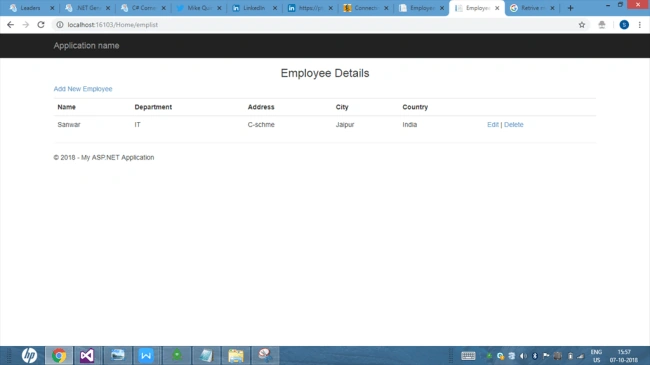
Step 8
- public ActionResult Delete(string id)
- {
- if (ModelState.IsValid)
- {
- string constr = ConfigurationManager.AppSettings["connectionString"];
- var Client = new MongoClient(constr);
- var DB = Client.GetDatabase("Employee");
- var collection = DB.GetCollection<EmployeeDetails>("EmployeeDetails");
- var DeleteRecored = collection.DeleteOneAsync(
- Builders<EmployeeDetails>.Filter.Eq("Id", id));
- return RedirectToAction("emplist");
- }
- return View();
- }
Step 9
- public ActionResult Edit(EmployeeDetails Empdet)
- {
- if (ModelState.IsValid)
- {
- string constr = ConfigurationManager.AppSettings["connectionString"];
- var Client = new MongoClient(constr);
- var Db = Client.GetDatabase("Employee");
- var collection = Db.GetCollection<EmployeeDetails>("EmployeeDetails");
- var update = collection.FindOneAndUpdateAsync(Builders<EmployeeDetails>.Filter.Eq("Id", Empdet.Id), Builders<EmployeeDetails>.Update.Set("Name", Empdet.Name).Set("Department", Empdet.Department).Set("Address", Empdet.Address).Set("City", Empdet.City).Set("Country", Empdet.Country));
- return RedirectToAction("emplist");
- }
- return View();
- }
Now add a view
- @model CrudOperation_MvcandMonGoDB.Models.EmployeeDetails
- @{
- ViewBag.Title = "Edit";
- }
- <h2>Edit</h2>
- @using (Html.BeginForm())
- {
- @Html.AntiForgeryToken()
- <div class="form-horizontal">
- <h4>EmployeeDetails</h4>
- <hr />
- @Html.ValidationSummary(true, "", new { @class = "text-danger" })
- @Html.HiddenFor(model => model.Id)
- <div class="form-group">
- @Html.LabelFor(model => model.Name, htmlAttributes: new { @class = "control-label col-md-2" })
- <div class="col-md-10">
- @Html.EditorFor(model => model.Name, new { htmlAttributes = new { @class = "form-control" } })
- @Html.ValidationMessageFor(model => model.Name, "", new { @class = "text-danger" })
- </div>
- </div>
- <div class="form-group">
- @Html.LabelFor(model => model.Department, htmlAttributes: new { @class = "control-label col-md-2" })
- <div class="col-md-10">
- @Html.EditorFor(model => model.Department, new { htmlAttributes = new { @class = "form-control" } })
- @Html.ValidationMessageFor(model => model.Department, "", new { @class = "text-danger" })
- </div>
- </div>
- <div class="form-group">
- @Html.LabelFor(model => model.Address, htmlAttributes: new { @class = "control-label col-md-2" })
- <div class="col-md-10">
- @Html.EditorFor(model => model.Address, new { htmlAttributes = new { @class = "form-control" } })
- @Html.ValidationMessageFor(model => model.Address, "", new { @class = "text-danger" })
- </div>
- </div>
- <div class="form-group">
- @Html.LabelFor(model => model.City, htmlAttributes: new { @class = "control-label col-md-2" })
- <div class="col-md-10">
- @Html.EditorFor(model => model.City, new { htmlAttributes = new { @class = "form-control" } })
- @Html.ValidationMessageFor(model => model.City, "", new { @class = "text-danger" })
- </div>
- </div>
- <div class="form-group">
- @Html.LabelFor(model => model.Country, htmlAttributes: new { @class = "control-label col-md-2" })
- <div class="col-md-10">
- @Html.EditorFor(model => model.Country, new { htmlAttributes = new { @class = "form-control" } })
- @Html.ValidationMessageFor(model => model.Country, "", new { @class = "text-danger" })
- </div>
- </div>
- <div class="form-group">
- <div class="col-md-offset-2 col-md-10">
- <input type="submit" value="Save" class="btn btn-default" />
- </div>
- </div>
- </div>
- }
- <div>
- @Html.ActionLink("Back to List", "Index")
- </div>
Now we run the project.
Sandeep KumarPosted Sep 22, 2015, 12:12 PM
nice share sir :)
Humayun Kabir MamunPosted Sep 22, 2015, 3:09 AM
Nice...
Pankaj Kumar ChoudharyPosted Sep 21, 2015, 12:29 PM
Thanks Rakesh Chavda Sir.......
Pankaj Kumar ChoudharyPosted Sep 21, 2015, 12:28 PM
Thanks Abhishek Singh Sir.............
Pankaj Kumar ChoudharyPosted Sep 21, 2015, 12:28 PM
thanks Ankit Bansal Sir.........
Pankaj Kumar ChoudharyPosted Sep 21, 2015, 12:28 PM
Thanks Sumit Joshi Sir...........
Pankaj Kumar ChoudharyPosted Sep 21, 2015, 12:27 PM
Thanks Sibeesh Venu Sir...........
Pankaj Kumar ChoudharyPosted Sep 21, 2015, 12:27 PM
Thanks Harshad Pansuriya............
Pankaj Kumar ChoudharyPosted Sep 21, 2015, 12:26 PM
Thanks Nilesh Jadav Sir..........
RakeshPosted Sep 21, 2015, 10:23 AM
Nice work
Abhishek KumarPosted Sep 21, 2015, 9:59 AM
very nice for beginners...Thanks for sharing..
Ankit BansalPosted Sep 21, 2015, 6:15 AM
good one...
Sumit JoshiPosted Sep 21, 2015, 3:29 AM
good one.
Sibeesh VenuPosted Sep 21, 2015, 3:23 AM
Nice Share :)
Harshad PansuriyaPosted Sep 21, 2015, 2:34 AM
Nice One
Nilesh JadavPosted Sep 21, 2015, 1:19 AM
Great Work Pankaj Kumar Choudhary