

Introduction
There are several validation attributes available in MVC 5 and we can create our custom validation also by overriding the ValidationAttribute method.
What are validations?
We can say that validation is nothing but some rules set by the developer on the input fields of a web page so as to satisfy the business rules for that particular input field in order to maintain proper data in the system.
What are the types of validation?
There are two types of validation.
- Server-side Validation
- Client Side Validation
The System.ComponentModel.DataAnnotations assembly has many built-in validation attributes.
- Required
- Range
- RegularExpression,
- Compare
- StringLength
- Data type
- Credit Card number
- Currency
- Custom
- Date
- DateTime
- Duration
- Email Address
- HTML
- Image URL
- Multiline text
- Password
- Phone number
- Postal Code
- Upload
Step 1
Step 2
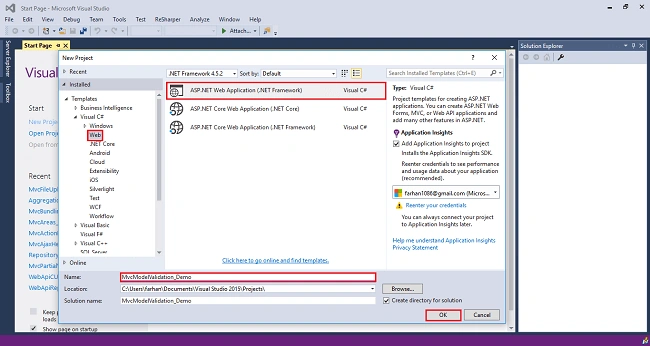
Step 3
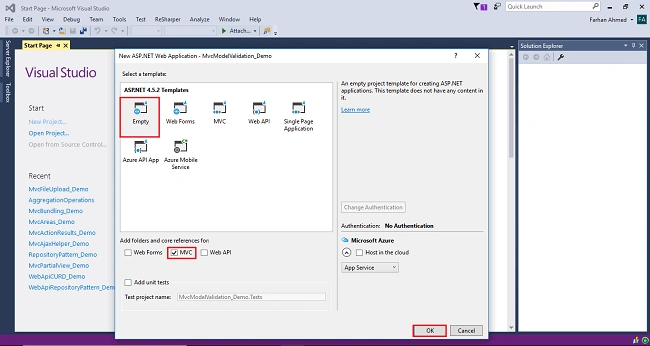
Step 4
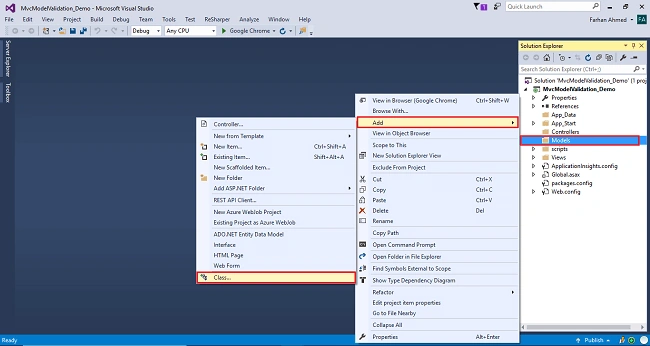
You will get a window; from there, select class, name it Employee, and click "Add".
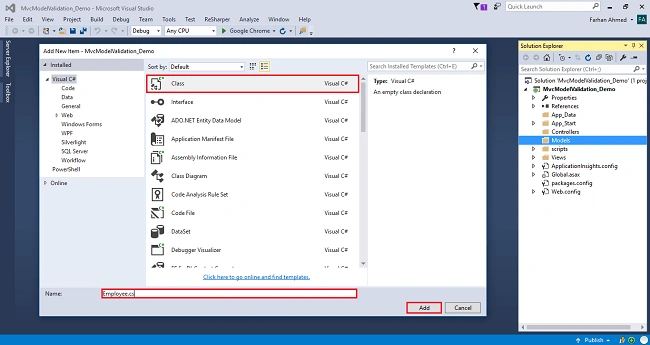
- using System;
- using System.Collections.Generic;
- using System.ComponentModel.DataAnnotations;
- using System.Linq;
- using System.Web;
- namespace MvcModelValidation_Demo.Models
- {
- public class Employee
- {
- public int Id { get; set; }
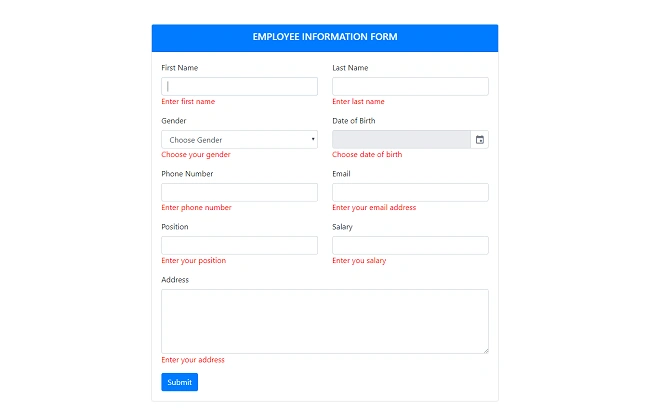
- [Required(ErrorMessage = "Enter first name")]
- [Display(Name = "First Name")]
- public string FirstName { get; set; }
- [Required(ErrorMessage = "Enter last name")]
- [Display(Name = "Last Name")]
- public string LastName { get; set; }
- [Required(ErrorMessage = "Choose your gender")]
- public string Gender { get; set; }
- [Required(ErrorMessage = "Choose date of birth")]
- [Display(Name = "Date of Birth")]
- [DataType(DataType.Date)]
- public DateTime BirthDate { get; set; }
- [Required(ErrorMessage = "Enter phone number")]
- [Phone]
- [Display(Name = "Phone Number")]
- public string PhoneNumber { get; set; }
- [Required(ErrorMessage = "Enter your email address")]
- [EmailAddress]
- public string Email { get; set; }
- [Required(ErrorMessage = "Enter your address")]
- public string Address { get; set; }
- [Required(ErrorMessage = "Enter your position")]
- public string Position { get; set; }
- [Required(ErrorMessage = "Enter you salary")]
- public int Salary { get; set; }
- }
- }
Step 5
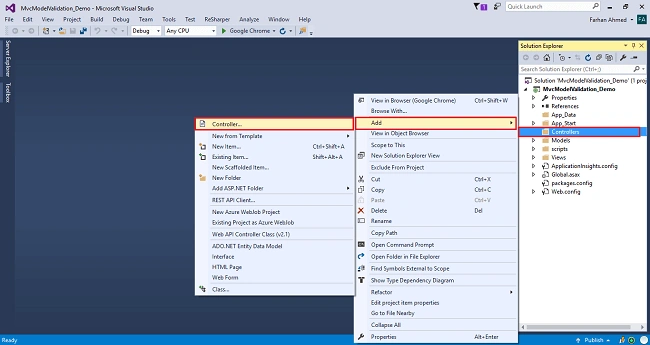
A window will appear. Choose MVC5 Controller-Empty and click "Add".
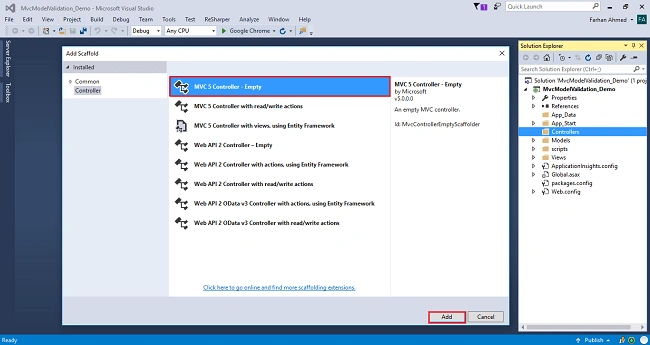
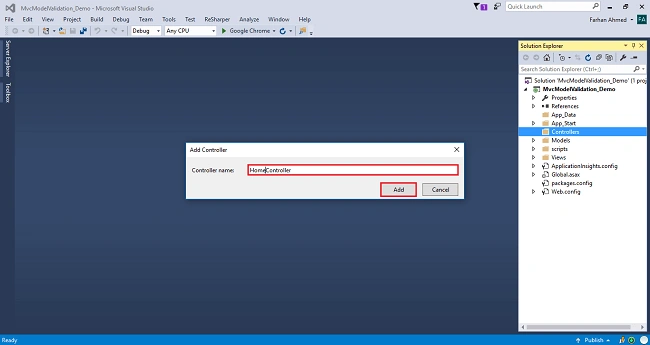
After clicking on "Add", another window will appear with DefaultController. Change the name to HomeController and click "Add". The HomeController will be added under the Controllers folder. Don’t change the Controller suffix for all controllers, change only the highlight, and instead of Default, just change Home;
Complete code for Home Controller
- using System;
- using System.Collections.Generic;
- using System.Linq;
- using System.Web;
- using System.Web.Mvc;
- using MvcModelValidation_Demo.Models;
- namespace MvcModelValidation_Demo.Controllers
- {
- public class HomeController : Controller
- {
- // GET: Home
- public ActionResult Index()
- {
- return View();
- }
- [HttpGet]
- public ActionResult Create()
- {
- return View();
- }
- [HttpPost]
- public ActionResult Create(Employee employee)
- {
- try
- {
- if (ModelState.IsValid)
- {
- return RedirectToAction("Index");
- }
- return View();
- }
- catch (Exception)
- {
- return View();
- }
- }
- }
- }
Step 6
- @model MvcModelValidation_Demo.Models.Employee
- @{
- ViewBag.Title = "Create";
- }
- @section Styles {
- <link href="https://cdn.jsdelivr.net/npm/[email protected]/css/gijgo.min.css" rel="stylesheet" type="text/css" />
- }
- @using (@Html.BeginForm())
- {
- <div class="card" style="width: 65%; margin:auto;">
- <div class="card-header bg-primary">
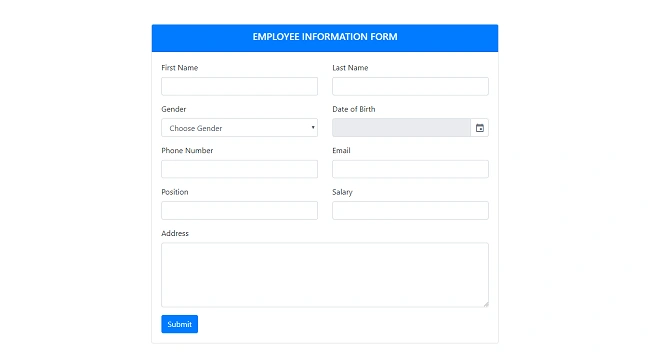
- <h5 class="text-white text-center text-uppercase">Employee Information Form</h5>
- </div>
- <div class="card-body">
- <div class="row">
- <div class="col-md-6">
- <div class="form-group">
- @Html.LabelFor(m => m.FirstName)
- @Html.TextBoxFor(m => m.FirstName, new { @class = "form-control",maxlength="30" })
- @Html.ValidationMessageFor(m => m.FirstName)
- </div>
- </div>
- <div class="col-md-6">
- <div class="form-group">
- @Html.LabelFor(m => m.LastName)
- @Html.TextBoxFor(m => m.LastName, new { @class = "form-control" })
- @Html.ValidationMessageFor(m => m.LastName)
- </div>
- </div>
- </div>
- <div class="row">
- <div class="col-md-6">
- <div class="form-group">
- @Html.LabelFor(m => m.Gender)
- @Html.DropDownList("Gender", new List<SelectListItem>()
- {
- new SelectListItem {Text = "Male", Value = "1"},
- new SelectListItem {Text = "Female", Value = "2"}
- }, "Choose Gender", new { @class = "form-control" })
- @Html.ValidationMessageFor(m => m.Gender)
- </div>
- </div>
- <div class="col-md-6">
- <div class="form-group">
- @Html.LabelFor(m => m.BirthDate)
- @Html.TextBox("BirthDate", "", new { @class = "form-control", @readonly = "readonly" })
- @Html.ValidationMessageFor(m => m.BirthDate)
- </div>
- </div>
- </div>
- <div class="row">
- <div class="col-md-6">
- <div class="form-group">
- @Html.LabelFor(m => m.PhoneNumber)
- @Html.TextBoxFor(m => m.PhoneNumber, new { @class = "form-control" })
- @Html.ValidationMessageFor(m => m.PhoneNumber)
- </div>
- </div>
- <div class="col-md-6">
- <div class="form-group">
- @Html.LabelFor(m => m.Email)
- @Html.TextBoxFor(m => m.Email, new { @class = "form-control" })
- @Html.ValidationMessageFor(m => m.Email)
- </div>
- </div>
- </div>
- <div class="row">
- <div class="col-md-6">
- <div class="form-group">
- @Html.LabelFor(m => m.Position)
- @Html.TextBoxFor(m => m.Position, new { @class = "form-control" })
- @Html.ValidationMessageFor(m => m.Position)
- </div>
- </div>
- <div class="col-md-6">
- <div class="form-group">
- @Html.LabelFor(m => m.Salary)
- @Html.TextBoxFor(m => m.Salary, new { @class = "form-control" })
- @Html.ValidationMessageFor(m => m.Salary)
- </div>
- </div>
- </div>
- <div class="row">
- <div class="col-md-12">
- <div class="form-group">
- @Html.LabelFor(m => m.Address)
- @Html.TextAreaFor(m => m.Address, new { @class = "form-control", rows = "5" })
- @Html.ValidationMessageFor(m => m.Address)
- </div>
- </div>
- </div>
- <button type="submit" class="btn btn-primary">Submit</button>
- </div>
- </div>
- }
- @section Scripts {
- <script src="https://cdn.jsdelivr.net/npm/[email protected]/js/gijgo.min.js" type="text/javascript"></script>
- <script>
- $('#BirthDate').datepicker({
- uiLibrary: 'bootstrap4'
- });
- </script>
- }
Step 7
- <script src="~/scripts/jquery-3.3.1.min.js"></script>
- <script src="~/scripts/jquery.validate.min.js"></script>
- <script src="~/scripts/jquery.validate.unobtrusive.min.js"></script>
- <script src="~/Scripts/bootstrap.min.js"></script>
- @RenderSection("Scripts", true)
- @RenderSection(name: "Styles",required:true)
Complete code for _Layout.csthml
- <!DOCTYPE html>
- <html>
- <head>
- <meta charset="utf-8" />
- <meta name="viewport" content="width=device-width, initial-scale=1.0">
- <title>@ViewBag.Title - My ASP.NET Application</title>
- <link href="~/Content/Site.css" rel="stylesheet" type="text/css" />
- <link href="~/Content/bootstrap.min.css" rel="stylesheet" type="text/css" />
- </head>
- <body>
- <div class="container">
- @RenderBody()
- </div>
- <script src="~/scripts/jquery-3.3.1.min.js"></script>
- <script src="~/scripts/jquery.validate.min.js"></script>
- <script src="~/scripts/jquery.validate.unobtrusive.min.js"></script>
- <script src="~/Scripts/bootstrap.min.js"></script>
- @RenderSection("Scripts", true)
- @RenderSection(name: "Styles",required:true)
- </body>
- </html>
Step 8
Join the conversation! Your thoughts help the community grow.