
What are Microsoft patterns & practices?
Microsoft patterns & practices provide scenario-specific recommendations illustrating how to design, develop, deploy, and operate architecturally sound applications for the Microsoft .NET platform. They offer deep technical guidance based on real-world experience that goes far beyond typical white papers and sample applications to help you quickly deliver sound solutions. Patterns & Practices provide proven architectures, production quality code, and recommended engineering practices. The technical guidance is created, reviewed, and approved by Microsoft architects, engineering teams, consultants, product support engineers, and by Microsoft partners and customers. The result is a thoroughly engineered and tested set of recommendations that can be followed with confidence when building your applications.
Microsoft patterns & practices are proven practices to help you generate predictable results.
The following article covers details on the Caching Application Block:
Enterprise Library Caching Application Block
The Developers and Architects of Enterprise applications and services need to overcome challenges such as
- Repetitive data creation, processing, and transportation.
- Proper Resource Utilization and scalability concerns.
- High Availability in case of system/network failures
How does the Caching Application Block address the above issues?
- By storing relevant data as close as possible to the data consumer, Caching addresses the Performance issue by eliminating the need to recreate process and transport redundant data.
- Storing information in a cache, addresses the Scalability issue by saving resources thereby increasing scalability as the demands on the application increase.
- By having the data stored in a local cache, the application may be able to survive system/network failures thereby increasing the Availability of the application
Where can the Caching Application Block be used?
Developers can incorporate a local cache in their applications. This application block supports both In-memory cache and Backing store
- The In-memory cache is non-permanent, but fast.
- The Backing store cache which can be either a Database or Isolated Storage is permanent, but slower. Functionality is provided to fetch, insert and remove data that has been cached. There is also the provision to configure the Expiration and Scavenging policies.
- The Caching Application Block is suitable for any of the following situations:
- When static data needs to be repeatedly accessed.
- When creation, processing and transportation of data is expensive.
- When High availability is a major factor.
The Caching Application Block can be used with any of the following application types:
- Windows Forms
- Console
- Windows Service
- Enterprise Services
- ASP.NET Web application or
- Web service if you need features that are not included in the ASP.NET cache
Design of the Caching Application Block
The Goal of this design:
- To Provide Manageable set of APIs
- .Add, .Retrieve and .Delete methods on individual cached items
- .Flush (all items)
- To be easily configurable via the Enterprise Library Configuration Console
- To perform efficiently.
- To ensure backing store is intact even when exception has occurred.
- To ensure synchronization of states in the backing-store and in-memory cache.
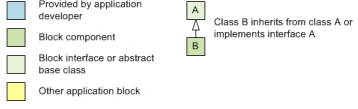
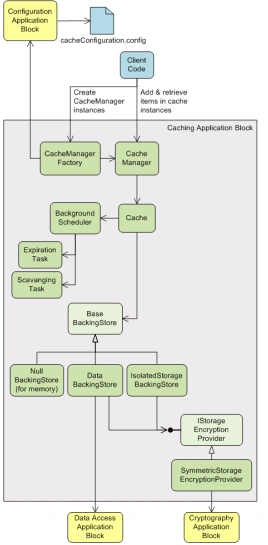
The CacheManager class is the primary interface between the application and the rest of the Caching Application Block. It handles operations related to Caching by creating a Cache object which is an in-memory representation of the Backing Store. Backing stores account for the persistence of cached data even if the application crashes.
This Manager class can be configured to store data only in memory, or it can be configured to store data both in memory and in persistent storage. The persistent storage is specified when you configure the backing store (discussed later).
To create an instance of a CacheManager object, the application uses the CacheFactory class, which in turn uses the CacheManagerFactory class. The CacheManagerFactory class creates all the internal classes needed to implement a CacheManager object.
Applications use the cached data via the CacheManager by invoking the GetData method on it. If the data is not present in the cache a NULL value is returned. The Add method on the CacheManager allows the addition of data (associated with a key) to the Cache. If the key already exists, the earlier data is overwritten with the new value.
Items added to the cache are represented as Cache Item. The Cache Item is stored in the in-memory hash table and has the following information:
- Data that needs to be cached.
- Key to represent the Cached Data
- Scavenging Priority
- Expiration Policies
- RefreshAction object that can be used to refresh an expired item from the cache
This in-memory HashTable provides a locking strategy when adding new items if not found in the Hash table.
This Block adopts a strong exception safety guarantee. A failure in the Add operation results in the Cache being reverted to the state before the item was added.
A BackgroundScheduler object is responsible for expiring aging cache items and scavenging lower-priority cache items. A PollTimer object triggers the expiration cycle and a numeric limit triggers the scavenging process. These are set in the configuration file.
Steps in Configuring the Caching Application Block
Configuring the Cache Application Block involves 3 processes
- Add the Caching Application Block to your application configuration
- Create a cache manager for each set of data to be cached
- Designate one as the default cache manager
The following figure represents a Configured Cached Application Block.
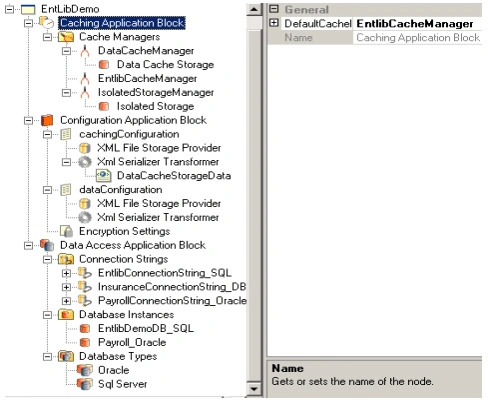
Fig: The Enterprise Configuration Manager to Configure the Caching Block.
Complete Steps:
- To use the Configuration Console, click Start, point to All Programs, point to Microsoft patterns and practices, point to Enterprise Library, click Configuration Console. This will activate the Enterprise Library Configuration Manager.
- The application configuration file (typically named either App.config or Web.config) contains information about which application blocks the application is configured to use and the path the configuration files for those application blocks.
- A new application configuration file can be created or an existing one can be opened where Caching related settings will be stored.
- Right-click the application root node, point to New, and click Caching Application Block Configuration. This generates a Caching subtree.
NOTE: A Configuration Application Block also gets generated. - The Caching Application Block Node has the Cache Managers subnode. This subnode can be configured to add multiple instances of the Cache Manager with each instance referencing either an in-memory cache, a Database or an Isolated Storage.
NOTE: The default Cache Manager can be set by clicking the Caching Application Block node and setting the DefaultCacheManager attribute. - Each Cache Manager Instance has the following attributes
- ExpirationPollFrequencyInSecond:
Represents value in seconds to set the frequency of the timer that regulates how frequently BackgroundScheduler checks for expired items. The minimum time is 1 second and the default time is 60 seconds - MaximumElementsInCacheBeforeScavenging
Sets the maximum number of elements that can be in the cache before scavenging begins. Default is 1000 elements. - NumberToRemoveWhenScavenging:
Sets the number of elements to remove after scavenging begins. Default is 10 elements.
- ExpirationPollFrequencyInSecond:
- Each cache manager can either be configured to store data only in memory, or it can be configured to store data both in memory and in persistent storage.
If data needs to be written to a backing store, there are four options provided that enables you to configure the Caching Application Block.
- Null Backing Store
- Data Cache Storage or
- Isolated Storage or
- A Custom Cache store
By default, the cache stores items only in memory and assigns the value of the backing store to NullBackingStore. The Null Backing Store does not persist cached items.
The Data Cache Storage option uses the Data Access Application Block as a database provider and lets you store the cached data in a database. Appropriate Database Settings need to be configured and the relevant Database Instance node must be referenced for caching purposes. The Data Access Application Block backing store option is suitable for smart clients and for server applications where each application domain has its own cache, and where you have access to a database.
The Isolated storage uses a Partition Name to identify the portion of the isolated store that the cache manager will use. The Partition Name is an attribute that needs to be set on this Backing Store. When configuring to use isolated storage, the backing store is isolated by the cache instance name, the user name, the assembly, and the application domain.
Note: Since isolated storage is always segregated by user, server applications must impersonate the user making a request to the application
Isolated storage is appropriate in the following situations:
- Persistent storage is required and the number of users is small.
- The overhead of using a database is significant or No database facility exists.
Scenarios where Isolated Storage should not be used:
- Isolated storage should not be used to store high-value secrets, such as unencrypted keys or passwords.
- The overhead of using a database is significant or No database facility exists.
- Isolated storage should not be used to store configuration and deployment settings, which administrators control.
The Custom Cache Storage option can be used if a custom backing store is being added.
Note An application can use more than one cache; each cache will be represented by a cache manager in the application's configuration. The Caching Application Block does not support the use of the same persistent backing store location and partition name by multiple cache managers in an application.
Cache Operations
Instantiating the CacheManager
NOTE : The following namespace must be included.
using Microsoft.Practices.EnterpriseLibrary.Caching;
using Microsoft.Practices.EnterpriseLibrary.Caching.Expirations;

CacheManager cacheManager;
cacheManager = CacheFactory.GetCacheManager("DataCacheManager");
Adding Items to Cache
The following code shows how to use the Add method. Add the code to the method that responds to the request to add an item to the cache.
string id="OrderId";
string name = "OrderName";
int price = 50;
Order order = new Order(id, name, price);
cacheManager.Add(order.id, order, 2, null, new SlidingTime(TimeSpan.FromMinutes(5)));
Note:
Defaults
- Scavenging priority: Normal
- No expiration
- When adding a second item with the same key as an existing item replaces the existing item
- When configured to use a persistent backing store, objects added to the cache must be serializable
Flushing the Cache
The following code shows how to use the Flush method. Add the code to the method that responds to the request to flush the cache.
cacheManager.Flush();
Removing an Item from Cache
The following code shows how to use the Remove method. Add the code to the method that responds to the request to remove an item from the cache.
cacheManager.Remove(order.id);
Retrieving data from Cache
The following code shows how to use the GetData method. Add the code to the method responding to the request to retrieve an item from the cache.
Order order = (Order) cacheManager.GetData(12);
Loading the Cache
There are two methods you can use for loading data:
- Proactive loading. This method retrieves all the required data and caches it for the lifetime of the application.
- Advantages
- Application performance improves because cache operations are optimized
- Application response times also improve because all the data is cached
- Disadvantages
- Does not result in most optimized since much of the state is cached even though it may not all be required
- The Implementation could turn out to be more complex than conventional techniques
- Advantages
- Reactive loading. This method retrieves data only when requested by the application and then caches it for future requests.
- Advantages
- System resources are not misused.
- Results in an optimized caching system since requested items are only stored.
- Disadvantages
- Performance might decrease when any piece of data is requested the first time because it must be loaded from the source.
- Checks need to be made every time to ensure the item is in cache
- Advantages
The Expiration Policies
The Caching Application Block's expiration process is performed by the BackgroundScheduler. It periodically examines the CacheItems in the hash table to see if any items have expired. You control how frequently the expiration cycle occurs when you configure an instance of the CacheManager using the Configuration Console.
NOTE : The following namespace must be included
using Microsoft.Practices.EnterpriseLibrary.Caching;
using Microsoft.Practices.EnterpriseLibrary.Caching.Expirations;
Following are the Expiration policies
Time-based expirations
You should use time-based expiration when volatile cache items-such as those that have regular data refreshes or those that are valid for only a set amount of time-are stored in a cache. Time-based expiration enables you to set policies that keep items in the cache only as long as their data remains current. For example, if you are writing an application that tracks currency exchange rates by obtaining the data from a frequently updated Web site, you can cache the currency rates for the time that those rates remain constant on the source Web site. In this situation, you would set an expiration policy that is based on the frequency of the Web site updates-for example, once a day or every 20 minutes.
Time Based Expirations are of three types
- Absolute. Allows you to define the lifetime of an item by specifying the absolute time for an item to expire.
- Simple-You define the lifetime of an item by setting a specific date and time for the item to expire.
- Extended-You define the lifetime of an item by specifying expressions such as every minute, every Sunday, expire at 5:15 AM on the 15th of every month, and so on.
- Sliding. Allows you to define the lifetime of an item by specifying the interval between the item being accessed and the policy defining it as expired. This means the item expires after the specified time has elapsed from when the item was last accessed. The default time is 2 minutes
TimeSpan refreshTime = new TimeSpan(0, 5, 0); // will expire if item has not been accessed for 5 minutes SlidingTime expireTime = new SlidingTime(refreshTime); cacheManager.Add("Key1", "Cache Item1", CacheItemPriority.Normal, null, expireTime); - Extended format. This allows you to be very detailed about when an item expires. For example, you can specify that an item expire every Saturday night at 10:03 PM, or on the third Tuesday of the month. Extended formats are listed in the ExtendedFormat.cs file.
Extended time formatExtendedFormatTime expireTime = new ExtendedFormatTime("0 0 * * 6"); // expire at midnight every Saturday cacheManager.Add("Key1", "Cache Item1", CacheItemPriority.Normal, null, expireTime);- "<Minute> <Hour> <Day of month> <Month> <Day of week>"
* means run every period
Examples - "* * * * *" expires every minute
- "5 * * * *" expire 5th minute of every hour
- "* 21 * * *" expire every minute of the 21st hour of every day
- "31 15 * * *" expire 3:31 PM every day
- "7 4 * * 6" expire Saturday 4:07 AM
- "15 21 4 7 *" expire 9:15 PM on 4 July
- "<Minute> <Hour> <Day of month> <Month> <Day of week>"
Notification-based expirations
You can use notification-based expiration to define the validity of a cached item based on the properties of an application resource, such as a file, a folder, or any other type of data source. If a dependency changes, the cached item is invalidated and removed from the cache.
File dependency. This means the item expires after a specific file has been modified.
FileDependency expireNotice = new FileDependency(“Trigger.txt”); // expire if the file Trigger.txt is changed
cacheManager.Add("Key1", "Cache Item1", CacheItemPriority.Normal, null, expireNotice);
NOTE: You can create custom expirations by creating classes that implement ICacheItemExpiration
Configuring Expiration Poll Frequency
The Caching Application Block's expiration process is performed by the BackgroundScheduler. It periodically examines the CacheItems in the hash table to see if any items have expired. You control how frequently the expiration cycle occurs when you configure an instance of the CacheManager using the Configuration Console.
The configuration settings for the Caching Application Block should reflect both an application's caching usage pattern and its system environment, such as the amount of available memory. For example, if an application adds items to the cache at a greater rate than it removes them when scavenging (this is a configurable setting), the cache will continue grow. Over time, this can cause memory starvation. Use the application block's performance counters to help tune the configuration settings for each application.
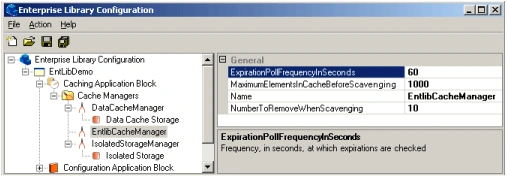
The following can be configured
- Removal of expired items occurs on a background thread
- You can set the frequency of how often this thread will run looking for expired items
- Count of the cached items to remove during the scavenging process.
One of the four priorities can be assigned to a cached item
- Low
- Normal
- High
- Not Removable.
NOTE: The default value is Normal.
The onus of the items that need to be scavenged is placed on the BackGroundScheduler object. The BackGroundScheduler performs a:
- major sort on priority
- minor sort on LTA
Scavenging is done in one single pass
Expiration is a two-part process
- Marking
- A copy of the hash table is made. Every CachedItem is checked for expiry. If item is to be expired, it is flagged.
- Sweeping
- Every flagged item is checked if it has been accessed in the mean time. If accessed it is kept in cache. If not, it is removed.
- A WMI event is triggered
Extending the Caching Application Block
Typically, to suit one's application needs one can extend and modify the Caching Application Block to accommodate the following
- Add a new Backing Store
A new backing store can be added by implementing the BaseBackingStore abstract class. The concrete implementation needs to ensure that the backing store remains intact and functional when any operation that accesses the backing store causes any exceptions. - Add a new Expiration Policy
The following interfaces need to be implemented in case one needs to provide custom expiration policies
- ICacheItemExpiration:
This interface represents an application-defined rule governing how and when a CacheItem object can expire. - ICacheRefreshAction:
This interface refreshes an expired cache item.
NOTE: The implementing class must be serializable.
NOTE: If you want to add new features to the application block, you can do so by modifying the source code (the installer includes both the source code and the binaries)
Instrumenting the Caching Application Block
The Caching Application block also incorporates the following instrumentation:
- Caching Application Block Performance Counters. The Caching Application Blocks records key metrics by writing to the Microsoft Windows operating system performance counters.
The Caching Application Block includes the following performance counters:
- Total Cache Entries. This performance counter shows the number of entries in the cache.
- Cache Hits/Sec. This performance counter shows the number of cache hits per second.
- Cache Misses/Sec. This performance counter shows the number of cache misses per second.
- Cache Hit Ratio. This performance counter shows the ratio of hits from all cache calls.
- Cache Total Turnover Rate. This performance counter shows the number of additions and removals to the total cache per second.
- Windows Management Instrumentation (WMI) Events. The Caching Application Block reports significant events within the application blocks by publishing WMI events.
There are several WMI events available to monitor any Cache Related operations
| CachingServiceEvent | Is the base event class for all events related to Caching.This base class has a string property named Message that contains the message for the event. |
| CachingServiceFailureEvent |
Is the base event class for all failure events. Includes the following properties:- |
| CachingServiceCacheFlushedEvent | This event signifies the cache has been flushed |
| CachingServiceCacheScavengedEvent | This event signifies the cache has been scavenged. |
| CachingServiceInternalFailureEvent | This event class inherits from the CachingServiceFailureEvent. It signifies that an internal failure has occurred. It includes the string property ConfigurationFilePaththat contains the path of the main configuration file. |
Anil KumarPosted Dec 2, 2011, 3:28 AM
i did not get ur code or database plz check and if u dont mind , can u mail me on [email protected]
Spring SummereditedPosted Jan 2, 2010, 9:30 PMEdited Jan 2, 2010, 9:31 PM
hi leon, i follow your sample for multiple transaction part, and wonder why i cant find the DBCommandWrapper object. I using enterprise library 2.0. And the zip i downloaded but unable to open it. Please advice. Thank you!
vissu putchalaPosted Jun 19, 2007, 4:00 AM
Dear Leon Pereira, I have to create this application in my module.Can you pls give the appliaction with coding. Because it will be very helpful to me. pls help me.This application will help me out of my problem can you pls send this application to my email id ([email protected]). Can you pls send this application in 2 days bec i have to submit with all the changes before thrusday This is the artical Heading: Microsoft patterns & practices: The Enterprise Library By Leon Pereira July 06, 2005 Microsoft patterns & practices provide scenario-specific recommendations illustrating how to design, develop, deploy, and operate architecturally sound applications for the Microsoft .NET platform.The following article covers details on the Data Access Application Block.
vissu putchalaPosted Jun 19, 2007, 3:58 AM
Dear Leon Pereira, I have to create this application in my module.Can you pls give the appliaction with coding. Because it will be very helpful to me. pls help me.This application will help me out of my problem can you pls send this application to my email id ([email protected]). Can you pls send this application in 2 days bec i have to submit with all the changes before thrusday This is the artical Heading: Microsoft patterns & practices: The Enterprise Library By Leon Pereira July 06, 2005 Microsoft patterns & practices provide scenario-specific recommendations illustrating how to design, develop, deploy, and operate architecturally sound applications for the Microsoft .NET platform.The following article covers details on the Data Access Application Block.
vissu putchalaPosted Jun 19, 2007, 3:57 AM
Dear Leon Pereira, I have to create this application in my module.Can you pls give the appliaction with coding. Because it will be very helpful to me. pls help me.This application will help me out of my problem can you pls send this application to my email id ([email protected]). Can you pls send this application in 2 days bec i have to submit with all the changes before thrusday This is the artical Heading: Microsoft patterns & practices: The Enterprise Library By Leon Pereira July 06, 2005 Microsoft patterns & practices provide scenario-specific recommendations illustrating how to design, develop, deploy, and operate architecturally sound applications for the Microsoft .NET platform.The following article covers details on the Data Access Application Block.
vissu putchalaPosted Jun 19, 2007, 3:57 AM
Dear Leon Pereira, I have to create this application in my module.Can you pls give the appliaction with coding. Because it will be very helpful to me. pls help me.This application will help me out of my problem can you pls send this application to my email id ([email protected]). Can you pls send this application in 2 days bec i have to submit with all the changes before thrusday This is the artical Heading: Microsoft patterns & practices: The Enterprise Library By Leon Pereira July 06, 2005 Microsoft patterns & practices provide scenario-specific recommendations illustrating how to design, develop, deploy, and operate architecturally sound applications for the Microsoft .NET platform.The following article covers details on the Data Access Application Block.