

Microsoft Graph API is a powerful API to fetch the data from all services across the Office 365 environment. If you have access and know the basic knowledge of Office 365 services, you can do a lot more than you can imagine.
Before we jump directly into the Planner, we must understand it and how it relates to Office 365.
Microsoft Planner is one of the services available under Office 365. This is used to create tasks and assign them to users in an Office 365 Group.
The collection of tasks for the team can be easily managed by the Plan under Microsoft Planner. And each Plan should be associated with any one of the Office 365 Groups. In simple words, this is nothing but the To-Do tasks for the group.
Microsoft Graph API supports the Microsoft Planner. We will see how to use Microsoft Graph Explorer V2 – Preview tool to create a Plan for the Office 365 group.
To create a Plan, we require the below mandatory information,
- Group ID
- Plan Title
To get the exiting Office 365 group ID from your groups, run the below query in Microsoft graph Explorer.
- URL: https://graph.microsoft.com/v1.0/groups
- Http-Method: GET
From the response, note down any of the group ID from the list of groups.
Create a new Plan
- Navigate to the Graph Explorer
- Login to the tool using the button called Sign in Graph explorer
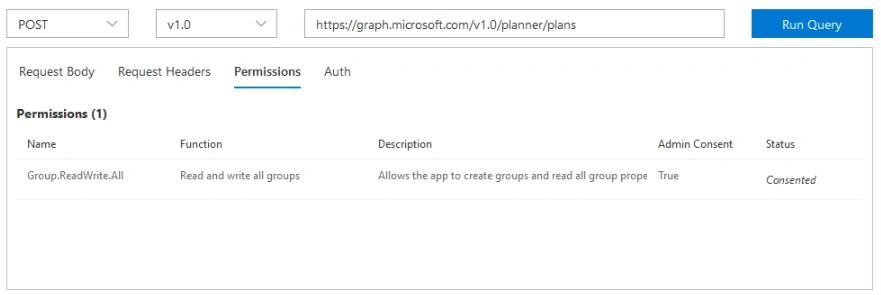
- Select the POST method from Request dropdown
- Select the version as v1.0
- Enter the below Graph API endpoint for creating a new plan
https://graph.microsoft.com/v1.0/planner/plans
- Ensure below permission scope is consented
- Group.ReadWrite.All
- Enter the below valid JSON (replace <group id>) in a Request Body area
- {
- "owner":"<group id>",
- "title":"Sample Plan"
- }
- After the json is entered, click Run Query button.
If the Group Id is valid and has valid permission, the tool creates a new Plan with the associated group.
Get the plans associated with the Office 365 Group
The below steps help to retrieve the list of plans associated with the single Office 365 Group,
- Navigate to the Microsoft Graph Explorer
- Ensure you have a login to the tool
- Select the GET method from Request dropdown
- Select the version as v1.0
- Enter the below Graph API endpoint for creating a new plan
https://graph.microsoft.com/v1.0/<group id>/planner/plans
- Ensure any one of the below permission scope has consented
- Group.Read.All
- Group.ReadWrite.All
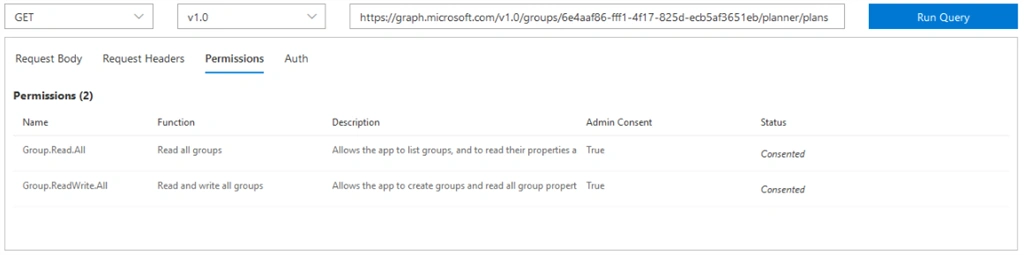
- Click Run Query button
In the same way, we can retrieve the tasks associated with the plans and categorize the plan tasks with buckets. We will see those in upcoming articles...
acou1304Posted Aug 7, 2020, 8:45 PM
You have a typo in the URL to retrieve group plans. It should be https://graph.microsoft.com/v1.0/groups/<group_id>/planner/plans as per your screenshot.
Renato RositoPosted May 19, 2020, 9:52 PM
Hi, is it possible to export a Planner from a Tenant and migrate it to another Tenant without loosing the plans ??
Bharat Bhushan KvPosted May 7, 2020, 1:06 AM
I want to create Planners Task, Update it as per the Exchange Communications are going via MS Graph. Is that possible if not through Flow? Let me know the High level steps to follow!