

Microsoft Graph is a RESTful web API that enables you to access Microsoft Cloud service resources. In this article, we will go through the requests we have to make in order to access the documents in a SharePoint Document Library.
Prerequisites
- Register an Azure AD app and allow the app to have full/read control to SharePoint sites in all site collections without a signed-in user. Refer to the Microsoft Graph permissions reference here.
- Note down the Application ID(Client ID) and Key(Client Secret).
- Download and install Postman that simplifies the API testing or any API Testing Tool.
REST Calls involved
Get Access Token
To call Microsoft Graph, your app must acquire an access token from Azure Active Directory (Azure AD), Microsoft’s Cloud Identity service. Access tokens issued by Azure AD are base 64 encoded JSON Web Tokens (JWT). They contain information (claims) that web APIs secured by Azure AD, like Microsoft Graph, are used to validate the caller and to ensure that the caller has the proper permissions to perform the operation they’re requesting.
Copy “access_token” value from the following API call’s response. This value will be used in the subsequent REST API calls as bearer token.
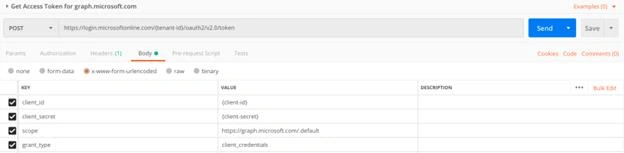
Replace
{tenant-id} with your Office 365 Tenant ID. You can find the same from here.
{client-id} with Application ID copied from Azure AD Application.
{client-secret} with Key(Client Secret) copied from Azure AD Application.
Get SharePoint Site ID
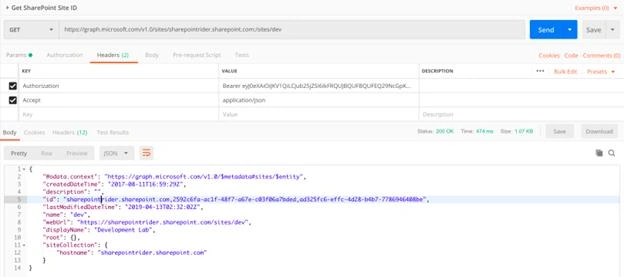
We have to get the SharePoint Site ID(highlighted) where the document library is located using the following URL.
https://graph.microsoft.com/v1.0/sites/{host-name}:/{server-relative-path}
Replace
{host-name} with your SharePoint online root site URL.
{server-relative-path} with the site’s relative path.
Get Document Libraries from a SharePoint Site
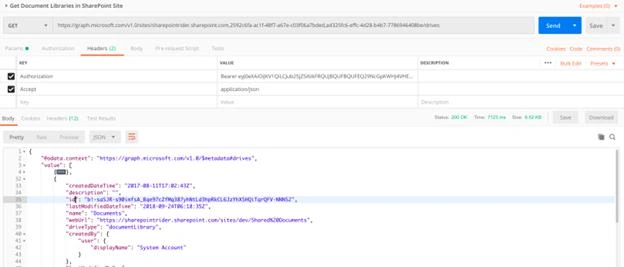
To get a list of document libraries from a SharePoint site, call the following endpoint.
https://graph.microsoft.com/v1.0/sites/{site-id}/drives
Replace
{site-id} with the site id received in the previous step.
Get Files from a Document Library
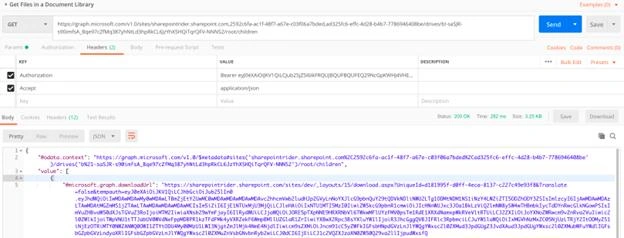
To get a list of files in a document library, call the following endpoint.
https://graph.microsoft.com/v1.0/sites/{site-id}/drives/{drive-id}/root/children
Replace
{site-id} with the site id received in the previous step.
{drive-id} with one of the document library id received in the previous step.
Get a Specific File from a Document Library
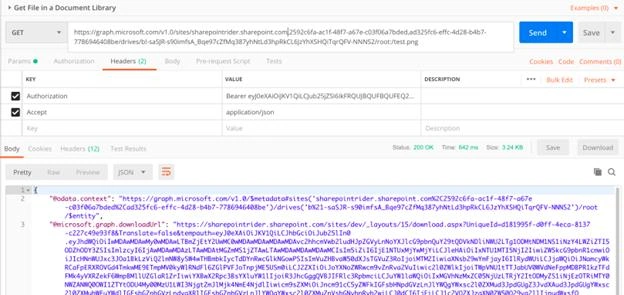
To get a specific file from a document library, call the following endpoint.
https://graph.microsoft.com/v1.0/sites/{site-id}/drives/{drive-id}/root:/{item-path}
Replace
{site-id} with the site id received in the previous step.
{drive-id} with one of the document library id received in the previous step.
{item-path} with file name or path.
I hope this article has helped you to understand the REST API calls required to reach a file in a SharePoint Document Library using Graph API.
Sharing is caring so don't forget to share it with your friends.
vill nahPosted Dec 6, 2020, 4:17 AM
Nice article. how can do serach file (by name ) in document library with Microsoft Graph API.thanks
Pradip RathodPosted Jun 14, 2020, 6:33 PM
Great Article! Wanted to know if this method works for a user who has two steps authentication enabled?
Roy RoyPosted Sep 11, 2019, 11:26 AM
Nice article. how can I attach file /link files list item...since graph api dont allow create listitem with attachments, i can upload files here in document library and attach them to list item...any way ?
PreetiPosted Aug 30, 2019, 3:47 AM
Pictures are not clearly visible
Joseph VelliahPosted May 15, 2019, 10:13 PM
Example server relative path : sites/dev
Aryan chauhanPosted May 10, 2019, 6:06 AM
What value i need to put in server-relative-path
Aryan chauhanPosted May 10, 2019, 6:05 AM
Https://graph.microsoft.com/v1.0/sites/{host-name}:/{server-relative-path}
Aryan chauhanPosted May 10, 2019, 6:05 AM
I was trying to follow your artical but get stuck here
Aryan chauhanPosted May 10, 2019, 6:04 AM
Hi Joseph,