

Building a BookBot using REST API
In my previous articles, we have seen how we can make our Bot more interactive. Based on users’ intent, Bot can perform certain actions and provide whatever information is needed.
Having said, I would like to build a BookBot, now. Below is the typical use-case for our BookBot.
BookBot Use-case,
- BookBot will first greet the user.
- BookBot will ask user to enter the topic name by which books can be searched.
- User will be presented with top 5 book titles based on what user has entered.
Approach
- Our BookBot will prompt user to capture the intent of a user.
- When user’s intent is of searching a book by entering a topic, BookBot will capture the keyword and call a REST API.
- REST API will return data to BookBot.
- BookBot will display the list of books to the end-user, based on the topic that user has entered.
Now, let’s start building this use-case. For this, I will be using Google Books APIs to search the books.
REST API considered,
REST API in Node.JS,
We will call above API in our NodeJS with the help of https module by using,
- var https = require('https');
- Our updated botserver.js code implementation can be seen as below,
- var builder = require('botbuilder');
- var https = require('https');
- var connector = new builder.ConsoleConnector().listen();
- var bot = new builder.UniversalBot(connector);
- function getBooksData(key) {
- https.get("https://www.googleapis.com/books/v1/volumes?q=" + key + "&maxResults=5", function(res) {
- var d = '';
- var i;
- res.on('data', function(chunk) {
- d += chunk;
- });
- res.on('end', function() {
- var e = JSON.parse(d);
- for (i = 0; i < e.items.length; i++) {
- console.log(i + 1 + ":" + e.items[i].volumeInfo.title);
- }
- });
- });
- }
- var intents = new builder.IntentDialog();
- bot.dialog('/', intents);
- intents.matches(/^Hi/i, [
- function(session) {
- builder.Prompts.text(session, 'Hey, I am a BookBot. Welcome to Book Searching through Chat!.To start, which books you would like to search?');
- },
- function(session, results) {
- session.send('Here are books for topic - %s.', results.response);
- getBooksData(results.response);
- }
- ]);
- intents.onDefault(builder.DialogAction.send('Hi there! How can I help you today?'));
Running a BookBot
Open a new Node.js command prompt and navigate to the bots folder, using command cd and running the following command. Our botserver.js has run successfully and our conversation has begun with our bot through command line channel.
Just type ‘Hi’ on command prompt to see how bot prompts user for a name.

BookBot greets and asks user to enter a topic for book search.
Asking BookBot to get the information of top 5 books on the given topic
Now, as a user, I would like to search books by the topic SharePoint. So, I entered ‘SharePoint’ in the command prompt.

Once you hit enter, BookBot will capture the keyword entered and search for the book using Google Books API. As soon as the results for books have arrived, these results will be shown to the user, in below format:
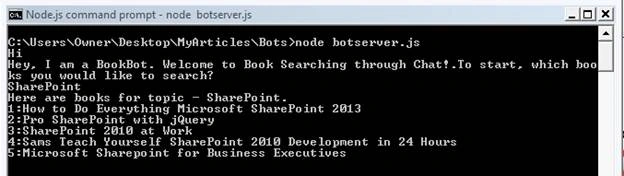
This way, we can make our bots intelligent to search the information from the cloud, and can provide the great conversational experience to end users.
Darnell ClaytonPosted Aug 4, 2016, 2:37 AM
Great tutorial. I have a quick questions for you. I noticed that you used the command prompt instead of the emulator. What changes would you have to make in the code to display the results in the emulator? Outside of adding restify.
kalu singh raoPosted Jul 26, 2016, 2:23 AM
Good one