

Introduction
We know that Web services are also classes just like any other .NET classes. Web services have methods marked as WebMethods that can be exposed by the WebServices to be consumed by the outside world. We can also overload the WebMethods but the method overloading in a Web Service is not as straightforward as in a class. When we try to overload a member method, we make two or more methods with the same name with different parameters. But this will not work in web services and will show a runtime error because WSDL is not supported by the same method name.
As we know a web service is a class that can utilize all the OOPS features like method overloading. However to use this feature on WebMethods we need to do something more that is explained in this article.
Overloading Web Services
When we try to overload Web Methods in Web Services and after doing the build, it will work successfully. But when we try to run or consume, it will show an error message. To see this first we need to create a web service.
Creating XML Web Service in .Net
Use the following steps to create a web service.
- Go to Visual Studio 2010 and create a New Project.
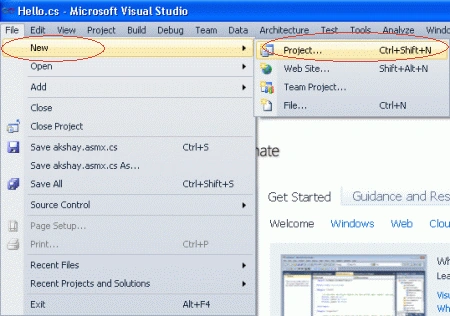
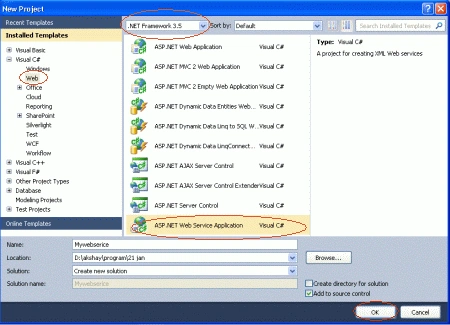
- Select .NET Framework 3.5.
- Create an ASP.NET Web Service Application.
- Give it a name and click ok button.
Add the following method in the Service.cs file.
[WebMethod]
public int AddNumber(int a, int b)
{
return (a + b);
}
[WebMethod]
public int AddNumber(int a, int b, int c)
{
return (a + b + c);
}
The complete Service.cs file is:
using System;
using System.Collections.Generic;
using System.Linq;
using System.Web;
using System.Web.Services;
namespace WebMethodOverlodding
{
/// <summary>
/// Summary description for Service1
/// </summary>
[WebService(Namespace = "http://tempuri.org/")]
[WebServiceBinding(ConformsTo = WsiProfiles.BasicProfile1_1)]
[System.ComponentModel.ToolboxItem(false)]
// To allow this Web Service to be called from script, using ASP.NET AJAX, uncomment the following line.
// [System.Web.Script.Services.ScriptService]
public class Service1 : System.Web.Services.WebService
{
[WebMethod]
public int AddNumber(int a, int b)
{
return (a + b);
}
[WebMethod]
public int AddNumber(int a, int b, int c)
{
return (a + b + c);
}
}
}
In the above Web Service, we have two overloaded WebMethods. This Web Service would compile fine. Run the WebService in the browser. That should give an error saying that the AddNumbers() methods use the same message name 'AddNumbers' and asking to use the MessageName property of the WebMethod. like as.
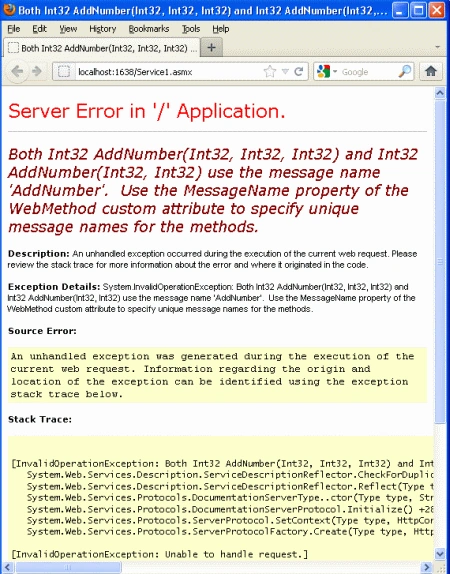
Solution for the Above Error
The procedure to solve this problem is very easy. Start each method with a Web Method attribute. Add the MessageName property to the WebMethod attribute as shown below.
[WebMethod]
public int AddNumber(int a, int b)
{
return (a + b);
}
[WebMethod (MessageName="AddThreeNumbers")]
public int AddNumber(int a, int b, int c)
{
return (a + b + c);
}
The complete Service.cs file is look like as.
using System;
using System.Collections.Generic;
using System.Linq;
using System.Web;
using System.Web.Services;
namespace WebMethodOverlodding
{
/// <summary>
/// Summary description for Service1
/// </summary>
[WebService(Namespace = "http://tempuri.org/")]
[WebServiceBinding(ConformsTo = WsiProfiles.BasicProfile1_1)]
[System.ComponentModel.ToolboxItem(false)]
// To allow this Web Service to be called from script, using ASP.NET AJAX, uncomment the following line.
// [System.Web.Script.Services.ScriptService]
public class Service1 : System.Web.Services.WebService
{
[WebMethod]
public int AddNumber(int a, int b)
{
return (a + b);
}
[WebMethod (MessageName="AddThreeNumbers")]
public int AddNumber(int a, int b, int c)
{
return (a + b + c);
}
}
}
Now again run the above web service by pressing the F5 key; we will then see:
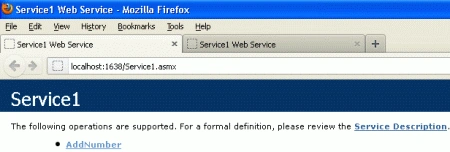
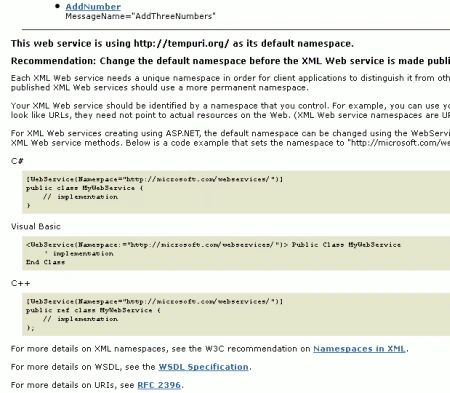
Reason for the Above Error
The Overloading is supported by web services. But when WSDL (Web Service Description Language) is generated, it will not be able to make the difference between methods because WSDL does not deal on the base of parameters. By ing web methods 'MessageName Property', it changes the method name in WSDL. See the WSDL given below, the operation name is AddNumber but the input method name and output method name is different. The same will apply for second method also.
<wsdl:operation name="AddNumber">
<wsdl:input message="tns:AddNumberSoapIn"/>
<wsdl:output message="tns:AddNumberSoapOut"/>
</wsdl:operation>
<wsdl:operation name="AddNumber">
<wsdl:input name="AddThreeNumbers" message="tns:AddThreeNumbersSoapIn"/>
<wsdl:output name="AddThreeNumbers" message="tns:AddThreeNumbersSoapOut"/>
</wsdl:operation>
Resources
Timothy PowerPosted May 14, 2013, 8:44 AM
I tried this and it puked during wsdl creation referencing it from another project. I got the following error message. Service 'PHIForestryWS.ProcessAXF' does not conform to WS-I Basic Profile v1.1. Please examine each of the normative statement violations below. To turn off conformance check set the ConformanceClaims property on corresponding WebServiceBinding attribute to WsiClaims.None. R2304: Operation name overloading in a wsdl:portType is disallowed by the Profile. A wsdl:portType in a DESCRIPTION MUST have operations with distinct values for their name attributes. Note that this requirement applies only to the wsdl:operations within a given wsdl:portType. A wsdl:portType may have wsdl:operations with names that are the same as those found in other wsdl:portTypes. - Operation 'InsertInspector' on portType 'ProcessAXFSoap' from namespace 'http://tempuri.org/'. - Operation 'UpdateInspector' on portType 'ProcessAXFSoap' from namespace 'http://tempuri.org/'. To make service conformant please make sure that all web methods belonging to the same binding have unique names.