

Here are the steps,
Step 1
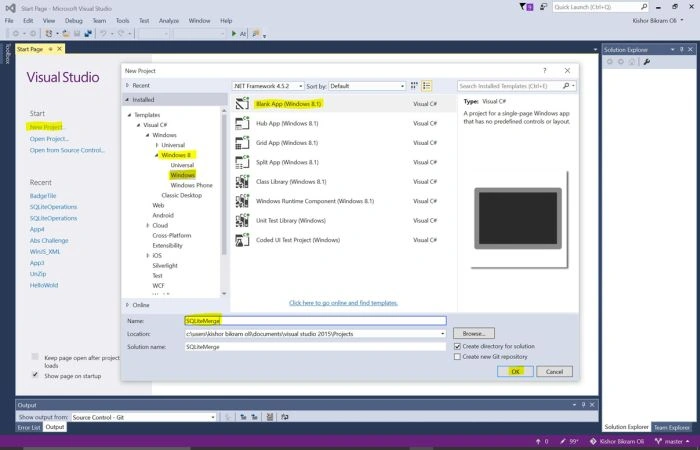
Firstly, Create a Blank Windows Project.
Step 2
Install ‘sqlite-net’ from the Package manager and also Add reference for ‘SQLite for Windows Runtime’.
In the MainPage.xaml, we add the following buttons with click events-
Firstly, Create a Blank Windows Project.
Step 2
Install ‘sqlite-net’ from the Package manager and also Add reference for ‘SQLite for Windows Runtime’.
In the MainPage.xaml, we add the following buttons with click events-
- Button to create a first database
- Button to create a second database
- Button to merge two databases
Complete XAML code
- <Page
- x:Class="SQLiteMerge.MainPage"
- xmlns="http://schemas.microsoft.com/winfx/2006/xaml/presentation"
- xmlns:x="http://schemas.microsoft.com/winfx/2006/xaml"
- xmlns:local="using:SQLiteMerge"
- xmlns:d="http://schemas.microsoft.com/expression/blend/2008"
- xmlns:mc="http://schemas.openxmlformats.org/markup-compatibility/2006"
- mc:Ignorable="d">
- <Grid Background="#FF5A7FD6">
- <Button x:Name="btnCreateFirstDb" Content="Create First Database" HorizontalAlignment="Left" Margin="154,97,0,0" VerticalAlignment="Top" Width="440" Height="77" Click="btnCreateFirstDb_Click"/>
- <Button x:Name="btnCreateSecondDb" Content="Create Second Database" HorizontalAlignment="Left" Margin="148,206,0,0" VerticalAlignment="Top" Width="446" Height="77" Click="btnCreateSecondDb_Click"/>
- <Button x:Name="btnMerge" Content="Merge Two Database" HorizontalAlignment="Left" Margin="154,316,0,0" VerticalAlignment="Top" Width="446" Height="77" Click="btnMerge_Click"/>
- </Grid>
- </Page>
In the code behind MainPage.xaml.cs, for each first two buttons we add the code for creating two Databases and a third button to merge values from second database to the first one.
Complete Code snippet
- using System;
- using System.Collections.Generic;
- using System.IO;
- using System.Linq;
- using System.Runtime.InteropServices.WindowsRuntime;
- using Windows.Foundation;
- using Windows.Foundation.Collections;
- using Windows.UI.Xaml;
- using Windows.UI.Xaml.Controls;
- using Windows.UI.Xaml.Controls.Primitives;
- using Windows.UI.Xaml.Data;
- using Windows.UI.Xaml.Input;
- using Windows.UI.Xaml.Media;
- using Windows.UI.Xaml.Navigation;
- using SQLite;
- using Windows.Storage;
- using System.Diagnostics;
- namespace SQLiteMerge
- {
- public sealed partial class MainPage : Page
- {
- private SQLiteAsyncConnection dbCon;
- public MainPage()
- {
- this.InitializeComponent();
- }
- [Table("Students")]
- public sealed class Student
- {
- public string Name { get; set; }
- public int RollNo { get; set; }
- public string Faculty { get; set; }
- }
- //Creates First Database
- private async void btnCreateFirstDb_Click(object sender, RoutedEventArgs e)
- {
- try
- {
- dbCon = new SQLiteAsyncConnection(ApplicationData.Current.LocalFolder.Path + "\\FirstDatabase.sqlite");
- await dbCon.CreateTableAsync<Student>();
- var student = new Student
- {
- Name = "Ram",
- RollNo = 1,
- Faculty = "Physics"
- };
- await dbCon.InsertAsync(student);
- }
- catch (Exception ex)
- {
- Debug.WriteLine(ex.ToString());
- }
- }
- //Creates Second Database
- private async void btnCreateSecondDb_Click(object sender, RoutedEventArgs e)
- {
- try
- {
- SQLiteAsyncConnection dbCon = new SQLiteAsyncConnection(ApplicationData.Current.LocalFolder.Path + "\\SecondDatabase.sqlite");
- await dbCon.CreateTableAsync<Student>();
- var student = new Student
- {
- Name = "Shyam",
- RollNo = 2,
- Faculty = "Biology"
- };
- await dbCon.InsertAsync(student);
- }
- catch (Exception ex)
- {
- Debug.WriteLine(ex.ToString());
- }
- }
- //Merging two databases. Inserts values from Second database to First Database
- private async void btnMerge_Click(object sender, RoutedEventArgs e)
- {
- try
- {
- string firstDbPath = ApplicationData.Current.LocalFolder.Path + "\\FirstDatabase.sqlite";
- string secondDbPath = ApplicationData.Current.LocalFolder.Path + "\\SecondDatabase.sqlite";
- await dbCon.ExecuteAsync("ATTACH DATABASE '" + firstDbPath + "' AS firstDB;");
- await dbCon.ExecuteAsync("ATTACH DATABASE '" + secondDbPath + "' AS secondDB");
- string query = "INSERT OR REPLACE INTO firstDB.Students ("
- + "Name, RollNo, Faculty) "
- + "SELECT Name, RollNo, Faculty "
- + "FROM secondDB.Students";
- await dbCon.ExecuteAsync(query);
- }
- catch (Exception ex)
- {
- Debug.WriteLine(ex.ToString());
- }
- }
- }
- }
Step 4
Run the application.
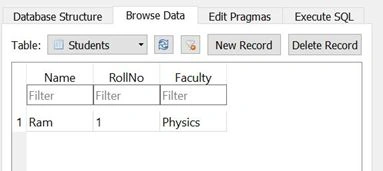
Click on Create First Database button. You will see the first SQLite database created in local folder. (This PC > C > Users > [Your User Name] > AppData > Local > Packages > [App package name] > LocalState)
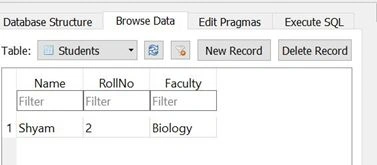
Click on Create Second Database button. You will see the second SQLite database created in local folder. (This PC > C > Users > [Your User Name] > AppData > Local > Packages > [App package name] > LocalState)
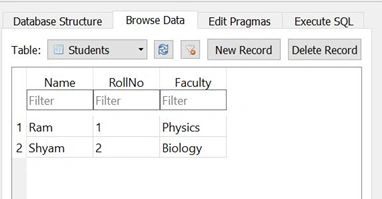
Finally Click on Merge two databases button, you will see the values from second database merged into first database.
You can get the complete project from GitHub https://github.com/olikishor/SQLiteMerge
Kuppurasu NagarajPosted May 17, 2016, 11:40 AM
Nice sharing..