

In the previous article we saw the Merge Statement.
These articles will work around the merge statement over XML data type. We know that the XML data type SQL SERVER. The XML Data type stores XML data using Bulk Insert of the data into SQL tables.
Example
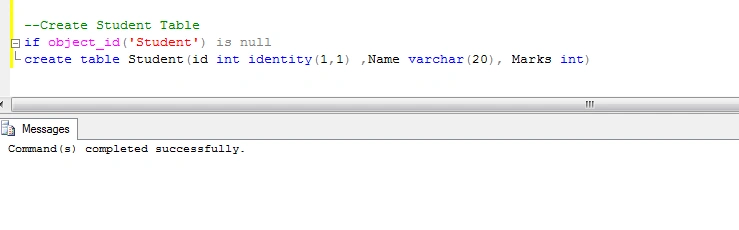
- --Create Student Table
- if object_id('Student') is null
- create table Student(id int identity(1,1) ,Name varchar(20), Marks int)
- Declare Xml Data Type and Assign Some Xml Data.
- Declare @Data xml
- set @Data=
- '<Root>
- <Student>
- <Name>Rakesh</Name>
- <Marks>80</Marks>
- </Student>
- <Student>
- <Name>Mahesh</Name>
- <Marks>90</Marks>
- </Student>
- <Student>
- <Name>Gowtham</Name>
- <Marks>60</Marks>
- </Student>
- </Root>'
- select @Data as StudentData

- select * from Student
- --no record in Student Table
- Merge Statement usign Xml Data.
- Merge into Student as Trg
- Using (select d.x.value('Name[1]','varchar(20)') as Name ,
- d.x.value('Marks[1]','int') as Marks from
- @data.nodes('/Root/Student')as d(x)) as Src
- on Trg.Name=Src.Name
- When Matched Then update set
- Trg.Marks=Src.Marks
- when not matched by target then
- insert (Name,Marks) values(Src.Name,Src.Marks);
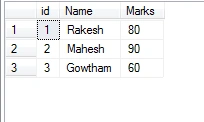
- select * from Student
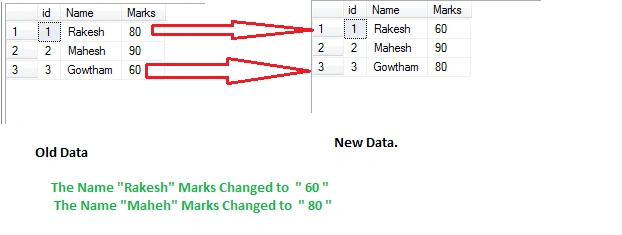
This time I changed the XML Data Marks Column with the same data. This time we need to update the Student table data.
- Declare @Data xml
- set @Data=
- '<Root>
- <Student>
- <Name>Rakesh</Name>
- <Marks>60</Marks>
- </Student>
- <Student>
- <Name>Mahesh</Name>
- <Marks>90</Marks>
- </Student>
- <Student>
- <Name>Gowtham</Name>
- <Marks>80</Marks>
- </Student>
- </Root>'
- Merge into Student as Trg
- Using (select d.x.value('Name[1]','varchar(20)') as Name
- ,d.x.value('Marks[1]','int') as Marks from
- @data.nodes('/Root/Student')as d(x)) as Src
- on Trg.Name=Src.Name
- When Matched Then update set
- Trg.Marks=Src.Marks
- when not matched by target then
- insert (Name,Marks) values(Src.Name,Src.Marks);
- select * from Student
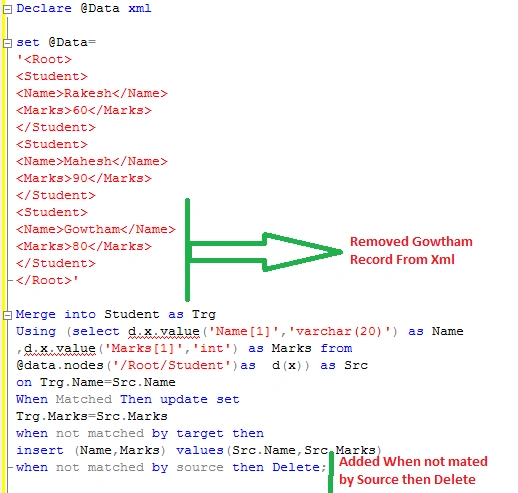
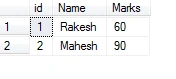
Remove some data from XML (“Here GoWtham“ record):
- Declare @Data xml
- set @Data=
- '<Root>
- <Student>
- <Name>Rakesh</Name>
- <Marks>60</Marks>
- </Student>
- <Student>
- <Name>Mahesh</Name>
- <Marks>90</Marks>
- </Student>
- </Root>'
- Merge into Student as Trg
- Using (select d.x.value('Name[1]','varchar(20)') as Name
- ,d.x.value('Marks[1]','int') as Marks from
- @data.nodes('/Root/Student')as d(x)) as Src
- on Trg.Name=Src.Name
- When Matched Then update set
- Trg.Marks=Src.Marks
- when not matched by target then
- insert (Name,Marks) values(Src.Name,Src.Marks)
- when not matched by source then Delete;
- select * from Student
Join the conversation! Your thoughts help the community grow.