

Introduction
In this article, we are going to learn about how to create a menu in Xamarin Android app.
Solution
Here are the steps to add tabs in an Android app.
Step 1
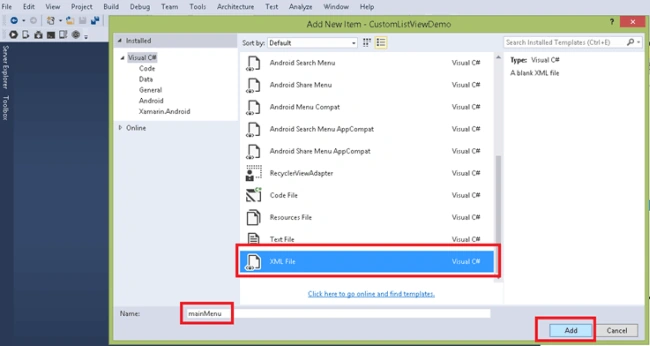
First, open the solution, add go to Resource, create menu folder and add new item as XML file. For the details, refer to the screenshot given below.
Step 2
Now, go to Values folder and add the lines of code given below in Strings.XML file to add the names of the tabs.
(File Name: Strings.XML)
- <string name="menuItem1">Item 1</string>
- <string name="menuItem2">Item 2</string>
- <string name="menuItem3">Item 3</string>
Step 3
Open the mainMenu.XML file and the code given below to add the menu on the Main Activity, as shown below.
(File Name: mainMenu.XML)
- <?xml version="1.0" encoding="utf-8"?>
- <menu xmlns:android="http://schemas.android.com/apk/res/android">
- <!-- Add menu Item 1 -->
- <item android:id="@+id/menuItem1"
- android:icon="@android:drawable/ic_popup_sync" android:showAsAction="always"/>
- <!-- Add menu Item 2 -->
- <item android:id="@+id/menuItem2"
- android:title="@string/menuItem2"/>
- <!-- Add menu Item 3 -->
- <item android:id="@+id/menuItem3"
- android:title="@string/menuItem3"/>
- </menu>
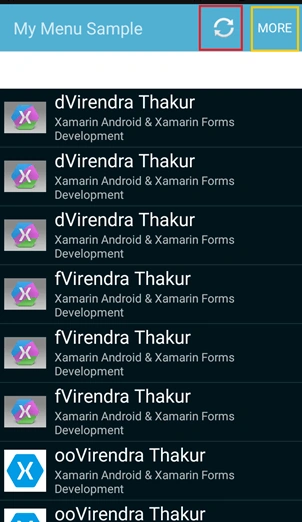
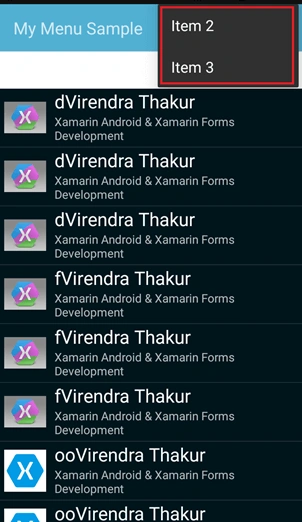
Here, android:showAsAction="always" shows the menu item on the Action bar always and rest all menu items are shown in the sub menu.
Step 4
Go to Main Activity and set the menu by adding the code given below.
(File Name: MainActivity.cs)
- public override bool OnCreateOptionsMenu(IMenu menu)
- {
- // set the menu layout on Main Activity
- MenuInflater.Inflate(Resource.Menu.mainMenu, menu);
- return base.OnCreateOptionsMenu(menu);
- }
Step 5
Now, the menu is added on the Main Activity, so we need to add the menu item selected event on the click of menu item. For this, add the code given below.
(File Name: MainActivity.cs)
- public override bool OnOptionsItemSelected(IMenuItem item)
- {
- switch (item.ItemId)
- {
- case Resource.Id.menuItem1:
- {
- // add your code
- return true;
- }
- case Resource.Id.menuItem2:
- {
- // add your code
- return true;
- }
- case Resource.Id.menuItem3:
- {
- // add your code
- return true;
- }
- }
- return base.OnOptionsItemSelected(item);
- }
By adding the action in the selected menu item, you can perform any action on the selection of the menu item.
Output
Federico NavarretePosted Nov 23, 2017, 1:52 AM
Can you update to the latest version with Toolbars? The IMenu doesn't work anymore.
Madhanmohan DevarajanPosted Mar 17, 2017, 12:52 PM
Thanks for sharing nice article on xamarin, the way you have described things are easy to understand.