

Math Object In TypeScript: Part 5
Before reading this article, please go through the following articles:
Introduction
In this article, I am describing the TypeScript math functions Pow, Sqrt, and Random.
In TypeScript the pow() method is used to return the base to the exponent power. In this method we need to pass two parameters, the first is the base to which the power will be calculated and the other is the exponent value. The power parameter of the pow method can be a fractional value.
Pow() Method
In this example, we declare a variable v and it's value 2. We use this variable as an exponent.
Syntax
- pow(x,y)
where x is the number and y is the power parameter.
- Pow(num: number) {
- var v = 2;
- var span = document.createElement("span");
- span.style.color = "green";
- span.innerText = +v + " Power of random number is -> " + Math.pow(num, 2) + "\n";
- document.body.appendChild(span);
- }
Sqrt() Method
Syntax
- sqrt(number)
Function
- Sqrt(num: number) {
- var span = document.createElement("span");
- span.style.color = "blue";
- span.innerText = "Square Root of random number is -> " + Math.sqrt(num) + "\n";
- document.body.appendChild(span);
- }
Random() Method
Syntax
- random()
Function
- var random = Math.floor(Math.random() * 10);
Complete Program
Pow_Sqrt_Random.ts
- class Pow_Sqrt_Random_Function {
- Pow(num: number) {
- var v = 2;
- var span = document.createElement("span");
- span.style.color = "green";
- span.innerText = +v + " Power of random number is -> " + Math.pow(num, 2) + "\n";
- document.body.appendChild(span);
- }
- Sqrt(num: number) {
- var span = document.createElement("span");
- span.style.color = "blue";
- span.innerText = "Square Root of random number is -> " + Math.sqrt(num) + "\n";
- document.body.appendChild(span);
- }
- }
- window.onload = () => {
- var obj = new Pow_Sqrt_Random_Function();
- var random = Math.floor(Math.random() * 10);
- var span = document.createElement("span");
- span.innerText = "Random number between 1-10 is -> " + random + "\n";
- document.body.appendChild(span);
- obj.Pow(random);
- obj.Sqrt(random);
- };
Pow_Sqrt_Random_Demo.htm
- <!DOCTYPE html>
- <html lang="en"
- xmlns="http://www.w3.org/1999/xhtml">
- <head>
- <meta charset="utf-8" />
- <title>TypeScript HTML App</title>
- <link rel="stylesheet" href="app.css" type="text/css" />
- <script src="Pow_Sqrt_Random.js"></script>
- </head>
- <body>
- <h2>Pow, Sqrt and Random Math Function in TypeScript</h2>
- <div id="content"/>
- </body>
- </html>
Pow_Sqrt_Random.js
- var Pow_Sqrt_Random_Function = (function() {
- function Pow_Sqrt_Random_Function() {}
- Pow_Sqrt_Random_Function.prototype.Pow = function(num) {
- var v = 2;
- var span = document.createElement("span");
- span.style.color = "green";
- span.innerText = +v + " Power of random number is -> " + Math.pow(num, 2) + "\n";
- document.body.appendChild(span);
- };
- Pow_Sqrt_Random_Function.prototype.Sqrt = function(num) {
- var span = document.createElement("span");
- span.style.color = "blue";
- span.innerText = "Square Root of random number is -> " + Math.sqrt(num) + "\n";
- document.body.appendChild(span);
- };
- return Pow_Sqrt_Random_Function;
- })();
- window.onload = function() {
- var obj = new Pow_Sqrt_Random_Function();
- var random = Math.floor(Math.random() * 10);
- var span = document.createElement("span");
- span.innerText = "Random number between 1-10 is -> " + random + "\n";
- document.body.appendChild(span);
- obj.Pow(random);
- obj.Sqrt(random);
- };
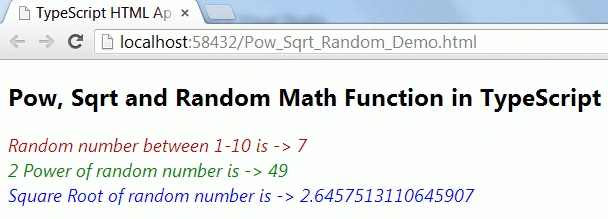
Output
Yusuf KaratoprakPosted Jan 14, 2013, 4:45 AM
Thanks. Good practice...