

Introduction
Java Math class provides several methods to work on math calculations like min(), max(), avg(), sin(), cos(), tan(), round(), ceil(), floor(), abs() etc. In this article, we will learn about the Java Math class, its basic methods, and constructors provided by the Java programming language.
Math class in Java
The class Math contains methods for performing basic numeric operations such as the elementary exponential, logarithm, square root, and trigonometric functions. Unlike some of the numeric methods of class StrictMath, all implementations of the equivalent functions of class Math are not defined to return the bit-for-bit the same results. This relaxation permits better-performing implementations where strict reproducibility is not required.
By default, many of the Math methods simply call the equivalent method in StrictMath for their implementation. Code generators are encouraged to use platform-specific native libraries or microprocessor instructions, where available, to provide higher-performance implementations of Math methods. Such higher-performance implementations still must conform to the specification for Math.
If the size is int or long and the results overflow the range of value, the methods addExact(), subtractExact(), multiplyExact(), and toIntExact() throw an ArithmeticException.
For other arithmetic operations like increment, decrement, divide, absolute value, and negation, overflow occurs only with a specific minimum or maximum value. It should be checked against the maximum and minimum values as appropriate.
Math class declaration
Following is the declaration for java.lang.Math class.
public final class Math
   extends Object
The complete example program of java.lang.Math class is listed below.
public class MathClassExample1 {
    public static void main(String[] args) {
        double x = 28;
        double y = 4;
        System.out.println("Maximum number of x and y is: " + Math.max(x, y));
        System.out.println("Square root of y is: " + Math.sqrt(y));
        System.out.println("Power of x and y is: " + Math.pow(x, y));
        System.out.println("Logarithm of x is: " + Math.log(x));
        System.out.println("Logarithm of y is: " + Math.log(y));
        System.out.println("return the logrithn of log10 of x is: " + Math.log10(x));
    }
}
The above program generates the following output.
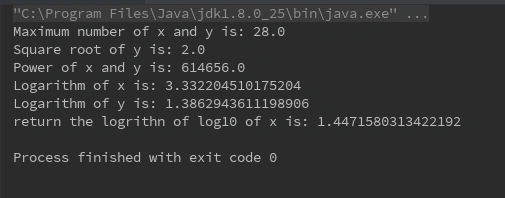
What is the NaN value in Math class?
NaN stands for not a number. Nan is produced if a floating-point operation has some input parameters that cause the operation to produce some undefined result. For example, 0.0 divided by 0.0 is arithmetically undefined. Finding out the square root of a negative number, too, is undefined.
The complete program of NaN value.
public class NaNValueExample {
    public static void main(String[] args) {
        System.out.println(2.0 % 0);
        System.out.println(0.0 / 0);
        System.out.println(Math.sqrt(-1));
    }
}
The above program generates the following output.
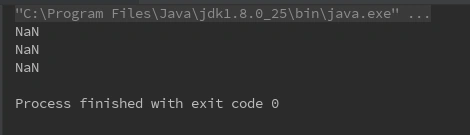
How to compare NaN values?
All numeric operations with NaN as an operand produce NaN as a result. The reason behind this is that NaN is unordered, so a numeric comparison operation involving one or two NaNs returns false.
- The numerical comparison operators <, <=, >, and >= always return false if either or both operands are NaN.(§15.20.1)
- The equality operator == returns false if either operand is NaN.
- The inequality operator != returns true if either operand is NaN. (§15.21.1).
The complete program of comparing the NaN values.
public class CompareNaNValues {
    public static void main(String[] args) {
        System.out.print("Check if equal :");
        System.out.println(Float.NaN == Float.NaN);
        System.out.print("Check if UNequal: ");
        System.out.println(Float.NaN != Float.NaN);
        System.out.print("Check if equal: ");
        System.out.println(Double.NaN == Double.NaN);
        System.out.print("Check if UNequal: ");
        System.out.println(Double.NaN != Double.NaN);
        double NaN = 2.1 % 0;
        System.out.println((2.1 % 0) == NaN);
        System.out.println(NaN == NaN);
    }
}
The above program generates the following output.
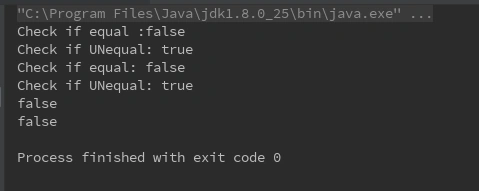
Math class methods in Java
The java.lang.Math class contains various methods for performing basic numeric operations such as the logarithm, cube root, and trigonometric functions, etc. The various Java math methods are as follows:
1) Math.abs() method in Java
The java.lang.Math.abs() method returns the absolute (positive) value of an int value. This method gives the absolute value of the argument. The argument can be int, double, long, and float.
- If the argument is positive zero or negative zero, the result is positive zero.
- If the argument is infinite, the result is positive infinity.
- If the argument is NaN, the result is NaN.
Syntax
public static int abs(int i)
public static double abs(double d)
public static float abs(float f)
public static long abs(long lng)
The complete program of java.lang.Math.abs() method example is listed below.
import java.lang.Math;
public class MathClassExample2 {
    public static void main(String[] args) {
        double x = 4876.1874d;
        double y = -0.0d;
        // get and print their absolute values
        System.out.println("absolute value of x =" + Math.abs(x));
        System.out.println("absolute value of y =" + Math.abs(y));
        System.out.println("absolute value of (-9999.555d)=" + Math.abs(-9999.555d));
    }
}
The above program generates the following output.
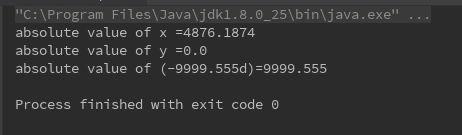
2) Math.acos() method in Java
The java.lang.Math.acos(double a) returns the arc cosine of an angle in the range of 0.0 through pi. If the argument is NaN or its absolute value is greater than 1, then the result is NaN. The results must be semi-monotonic.
Syntax
public static double acos(double a)
The complete program of java.lang.Math.acos(double a) method example is listed below.
import java.lang.Math;
public class MathClassExample3 {
    public static void main(String[] args) {

        double x = Math.PI / 2;
        x = Math.toRadians(x);

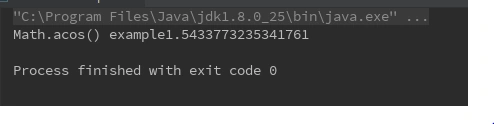
        System.out.println("Math.acos() example" + Math.acos(x));
    }
}
The above program generates the following output.
3) Math.asin() method in Java
The java.lang.Math.asin(double a) returns the arc sine value of the method argument passed. The returned angle is in the range -pi/2 to pi/2.
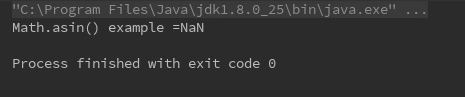
- If the argument is NaN or its absolute value is greater than 1, then the result is NaN.
- If the argument is zero, then the result is a zero with the same sign as the argument.
The results must be semi-monotonic.
Syntax
public static double asin(double a)
The complete program of java.lang.Math.asin(double a)) method example is listed below.
public class MathClassExample4 {
    public static void main(String[] args) {
        double x = Math.PI / 2;
        System.out.println("Math.asin() example =" + Math.asin(x));
    }
}
The above program generates the following output.
4) Math.toRadians() method in Java
The java.lang.Math.toRadians(double deg) converts an angle measured in degrees to an approximately equivalent angle measured in radians. Math class usually takes radians as an input which is very much different in real-life applications since angles are usually represented in degrees.
Syntax
public static double toRadians(double deg)
The complete program of java.lang.Math.toRadians(double deg) method example is listed below.
import java.lang.Math;
public class MathClassExample5 {
    public static void main(String[] args) {
        double x = 45;
        double y = -180;
        x = Math.toRadians(x);
        y = Math.toRadians(y);
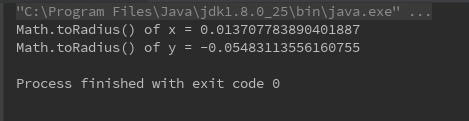
        System.out.println("Math.toRadius() of x = " + Math.toRadians(x));
        System.out.println("Math.toRadius() of y = " + Math.toRadians(y));
    }
}
The above program generates the following output.
5) Math.max() method in Java
The java.lang.math.max() is an inbuilt method in Java that is used to return the Maximum or Largest value from the given two arguments. The arguments are taken in int, float, double and long.
- If we provide positive and negative values as an argument, this method will return a positive argument.
- If we provide both negative values as an argument, the number with the lower magnitude is returned as a result.
- If the arguments are not a number(NaN), this method will return NaN.
Syntax
public static int max(int a, int b)
public static double max(double a, double b)
public static long max(long a, long b)
public static float max(float a, float b)
The complete program of java.lang.math.max()) method example is listed below.
public class MathClassExample6 {
    public static void main(String args[]) {
        //print the maximum of two numbers
        //Compare two integer numbers
        int x = 20;
        int y = 50;
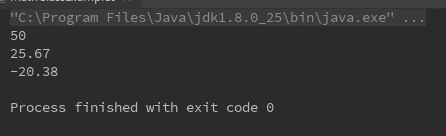
        System.out.println(Math.max(x, y));
        //Compare two double number
        double a = 25.67;
        double b = -38.67;
        System.out.println(Math.max(a, b));
        //Compare two float numbers
        float p = -25.74f;
        float q = -20.38f;
        System.out.println(Math.max(p, q));
    }
}
The above program generates the following output.
6) Math.min() method in Java
The java.lang.math.min() is an inbuilt method in Java that is used to return the Minimum or Lowest value from the given two arguments. The arguments are taken in int, float, double and long
- If we provide positive and negative values as an argument, this method will return a negative argument.
- If we provide both negative values as an argument, the number with a higher magnitude is returned as a result.
- If the arguments are not a number(NaN), this method will return NaN.
Syntax
public static int min(int a, int b)
public static double min(double a, double b)
public static long min(long a, long b)
public static float min(float a, float b)
The complete program of java.lang.math.min() method example is listed below.
public class MathClassExample7 {
    public static void main(String args[])
    {
        //print the minimum of two numbers
        int x = 20;
        int y = 50;
        //print the minimun value of integer values
        System.out.println(Math.min(x, y));
        double a = 25.67;
        double b = -38.67;
        //print the minimum value of double values
        System.out.println(Math.min(a, b));
        float p = -55.73f;
        float q = -30.95f;
        //print the minimum value of float values
        System.out.println(Math.min(p, q));
    }
}
The above program generates the following output.
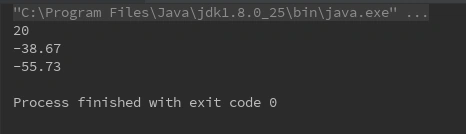
7) Math.nextAfter() method in Java
The java.lang.Math.nextAfter() returns the floating-point number adjacent to the first argument in the direction of the second argument. If both the first argument and the second argument are the same, then this method will return the second argument.
- If either argument is a NaN, this method will return NaN.
- If both arguments are signed zeros, the direction will be unchanged.
- If start argument(a) is equal to a positive or negative, Double.MIN_VALUE or Float.MIN_VALUE and direction argument(b) has a value such that the result should have a smaller magnitude; this method will return Zero with the same sign as the argument.
- If start argument(a) is equal to a positive or negative Double.MAX_VALUE or Float.MAX_VALUE and direction argument(b) has a value such that the result should have a larger magnitude; this method will return Infinite with the same sign as the argument.
The complete program of java.lang.Math.nextAfter() method is listed below.
public class MathClassExample8 {
    public static void main(String[] args) {
        double x = 98759.765;
        double y = 154.28764;
        float a = 787.843f;
        double b = 345.56;

        System.out.println(Math.nextAfter(a, b));
        System.out.println(Math.nextAfter(a, b));

        System.out.println("Math.nextAfter(" + x + "," + y + ")=" + Math.nextAfter(x, y));
        System.out.println("Math.nextAfter(" + y + "," + x + ")=" + Math.nextAfter(y, x));

    }
}
The above program generates the following output.
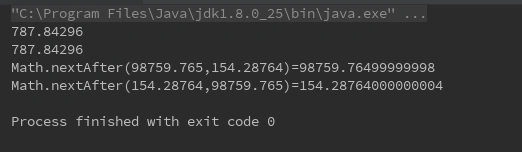
8) Math.nextUp() method in Java
The java.lang.Math.nextUp(double d) returns the floating-point value adjacent to d in the direction of positive infinity. This method is semantically equivalent to nextAfter(d, Double.POSITIVE_INFINITY); however, a nextUp implementation may run faster than its equivalent nextAfter call.
- If the argument is NaN, the result is NaN.
- If the argument is positive infinity, the result is positive infinity.
- If the argument is zero, the result is Double.MIN_VALUE.
The complete program of java.lang.Math.nextUp(double d) method example is listed below.
public class MathClassExample9 {
    public static void main(String[] args) {
        double x = 98759.765;
        double y = 154.28764;
        float d = 0.0f / 0;

        // print the next floating numbers towards positive infinity
        System.out.println("Math.nextUp = " + Math.nextUp(x));
        System.out.println("Math.nextUp = " + Math.nextUp(y));
        // Input NaN, Output NaN
        System.out.println(Math.nextUp(d));
    }
}
The above program generates the following output.
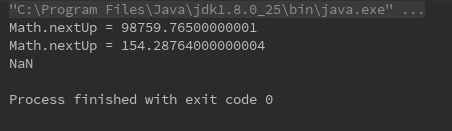
9) Math.nextDown() method in Java
The java.lang.Math.nextDown() is a built-in math method in Java. It returns the floating-point value adjacent to the user-specified parameter (d) in the direction of negative infinity. This method is equivalent to nextAfter(d, Double.NEGATIVE_INFINITY) method.
- If the argument is NaN, this method will return NaN.
- If the argument is Zero and we are dealing with double, this method will return Double.MIN_VALUE.
- If the argument is Zero and we are dealing with float, this method will return Float.MIN_VALUE.
Syntax
public static double nextDown(double a)
public static float nextDown(float a)
The complete program of java.lang.Math.nextDown() method example is listed below.
public class MathClassExample10 {
    public static void main(String[] args)
    {
        float x = 0.0f / 0;
        double d = 744.93;
        float f = 328.7f;

        System.out.println(Math.nextDown(f));
        System.out.println(Math.nextDown(x));
        System.out.println(Math.nextDown(d));
    }
}
The above program generates the following output.
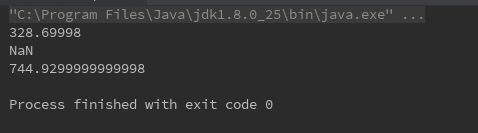
10) Math.pow() method in Java
The java.lang.Math.pow() is used to return the value of the first argument raised to the power of the second argument. The return type of the pow() method is double.
- If the second argument is positive or negative zero, this method will return 1.0.
- If the second argument is not a number (NaN), this method will return NaN.
- If the second argument is 1, this method will return the result the same as the first argument.
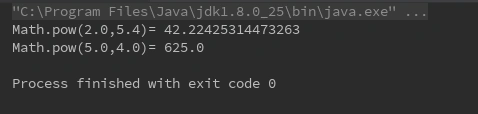
The complete program of java.lang.Math.pow() method example is listed below.
public class MathClassExample11 {
    public static void main(String[] args) {
        //power of double value
        double x = 2.0;
        double y = 5.4;

        System.out.println("Math.pow(" + x + "," + y + ")= " + Math.pow(x, y));
        // power of integer value
        double a = 5;
        double b = 4;
        System.out.println("Math.pow(" + a + "," + b + ")= " + Math.pow(a, b));
    }
}
The above program generates the following output.
11) Math.random() method in Java
The java.lang.Math.random() is used to return a pseudorandom double-type number greater than or equal to 0.0 and less than 1.0. The default random number is always generated between 0 and 1.
Returned values are chosen pseudorandomly with (approximately) uniform distribution from that range. When this method is first called, it creates a single new pseudorandom-number generator, exactly as if by the expression new java.util.Random.
Note. If you want to a specific range of values, you have to multiply the returned value by the magnitude of the range. For example, if you want to get a random number between 0 to 20, the resultant address has to be multiplied by 20 to get the desired result.
Syntax
public static double random( )
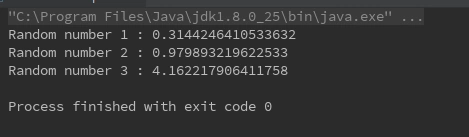
The complete program of java.lang.Math.random() method example is listed below.
public class MathClassExample12 {
    public static void main(String[] args) {
        double x = Math.random();
        double y = Math.random();
        double a = Math.random() * 20;

        // Output is different every time this code is executed
        System.out.println("Random number 1 : " + x);
        System.out.println("Random number 2 : " + y);
        System.out.println("Random number 3 : " + a);
    }
}
The above program generates the following output.
For more information about Random Class in Java Click here
12) Math.round() method in Java
The java.lang.Math.round() is used round of the decimal numbers to the nearest value. This method is used to return the closest long to the argument, with ties rounding to positive infinity.
- If the argument is NaN, the result is 0.
- If the argument is negative infinity or any value less than or equal to the value of Long.MIN_VALUE, the result is equal to the value of Long.MIN_VALUE.
- If the argument is positive infinity or any value greater than or equal to the value of Long.MAX_VALUE, the result is equal to the value of Long.MAX_VALUE.
Syntax
public static long round(double a)
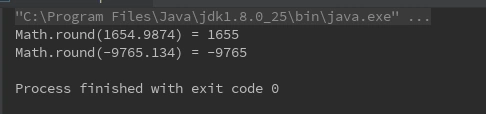
The complete program of java.lang.Math.round() method example is listed below.
public class MathClassExample13 {
    public static void main(String[] args) {

        double x = 1654.9874;
        double y = -9765.134;

        System.out.println("Math.round(" + x + ") = " + Math.round(x));
        System.out.println("Math.round(" + y + ") = " + Math.round(y));
    }
}
The above program generates the following output.
13) Math.sqrt() method in Java
The java.lang.Math.sqrt() is used to return the square root of a number. Otherwise, the result is the double value closest to the true mathematical square root of the argument value.
- If the argument is NaN or less than zero, then the result is NaN.
- If the argument is positive infinity, then the result is positive infinity.
- If the argument is positive zero or negative zero, then the result is the same as the argument.
Syntax
public static double sqrt(double x)
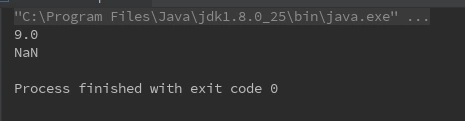
The complete program of java.lang.Math.sqrt() method example is listed below.
public class MathClassExample14 {
    public static void main(String[] args)
    {
        double x = 81.0;
        double y = -81.78;
        System.out.println(Math.sqrt(x));
        System.out.println(Math.sqrt(y));
    }
The above program generates the following output.
14) Math.log() method in Java
The java.lang.Math.log(double a) returns the natural logarithm (base e) of a double value. This method returns the natural logarithm (base e) of a double value as a parameter.
- If the argument is NaN or less than zero, then the result is NaN.
- If the argument is positive infinity, then the result is positive infinity.
- If the argument is positive zero or negative zero, then the result is negative infinity.
Syntax
public static double log(double a)
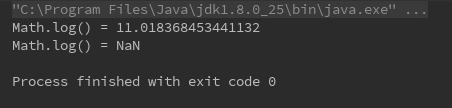
The complete program of java.lang.Math.log() method example is listed below.
public class MathClassExample15 {
    public static void main(String[] args) {
        // find the logarithm  of x and y
        double x = 60984.1;
        double y = -497.99;
        System.out.println("Math.log() = " + Math.log(x));

        System.out.println("Math.log() = " + Math.log(y));
    }
}
The above program generates the following output.
15) Math.log10() method in Java
The java.lang.Math.log10() is used to find out the Logarithmic of a number when the base is 10. This method returns the base 10 logarithms of a double value.
- If the argument is Positive value, this method will return the logarithm of a given value.
- If the argument is equal to 10n for integer n, this method will return n.
- If the argument is a Negative value, this method will return NaN.
- If the argument is NaN, this method will return NaN.
Syntax
public static double log10(double a)
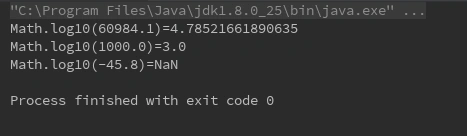
The complete java.lang.Math.log10() method example is listed below.
public class MathClassExample16 {
    public static void main(String[] args) {
        // get the base 10 logarithm for y
        double x = 60984.1;
        double y = 1000;
        double z = -45.8;

        System.out.println("Math.log10(" + x + ")=" + Math.log10(x));
        System.out.println("Math.log10(" + y + ")=" + Math.log10(y));
        System.out.println("Math.log10(" + z + ")=" + Math.log10(z));
    }
}
The above program generates the following output.
16) Math.sin() method in Java
The java.lang.Math.sin() is used to return the trigonometric sine of an angle. This method returns a value between -1 to 1.
- If the argument is NaN or an infinity, then the result is NaN.
- If the argument is zero, then the result is a zero with the same sign as the argument.
Syntax
public static double sin(double a)
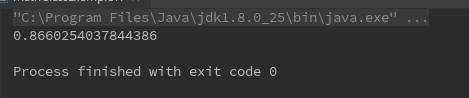
The complete program of java.lang.Math.sin() method example is listed below.
public class MathClassExample17 {
    public static void main(String arg[]) {
        double a = 60;
        double b = Math.toRadians(a);
        System.out.println(Math.sin(b));
    }
}
The above program generates the following output.
17) Math.cos() method in Java
The java.lang.Math.cos(double a) returns the trigonometric cosine of an angle. If the argument is NaN or an infinity, then the result is NaN. The computed result must be within 1 ulp of the exact result. ulp is the unit in the last place. An ulp of a float or double value is the positive distance between a given value and the next value that is larger in magnitude. The results must be semi-monotonic.
Syntax
public static double cos(double a)
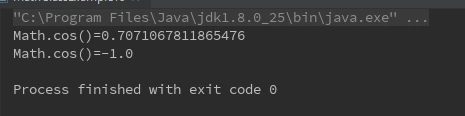
The complete program of java.lang.Math.cos() method example is listed below.
public class MathClassExample18 {
    public static void main(String arg[]) {
        double x = 45.0;
        double y = 180.0;
        x = Math.toRadians(x);
        y = Math.toRadians(y);
        System.out.println("Math.cos()=" + Math.cos(x));
        System.out.println("Math.cos()=" + Math.cos(y));
    }
}
The above program generates the following output.
Summary
In this article, we learned about Math class and its methods in Java programming language and how we can use them into the Java Programs.
Join the conversation! Your thoughts help the community grow.