

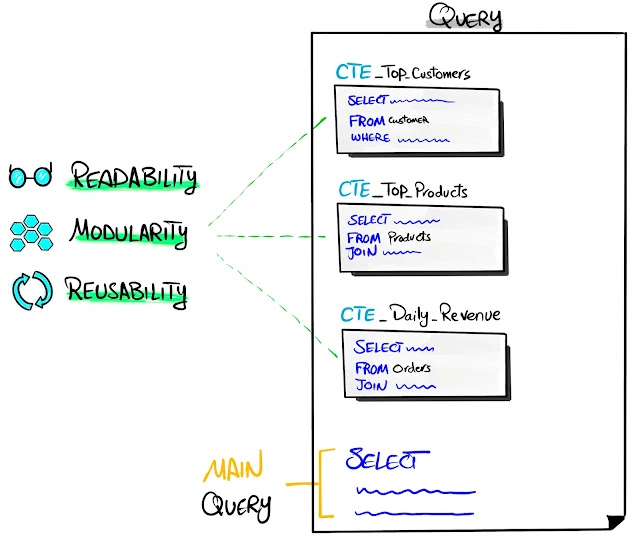
Image source: online
In this article, I’ll take you through everything you need to know about CTEs in SQL Server. We’ll explore their benefits, performance considerations, best practices for clean code, practical usage, alternatives, and a spectrum of examples—from basic to advanced. Whether you’re a beginner or a seasoned developer, this post will equip you with the knowledge to leverage CTEs effectively in your SQL Server projects. Drawing from a real-world scenario inspired by an attendance and incentive processing system, I’ll demonstrate how CTEs can transform complex queries into structured, maintainable solutions.
One of the most powerful features in SQL Server for achieving this is the Common Table Expression (CTE), introduced in SQL Server 2005. CTEs provide a way to simplify complex queries, improve readability, and tackle recursive and hierarchical data processing with elegance.
Table of Contents
- What Are Common Table Expressions (CTEs)?
- Definition and Syntax
- Why Use CTEs?
- Benefits of CTEs
- Readability and Maintainability
- Modularity and Reusability
- Support for Recursion
- Performance Considerations
- How CTEs Are Executed
- Performance Pitfalls and Optimizations
- Clean Code Practices with CTEs
- Naming Conventions
- Structuring Queries
- Avoiding Common Mistakes
- Usage Scenarios
- Basic Data Aggregation
- Hierarchical Data Processing
- Recursive Queries
- Alternatives to CTEs
- Subqueries
- Temporary Tables
- Table Variables
- Examples: From Basic to Advanced
- Basic CTE: Simple Aggregation
- Intermediate CTE: Multi-Step Processing
- Advanced CTE: Recursive Hierarchies
- Complex Scenario: Incentive Calculations
- Sample Data and Scenarios
- Example Data Setup
- Practical Scenarios
- Advanced Scenarios
- Best Practices and Tips
- Optimizing CTE Performance
- Debugging and Testing
- Conclusion
- Key Takeaways
1. What Are Common Table Expressions (CTEs)?
Definition and Syntax
A Common Table Expression (CTE) is a temporary result set defined within the execution scope of a single SQL statement (SELECT, INSERT, UPDATE, DELETE, or MERGE). It allows you to name a subquery block, reference it multiple times in the main query, and even perform recursive operations. CTEs are defined using the WITH clause and are available only for the duration of the query.
Basic Syntax
WITH cte_name [(column_name1, column_name2, ...)]
AS (
    -- Subquery defining the CTE
    SELECT ...
)
SELECT ... FROM cte_name;
- cte_name: The name of the CTE, used to reference it in the main query.
- column_name1, column_name2, ...: Optional column aliases for the CTE’s result set.
- The CTE is defined within parentheses and can be used in the main query or other CTEs.
2. Why Use CTEs?
CTEs were introduced in SQL Server 2005 to address limitations of subqueries and temporary tables. They offer:
- Improved Readability: Break complex queries into logical, named blocks.
- Recursion: Handle hierarchical or recursive data (e.g., organizational charts, bill of materials).
- Reusability: Reference the same CTE multiple times in a query.
- Maintainability: Make it easier to modify and debug complex logic.
Benefits of CTEs
Readability and Maintainability
CTEs allow you to break down complex queries into smaller, named components, making the code easier to read and understand. For example, instead of nesting multiple subqueries, you can define each logical step as a CTE, improving clarity for both developers and maintainers.
Modularity and Reusability
A CTE can be referenced multiple times within the same query, reducing code duplication. This is particularly useful for calculations or aggregations that need to be reused in different parts of the query.
Support for Recursion
CTEs are unique in their ability to handle recursive queries natively. This is invaluable for processing hierarchical data, such as employee reporting structures or nested categories, without resorting to complex loops or cursors.
3. Performance Considerations
How CTEs Are Executed?
CTEs are not materialized (i.e., they are not stored as physical tables unless explicitly persisted). SQL Server evaluates the CTE each time it is referenced in the query, which can impact performance for large datasets or frequent references. The query optimizer treats CTEs similarly to subqueries, meaning they are inlined into the main query execution plan.
Performance Pitfalls
- Multiple References: Referencing a CTE multiple times may cause the underlying query to execute repeatedly, increasing resource usage.
- Large Result Sets: CTEs with large result sets can consume memory, especially in recursive queries.
- Lack of Indexing: Since CTEs are not physical tables, they cannot be indexed, unlike temporary tables.
Optimizations
- Materialize When Necessary: For performance-critical queries, consider using temporary tables or table variables to store intermediate results.
- Minimize CTE References: Avoid excessive references to the same CTE.
- Optimize Subqueries: Ensure the CTE’s inner query is optimized with proper indexes and filters.
- Use Recursive CTEs Judiciously: Limit recursion depth to prevent excessive resource consumption.
4. Clean Code Practices with CTEs
Naming Conventions
- Use descriptive, meaningful names for CTEs (e.g., EmployeeHierarchy, SalesSummary).
- Follow a consistent naming pattern, such as PascalCase or snake_case, to align with your team’s standards.
- Avoid generic names like Temp or CTE1.
Structuring Queries
- Place each CTE on a new line with clear indentation.
- Use comments to describe the purpose of each CTE.
- Break complex logic into multiple CTEs for clarity, even if they are not reused.
Avoiding Common Mistakes
- Overusing CTEs: Don’t use CTEs for simple queries where a direct SELECT suffices.
- Ignoring Performance: Test CTE performance with large datasets.
- Neglecting Error Handling: Validate input parameters to prevent unexpected results.
5. Usage Scenarios
Basic Data Aggregation
CTEs are ideal for aggregating data in a readable way, such as summarizing sales by region or department.
Hierarchical Data Processing
CTEs excel at handling hierarchical data, such as organizational charts or product categories, using recursion.
Recursive Queries
Recursive CTEs are used to process data where a row references other rows in the same table, such as a tree structure or bill of materials.
6. Alternatives to CTEs
Subqueries
Subqueries are inline queries within a SELECT statement. They are less readable than CTEs but can achieve similar results for simple cases.
Pros
- No need for separate definition.
- Suitable for one-off calculations.
Cons
- Poor readability for nested subqueries.
- Harder to debug and maintain.
Temporary Tables
Temporary tables (#TableName) are physical tables stored in tempdb, offering persistence and indexing capabilities.
Pros
- Can be indexed for performance.
- Persist for the session duration.
Cons
- Require explicit creation and cleanup.
- Higher overhead than CTEs.
Table Variables
Table variables (@TableName) are in-memory tables with limited scope.
Pros
- Lightweight for small datasets.
- No need for explicit cleanup.
Cons
- Limited indexing options.
- Poor performance for large datasets.
7. Examples: From Basic to Advanced
Basic CTE: Simple Aggregation
Scenario: Summarize total sales by department for a given year.
Sample Data
CREATE TABLE DepartmentSales (
    DepartmentID INT,
    SaleAmount DECIMAL(10,2),
    SaleYear INT
);

INSERT INTO DepartmentSales (DepartmentID, SaleAmount, SaleYear)
VALUES
    (1, 1000.00, 2025),
    (1, 1500.00, 2025),
    (2, 2000.00, 2025),
    (2, 2500.00, 2025);
CTE Query
WITH DepartmentSummary AS (
    SELECT DepartmentID, SUM(SaleAmount) AS TotalSales
    FROM DepartmentSales
    WHERE SaleYear = 2025
    GROUP BY DepartmentID
)
SELECT DepartmentID, TotalSales
FROM DepartmentSummary
ORDER BY DepartmentID;
Output
| DepartmentID | TotalSales |
|---|---|
| 1 | 2500.00 |
| 2 | 4500.00 |
Explanation
- The CTE (DepartmentSummary) aggregates sales by department.
- The main query selects from the CTE, making the query modular and readable.
Intermediate CTE: Multi-Step Processing
Scenario: Calculate total sales and average sale amount per department, then rank departments by total sales.
CTE Query
WITH DepartmentSummary AS (
    SELECT DepartmentID, SUM(SaleAmount) AS TotalSales, AVG(SaleAmount) AS AvgSale
    FROM DepartmentSales
    WHERE SaleYear = 2025
    GROUP BY DepartmentID
),
RankedDepartments AS (
    SELECT DepartmentID, TotalSales, AvgSale,
           RANK() OVER (ORDER BY TotalSales DESC) AS SalesRank
    FROM DepartmentSummary
)
SELECT DepartmentID, TotalSales, AvgSale, SalesRank
FROM RankedDepartments
WHERE SalesRank <= 2;
Output
| DepartmentID | TotalSales | AvgSale | SalesRank |
|---|---|---|---|
| 2 | 4500.00 | 2250.00 | 1 |
| 1 | 2500.00 | 1250.00 | 2 |
Explanation
- The first CTE (DepartmentSummary) aggregates sales data.
- The second CTE (RankedDepartments) adds a ranking based on total sales.
- The main query filters for the top 2 departments.
Advanced CTE: Recursive Hierarchies
Scenario: Retrieve an employee hierarchy from a table with employee-manager relationships.
Sample Data
CREATE TABLE Employees (
    EmployeeID INT PRIMARY KEY,
    EmployeeName VARCHAR(50),
    ManagerID INT
);

INSERT INTO Employees (EmployeeID, EmployeeName, ManagerID)
VALUES
    (1, 'CEO', NULL),
    (2, 'Manager A', 1),
    (3, 'Manager B', 1),
    (4, 'Employee A1', 2),
    (5, 'Employee A2', 2),
    (6, 'Employee B1', 3);
Recursive CTE Query
WITH EmployeeHierarchy AS (
    -- Anchor member: Start with the top-level employee (CEO)
    SELECT EmployeeID, EmployeeName, ManagerID, 0 AS Level
    FROM Employees
    WHERE ManagerID IS NULL
    UNION ALL
    -- Recursive member: Get employees reporting to the previous level
    SELECT e.EmployeeID, e.EmployeeName, e.ManagerID, h.Level + 1
    FROM Employees e
    INNER JOIN EmployeeHierarchy h ON e.ManagerID = h.EmployeeID
)
SELECT EmployeeID, EmployeeName, ManagerID, Level
FROM EmployeeHierarchy
ORDER BY Level, EmployeeID;
Output
| EmployeeID | EmployeeName | ManagerID | Level |
|---|---|---|---|
| 1 | CEO | NULL | 0 |
| 2 | Manager A | 1 | 1 |
| 3 | Manager B | 1 | 1 |
| 4 | Employee A1 | 2 | 2 |
| 5 | Employee A2 | 2 | 2 |
| 6 | Employee B1 | 3 | 2 |
Explanation
- The anchor member selects the top-level employee (CEO, ManagerID IS NULL).
- The recursive member joins the Employees table with the CTE to retrieve subordinates, incrementing the Level for each hierarchy level.
- The query stops when no more subordinates are found.
Complex Scenario: Incentive Calculations
Scenario: Calculate incentives across multiple categories, compute their percentage of total incentives and primary sales revenue, and include approval and calculation sheet references. This is based on the provided query (with table/column names generalized).
Sample Data
CREATE TABLE IncentiveCategory1 (YR INT, MN INT, IncAmt DECIMAL(10,2));
CREATE TABLE IncentiveCategory2 (YR INT, MN INT, IncAmt DECIMAL(10,2));
CREATE TABLE SalesRevenue (YR INT, MN INT, PVAL DECIMAL(10,2));

INSERT INTO IncentiveCategory1 (YR, MN, IncAmt)
VALUES
    (2025, 7, 1000.00),
    (2025, 7, 1500.00);

INSERT INTO IncentiveCategory2 (YR, MN, IncAmt)
VALUES
    (2025, 7, 2000.00),
    (2025, 7, 2500.00);

INSERT INTO SalesRevenue (YR, MN, PVAL)
VALUES (2025, 7, 100000.00);
Modified Query (Generalized)
DECLARE @PrimarySalesRevenue NUMERIC(17,0) = 0;
DECLARE @yr INT = 2025;
DECLARE @mn INT = 7;
DECLARE @Qtr INT;

SELECT @PrimarySalesRevenue = ISNULL(PVAL, 0)
FROM SalesRevenue
WHERE YR = @yr AND MN = @mn;

SET @Qtr = CEILING(@mn / 3.0);

-- Step 1: Base incentive data
WITH IncentiveData AS (
    SELECT 'Category 1 Incentive' AS Area, SUM(IncAmt) AS IncentiveAmount, 'Sheet1' AS ApprovalSheetNo, 'Calc1' AS CalculationSheetNo
    FROM IncentiveCategory1 WHERE YR = @yr AND MN = @mn
    UNION ALL
    SELECT 'Category 2 Incentive', SUM(IncAmt), 'Sheet2', 'Calc2'
    FROM IncentiveCategory2 WHERE YR = @yr AND MN = @mn
),
-- Step 2: Total incentive
TotalCTE AS (
    SELECT SUM(IncentiveAmount) AS TotalIncentive
    FROM IncentiveData
)
-- Step 3: Final select with percentages
SELECT
    ISNULL(i.Area, '<b>GRAND TOTAL</b>') AS Area,
    CONVERT(VARCHAR, SUM(i.IncentiveAmount), 1) AS [Incentive Amount],
    CASE
        WHEN i.Area IS NULL THEN '100.00%'
        ELSE CONVERT(VARCHAR, ROUND(SUM(i.IncentiveAmount) * 100.0 / NULLIF(t.TotalIncentive, 0), 2)) + '%'
    END AS [% of Total Incentive],
    CASE
        WHEN @PrimarySalesRevenue = 0 THEN ''
        ELSE CONVERT(VARCHAR, ROUND(SUM(i.IncentiveAmount) * 100.0 / NULLIF(@PrimarySalesRevenue, 0), 2)) + '%'
    END AS [% of Primary Sales Revenue],
    MAX(i.ApprovalSheetNo) AS [Approval File No],
    MAX(i.CalculationSheetNo) AS [Calculation File No]
FROM IncentiveData i
CROSS JOIN TotalCTE t
GROUP BY GROUPING SETS ((i.Area), ())
ORDER BY
    CASE
       26
System: WHEN i.Area IS NULL THEN 999
        ELSE CAST(LEFT(i.Area, CHARINDEX('.', i.Area) - 1) AS INT)
    END;
Output (Assuming sample data)
| Area | Incentive Amount | % of Total Incentive | % of Primary Sales Revenue | Approval File No | Calculation File No |
|---|---|---|---|---|---|
| Category 1 Incentive | 2,500.00 | 37.50% | 2.50% | Sheet1 | Calc1 |
| Category 2 Incentive | 4,500.00 | 62.50% | 4.50% | Sheet2 | Calc2 |
| GRAND TOTAL | 7,000.00 | 100.00% | 7.00% |
Explanation
- First CTE (IncentiveData): Aggregates incentive amounts from multiple categories using UNION ALL.
- Second CTE (TotalCTE): Calculates the total incentive amount across all categories.
- Main Query: Uses GROUPING SETS to include both category-level and grand total rows, calculates percentages, and formats output using a custom function (replaced here with CONVERT for simplicity).
- Performance Note: The CTEs make the query modular, but multiple references to IncentiveData could lead to repeated execution. For large datasets, consider materializing results in a temporary table.
8. Sample Data and Scenarios
Example Data Setup
-- Employee hierarchy
CREATE TABLE Employees (
    EmployeeID INT PRIMARY KEY,
    EmployeeName VARCHAR(50),
    ManagerID INT
);

INSERT INTO Employees (EmployeeID, EmployeeName, ManagerID)
VALUES
    (1, 'CEO', NULL),
    (2, 'Manager A', 1),
    (3, 'Manager B', 1),
    (4, 'Employee A1', 2),
    (5, 'Employee A2', 2),
    (6, 'Employee B1', 3);

-- Sales data
CREATE TABLE Sales (
    SaleID INT PRIMARY KEY,
    DepartmentID INT,
    SaleAmount DECIMAL(10,2),
    SaleYear INT
);

INSERT INTO Sales (SaleID, DepartmentID, SaleAmount, SaleYear)
VALUES
    (1, 1, 1000.00, 2025),
    (2, 1, 1500.00, 2025),
    (3, 2, 2000.00, 2025),
    (4, 2, 2500.00, 2025);
Practical Scenarios
- Summarizing Sales by Department
- Use a CTE to aggregate sales data, as shown in the basic example.
- Scenario: Generate a report for department heads showing total sales for 2025.
- Employee Reporting Structure
- Use a recursive CTE to display the organizational hierarchy, as shown in the advanced example.
- Scenario: HR needs a report of all employees and their reporting levels.
Advanced Scenarios
- Bill of Materials (BOM)
- Scenario: A manufacturing company tracks parts and subassemblies in a table with parent-child relationships. A recursive CTE calculates the total cost of a product by summing the costs of all components.
- Query
OutputCREATE TABLE BOM ( PartID INT PRIMARY KEY, PartName VARCHAR(50), ParentPartID INT, Cost DECIMAL(10,2) ); INSERT INTO BOM (PartID, PartName, ParentPartID, Cost) VALUES (1, 'Bicycle', NULL, 100.00), (2, 'Frame', 1, 50.00), (3, 'Wheel', 1, 30.00), (4, 'Tire', 3, 10.00), (5, 'Rim', 3, 15.00); WITH BOMCost AS ( SELECT PartID, PartName, ParentPartID, Cost, 0 AS Level FROM BOM WHERE ParentPartID IS NULL UNION ALL SELECT b.PartID, b.PartName, b.ParentPartID, b.Cost, bc.Level + 1 FROM BOM b INNER JOIN BOMCost bc ON b.ParentPartID = bc.PartID ), TotalCost AS ( SELECT SUM(Cost) AS TotalProductCost FROM BOMCost WHERE PartID = 1 OR ParentPartID = 1 OR ParentPartID IN (SELECT PartID FROM BOMCost WHERE ParentPartID = 1) ) SELECT TotalProductCost FROM TotalCost;Explanation: The CTE calculates the total cost of a bicycle by including the frame, wheel, tire, and rim costs.TotalProductCost 205.00
- Financial Incentive Report
- Scenario: An HR system calculates incentives across multiple categories, as shown in the complex example. The query uses multiple CTEs to aggregate data, compute totals, and calculate percentages relative to total incentives and sales revenue.
- Use Case: Generate a monthly report for finance to approve incentive payouts.
9. Best Practices and Tips
Optimizing CTE Performance
- Index Underlying Tables: Ensure tables used in CTEs have appropriate indexes on join and filter columns.
- Limit Recursion Depth: Use the MAXRECURSION option to prevent infinite loops in recursive CTEs:
WITH RecursiveCTE AS ( ... ) SELECT * FROM RecursiveCTE OPTION (MAXRECURSION 100); - Materialize Large CTEs: For complex CTEs referenced multiple times, store results in a temporary table:
SELECT * INTO #Temp FROM CTE;
Debugging and Testing
- Test CTEs with small datasets to verify logic.
- Use SQL Server Management Studio (SSMS) to view execution plans and identify performance bottlenecks.
- Validate input parameters to avoid division by zero or null issues.
10. Conclusion
Key Takeaways
CTEs are a powerful tool in SQL Server for simplifying complex queries, improving readability, and handling recursive data. By breaking queries into modular blocks, they make code easier to maintain and debug. However, careful attention to performance is crucial, especially for large datasets or recursive queries. Alternatives like temporary tables or subqueries may be better in specific scenarios, but CTEs shine for their clarity and recursion support.
Join the conversation! Your thoughts help the community grow.