

Session Management
Session management is a fundamental aspect of web applications that allows developers to track user activity, maintain login states, and manage temporary data throughout a user's interaction with the system. Without effective session management, applications would not be able to provide a seamless and secure experience, requiring users to repeatedly authenticate or lose their progress when navigating between different pages.
Whether it's for user authentication, authorization, or storing temporary data, sessions play a critical role in ensuring a smooth and secure user experience. Different techniques, such as Local Storage, Session Storage, Cookies, and Token-based Authentication, offer various methods for managing sessions, each with its own pros and cons.
In this article, we'll explore these common session management techniques to help you understand which approach best suits your web development needs.
Session Management in Web Applications
Session management is essential in web applications for several key reasons.
- User Authentication: It checks that a user's identity is verified and remains consistent throughout their interaction with the application. Once a user logs in, the session helps maintain their login state across different pages without asking them to authenticate repeatedly.
- Authorization: Sessions help manage what specific actions or resources a user can access based on their role or permissions. Once authenticated, a session can store the user's roles or privileges and check if they are allowed to access protected routes or features.
- Temporary Data Storage: Sessions offer a convenient way to store data that does not persist in a database temporarily. For example, in a multi-step form or shopping cart scenario, sessions can keep track of user data like form inputs or selected items until the user either completes the process or logs out.
Session management is a crucial part of web applications, helping maintain user states, authorization, and temporary data across requests. Below are common session management techniques and their advantages and disadvantages:
1. Local Storage (LS)
Local Storage allows you to store data on the client side within the browser.
- Pros
- Easy to implement: Storing and retrieving data from Local Storage is simple with JavaScript.
- Persistent across tabs and sessions: Data remains even after closing and reopening the browser unless explicitly cleared.
- Cons
- Vulnerable to XSS attacks: As it's client-side storage, malicious scripts can access the data if not properly sanitized.
- Limited storage capacity: Local Storage typically provides 5–10 MB of storage, which may be insufficient for large-scale applications.
2. Session Storage (SS)
Session Storage stores data in the browser but is scoped to a single session (per tab or window).
- Pros
- Easy to implement: Like Local Storage, Session Storage is simple to use with JavaScript.
- Automatically cleared on tab close: Data is automatically deleted when the session (or tab) is closed, making it useful for temporary storage.
- Cons
- Limited storage capacity: Similar to Local Storage, Session Storage has limited space (about 5 MB), which can restrict data usage.
3. Cookies
Cookies store small pieces of data (e.g., authentication tokens) that are sent to the server with each HTTP request.
- Pros
- Widely supported: Cookies have been part of the web for decades and are supported by all major browsers.
- Automatic expiration: Cookies can be configured to expire at specific times or when the session ends, offering flexibility for sensitive data.
- Cons
- Vulnerable to CSRF attacks: Cookies, especially when storing sensitive data, can be exploited in cross-site request forgery (CSRF) attacks if not protected by additional security measures like
SameSiteandHttpOnly. - Limited storage capacity: Cookies typically have a size limit of around 4 KB, which restricts the amount of data that can be stored.
- Vulnerable to CSRF attacks: Cookies, especially when storing sensitive data, can be exploited in cross-site request forgery (CSRF) attacks if not protected by additional security measures like
4. Token-based Authentication (e.g., JWT)
In token-based authentication, a token (e.g., JWT - JSON Web Token) is issued after a user logs in. This token is then sent with subsequent requests to authenticate and authorize users.
- Pros
- Secure: Tokens are signed and can include claims that help with authorization. Additionally, they are not stored with session data on the server, reducing server load.
- Scalable: Token-based approaches work well with microservices and are easy to implement across distributed systems.
- Easy to implement: Once the server-side setup is complete, managing token storage client-side (in Local Storage or Cookies) is straightforward.
- Cons
- Requires server-side setup: Proper configuration is needed to generate, sign, and verify tokens on both client and server.
5. Redux or MobX (State Management Libraries)
For more complex applications, state management libraries like Redux or MobX allow you to manage user sessions and data centrally.
- Pros
- Centralized state management: All session-related data can be stored and managed from a single source of truth, making debugging and maintenance easier.
- Easy to integrate: These libraries integrate well with popular frameworks like React, enabling a seamless session management experience.
- Cons
- Additional library dependency: These libraries add extra complexity and dependencies to the project, which may not be necessary for simpler applications.
Example Implementation with React Context API and Local Storage
Using React Context API with Local Storage is an effective way to manage user sessions in client-side applications. Below is a TypeScript implementation that helps to manage user authentication tokens and session data.
// SessionProvider.tsx
import React, { createContext, useState, useEffect, ReactNode, useContext } from 'react';

interface User {
  id: string;
  name: string;
  // Add more user properties as needed
}

interface SessionContextProps {
  user: User | null;
  login: (token: string) => void;
  logout: () => void;
}

const SessionContext = createContext<SessionContextProps | undefined>(undefined);

interface SessionProviderProps {
  children: ReactNode;
}

const SessionProvider: React.FC<SessionProviderProps> = ({ children }) => {
  const [user, setUser] = useState<User | null>(null);
  const [token, setToken] = useState<string | null>(localStorage.getItem('token'));

  useEffect(() => {
    if (token) {
      // Verify token with server
      fetch('/verify-token', {
        headers: { Authorization: `Bearer ${token}` },
      })
        .then((res) => res.json())
        .then((data) => {
          if (data.valid) {
            setUser(data.user);
          } else {
            // Logout user
            setToken(null);
            localStorage.removeItem('token');
          }
        })
        .catch(() => {
          setToken(null);
          localStorage.removeItem('token');
        });
    }
  }, [token]);

  const login = (token: string) => {
    setToken(token);
    localStorage.setItem('token', token);
  };

  const logout = () => {
    setToken(null);
    localStorage.removeItem('token');
  };

  return (
    <SessionContext.Provider value={{ user, login, logout }}>
      {children}
    </SessionContext.Provider>
  );
};

export { SessionProvider, SessionContext };
Wrapping the app with the SessionProvider:
// App.tsx
import React from 'react';
import { SessionProvider } from './SessionProvider';
import MyComponent from './MyComponent'; // Example component

const App: React.FC = () => {
  return (
    <div>
      <h1>My Application</h1>
      <MyComponent />
    </div>
  );
};

const WrappedApp: React.FC = () => {
  return (
    <SessionProvider>
      <App />
    </SessionProvider>
  );
};

export default WrappedApp;
Accessing session data and functions with useContext:
// MyComponent.tsx
import React, { useContext } from 'react';
import { SessionContext } from './SessionProvider';

const MyComponent: React.FC = () => {
  const session = useContext(SessionContext);

  if (!session) {
    return <div>Error: Session context not available.</div>;
  }

  const { user, login, logout } = session;

  return (
    <div>
      <h2>User Info</h2>
      {user ? <p>Welcome, {user.name}!</p> : <p>Please log in.</p>}
      <button onClick={() => login('exampleToken')}>Login</button>
      <button onClick={logout}>Logout</button>
    </div>
  );
};

export default MyComponent;
- SessionProvider Component: Manages the session state and uses
localStorageit to persist the authentication token across browser sessions. - Token Verification: After a token is set, it is verified with the server via an API call. If the token is valid, user data is stored in the session; otherwise, the session is cleared.
- Context API: The
SessionContextprovides the session-related data (user info) and functions (login,logout) to any components that need access to the session state.
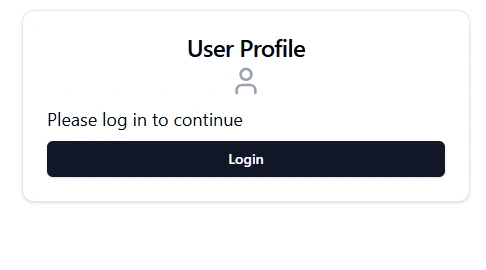
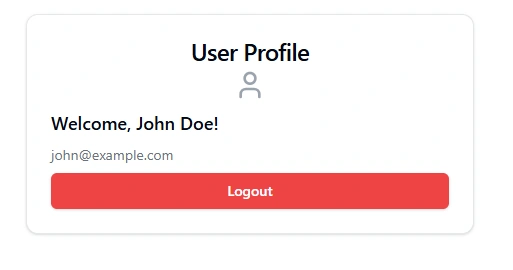
In this example, we've used React Context API in combination with Local Storage to manage user authentication tokens in a clean and centralized way. This approach is easy to implement and provides a solid foundation for managing user sessions in client-side React applications. Moving forward, you can extend and improve upon this setup based on your specific project needs, such as adding more secure token handling practices or implementing additional session management strategies like server-side storage or refresh tokens.
With tools like TypeScript, you also gain the advantage of type safety and reliable and maintainable session management across your application.
Join the conversation! Your thoughts help the community grow.